dumpspedia logo

You are a medical researcher.
You need to ensure that Microsoft 365 Copilot responds to you in a professional manner that is appropriate to your field. What is the best approach to achieve the goal?
You create a Microsoft Teams meeting that will only allow the use of Copilot during the meeting. The meeting will NOT be transcribed.
Which statement accurately describes how Copilot can be used during the meeting?
You have a Microsoft Excel workbook open that contains a table. The table contains sales data and the following columns:
• OrderDate
• OrderNumber
• Amount
You plan to use Microsoft Copilot in Excel to generate a monthly summary of the sales data in the table.
What should you include in the prompt to generate an effective summary? More than one answer choice may achieve the goal. Select the BEST answer.
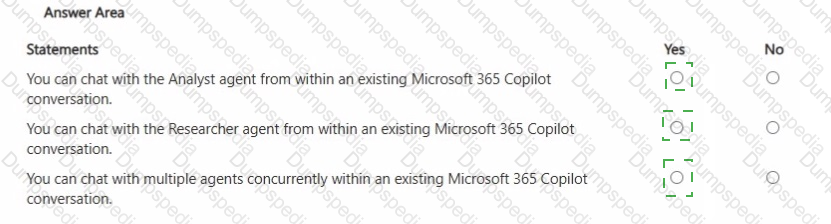
For each of the following statements, select Yes if the statement is true. Otherwise, select No. NOTE: Each correct selection is worth one point.
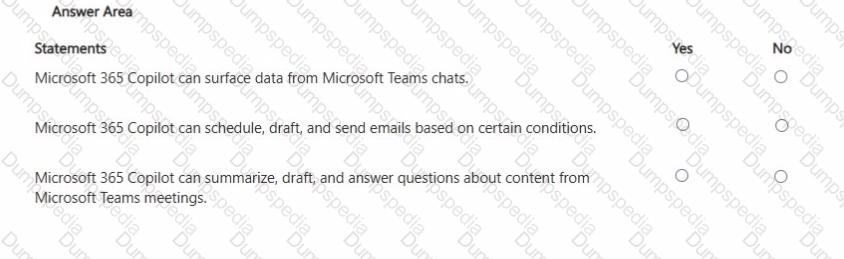
You are comparing the difference between Microsoft 365 Copilot and Microsoft 365 Copilot Chat.
What is available in both versions?
You have an open Microsoft Word document that has a sensitivity label named Highly Confidential applied. From Microsoft PowerPoint, you plan to use Microsoft 365 Copilot to generate a presentation of the Word document. What will be the result?
You have several separate Microsoft 365 Copilot conversations.
You need to gather the conversations so that you can find them more easily, and the conversations can share the same reference material.
What is the best solution to achieve the goal? More than one answer choice may achieve the goal. Select the BEST answer.
You plan to use a notebook in Microsoft 365 Copilot.
What is the purpose of a notebook?
You plan to create an agent in the Microsoft 365 Copilot app to help meeting organizers create and run effective meetings The agent will be used to prepare invite emails, assign meeting roles, and take meeting notes
You need to create the agent as soon as passible, and then perform a basic test of the agent. The solution must minimize effort
What is the best approach to achieve the goal? More than one answer choice may achieve the goal Select the BEST answer
You have a Microsoft 365 subscription.
You do NOT have a Microsoft 365 Copilot license.
When you send a prompt in Microsoft 365 Copilot Chat, which three sources does Copilot Chat use to respond? Each correct answer presents part of the solution.
NOTE: Each correct selection is worth one point.
You run a saved prompt and receive the following response:
" You asked for a summary of File.docx. However, the file appears to be either empty, corrupted, or in a format that I cannot process. "
What is a possible cause of the response?
You receive several images from a colleague.
You suspect that the images were generated by using Microsoft 365 Copilot.
What can you use to verify whether the images were AI-generated?
In a Microsoft 365 Copilot conversation, you generate a report, and then edit the report in a page. You need to collaborate with a colleague on the report.
What are two ways to achieve the goal?
You are creating a custom agent in the Microsoft 365 Copilot app for the marketing team at your company. The agent will be used to produce marketing collateral, including copy, logos, and artwork.
What should you add to the agent? More than one answer choice may achieve the goal. Select the BEST answer.
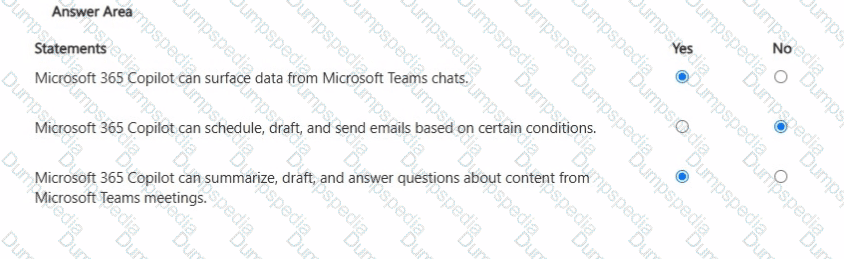
You are a business user who uses Microsoft 365 apps and services, including Microsoft Teams. You have a work account.
You want to use Microsoft 365 Copilot to help with meetings.
For each of the following statements, select Yes if the statement is true. Otherwise, select No.
NOTE: Each correct selection is worth one point.
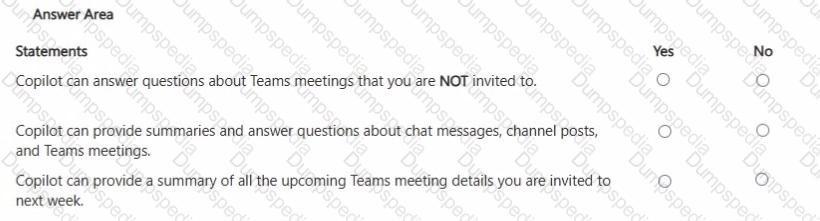
For each of the following statements, select Yes if the statement is true. Otherwise, select No. NOTE: Each correct selection is worth one point.
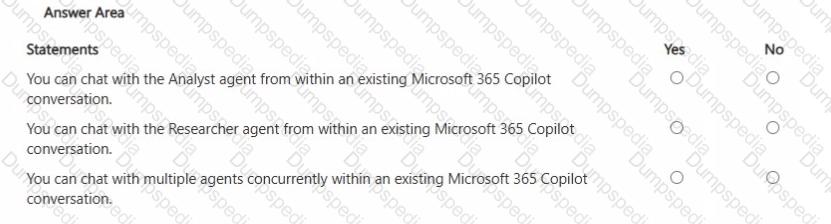
You use Microsoft 365 Copilot.
You discover that you had a conversation that used a knowledge source that contains confidential information.
You need to delete the conversation data without requiring administrative approval. You must retain your other conversations, if possible.
What should you use?
You have a Microsoft 365 Copilot license.
You are preparing a business presentation by using Copilot in PowerPoint
Which two tasks can you achieve by using Cop lot n PowerPoint? Each correct answer presents a complete the solution NOTE Each correct selection is worth one point.
You have a Microsoft 365 subscription.
You do NOT have a Microsoft 365 Copilot license.
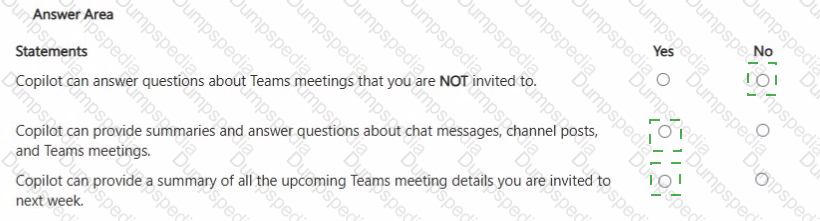
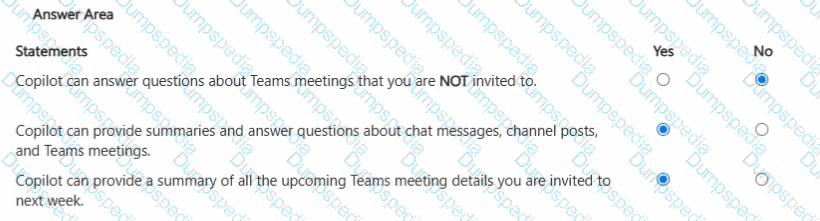
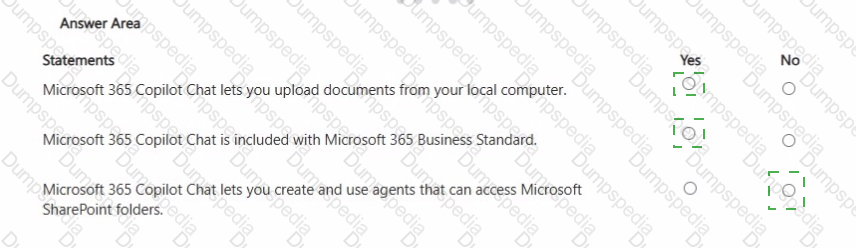
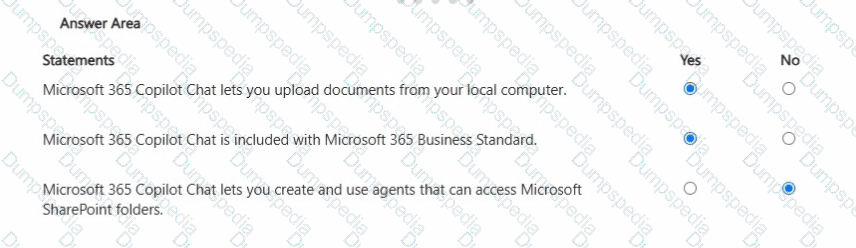
For each of the following statements, select Yes if the statement is true. Otherwise, select No.
NOTE: Each correct selection is worth one point.
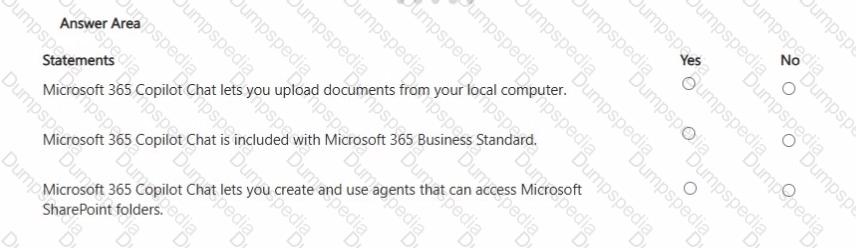
You are creating a prompt in Microsoft 365 Copilot to get information about a proposal. You need to ensure that the response is grounded in the proposal ' s information.
What is the best approach to achieve the goal? More than one answer choice may achieve the goal. Select the BEST answer.

TESTED 20 Sep 2026