dumpspedia logo

A retail company has over 3000 stores all using the same Point of Sale (POS) system. The company wants to deliver near real-time sales results to category managers. The stores operate in a variety of time zones and exhibit a dynamic range of transactions each minute, with some stores having higher sales volumes than others.
Sales results are provided in a uniform fashion using data engineered fields that will be calculated in a complex data pipeline. Calculations include exceptions, aggregations, and scoring using external functions interfaced to scoring algorithms. The source data for aggregations has over 100M rows.
Every minute, the POS sends all sales transactions files to a cloud storage location with a naming convention that includes store numbers and timestamps to identify the set of transactions contained in the files. The files are typically less than 10MB in size.
How can the near real-time results be provided to the category managers? (Select TWO).
All files should be concatenated before ingestion into Snowflake to avoid micro-ingestion.
A Snowpipe should be created and configured with AUTO_INGEST = true. A stream should be created to process INSERTS into a single target table using the stream metadata to inform the store number and timestamps.
A stream should be created to accumulate the near real-time data and a task should be created that runs at a frequency that matches the real-time analytics needs.
An external scheduler should examine the contents of the cloud storage location and issue SnowSQL commands to process the data at a frequency that matches the real-time analytics needs.
The copy into command with a task scheduled to run every second should be used to achieve the near-real time requirement.
To provide near real-time sales results to category managers, the Architect can use the following steps:
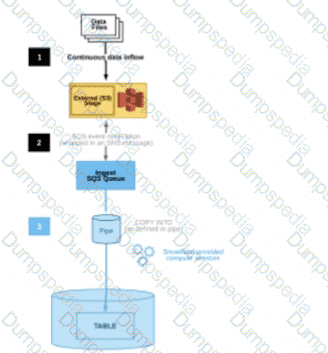
Create an external stage that references the cloud storage location where the POS sends the sales transactions files. The external stage should use the file format and encryption settings that match the source files2
Create a Snowpipe that loads the files from the external stage into a target table in Snowflake. The Snowpipe should be configured with AUTO_INGEST = true, which means that it will automatically detect and ingest new files as they arrive in the external stage. The Snowpipe should also use a copy option to purge the files from the external stage after loading, to avoid duplicate ingestion3
Create a stream on the target table that captures the INSERTS made by the Snowpipe. The stream should include the metadata columns that provide information about the file name, path, size, and last modified time. The stream should also have a retention period that matches the real-time analytics needs4
Create a task that runs a query on the stream to process the near real-time data. The query should use the stream metadata to extract the store number and timestamps from the file name and path, and perform the calculations for exceptions, aggregations, and scoring using external functions. The query should also output the results to another table or view that can be accessed by the category managers. The task should be scheduled to run at a frequency that matches the real-time analytics needs, such as every minute or every 5 minutes.
The other options are not optimal or feasible for providing near real-time results:
All files should be concatenated before ingestion into Snowflake to avoid micro-ingestion. This option is not recommended because it would introduce additional latency and complexity in the data pipeline. Concatenating files would require an external process or service that monitors the cloud storage location and performs the file merging operation. This would delay the ingestion of new files into Snowflake and increase the risk of data loss or corruption. Moreover, concatenating files would not avoid micro-ingestion, as Snowpipe would still ingest each concatenated file as a separate load.
An external scheduler should examine the contents of the cloud storage location and issue SnowSQL commands to process the data at a frequency that matches the real-time analytics needs. This option is not necessary because Snowpipe can automatically ingest new files from the external stage without requiring an external trigger or scheduler. Using an external scheduler would add more overhead and dependency to the data pipeline, and it would not guarantee near real-time ingestion, as it would depend on the polling interval and the availability of the external scheduler.
The copy into command with a task scheduled to run every second should be used to achieve the near-real time requirement. This option is not feasible because tasks cannot be scheduled to run every second in Snowflake. The minimum interval for tasks is one minute, and even that is not guaranteed, as tasks are subject to scheduling delays and concurrency limits. Moreover, using the copy into command with a task would not leverage the benefits of Snowpipe, such as automatic file detection, load balancing, and micro-partition optimization. References:
1: SnowPro Advanced: Architect | Study Guide
2: Snowflake Documentation | Creating Stages
3: Snowflake Documentation | Loading Data Using Snowpipe
4: Snowflake Documentation | Using Streams and Tasks for ELT
Snowflake Documentation | Creating Tasks
Snowflake Documentation | Best Practices for Loading Data
Snowflake Documentation | Using the Snowpipe REST API
Snowflake Documentation | Scheduling Tasks
SnowPro Advanced: Architect | Study Guide
Creating Stages
Loading Data Using Snowpipe
Using Streams and Tasks for ELT
[Creating Tasks]
[Best Practices for Loading Data]
[Using the Snowpipe REST API]
[Scheduling Tasks]
What is a characteristic of loading data into Snowflake using the Snowflake Connector for Kafka?
The Connector only works in Snowflake regions that use AWS infrastructure.
The Connector works with all file formats, including text, JSON, Avro, Ore, Parquet, and XML.
The Connector creates and manages its own stage, file format, and pipe objects.
Loads using the Connector will have lower latency than Snowpipe and will ingest data in real time.
According to the SnowPro Advanced: Architect documents and learning resources, a characteristic of loading data into Snowflake using the Snowflake Connector for Kafka is that the Connector creates and manages its own stage, file format, and pipe objects. The stage is an internal stage that is used to store the data files from the Kafka topics. The file format is a JSON or Avro file format that is used to parse the data files. The pipe is a Snowpipe object that is used to load the data files into the Snowflake table. The Connector automatically creates and configures these objects based on the Kafka configuration properties, and handles the cleanup and maintenance of these objects1.
The other options are incorrect because they are not characteristics of loading data into Snowflake using the Snowflake Connector for Kafka. Option A is incorrect because the Connector works in Snowflake regions that use any cloud infrastructure, not just AWS. The Connector supports AWS, Azure, and Google Cloud platforms, and can load data across different regions and cloud platforms using data replication2. Option B is incorrect because the Connector does not work with all file formats, only JSON and Avro. The Connector expects the data in the Kafka topics to be in JSON or Avro format, and parses the data accordingly. Other file formats, such as text, ORC, Parquet, or XML, are not supported by the Connector3. Option D is incorrect because loads using the Connector do not have lower latency than Snowpipe, and do not ingest data in real time. The Connector uses Snowpipe to load data into Snowflake, and inherits the same latency and performance characteristics of Snowpipe. The Connector does not provide real-time ingestion, but near real-time ingestion, depending on the frequency and size of the data files4. References: Installing and Configuring the Kafka Connector | Snowflake Documentation, Sharing Data Across Regions and Cloud Platforms | Snowflake Documentation, Overview of the Kafka Connector | Snowflake Documentation, Using Snowflake Connector for Kafka With Snowpipe Streaming | Snowflake Documentation
An Architect is designing a file ingestion recovery solution. The project will use an internal named stage for file storage. Currently, in the case of an ingestion failure, the Operations team must manually download the failed file and check for errors.
Which downloading method should the Architect recommend that requires the LEAST amount of operational overhead?
Use the Snowflake Connector for Python, connect to remote storage and download the file.
Use the get command in SnowSQL to retrieve the file.
Use the get command in Snowsight to retrieve the file.
Use the Snowflake API endpoint and download the file.
The get command in SnowSQL is a convenient way to download files from an internal stage to a local directory. The get command can be used in interactive mode or in a script, and it supports wildcards and parallel downloads. The get command also allows specifying the overwrite option, which determines how to handle existing files with the same name2
The Snowflake Connector for Python, the Snowflake API endpoint, and the get command in Snowsight are not recommended methods for downloading files from an internal stage, because they require more operational overhead than the get command in SnowSQL. The Snowflake Connector for Python and the Snowflake API endpoint require writing and maintaining code to handle the connection, authentication, and file transfer. The get command in Snowsight requires using the web interface and manually selecting the files to download34 References:
1: SnowPro Advanced: Architect | Study Guide
2: Snowflake Documentation | Using the GET Command
3: Snowflake Documentation | Using the Snowflake Connector for Python
4: Snowflake Documentation | Using the Snowflake API
Snowflake Documentation | Using the GET Command in Snowsight
SnowPro Advanced: Architect | Study Guide
Using the GET Command
Using the Snowflake Connector for Python
Using the Snowflake API
[Using the GET Command in Snowsight]
When loading data from stage using COPY INTO, what options can you specify for the ON_ERROR clause?
CONTINUE
SKIP_FILE
ABORT_STATEMENT
FAIL
The ON_ERROR clause is an optional parameter for the COPY INTO command that specifies the behavior of the command when it encounters errors in the files. The ON_ERROR clause can have one of the following values1:
CONTINUE: This value instructs the command to continue loading the file and return an error message for a maximum of one error encountered per data file. The difference between the ROWS_PARSED and ROWS_LOADED column values represents the number of rows that include detected errors. To view all errors in the data files, use the VALIDATION_MODE parameter or query the VALIDATE function1.
SKIP_FILE: This value instructs the command to skip the file when it encounters a data error on any of the records in the file. The command moves on to the next file in the stage and continues loading. The skipped file is not loaded and no error message is returned for the file1.
ABORT_STATEMENT: This value instructs the command to stop loading data when the first error is encountered. The command returns an error message for the file and aborts the load operation. This is the default value for the ON_ERROR clause1.
Therefore, options A, B, and C are correct.
COPY INTO