What is a difference between compression and deduplication within a VxRail OSA cluster?
Compression is only applied on a per disk basis. Deduplication is applied to the entire disk group.
Compression requires significant resources to run. Deduplication requires marginal resources to run.
Compression requires reformatting of the disk group. Deduplication does not require reformatting of disk groups.
Within a VxRail cluster operating on the Original Storage Architecture (OSA), optimizing storage capacity is driven by software-defined data efficiency policies. Starting with vSphere 7.0 Update 1, vSAN introduced the option to enable "Compression Only" as a distinct toggle from the combined "Deduplication and Compression" feature set. A fundamental architectural distinction between these two mechanisms lies in their operational scope and data reduction boundaries.
When the compression-only feature is active, data reduction algorithms execute strictly on a per-disk basis. This means blocks are evaluated and compressed locally before being written directly to that specific capacity drive, avoiding structural dependencies on adjacent drives or affecting the broader disk group cache-to-capacity relationship. In contrast, deduplication inherently requires a cross-device scope because it eliminates redundant data blocks across a larger logical boundary; hence, deduplication is applied to the entire disk group. For deduplication to occur, the hashing algorithms must track data signatures across all capacity drives tied to a specific caching drive within that given disk group. Consequently, deduplication carries a wider failure domain and distinct architectural requirements compared to localized per-disk compression profiles.
What is the minimum and maximum number of nodes that can be selected to create a standard VxRail cluster in the deployment wizard?
2 and 12
2 and 32
3 and 6
3 and 64
During the architectural phase and the subsequent execution of the VxRail Deployment Wizard, strict boundary constraints govern the node scaling of a standard VxRail cluster. The minimum and maximum number of nodes that can be selected to create a standard VxRail cluster are 3 and 64 nodes, respectively. A standard hyperconverged cluster requires a baseline minimum of three nodes during initial Day 1 deployment to establish a fully functional vSAN datastore that satisfies the default primary level of failures to tolerate (FTT=1) using a standard RAID-1 mirroring configuration.
While specialized deployment profiles like 2-node clusters exist, they require an external witness appliance and are classified as a distinct topology rather than a standard cluster path. On the upper boundary, the VxRail deployment framework scales in full alignment with VMware vSphere and vSAN core software limitations, allowing a single logical cluster to expand up to a maximum of 64 physical ESXi hosts. Adhering to these minimum and maximum boundaries ensures long-term operational stability and complete alignment with validated support matrices.
When following Dell best practices during an implementation, where do you assign the VxRail Manager permanent IP address?
All nodes
Any node
Primary node
When preparing for a Dell VxRail cluster implementation, establishing network connectivity and identity for the management plane is a key foundational step. During the automated initialization process orchestrated by the VxRail Deployment Wizard or via a pre-configured configuration JSON template, the permanent management IP address designated for the VxRail Manager virtual appliance is assigned to the primary node.
The primary node—traditionally the first physical host in the rack sequence (Node 1)—acts as the bootstrap anchor point for the entire deployment workflow. The VxRail Manager virtual machine is initially stood up, configured, and run locally on this primary node's storage and compute resources before the cluster is fully formed and resources are aggregated into a shared vSAN datastore. Once the initial node setup completes and the hyperconverged cluster environment is established, the VxRail Manager VM participates in standard vSphere High Availability (HA) rules and can migrate across other nodes as needed, but its definitive configuration and initial IP binding are bound directly to the primary node profile during Day 1 tasks. Assigning the permanent IP addresses randomly or globally across all nodes is incorrect, as only the specific management host entity receives the dedicated identifier.
An administrator has deployed a VxRail dynamic node cluster using a VxRail-managed vCenter. Which task must they complete?
Assign a license to the vCenter server
Configure the appropriate storage policies.
Update the vCenter to the latest version using VAMI.
A VxRail dynamic node cluster functions as a compute-only topology designed to utilize external shared storage resources instead of local vSAN storage pools. During the automated initialization phase of a dynamic node cluster leveraging a VxRail-managed vCenter, the deployment framework configures ESXi hosts, internal networking, vSphere Distributed Switches, and lifecycle management components. However, because dynamic nodes do not contain local capacity drives to assemble a local vSAN datastore, a primary storage repository is not automatically created or allocated for workloads.
Consequently, as a primary post-deployment milestone, the administrator must explicitly map external storage targets—such as Dell PowerStore, PowerMax, Unity XT, or an adjacent cluster via vSAN HCI Mesh—and subsequently configure the appropriate VM storage policies. Defining these storage policies is an absolute requirement to dictate availability, performance characteristics, and structure placement rules for virtual machine workloads across the externally attached array fabrics. Alternative tasks, such as provisioning a vCenter license, are natively orchestrated during deployment, while modifying components via the VAMI does not address immediate datastore requirements.
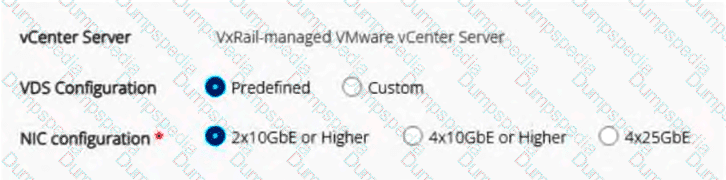
Refer to the exhibit.

What teaming policy is applied to the vSAN port group?
Standby/Active
Active/Active
Unused/Active
In a VxRail deployment where the "Predefined" virtual distributed switch (VDS) configuration is selected alongside a "2x10GbE or Higher" dual-NIC layout, the automated installer applies deterministic network load-balancing and failover policies. Because a 2-NIC profile aggregates all foundational infrastructure traffic—including Management, vMotion, vSAN, and Virtual Machine networks—onto a single pair of physical uplinks (Uplink 1 and Uplink 2), logical segregation is critical to prevent contention and ensure data path reliability.
To achieve this, the predefined architecture utilizes an explicit failover ordering mechanism rather than a standard active/active load-balancing state across the uplinks. For the vSAN port group, which carries high-throughput storage synchronization traffic, the network design configures Uplink 1 as Standby and Uplink 2 as Active. This configuration maps directly to a Standby/Active setup. Conversely, the Management port group operates in an inverse fashion, utilizing Uplink 1 as Active and Uplink 2 as Standby. This layout optimizes bandwidth usage across both physical connections during standard operations, while guaranteeing that full path redundancy remains maintained if an upstream switch link failover event occurs.
Which two iDRAC settings must be set before running the VxRail Deployment Wizard? (Choose two.)
Channel Privilege Level Limit to Operator
NIC selection to Dedicated
Auto Negotiation to Off
Enable IPMI over LAN to Enabled
During the hardware preparation and initial configuration phase of Dell VxRail nodes, specific Integrated Dell Remote Access Controller (iDRAC) settings must be manually validated or modified to ensure proper communication and discovery by the VxRail Manager during cluster creation.
First, the iDRAC NIC Selection must be explicitly set to Dedicated. This configuration ensures that out-of-band management traffic is routed exclusively through the server's dedicated iDRAC port rather than sharing a LOM or OCP adapter network path, ensuring clean channel segregation and management path integrity. Second, the Enable IPMI over LAN attribute must be set to Enabled. The automated VxRail Deployment Wizard relies directly on Intelligent Platform Management Interface (IPMI) commands over the network to securely query, identity-check, and configure node states during initialization. If IPMI over LAN is left disabled, the VxRail Manager cannot communicate with the chassis management layer, causing automated host validation to fail. Other options, such as modifying the Channel Privilege Level Limit to Operator or altering default Auto Negotiation parameters, are not required and can disrupt expected configuration fabrics.
What are three planning considerations when using a customer-supplied vCenter Server? (Choose three.)
Includes a standard vCenter license.
Requires an external DNS server.
Requires a separate vCenter license.
Uses customer-defined procedures for vCenter software upgrades.
Uses VxRail Lifecycle Management for vCenter software upgrades.
When an organization opts to deploy a VxRail cluster using a customer-supplied (external) vCenter Server instead of the embedded VxRail-managed virtual appliance, specific architectural and licensing boundaries must be accommodated during the design and planning phase. First, this model dictates that the customer must provide a separate, valid VMware vCenter Server license (Choice C), as the automated, bundled license included with the embedded deployment model is non-transferable to external management entities.
Second, because the infrastructure services are completely decoupled, the environment requires a fully functional, external DNS server (Choice B) with pre-established forward and reverse lookup records for all node management components, ESXi hosts, and the incoming VxRail Manager instance prior to initialization. Third, the long-term maintenance paradigm shifts completely; the cluster uses customer-defined procedures for vCenter software upgrades (Choice D). This means the customer is independently responsible for patching and upgrading the external vCenter Server instance using standard VMware utilities like the vCenter Server Appliance Management Interface (VAMI) before initiating updates on the VxRail cluster components, effectively separating the external management platform from the automated VxRail Manager lifecycle management (LCM) framework.
The default permissions of the vCenter server administrator account have been identified as a security concern. Due to this security issue, the customer cannot use the default administrator account for the VxRail deployment. What should the customer do to eliminate the concern?
Create a custom role with full permissions. Create a user and assign the new role.
Create a custom role with limited permissions. Add administrator@vsphere.local to the new role.
Create a custom role with limited permissions. Create a user and assign the new role.
Create a custom role with full permissions. Add administrator@vsphere.local to the new role.
Enterprise security standards often restrict the use of default administrative credentials, such as administrator@vsphere.local, due to auditing, accountability, and least-privilege enforcement policies. When preparing for a VxRail deployment with an external, customer-managed vCenter, it is not mandatory to utilize the unrestricted default administrator account. To eliminate security vulnerabilities while facilitating proper cluster initialization, the customer should create a custom role within vCenter configured with limited permissions, then provision a dedicated user account and assign it to this new role.
Dell specifies a precise, restricted matrix of privileges required by the VxRail Manager service account to manage host attachment, storage provisioning, network alignment, and lifecycle updates. By building a custom role that contains only these mandatory minimum privileges and binding it to a newly created non-default service user, the organization enforces a secure operational boundary. Modifying the permissions of the default administrator@vsphere.local account or providing full administrative scope to a new user fails to satisfy least-privilege security requirements and can inadvertently destabilize global vCenter management operations.
What is a consideration when implementing an existing customer-managed VDS on a VxRail cluster?

Supports only two NIC uplinks.
Requires multiple switches to share each distributed port group.
Supports only four NIC uplinks.
Requires each LAG uplink to exist in the vCenter before implementing.
Utilizing a customer-managed Virtual Distributed Switch (VDS) allows enterprise organizations to pre-configure network settings, security policies, and custom port groups within their external vCenter before initiating the VxRail Deployment Wizard. When choosing this deployment pathway, particularly when Link Aggregation Control Protocol (LACP) is selected for network redundancy and load balancing, specific sequencing prerequisites must be followed.
If the architecture dictates the use of an LACP configuration to bundle physical network adapters, each Link Aggregation Group (LAG) uplink structure must be manually created and exist within the customer-managed VDS inside vCenter prior to running the deployment process. The VxRail Deployment Wizard cannot dynamically generate or inject new LAG configurations into an existing, externally managed VDS. During automated initialization, the VxRail Manager discovers these predefined LAG uplinks and maps the designated physical network interface cards (pNICs) of the incoming VxRail nodes to them. This ensures that high-bandwidth traffic such as vSAN and vMotion matches the upstream physical switch configurations immediately upon node discovery and initialization.
TESTED 14 Jul 2026