Which statement best describes what happens when a detector group is selected while creating a content detector?
The detector is excluded from scan results.
The detector becomes part of the AI Mesh and contributes to classification results.
The detector automatically revokes permissions on matching files.
The detector converts all keyword logic into taxonomy labels.
The correct answer is B . In Forcepoint DSPM, content detectors analyze file contents using configured search logic such as keywords, phrases, positive and negative terms, or regular expressions. During detector creation, administrators can associate the detector with a detector group. Forcepoint states that when a detector group is selected, the detector becomes part of the AI Mesh and contributes to classification results. If the administrator does not want the detector to influence classification, a non-AI Mesh detector group should be selected instead.
This is important because detector grouping controls whether detector hits are merely informational or actively influence classification decisions. A payroll detector, for example, may search for terms such as salary, payslip, compensation, or payroll. If tied into the AI Mesh, those hits can help classify files as sensitive or confidential. The other options misrepresent detector behavior. Detectors do not automatically revoke permissions, convert keywords directly into taxonomy labels, or disappear from scan results when grouped. References/topics: Administration > Detectors, Content Detectors, Detector Groups, AI Mesh, Classification Results, Contain/Not Contain Logic .
Which of the following are key configuration components of pattern matching in Forcepoint DSPM? Select two.
Regular expressions
Classification tags
Applicable Country
User credentials
Data sensitivity keys
The correct selections are Regular expressions and Classification tags . In Forcepoint DSPM pattern matching, a pattern is built around a RegEx , meaning the text sequence or structure the system searches for during file scans. Forcepoint defines RegEx as “a sequence or pattern that is searched for in text,” and defines a pattern as the RegEx plus the rules associated with its detection. That makes regular expressions the core detection mechanism for custom pattern matching.
Classification tags are also a key configuration component because they define how matching files should be labelled after the pattern is detected. In the Add New Pattern workflow, Forcepoint lists Classifications as a configurable field and describes it as the “Classification tagset value.” The same workflow states that selected Classification, Compliance, and Distribution values override machine-learning model output during endpoint suggestions and file scans.
The remaining options are not primary pattern-matching configuration components. Applicable Country is not listed as a core pattern field in the documented pattern workflow. User credentials belong to identity and access management, not detection logic. Data sensitivity keys is not the documented configuration term used for pattern creation. References/topics: Pattern Matching, RegEx Detection, Classification Tags, Compliance Tags, Distribution Tags, Scan Classification Overrides .
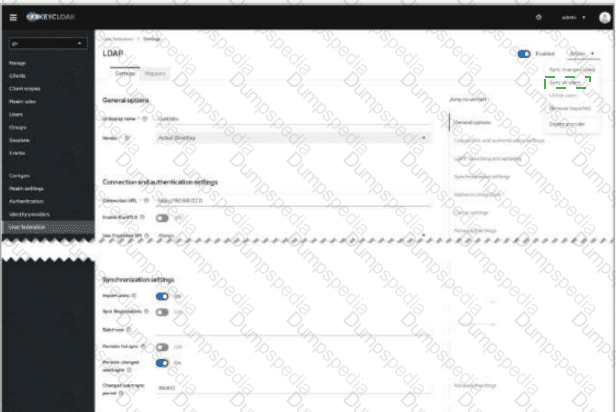
If LDAP searching and updating is set to READ_ONLY mode, which synchronization option becomes irrelevant?
Periodic changed users sync
Import users
Periodic full sync
Sync Registrations
The correct answer is Sync Registrations . In Forcepoint DSPM, Active Directory users are imported through Keycloak User Federation . The Forcepoint DSPM administration workflow directs administrators to access Keycloak, select the gv realm, navigate to User Federation , and add an LDAP provider for AD integration.
In Keycloak LDAP configuration, READ_ONLY edit mode means Keycloak can read LDAP-backed user data, but it cannot modify mapped LDAP attributes such as username, email, first name, last name, or passwords. Keycloak’s own administration guide states that READ_ONLY prevents user attribute changes and password updates, while WRITABLE mode is the mode that allows changes to be synchronized back to LDAP.
That makes Sync Registrations irrelevant in READ_ONLY mode because Sync Registrations is specifically used when newly created Keycloak users should also be added to LDAP. Since READ_ONLY mode prevents Keycloak from writing new or modified user objects back to LDAP, registration synchronization has no useful effect in that configuration. By contrast, Import users , Periodic full sync , and Periodic changed users sync remain relevant because they are read-oriented synchronization mechanisms that bring LDAP/AD identities into DSPM’s Keycloak-backed identity layer. References/topics: Keycloak User Federation, LDAP Edit Mode, READ_ONLY Mode, AD Import, Synchronization Settings .
Which of the following is a key benefit of defining a custom data taxonomy?
Reduces data storage costs.
Decreases data duplication.
Simplifies user authentication.
Enhances data security.
The correct answer is D. Enhances data security . In Forcepoint DSPM, taxonomy is the structured classification model used to assign sensitivity meaning to discovered data. Forcepoint describes taxonomy as a machine-learning-based structured classification system that assigns sensitivity levels such as Confidential , General Business , Public , and Highly-Confidential . This classification directly corresponds to the Classification column in scan results, allowing security and governance teams to understand how sensitive a file or data asset is after scanning.
A custom taxonomy improves security because it lets an organisation align DSPM classification labels with its own internal data-handling rules, security protocols, and business language. Forcepoint notes that taxonomy customization ensures data handling aligns with an organisation’s security protocols, and that applied tags are visible in the Data Asset Inventory . In the administration taxonomy workflow, Forcepoint also explains that predefined AI Mesh tags can be supplemented with custom tags for pattern matching and detection rules, and those tags can be mapped to data-source taxonomies for label writeback.
The other options describe possible operational goals but not the primary purpose of taxonomy. Taxonomy is not an authentication mechanism, deduplication feature, or storage-reduction tool. References/topics: Taxonomy, Classification Tags, AI Mesh, Pattern Matching, Data Asset Inventory, Compliance Hub .
You have connected Forcepoint DSPM to your Active Directory using the User Federation configuration. You confirmed the connection is successful, but users have not synced after some time. Where in the UI would you go to manually initiate a user sync?
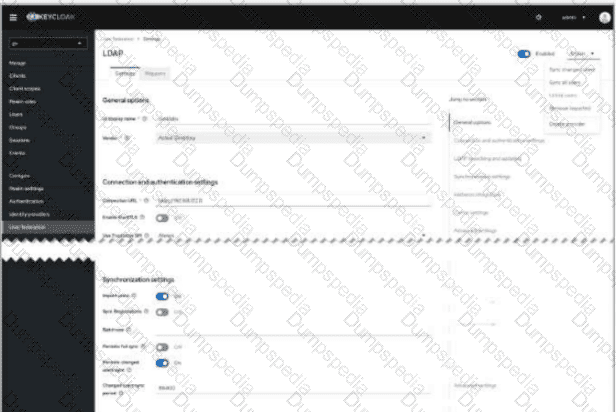

Select the Actions drop-down in the upper-right corner of the LDAP provider screen, then choose Sync all users or Sync changed users .
Manual synchronization is initiated from the LDAP provider configuration page inside Keycloak User Federation, not from the general DSPM dashboard or from the Users page. The correct UI location is the Actions menu at the upper-right of the LDAP provider screen. In the screenshot, this is the open drop-down containing options such as Sync all users , Sync changed users , Unlink users , and Remove imported . To force synchronization after a successful connection test, choose Sync all users for a full import or Sync changed users when only deltas are required.
Forcepoint DSPM uses Keycloak for Active Directory import. The official DSPM documentation states that AD users are added through Keycloak , with administrators selecting the gv realm, navigating to User Federation , and adding/configuring an LDAP provider. It also identifies synchronization settings such as Import users , Periodic full sync , and Periodic changed users sync as the mechanisms used to bring LDAP users into Keycloak and then into DSPM.
Therefore, the click target is the upper-right Actions drop-down on the LDAP provider page , specifically the sync command within that menu. References/topics: User Federation, LDAP Provider, Active Directory Import, Keycloak gv Realm, Synchronization Settings .
Which of the following is an option to aid the process of reviewing the incidents generated from triggered rules in Controls Orchestration?
Use the Timestamp filter to narrow the results based on time.
In the search field, enter GQL filter to narrow the results based on the filter.
Use the Risk type drop-down to narrow the results based on risk.
In the search field, enter in a keyword to narrow the results based on the keyword.
The correct answer is B . Forcepoint DSPM Controls Orchestration rules are built around query-driven rule logic. In the rule configuration workflow, administrators select a dataset such as Files , Trustees , or Agent Activities , then configure the rule condition using GQL syntax . This GQL condition defines which records match the rule and therefore which results appear as incidents when the rule is triggered. Forcepoint documentation states that Controls Orchestration rules identify data matching specific criteria and that the Condition field uses GQL syntax to filter the selected dataset.
When reviewing incidents, Forcepoint’s Incidents page provides a top-down view of orchestration rules and available match results. Selecting an incident card opens a results preview, and choosing View in the Page displays those matched files in Enterprise Search , where additional review and action options are available. Enterprise Search is specifically designed to narrow scanned-file results using GetVisibility Query Language , and Forcepoint notes that GQL filtering helps reduce the result set to a more manageable subset for analysis and action.
Timestamp, Risk type, and keyword filtering may be useful in other contexts, but the documented advanced review mechanism for these results is GQL-based filtering. References/topics: Controls Orchestration, Incidents, Enterprise Search, GQL Filtering, Rule Match Review .
Which of the following is NOT a key use case for detectors in Forcepoint DSPM?
Encrypting data transfers.
Identifying sensitive information.
Managing compliance.
Preventing data breaches.
The correct answer is A. Encrypting data transfers . Detectors in Forcepoint DSPM are classification and discovery components, not transport-security controls. A detector is used to analyze file content, file paths, attributes, keywords, phrases, regular expressions, and positive or negative match terms so the platform can identify and categorize data during scans. Forcepoint describes Content Detectors as tools that “analyze file content to detect and categorize” based on keywords, phrases, or patterns, making them directly relevant to finding sensitive information.
Detectors also support compliance and breach-prevention outcomes because their findings contribute to the broader DSPM visibility model: identifying where sensitive data exists, how it is classified, and where risk-reduction actions may be needed. Forcepoint describes DSPM as providing visibility and risk remediation across cloud and on-premises environments, and notes that AI technology combined with Detectors and Compliance Hub helps organizations protect sensitive information and maintain regulatory requirements.
Encryption of data transfers, however, is handled by transport protocols, connector configuration, network security controls, or platform security architecture—not by detector logic. Detectors can help discover sensitive data that may require protection, but they do not encrypt traffic. References/topics: Detectors, Content Detectors, AI Mesh, Sensitive Data Discovery, Compliance Hub, Risk Remediation .
When creating a Security Posture Policy in Forcepoint DSPM, which field uses a GQL query to identify the data asset?

Department
Data Owner
Data Mapping
Asset Name
The correct answer is C. Data Mapping . In Forcepoint DSPM, Security Posture Policies are used to define and govern critical business data assets, often referred to as crown-jewel data. Each policy represents a managed data asset associated with a department, owner, and query-based definition. The Data Mapping field is where the administrator enters or edits the GQL query that identifies which files or records belong to that data asset. Forcepoint’s documentation explicitly lists Asset Name , Department , Data Owner , and Data Mapping as required Security Posture Policy details, and defines Data Mapping as “a GQL query used to identify the data asset within the DSPM database.”
This distinction matters because Asset Name is only the business label, Department assigns responsibility to a business unit, and Data Owner identifies the person or group accountable for monitoring and compliance. The actual technical selection logic is contained in Data Mapping , where GQL can match data across sources such as SMB and SharePoint using query criteria like source and path. References/topics: Policy Center, Data Register, Security Posture Policies, Data Mapping, GQL, Data Asset Inventory .
What is the first step in configuring the Data Register in Forcepoint DSPM?
Enabling Pattern Matching.
Creating Security Posture Policies.
Configuring Data Mapping.
Reviewing policies in the Data Asset Inventory.
The first step in configuring the Data Register is Creating Security Posture Policies . In Forcepoint DSPM, the Data Register is the governance workspace where an organization defines and manages its most important data assets, commonly described as “crown jewels.” Forcepoint’s Data Register structure lists three main areas in order: Security Posture Policies , Data Asset Inventory , and Review Status , making Security Posture Policies the starting point for register configuration.
A Security Posture Policy creates the formal representation of a governed data asset. The documented workflow is to navigate to Policy Center > Data Register > Security Posture Policies , click Add new Security Posture Policy , and define required details such as Asset Name , Department , Data Owner , and Data Mapping using a GQL query.
The other choices are not the first Data Register configuration step. Pattern Matching belongs to detection and classification logic, not Data Register setup. Data Mapping is important, but it is configured under Compliance Hub as the framework for Data Asset Inventory metadata fields. Reviewing policies in the Data Asset Inventory occurs after policies and asset definitions exist. References/topics: Policy Center, Data Register, Security Posture Policies, Data Asset Inventory, Data Mapping, Data Ownership .
TESTED 26 Aug 2026