Common storage networks include direct attached storage (DAS), network attached storage (NAS), and storage area network (SAN). SANs are divided into Fibre Channel storage area networks (FC SANs) and IP storage area networks (IP SANs).
TRUE
FALSE
According to the Huawei HCIA-Cloud Computing technical guidelines, storage is categorized by its connection method and the protocol used to access data. Direct Attached Storage (DAS) is the most basic form, where storage devices are connected directly to a single server via an internal bus or external cable. While simple, it lacks the scalability and resource-sharing capabilities required for modern cloud data centers. Network Attached Storage (NAS) provides file-level access over a standard IP network, typically using protocols like NFS or CIFS, allowing multiple clients to share a central pool of files over a local area network.
The Storage Area Network (SAN) is a specialized, high-speed network that provides block-level access to storage, making it appear to the operating system as a locally attached disk. In Huawei’s virtualization solutions, SANs are the preferred choice for high-performance clusters and features like VM Live Migration. As the statement correctly identifies, SANs are primarily divided into two types based on the transport protocol used: Fibre Channel (FC) SANs and IP SANs. FC SANs utilize dedicated fiber-optic cables, FC switches, and Host Bus Adapters (HBAs) to transmit data using the Fibre Channel protocol, offering extremely high reliability and minimal latency. Conversely, IP SANs utilize standard Ethernet infrastructure and the iSCSI protocol to encapsulate SCSI commands into IP packets. This allows for lower costs and easier management by leveraging existing Ethernet knowledge. Understanding these distinctions is crucial for the HCIA exam, as the choice between FC and IP SAN directly impacts the deployment architecture and performance characteristics of Huawei's FusionCompute and FusionAccess solutions in an enterprise environment.
Which of the following statements about FusionAccess for office automation (OA) isfalse?
FusionAccess can be interconnected with existing enterprise IT systems to use existing IT applications.
FusionAccess has three zones (red, yellow, and green). These zones are isolated from each other and have their own FusionAccess systems. Data can be transmitted between them.
Zone-based security is high, easy to deploy, and meets the security management requirements of most enterprises.
Enterprise Active Directory (AD) is an important component of FusionAccess, and users must be authenticated by AD before logging in to virtual desktops.
FusionAccess OA security architecture adoptszone-based isolation(red, yellow, green zones).
Each zone islogically and physically isolated
Each zone has itsown FusionAccess system
Data is not allowed to flow freely between zones
OptionBis false because it incorrectly states that data can be transmitted between zones. The other statements correctly reflect FusionAccess OA security and integration characteristics.
For a small enterprise with no more than 100 employees, using the FusionAccess gateway and load balancer deployment solution for office scenarios, which of the following plans isrecommended?
Two CNA nodes, each deployed with two VMs that integrate the vAG and vLB
Two CNA nodes, each deployed with a vAG VM and a VM that integrates the vAG and vLB
Two CNA nodes, each deployed with a VM that integrates the vAG and vLB
Two CNA nodes, each deployed with a vAG VM and a vLB VM
Forsmall-scale office scenarios (≤100 users), the HCIA–Cloud Computing FusionAccess deployment guidelines recommend asimplified architecturethat balances availability and cost.
Deployingone integrated vAG + vLB VM on each CNA nodeprovides:
Basichigh availability
Reduced VM count
Simpler deployment and maintenance
Sufficient performance for small user规模
Separate deployment of vAG and vLB or multiple integrated VMs is more suitable formedium and large-scale environments.
Therefore, the recommended solution istwo CNA nodes, each deployed with a VM that integrates the vAG and vLB.
Which of the following statements aretrueabout distributed storage?
Distributed storage features outstanding scalability.
Distributed storage typically uses general-purpose servers rather than storage devices.
Distributed storage leverages RAID technology to ensure high data availability and security.
Distributed storage has no controller enclosure or disk enclosure. All disk storage resources are delivered by general-purpose servers.
Distributed storage is a core concept in cloud computing and is emphasized in HCIA–Cloud Computing as a foundational technology for large-scale cloud platforms.
OptionAis true. Distributed storage is designed forhorizontal scalability, allowing storage capacity and performance to increase simply by adding more nodes.
OptionBis true. Unlike traditional centralized storage systems, distributed storage typically runs ongeneral-purpose x86 servers, reducing cost and improving flexibility.
OptionCis false. Distributed storagedoes not rely on traditional RAIDfor data protection. Instead, it usesdata replication or erasure coding, which are more suitable for large-scale distributed environments.
OptionDis true. Distributed storage eliminates the need for dedicated controller enclosures or disk enclosures. Storage resources are directly provided bygeneral-purpose servers, which aligns with cloud-native architecture principles described in HCIA materials.
Which of the following statements is false about a Virtual Image Management System (VIMS) file system?
VIMS is the technical basis of advanced features such as thin-provisioned disks, snapshots, and storage migration.
VIMS is compatible with FC SAN storage, IP SAN storage, and local disks.
VIMS is a universal storage virtualization file system in the industry.
VIMS is a high-performance cluster file system.
In Huawei FusionCompute, VIMS is a storage virtualization file system designed specifically for Huawei’s virtualization platform.
Option A is true. VIMS underpins advanced storage features such as thin provisioning, snapshots, and live storage migration, which are core functions in FusionCompute.
Option B is true. VIMS supports multiple backend storage types, including FC SAN, IP SAN, and local disks, offering flexible deployment options.
Option D is true. VIMS is a high-performance cluster file system optimized for virtualized environments and concurrent access.
Option C is false. VIMS is not a universal industry-standard file system. It is a Huawei-specific storage virtualization file system, designed for FusionCompute and not broadly adopted across all vendors.
Thus, the false statement is C.
Which of the following commands are used to view common files on Linux?
less
more
vim
cat
In the HCIA–Cloud Computing syllabus, Linux command-line operations are part of theOperating System Basicsdomain. Viewing file contents is one of the most common Linux administration tasks.
Theless (A)command is used to view file contents page by page. It supports forward and backward scrolling and searching, making it suitable for viewing large files. HCIA materials often recommend less as a preferred file-viewing tool.
Themore (B)command is an earlier paging command that displays file contents one screen at a time. Although it has fewer features than less, it is still a valid file-viewing command.
Thecat (D)command is used to display the entire content of a file directly to standard output. It is commonly used for viewing small files or concatenating files.
Thevim (C)command is primarily atext editor, not a file-viewing command. While it can open and display files, its main purpose is editing rather than viewing, which is how HCIA differentiates it.
Therefore, the correct answers areA, B, and D.
Desktop users on the same FusionAccess can be authenticated using different domains.
TRUE
FALSE
As detailed in the Huawei HCIA-Cloud Computing training material regarding FusionAccess Service Provisioning, the statement is TRUE. Huawei FusionAccess is designed to support complex enterprise environments, including multi-domain architectures. This is particularly relevant for large corporations that have acquired other companies or have organized their IT infrastructure into a forest of multiple Active Directory (AD) domains.
FusionAccess achieves this by establishingTrust Relationshipsbetween the "Management Domain" (where the infrastructure components like HDC and ITA are located) and the "User Domains" (where the desktop users' accounts are stored). When trust is correctly configured between AD domains, theHDC (Huawei Desktop Controller)can query and authenticate users across these boundaries. For instance, a user from marketing.huawei.com and another from research.huawei.com can both log into the same Web Interface (WI) and access their respective virtual desktops.
During the service provisioning process, the administrator adds the various domains to the FusionAccess management system. When a user logs in, they specify their domain prefix (e.g., DOMAIN_A\username), and the system routes the authentication request to the appropriate Domain Controller. This multi-domain support is critical forMulti-tenancyand large-scale enterprise consolidation. It allows a single, unified FusionAccess platform to serve multiple organizational units without requiring all users to be migrated into a single, massive AD domain. This logical separation is a key feature taught in the HCIA curriculum to demonstrate the scalability and flexibility of Huawei's virtual desktop solution.
====================
Which of the following statements are true about system encapsulation and Sysprep (system encapsulation tool) for creating a full copy template on FusionAccess?
Sysprep can delete specific system information from an installed Windows image.
Sysprep can be used to reset Windows product activation.
System encapsulation can complete system installation in minutes.
During system encapsulation, you cannot add software to the system.
According to the Huawei HCIA-Cloud Computing training material, system encapsulation is a vital process when creating a "Golden Image" for Full Copy virtual desktops. The primary tool used for this in Windows environments is Sysprep (System Preparation Tool). Statement A is TRUE because the fundamental purpose of Sysprep is to "generalize" the operating system. This process removes computer-specific information, such as the Security Identifier (SID), computer name, and specific hardware drivers. If multiple VMs were cloned from a template without this step, they would all share the same SID, leading to domain conflict issues and security vulnerabilities in an enterprise Active Directory environment.
Statement B is alsoTRUE. Sysprep includes a functionality to reset the Windows Product Activation clock (often referred to as a "rearm"). This allows the cloned virtual machines to start their grace period anew upon their first boot, which is essential for large-scale deployments before the KMS (Key Management Service) or other volume licensing activation takes place. Statement C is incorrect because encapsulation is the process of preparing an image, not the installation itself; while cloning from a template saves time, "encapsulation" does not perform the installation. Statement D is incorrect because administrators typically install all necessary service software and driversbeforeor during the Audit Mode phase of Sysprep to ensure the final template is fully equipped.
In the Huawei FusionAccess workflow, encapsulation is the penultimate step before converting the VM into a template. By stripping the uniqueness of the source VM, Sysprep ensures that every Full Copy desktop provisioned to an end-user starts as a clean, unique instance that can successfully join the corporate domain and receive independent security policies.
====================
Which of the following IP addresses cannot be assigned to service hosts?
0.0.0.0
169.254.0.0/24
255.255.255.255
127.0.0.0/8
In the Huawei HCIA-Cloud Computing curriculum, understanding the classification and reservation of IPv4 addresses is essential for proper network configuration within a virtualized data center. According to official documentation, certain address ranges are reserved for specific protocols or system functions and are strictly prohibited from being assigned to service hosts (end-user devices or servers).
Firstly,0.0.0.0is an unspecified address. It is used by a host that does not yet have an IP address when it sends a DHCP Discover packet to find a server. It also represents the "default route" in routing tables. Secondly, the127.0.0.0/8range is reserved for loopback testing. Any packet sent to this range never leaves the local host's internal network stack; it is used to verify that the TCP/IP suite is installed correctly. Thirdly,255.255.255.255is the "limited broadcast address." It is used to send data to every device on the current local network segment but is never routed across different subnets. Finally, the169.254.0.0/16range (represented here as a /24 subnet) is the Automatic Private IP Addressing (APIPA) range. If a host is configured to obtain an IP automatically but fails to contact a DHCP server, the operating system assigns an address from this range so the host can still communicate with others on the same link.
None of these addresses can be used as a source or destination for standard service traffic across a routed cloud infrastructure. Service hosts must be assigned either public IP addresses or private IP addresses from the RFC 1918 ranges (10.0.0.0/8, 172.16.0.0/12, or 192.168.0.0/16). Assigning reserved addresses to service hosts would lead to routing conflicts, local loopback errors, or a complete failure of network communication within the Huawei FusionCompute or FusionAccess environment.
====================
FusionCompute integrates physical CPU and memory resources on hosts into a compute resource pool and divides the resources into virtual CPU and memory resources for VMs. The compute resources actually used by a VM cannot exceed the specifications of the hardware resources on the host because the CPU and memory resources used by the VM must be provided by the same host. If this host malfunctions, the system automatically assigns another host to the VM to provide compute resources.
TRUE
FALSE
This statement is TRUE and covers two fundamental concepts within the Huawei HCIA-Cloud Computing curriculum: resource locality and High Availability (HA).
First, the statement addresses the constraint ofresource locality. In the current architecture of Huawei FusionCompute (and most mainstream virtualization platforms), a single Virtual Machine (VM) cannot "span" its core compute resources (vCPU and RAM) across multiple physical hosts simultaneously. For instance, if a physical host has 128GB of RAM, you cannot create a single VM with 256GB of RAM, because that VM’s memory address space must be mapped to the physical DIMMs of a single physical server to maintain performance and synchronization. Therefore, the maximum specifications of a VM are always bounded by the physical hardware limits of a single host within the cluster.
Second, the statement accurately describes theHigh Availability (HA)function. While a running VM is tied to one host, cloud computing overcomes this physical dependency through cluster-level management. When theVRM (Virtual Resource Management)node detects that a physical host has malfunctioned (via heartbeat loss), it triggers the HA policy. Since the VM’s disk files are stored on shared storage (like a SAN or NAS), the system "assigns" the VM to a different healthy host in the same cluster. The VM is then automatically restarted on that new host, which provides the necessary CPU and memory resources to resume services.
This combination of strict host-level resource allocation for execution and cluster-level flexibility for recovery is what allows Huawei’s cloud solutions to provide stable, enterprise-grade infrastructure. Understanding that compute resources are provided by a "single host" at runtime, but protected by the "cluster" during a failure, is a core objective of the HCIA-Cloud Computing certification.
On FusionAccess, when creating afull copy, QuickPrep, or linked clone template, the template must be added to a domain.
TRUE
FALSE
In FusionAccess,templates must not be joined to a domain.
HCIA–Cloud Computing materials specify that:
Templates are created in aworkgroup environment.
Domain joining is performed during desktop provisioning, not at the template stage.
Joining a template to a domain can cause conflicts such as duplicate computer accounts.
Therefore, the statement isFALSE.
At which layer of the TCP/IP reference model does a router work?
Data link layer
Network layer
Application layer
Transport layer
The HCIA–Cloud Computing syllabus explains that routers are responsible forinter-network communicationand packet forwarding based onIP addresses. In the TCP/IP reference model, this function corresponds to theNetwork layer.
Routers analyze the destination IP address of a packet and use routing tables and routing protocols to determine thebest pathfor forwarding the packet to its destination. This behavior is distinct from switches, which forward frames based on MAC addresses at the data link layer.
TheData link layer (A)is associated with switches, theTransport layer (D)handles end-to-end communication (such as TCP and UDP), and theApplication layer (C)provides services to applications.
Therefore, according to HCIA–Cloud Computing network fundamentals, the correct answer isNetwork layer.
The Central Processing Unit (CPU) is the computer's computing and control core. Mainly composed of an arithmetic logic unit (ALU) and a controller, it reads and executes data according to instructions.
TRUE
FALSE
According to the HCIA–Cloud Computing curriculum underServer Basics, the CPU is defined as thecore component responsible for computation and controlwithin a computer system. The CPU executes program instructions and coordinates the operation of all other hardware components.
The CPU is primarily composed of two main functional units:
Arithmetic Logic Unit (ALU):Responsible for performing arithmetic operations (such as addition and subtraction) and logical operations (such as comparisons and logical AND/OR).
Control Unit (Controller):Responsible for fetching instructions from memory, decoding them, and controlling the execution process by issuing control signals to other components.
The CPU operates based on thefetch–decode–execute cycle, which is a fundamental concept emphasized in HCIA learning materials. During this process, the CPU reads instructions and related data from memory, processes them, and produces results according to the instruction set architecture.
Because the statement accurately describes therole, composition, and working principleof the CPU as defined in Huawei’s HCIA–Cloud Computing documentation, it iscorrect.
In FusionCompute, which of the following isnota prerequisite for VM live migration?
The VM must be in the running state.
The uplink of the distributed virtual switch (DVS) where the VM NIC resides must be associated with both the source and target hosts.
The IMC policy of the cluster must be configured.
The datastore to which the VM disk belongs must be associated with both the source and target hosts.
VM live migration in FusionCompute has several mandatory prerequisites.
Ais required because live migration applies only torunning VMs.
Bis required to ensure uninterrupted network connectivity during migration.
Dis required because both source and target hosts must access the same datastore to migrate VM disks seamlessly.
IMC policy (C)isnot mandatoryfor live migration. It is requiredonly when hosts have different CPU models. If hosts use compatible CPUs, live migration can proceed without configuring IMC.
Therefore, the correct answer isC.
Which of the following parameters are mandatory for quickly provisioning desktops on FusionAccess?
Computer Type
Host
Security Group
Template
In the official Huawei FusionAccess documentation, "Quick Provisioning" is a streamlined workflow designed to deploy multiple virtual desktops efficiently.1 For this process to succeed, several mandatory parameters must be defined to ensure the Virtual Machines (VMs) are created with the correct hardware and software specifications.
First, theComputer Type (A)is mandatory as it determines whether the desktops will be "Full Copy" (independent disks) or "Linked Clone" (shared base disk). This choice significantly impacts storage consumption and future maintenance. Second, aTemplate (D)is required because it serves as the "Golden Image" containing the pre-installed Operating System, drivers, and the Huawei Access Agent (HDA). Without a template, the system cannot instantiate the VM's disk content. Third, a targetHost (B)or resource cluster must be selected to provide the physical CPU and memory resources required for the VMs to run.
WhileSecurity Groups (C)are an important part of the network configuration, they are typically associated with a "Desktop Group" rather than being a mandatory field in the quick provisioning wizard itself. If no specific security group is selected, the system often applies a default policy. According to the HCIA curriculum, the core "Provisioning Plan" focuses on the source (Template), the deployment mode (Computer Type), and the destination (Host/Cluster). Ensuring these three parameters are correctly matched is vital for the automated provisioning engine to calculate resource availability and successfully trigger the VM creation on the backend FusionCompute platform.
====================
In Huawei FusionCompute, a VM running Linux is created. In this scenario, which of the following does the guest OS run in?
VRM
CNA
Linux VM
VNA
(Note: The original question contained a typo. As requested, "host OS" has been corrected to "guest OS" because Linux, in this scenario, is the Guest operating system.)
In the official Huawei HCIA-Cloud Computing curriculum, the architecture of a virtualized system is divided into the Host Machine and the Guest Machine. TheHost Machineis the physical server (hardware) and the virtualization software (CNA in FusionCompute). TheGuest Machineis the Virtual Machine (VM) created by the hypervisor. According to the training materials, theGuest OSis the operating system that is installed and executed within the virtualized environment of a VM.13
Therefore, if a VM running Linux is created, the Linux operating system is the Guest OS, and it runs specifically inside theLinux VM. The VM acts as a logical container that provides the Linux OS with virtualized CPU, memory, storage, and network resources.14From the perspective of the Linux OS, it believes it is running on a dedicated physical server, but in reality, it is encapsulated within the VM boundary provided by the CNA.
The other components mentioned have different roles:CNA (Computing Node Agent)is the "host" software that manages the hardware and hosts the VM, but the Linux OS does not run "in" the CNA directly; it runs in the VM managed by the CNA.VRM (Virtual Resource Management)is the management platform used by administrators to create and configure the VM.VNA (Virtual Node Agent)is a process within the CNA that handles management commands from the VRM. In the Huawei certification logic, it is crucial to distinguish between the "Container" (the VM) and the "Occupant" (the Guest OS). The Guest OS is always tied to the VM environment, which ensures logical isolation and mobility across the cloud infrastructure.
The essence of ___ technology is to convert physical devices into logical ones, thereby decoupling software from hardware.
Virtualization
In the official Huawei HCIA–Cloud Computing documentation, the core definition of virtualization centers on the abstraction of physical resources. The essence of virtualization technology is precisely the transformation of physical, hardware-based resources—such as CPUs, memory, network interface cards, and storage disks—into virtualized, logical entities. This process is facilitated by a software layer known as the Hypervisor or Virtual Machine Monitor (VMM). By creating this abstraction layer, virtualization effectively achieves the "decoupling" of the software environment (the Operating System and applications) from the underlying physical hardware.
This decoupling is a revolutionary shift from traditional computing architectures where an Operating System was tied to specific hardware drivers and physical configurations. In a virtualized environment, a Virtual Machine (VM) perceives a set of standardized, logical hardware components provided by the Hypervisor. Because the software is no longer bound to the physical machine, it gains significant mobility and flexibility. For example, in Huawei’s FusionCompute platform, this decoupling allows for features such as Live Migration, where a running VM can be moved from one physical host to another without any service interruption. This is possible because the VM's "logical" hardware remains consistent even as the "physical" host changes.
Furthermore, this transformation from physical to logical enables better resource utilization through overcommitment and sharing. Multiple logical servers can run on a single physical server, each isolated from the others. This fundamental shift is what provides the agility, scalability, and efficiency required for Cloud Computing. Without the decoupling provided by virtualization, the rapid provisioning and elastic resource scaling that define cloud services would be impossible to achieve. Therefore, virtualization serves as the indispensable technical foundation upon which all other cloud services and management layers are built within the Huawei ICT ecosystem.
In virtualization, KVM and Xen are typical hardware-assisted virtualization technologies. They implement virtualization based on kernel modules in the operating system.
TRUE
FALSE
According to the HCIA–Cloud Computing virtualization domain,KVM (Kernel-based Virtual Machine)andXenare both examples ofhardware-assisted virtualizationtechnologies.
Hardware-assisted virtualization relies on CPU extensions such asIntel VT-xandAMD-Vto improve virtualization performance and isolation. Both KVM and Xen leverage these CPU features.
KVMis implemented as akernel modulewithin the Linux operating system. Once loaded, the Linux kernel itself becomes a hypervisor, managing CPU and memory virtualization with hardware support.
Xenalso relies on hardware virtualization features and interacts closely with the operating system kernel, especially in full virtualization and hardware-assisted modes.
Because the statement correctly describes both thevirtualization typeand theimplementation approach, it aligns with HCIA documentation and isTRUE.
Which of the following statements is false about concepts of virtualization?
A guest OS is the OS running on a virtual machine (VM).
A host machine is a physical machine.
A host OS is the virtualization software layer.
A guest machine is a VM.
In the "Virtualization Basics" section of the Huawei HCIA-Cloud Computing training material, the taxonomy of virtualization components is strictly defined. Statement C is FALSE because the virtualization software layer is technically called the Hypervisor or Virtual Machine Monitor (VMM), not the "Host OS." While a "Host OS" exists in Type-2 (hosted) virtualization (where the hypervisor runs as an application on top of an existing OS like Windows or Linux), the software layer that actually performs the resource abstraction and logical partitioning is the Hypervisor itself.
The other definitions are central to Huawei's technical documentation. AGuest OS(Statement A) is indeed the operating system—such as Windows Server or Ubuntu—that is installed inside a Virtual Machine. It is "unaware" that it is running on virtual hardware. TheHost Machine(Statement B) refers to the underlying physical server (e.g., a Huawei FusionServer Pro) that provides the actual CPU, RAM, and physical NICs. Finally, aGuest Machine(Statement D) is a synonym for a Virtual Machine (VM), representing the logical container that houses the Guest OS and applications.
In a Type-1 virtualization architecture (like HuaweiFusionCompute), the Hypervisor (CNA) sits directly on the hardware. In this scenario, there is no "Host OS" at all, further proving why statement C is incorrect. The Hypervisor is responsible for trapping "privileged instructions" from the Guest OS and translating them into actions on the physical hardware. Correctly identifying these roles—Host Machine, Hypervisor, and Guest VM—is a prerequisite for understanding more advanced cloud features like Resource Clusters and Distributed Resource Scheduling (DRS).
The service modes for cloud computing include Infrastructure as a Service (IaaS), Platform as a Service (PaaS), and Software as a Service (SaaS). Which of the following statements arefalseabout the IaaS model?
Users need to install a virtualization suite to integrate resources.
Users only need to pay attention to applications.
Users only need to focus on applications and data.
Users only need to focus on systems and applications.
The HCIA–Cloud Computing syllabus clearly defines responsibility boundaries forIaaS. In the IaaS model, the cloud provider deliversbasic infrastructure resources, including compute, storage, networking, and virtualization. The user is responsible for managingoperating systems, middleware, runtime environments, applications, and data.
OptionAis false becausevirtualization is managed by the cloud provider, not the user. In IaaS, users consume virtualized resources (such as ECS instances) but donotdeploy or maintain the underlying hypervisors or virtualization platforms.
OptionBis false. Only focusing on applications aligns with theSaaSmodel, where the provider manages everything else. In IaaS, users must also manage operating systems and system-level configurations.
OptionCis also false. Focusing only on applications and data corresponds more closely toPaaS, where the platform handles operating systems and runtime environments.
OptionDis thecorrect description of IaaS responsibilities, because users must manageoperating systems (systems) and applications, while the provider manages the infrastructure layer. Therefore, D is not false and is excluded from the answer.
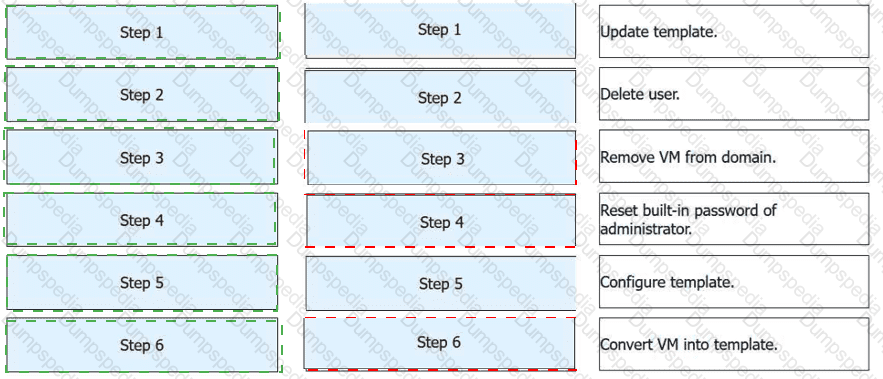
FusionAccess can use a provisioned full copy VM as a full copy VM template. Place the following operations in the correct order.
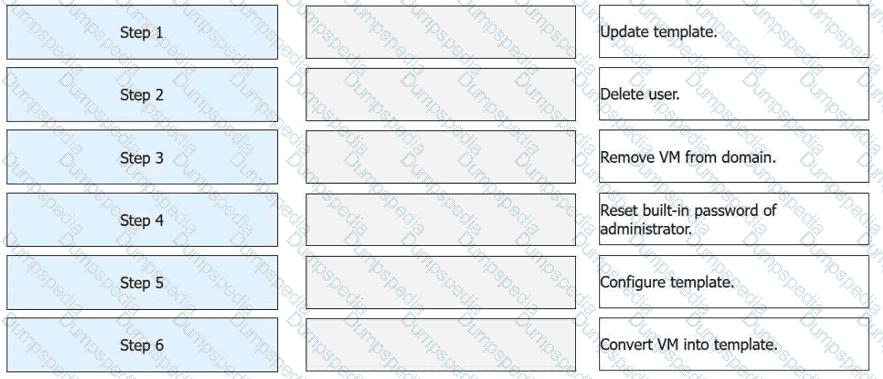
Step
Operation
Step 1
Update template.
Step 2
Delete user.
Step 3
Remove VM from domain.
Step 4
Reset built-in password of administrator.
Step 5
Configure template.
Step 6
Convert VM into template.
Step
Operation
Technical Rationale
Step 1
Update template
Power on the VM to install the latest OS patches and software updates.
Step 2
Delete user
Remove user profiles and personal data to ensure the master image is clean.
Step 3
Remove VM from domain
Disjoin the VM from the AD domain to prevent Security Identifier (SID) or account name conflicts on new clones.
Step 4
Reset built-in administrator password
Set a secure, standardized baseline credential for the local administrator account.
Step 5
Configure template
Run theHuawei Desktop Preparation Toolto optimize the OS and encapsulate the system.
Step 6
Convert VM into template
Use the management console to officially mark the VM as a read-only template resource.
Initialization (Steps 1-4):Before a VM can be turned into a "Golden Image," it must be stripped of its unique identity. This includes removing it from anyActive Directory (AD)domain and clearing out specific user accounts. Failing to remove the VM from the domain can lead to "duplicate computer name" errors when new desktops are provisioned from the final template.
System Encapsulation (Step 5):The "Configure template" phase is often synonymous withSysprepor the Huawei-specific encapsulation process. This step resets the OS clock and generalizations, such as the hardware-dependent drivers, so the image can boot correctly on any host in the cluster.
Finalization (Step 6):Once converted into a template, the VM is no longer a running instance. It becomes a master file that theITA (IT Adapter)uses for rapid service provisioning.
According to the official Huawei HCIA-Cloud Computing documentation, converting a provisioned full-copy virtual machine (VM) back into a template is a specific administrative workflow used for updating "Golden Images" without starting from a bare VM. The process must follow a logical sequence to ensure that the final template is clean, generalized, and compatible with the FusionAccess management plane.
The workflow begins withStep 1: Update template, which involves powering on the VM to install necessary software patches, security updates, or new applications. Once updated,Step 2: Delete useris performed to remove any cached user profiles, temporary files, or local user data that should not exist in the master image.Step 3: Remove VM from domainis a critical step to ensure that the VM is no longer associated with a specific Active Directory security identifier (SID) or domain account, preventing SID conflicts when the template is later used to provision multiple new desktops.
Following the domain disjunction,Step 4: Reset built-in password of administratoris required to ensure the FusionAccess system can maintain management access via a known, local credential during the subsequent automation phases.Step 5: Configure templateinvolves running theHuawei Desktop Preparation Tool. This tool performs system encapsulation (similar to Sysprep), optimizes the OS for VDI usage, and prepares the Huawei Desktop Agent (HDA). Finally,Step 6: Convert VM into templateis the final action performed in the FusionCompute or FusionAccess management console. This marks the VM as a read-only template resource, ready to be used by the ITA (IT Adapter) for rapid service provisioning.
The kernel is an essential part of the operating system (OS). It is used to manage computer hardware resources and provide a system call interface to run upper-layer application programs.
TRUE
FALSE
In the official Huawei HCIA-Cloud Computing curriculum, the OS is described as the bridge between hardware and software, with the kernel serving as its most critical component. The statement is TRUE because the kernel acts as the core manager of all physical resources, including the CPU, memory, and I/O devices. When an upper-layer application needs to perform a task—such as reading a file from a disk or sending data over a network—it cannot access the hardware directly. Instead, it must send a request to the kernel through a System Call Interface.
The kernel operates in a protected "Kernel Mode," while applications run in "User Mode." This separation ensures system stability and security. By managing resource scheduling, the kernel ensures that multiple applications can run concurrently without interfering with each other's memory space or crashing the entire system. In a virtualization context, the role of the kernel becomes even more significant. For instance, in Huawei’s KVM-based virtualization, the Linux kernel itself is transformed into a Hypervisor. The kernel's ability to manage CPU and memory is extended to create virtualized versions of these resources for Virtual Machines (VMs).
The Huawei training documentation highlights that the efficiency of the kernel directly impacts the performance of the cloud platform. Because the kernel handles process management, memory allocation, and the file system, any optimization at the kernel level results in better VM density and lower latency for cloud services. Therefore, understanding the kernel's role as both a resource manager and a provider of the system call interface is fundamental for any ICT associate working with Huawei FusionCompute or FusionAccess solutions.
====================
Which of the following statements is false about virtualized storage?
LUNs allocated by Huawei Distributed Block Storage can be encapsulated as data stores.
Storage virtualization abstracts storage devices to a data store so that each VM can be stored as a group of files in a directory on the data store.
A data store is a logical repository that is similar to a file system. It combines storage devices of different types and provides a unified model to store VM files.
Storage virtualization greatly improves storage resource utilization.
According to the Huawei HCIA-Cloud Computing curriculum, statement C is FALSE regarding the architecture of a datastore. While a datastore is indeed a logical repository similar to a file system, it does not "combine storage devices of different types" into a single unified model. In FusionCompute, a datastore has a strict 1-to-1 relationship with its underlying storage resource. For example, a datastore created on an FC SAN LUN is separate from a datastore created on an NFS share or a local disk. You cannot merge a LUN from a SAN and a folder from a NAS into a single "Datastore" entity. Each datastore is formatted with a specific file system (like VIMS for block storage or NFS for file storage) that is native to that specific storage type.
The other statements represent the core principles of storage virtualization in the Huawei ecosystem. Statement A is true; LUNs from Huawei's distributed block storage (FusionStorage) are presented to hosts as block devices and can then be initialized as VIMS datastores. Statement B is a fundamental definition ofVirtualized Storage: the hypervisor uses a cluster file system (VIMS) to hide the complexities of the hardware, allowing each VM to exist simply as a set of files (configuration files, disk files like .vhd, and log files) inside a directory.
Statement D is also correct; storage virtualization significantly improves utilization through technologies likeThin Provisioning. In a traditional environment, if you allocate 100GB to a server, that space is "locked." In a virtualized environment with thin provisioning, the datastore only consumes the actual physical space being used by the data, allowing administrators to "over-allocate" storage and maximize the efficiency of their physical disk arrays.
Which of the following statements is false about CPU virtualization?
CPU virtualization includes full virtualization, paravirtualization, and hardware-assisted virtualization.
Full virtualization does not modify the guest OS. Virtual machines are highly portable and compatible and support a wide range of operating systems.
The host OS in paravirtualization supports only open-source operating systems.
Hardware-assisted virtualization does not require the CPUs to support it.
CPU virtualization is a fundamental concept in HCIA–Cloud Computing and includes multiple implementation methods.
Option A is correct. CPU virtualization is commonly categorized into full virtualization, paravirtualization, and hardware-assisted virtualization.
Option B is correct. Full virtualization allows guest operating systems to run without modification, which ensures high compatibility and portability across different platforms.
Option C is correct in the HCIA context. Paravirtualization requires modifications to the guest OS kernel, which historically limited support primarily to open-source operating systems.
Option D is false. Hardware-assisted virtualization explicitly requires CPU support, such as Intel VT-x or AMD-V. Without these features, hardware-assisted virtualization cannot function.
Therefore, the false statement is D.
A switch can learn the source and destination MAC addresses of traffic and add the addresses to a MAC address table. It cannot isolate collision domains.
TRUE
FALSE
In the HCIA–Cloud Computing curriculum, Ethernet switches are core components of the data center network and operate mainly at thedata link layer. One of their key functions isMAC address learning. When a switch receives a frame, it records thesource MAC addressand the corresponding incoming port in the MAC address table. This allows the switch to forward subsequent frames intelligently.
More importantly, a switchcan isolate collision domains, which makes the statement false. Each switch port represents anindependent collision domain, meaning that collisions occurring on one port do not affect other ports. This is a major improvement over hubs, which place all connected devices in a single collision domain.
However, switchesdo not isolate broadcast domainsby default. Broadcast traffic is forwarded to all ports within the same VLAN. Broadcast domain isolation requires technologies such asVLANs or routers.
Since the statement claims that a switchcannotisolate collision domains, which contradicts the HCIA definition of switching behavior, the correct answer isFALSE.
Which of the following statements arefalseabout the network shown in the figure?
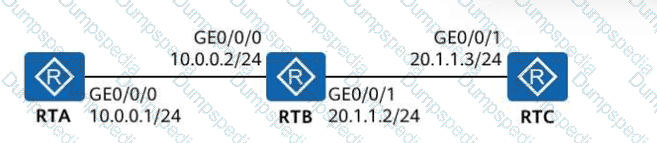
The next-hop address of the packet sent from RTA to RTC is20.1.1.2.
If RTA needs to communicate with RTC, a route needs to be configured onRTC.
RTB can communicate with RTA and RTCwithout any configuration modification.
If RTA needs to communicate with RTC, a route needs to be configured onRTB.
In the shown topology, RTA and RTB are directly connected on10.0.0.0/24(RTA: 10.0.0.1/24, RTB: 10.0.0.2/24). RTB and RTC are directly connected on20.1.1.0/24(RTB: 20.1.1.2/24, RTC: 20.1.1.3/24). In HCIA networking fundamentals, a router forwards packets based on its routing table, and thenext hop must be reachable on a directly connected network(or resolved via recursion), meaning it is typically theneighbor router interface on the local link.
A is false: For traffic fromRTA to RTC (20.1.1.3), RTA’s next hop should beRTB’s interface 10.0.0.2(its directly connected neighbor). The address20.1.1.2is not on RTA’s directly connected subnet, so it cannot be used as the immediate next hop in this basic routing scenario.
B is true: RTC must have a route back to10.0.0.0/24(for return traffic to RTA). Since RTC only knows its directly connected network20.1.1.0/24, a static/default route is required pointing to20.1.1.2.
C is true: RTB has two directly connected networks (10.0.0.0/24 and 20.1.1.0/24), so it can reach both RTA and RTC withno additional routes.
D is false: RTB does not need extra routing configuration for RTA↔RTC communication because both networks are alreadydirectly connectedon RTB.
FusionCompute supports the storage multipathing function to implement load balancing of storage data flows and improve reliability between storage devices and hosts. Which of the following statements about storage multipathing is true?
Storage multipathing applies to multiple storage devices. It is recommended that multiple network ports on the controllers with the same name on each storage device be allocated to the same VLAN to form a storage plane.
Storage multipathing applies to a single storage device. It is recommended that multiple network ports on the same controller be allocated to the same VLAN to form a storage plane.
Storage multipathing applies to a single storage device. It is recommended that multiple network ports on different controllers be allocated to the same VLAN to form a storage plane.
Storage multipathing applies to multiple storage devices. It is recommended that multiple network ports on the controllers with different names on each storage device be allocated to the same VLAN to form a storage plane.
In the Huawei FusionCompute environment, storage multipathing is a critical feature used to ensure the continuity of I/O operations and to enhance performance through load balancing. According to the official training materials, statement C is the correct technical recommendation. Multipathing technology, such as Huawei UltraPath, is designed to manage multiple physical paths between a host and a single storage device.
The core requirement for a resilient storage network is the elimination of single points of failure (SPOF). To achieve this, a storage device is configured with at least two controllers (Controller A and Controller B). The best practice for multipathing is to connect the host to network ports ondifferent controllersand allocate these ports to thesame VLAN(the storage plane). This configuration ensures that if one controller fails or is undergoing maintenance, the multipathing software on the host can automatically failover the I/O traffic to the other controller without interrupting the Virtual Machines (VMs).
By placing these ports in the same VLAN, the host can discover all available "targets" (LUNs) through multiple paths. The system can then distribute the I/O load across these paths (Load Balancing) or simply keep one as a standby (Failover). If an administrator were to use ports on the same controller (as suggested in option B), they would still be vulnerable to a total controller failure. Furthermore, multipathing logic is applied per-storage-device to ensure that the block-level mapping remains consistent. In Huawei's FusionCompute, correctly configuring the storage plane with cross-controller redundancy is a prerequisite for high-performance features and overall system stability.
====================
When an administrator uses alinked clone templateto quickly provision virtual machines (VMs) on FusionAccess, which of the following are thesteps of the quick provision process?
Create a VM.
Add the VM to a domain.
Rename the VM.
Associate the VM with a user group.
Quick provisioning using alinked clone templateis designed to rapidly deploy desktops while ensuring standardization and automation.
According to HCIA–Cloud Computing FusionAccess service provisioning procedures, the quick provision workflow includes:
Creating the VMbased on the linked clone template and snapshot.
Renaming the VMto meet enterprise naming rules.
Adding the VM to the domain, enabling centralized authentication and policy control.
Associating the VM with a user or user group, which determines desktop assignment and access permissions.
All listed operations are integral steps in the linked clone quick provisioning process. Therefore,all options are correct.
In FusionCompute, which of the following statements are false about security groups?
Similar to firewalls, security groups use iptables to filter packets for access control.
A running VM can be added to a security group.
If VM A is added to security group B, it cannot be added to other security groups.
Users can create security groups on VMs and add security group rules.
According to the Huawei HCIA-Cloud Computing documentation, security groups act as a distributed virtual firewall for Virtual Machines (VMs). Statement C is FALSE because FusionCompute allows a single Virtual Machine (or more specifically, a virtual NIC) to belong to multiple security groups simultaneously. This multi-group association allows for tiered security policies, such as having one security group for general web traffic and another for specific management access. When a VM belongs to multiple groups, the rules from all groups are aggregated to determine the final access control list.
Statement D is alsoFALSEbecause of the terminology regarding the "creation" location. In the FusionCompute architecture, security groups are logical objects created and managed within theVRM (Virtual Resource Management)portal, not "on the VMs" themselves. A security group exists independently of any specific VM; administrators create the group and define its rules first, and then they associate VMs with that group. Furthermore, users do not add rules "on VMs"; they add rules to the security group object in the management plane, which the system then automatically pushes to the corresponding CNA hosts where the VMs are running.
The other statements are technically accurate. Statement A is correct as Huawei’s security groups utilize the underlying LinuxiptablesorOVS (Open vSwitch)flow rules to filter packets at the hypervisor level. Statement B is also true; a VM's security group membership can be modified dynamically while the VM is in a running state without requiring a restart or causing a service interruption. This flexibility is a key feature of Huawei’s software-defined networking, allowing for real-time security adjustments in a dynamic cloud environment.
====================
After installing infrastructure VMs, you must configure the virtualized environment and vAG/vLB so that FusionAccess can work properly. Which of the following statements aboutFusionAccess initializationaretrue?
After interconnection with a Windows AD domain is configured for authentication and authorization and the local domain is not enabled, the priority of the default LiteAS authentication and authorization is lower than that of the interconnected Windows AD domain.
When the vAG and vLB are used as the gateway and load balancer, related parameters of a WI cluster must be configured on FusionAccess.
If the CNA node or storage device where the backup server resides is faulty, backup data may be lost. Therefore, a third-party FTP backup server is preferred on the live network.
When configuring the License on FusionAccess and the License supports both per-desktop and per-user modes, you must selectUser CountorConcurrent User Count.
All four statements accurately describe keyinitialization and configuration principlesof FusionAccess:
Ais true: When Windows AD is interconnected and local authentication is disabled,AD authentication has higher prioritythan LiteAS.
Bis true: vAG/vLB deployment requires properWI cluster configurationto enable access services.
Cis true: To avoid backup data loss caused by infrastructure failures,external FTP backup serversare recommended in production networks.
Dis true: When a License supports multiple charging modes, administrators must explicitly chooseUser Count or Concurrent User Count.
Thus,all options are correct.
FusionCompute supports the following memory overcommitment technologies: memory sharing, memory swapping, and memory ballooning. After host memory overcommitment is enabled in cluster resource control, one of the preceding memory overcommitment technologies needs to be selected.

TRUE
FALSE
FusionCompute supportsmemory overcommitmentto improve overall memory utilization in virtualized environments. The supported technologies include:
Memory sharing
Memory ballooning
Memory swapping
According to HCIA–Cloud Computing materials, after enabling memory overcommitment incluster resource control, administrators mustselect at least one memory overcommitment mechanismto take effect.
Therefore, the statement correctly describes FusionCompute behavior and isTRUE.
TESTED 16 Jul 2026