dumpspedia logo

You want to use user identity information to secure your network.
Which two actions must you perform on your SRX Series Firewall to accomplish this task? (Choose two.)
Create security policies that include user identity configuration
Add user accounts to the Active Directory Domain Users group
Configure an identity provider on your SRX Series Firewall.
Add the user identity feature license to your SRX Series Firewall.
The correct answers are A and C. To use user identity information on an SRX Series Firewall, the firewall must first be able to obtain identity mappings from an identity source or identity provider, such as Active Directory, JIMS, Aruba ClearPass, or another supported identity-aware firewall component. Juniper’s identity-aware firewall documentation states that identity parameters are used to configure security policies so authenticated users receive the correct level of access, and that firewalls can query JIMS, obtain user identity information, and then enforce security policy decisions.
Option A is required because identity-aware enforcement only happens when security policies include user identity match criteria, such as source identity, users, roles, or groups. Juniper’s source-identity policy reference states that source identities are used as match criteria in security policies, and when configured, traffic is matched against authentication-table entries before policy lookup completes. Option C is required because the SRX must be configured with an identity source/provider so it can populate or query identity mappings. Option B is not an SRX configuration task and is not generally required because users may already exist in appropriate AD groups. Option D is wrong for this question; the required SRX tasks are configuring identity integration and identity-aware policies, not adding a separate “user identity” license. Reference topics: Identity-Aware Security Policies, identity source/provider, authentication table, source-identity policy matching.
You are asked to onboard an SRX Series device to Junos Space Security Director, but it is not working.
In this scenario, what are three areas that should be reviewed? (Choose three.)
chassis serial number
SSH port number
active security policies
authentication credentials
IP address
The correct answers are B, D, and E. Security Director device onboarding depends on management reachability and valid administrative access. Juniper’s device discovery documentation states that Junos Space discovers network devices using SSH, with optional ping and SNMP, and connects to the physical device to retrieve running configuration and status information. It also explains that device authentication uses administrator login credentials, SSH credentials, SNMP settings, or keys depending on the discovery method.
Option E is required because Security Director must target a reachable management IP address or hostname. Juniper’s discovery-profile workflow explicitly uses the target IP address, hostname, IP range, or subnet to locate devices. Option D is required because invalid username/password or insufficient privileges prevent discovery and management; Juniper’s device-management guidance identifies credentials as required input for discovering devices. Option B is required because onboarding uses SSH, so the correct SSH service and port must be reachable. Juniper’s device access procedure explicitly includes a Port field for the SSH connection.
Option A is wrong because chassis serial number is not the normal troubleshooting field for Security Director discovery. Option C is wrong because active security policies do not determine whether Security Director can initially discover and onboard the device. Reference topics: Security Director, device discovery, SSH access, management IP reachability, authentication credentials.
Which two statements describe how Juniper ATP Cloud improves security? (Choose two.)
It tracks and logs malicious traffic.
It offers real-time threat analysis and mitigation.
It simulates real user environments to trigger malicious code execution.
It increases performance speeds.
The correct answers are B and C. Juniper ATP Cloud improves security by delivering cloud-based threat detection, malware analysis, and enforcement integration with SRX Series Firewalls. Juniper describes ATP Cloud as using shared cloud intelligence so customers benefit from new threat intelligence in near real time. It also provides zero-day threat protection, machine-learning-based malware detection, inline malware blocking, and policy actions that can stop malware, quarantine infected systems, prevent data exfiltration, and disrupt lateral movement.
Option C is also correct because Juniper ATP Cloud uses dynamic analysis, commonly called sandboxing. In this process, a suspicious file is executed in a secure environment while tools monitor its activity. Juniper further explains that ATP Cloud uses deception techniques to make the sandbox appear like a real user environment, including simulated mouse movement, keystrokes, common software packages, realistic network access, stored credentials, and vulnerable OS areas. This encourages evasive malware to execute and reveal malicious behavior.
Option A is weaker and not the best answer because logging alone is not the key ATP Cloud security-improvement mechanism being tested. Option D is wrong because ATP Cloud is a threat-prevention service, not a performance-acceleration technology. Reference topics: ATP Cloud, malware analysis, dynamic sandboxing, machine learning, threat intelligence, inline malware blocking.
Using Junos Space Security Director, you want to configure a unique firewall policy for a specific SRX Series device.
Which firewall policy rule would satisfy the requirement?
all devices policy prerules
group policy prerules
device policy rules
all devices policy postrules
The correct answer is C. device policy rules. In Junos Space Security Director, a firewall rule that must apply uniquely to one SRX Series device belongs in the device-specific policy layer, not in global or group-level policy. Juniper’s Security Director documentation states that a device can have a device-specific policy and can also be part of multiple group policies; the rule processing order places policies applied before device-specific policies first, then device-specific policies, then policies applied after device-specific policies. Juniper also explains that rules applied before device-specific policies take priority and cannot be overridden, while rules applied after device-specific policies can be overridden by adding a rule in the device-specific policy.
Option A is wrong because all-devices prerules are global mandatory rules applied before device-specific policy, not unique device exceptions. Option B is wrong because group policy prerules apply to a group of devices, not one specific SRX. Option D is wrong because all-devices postrules are still global policy rules, although they can be overridden. For a unique policy requirement on one SRX device, device policy rules are the precise Security Director construct. Reference topics: Security Director, firewall policies, device-specific policies, policy rule precedence, global/group/device rule hierarchy.
How does the SSL proxy detect if a particular session is SSL encrypted?
It uses AppID services.
It verifies the length of the packet.
It looks at the destination port number.
It uses a certificate authority (CA).
The correct answer is A. It uses AppID services. Juniper SSL proxy does not rely only on TCP/443 or a static destination-port assumption. It uses Application Identification services to dynamically determine whether the session is SSL/TLS encrypted. Juniper states directly that SSL proxy uses application identification services to detect whether a session is SSL encrypted, and SSL proxy is allowed only when the session is identified as encrypted. If the application system cache marks the session as Encrypted=Yes, SSL proxy can transition into proxy processing; if the session is marked Encrypted=No, SSL proxy ignores it.
Option B is wrong because packet length does not reliably identify SSL/TLS encryption. Option C is a common trap: many SSL/TLS sessions use port 443, but SSL/TLS can run on nonstandard ports, and non-SSL applications can also use port 443. Junos uses AppID to avoid that weak assumption. Option D is wrong because a CA is used to sign or validate certificates during SSL forward or reverse proxy operations; it is not the mechanism used to detect whether a session is encrypted. Reference topics: SSL Proxy, AppID, encrypted session detection, application system cache, SSL/TLS inspection.
Which IDP action is also referred to as a silent discard?
no action
close client and server
ignore connection
drop packet
The correct answer is D. drop packet. In IDP terminology, a silent discard means the offending packet is discarded without sending reset packets or other connection-closing signals back to the endpoints. Juniper defines the Drop Packet IDP action as dropping a matching packet before it reaches its destination while not closing the connection. That is the closest and correct IDP action for “silent discard” in the listed choices.
Option A, no action, is wrong because it does not discard anything; Juniper describes No Action as taking no enforcement action, typically used when the administrator only wants logging. Option B, close client and server, is wrong because that action actively closes the session by sending TCP RST packets to both sides, which is explicitly not silent. Option C, ignore connection, is wrong because it stops further IDP scanning for the rest of the connection; it does not discard the packet. Juniper distinguishes these actions clearly: drop packet discards the offending packet, drop connection blocks the whole connection, and close actions send reset packets. Reference topics: IDP actions, drop packet, close client and server, ignore connection, silent discard behavior.
Which two statements are correct about IDP policy templates? (Choose two.)
They are provided by Juniper Networks.
They are not customizable.
They are available on a “factory-default config.”
They must be installed.
The correct answers are A and D. Juniper provides predefined IDP policy templates to simplify IDP deployment. These templates are supplied by Juniper Networks and include common templates such as client protection, server protection, DMZ services, DNS server, file server, web server, IDP default, and recommended policies. Juniper’s IDP documentation states that predefined templates are available from a secured Juniper Networks website, and the listed templates are explicitly described as being provided by Juniper Networks.
Option D is correct because these templates are not automatically present as usable policies in a factory-default SRX configuration. Juniper’s procedure says that to use predefined IDP policy templates, you download the policy templates and then install them. The CLI process includes request security idp security-package download policy-templates followed by request security idp security-package install policy-templates; committing then makes them available under the IDP policy hierarchy.
Option B is wrong because Juniper specifically says you should customize these templates for your network and recommends using a copied template so you can safely make changes. Option C is wrong because they must be downloaded and installed, so they are not simply available in the factory-default configuration. Reference topics: IDP, predefined IDP policy templates, security-package download, security-package install, active IDP policy.
Which three actions does Junos Space Security Director perform during the device discovery process? (Choose three.)
It imports the device’s active device configuration.
it reboots the device.
It imports device status information.
It adds a local superuser account to the device configuration.
It connects to the device using SSH.
The correct answers are A, C, and E. During Security Director device discovery, Junos Space first finds and connects to the managed device, then synchronizes the device inventory and configuration into the Junos Space database. Juniper’s Security Director documentation states that discovery uses a discovery profile containing target information, authentication credentials, probes, and SSH fingerprints. During discovery, Junos Space connects to the physical device and retrieves the running configuration and status information. It also states that Junos Space uses SSH, with optional ping and SNMP, to discover network devices.
Option B is wrong because device discovery is not a reboot operation. Rebooting would be disruptive and is not part of onboarding a managed SRX into Security Director. Option D is wrong because discovery does not automatically inject a local superuser into the SRX configuration. Security Director authenticates using credentials supplied in the discovery profile; it does not create privileged local accounts as a discovery action. The tested workflow is management-plane discovery: connect, authenticate, retrieve inventory/status, and import configuration state. Reference topics: Security Director, device discovery, discovery profiles, SSH, running configuration import, device status synchronization.
Which two functions does Juniper ATP Cloud perform to reduce delays in the inspection of files? (Choose two.)
Juniper ATP Cloud allows the creation of allowlists.
Juniper ATP Cloud uses a single antivirus software package to analyze files.
Juniper ATP Cloud allows end users to bypass the inspection of files.
Juniper ATP Cloud performs a cache lookup on files.
The correct answers are A and D. Juniper ATP Cloud reduces inspection delay in two practical ways: trusted allowlists and cache lookup. An allowlist contains known trusted IP addresses, hashes, email addresses, and URLs; Juniper states that content downloaded from locations on the allowlist does not have to be inspected for malware. That eliminates unnecessary cloud-analysis cycles for known trusted sources or objects.
Option D is also correct because ATP Cloud performs a real-time cache lookup before deeper analysis. Juniper explains that when a file is uploaded, ATP Cloud first checks whether the file has been analyzed before; if it has, the stored verdict is returned to the SRX Series Firewall and there is no need to re-analyze the file. This directly reduces inspection delay and enables faster enforcement. Option B is wrong because ATP Cloud does not rely on a single antivirus engine; it uses a pipeline that can include cache lookup, antivirus, static analysis, dynamic analysis, and machine learning. Option C is wrong because inspection bypass is not delegated to end users. Reference topics: ATP Cloud, allowlists, file inspection workflow, cache lookup, malware analysis pipeline.
You need to secure communications from a mobile command center which uses a 5G mobile ISP behind CGNAT to an SRX Series Firewall at headquarters.
Which two actions should be performed on the SRX Series Firewall in this scenario? (Choose two.)
Configure the IPsec VPN to use NAT-T.
Configure the IPsec VPN to use IKEv1 aggressive mode.
Configure the IPsec VPN to use IKEv2 aggressive mode.
Configure the IPsec VPN to use DPD.
The correct answers are A and D. A mobile command center using a 5G ISP behind CGNAT is operating behind dynamic address translation. For IPsec to work reliably through NAT, the SRX must support NAT Traversal, which encapsulates IKE and ESP traffic in UDP/4500 after NAT is detected. Juniper states that NAT-T is used when NAT devices exist in the datapath and that NAT keepalives are required because NAT devices age out UDP translations. Juniper’s Security Director VPN workflow also specifically says to enable NAT-T when the dynamic endpoint is behind a NAT device.
DPD is also required because mobile and carrier-grade NAT connections can disappear, roam, or become stale without a clean tunnel teardown. Juniper defines Dead Peer Detection as the method used by IPsec peers to verify whether the remote peer is still present and responsive by sending encrypted IKE notification payloads and waiting for acknowledgements. Option B is not the best answer because IKEv1 aggressive mode is weaker and does not provide identity protection; Juniper also notes that aggressive mode applies only to IKEv1. Option C is invalid because IKEv2 aggressive mode does not exist. Reference topics: IPsec VPN, NAT-T, CGNAT, dynamic endpoints, DPD, IKE peer availability.
What are two types of attack objects included in an IDP attack object database? (Choose two.)
statistic-based
protocol anomaly-based
signature-based
vector-based
The correct answers are B and C. Juniper IDP uses attack objects as match conditions inside IDP policy rules. Juniper states that IDP attack objects represent known and unknown attacks and that the predefined attack object database is periodically updated by Juniper Networks. The main IDP attack object types include signature attack objects, protocol anomaly attack objects, and compound attack objects.
Option C is correct because signature attack objects detect known attacks using stateful attack signatures. Juniper defines a signature as a pattern that exists within a specific section of an attack and includes protocol, service, direction, flow, and context information to reduce false positives.
Option B is correct because protocol anomaly attack objects detect abnormal protocol behavior. Juniper explains that protocol anomaly objects identify unusual or ambiguous traffic that violates protocol specifications, RFCs, or common RFC extensions.
Option A is wrong because “statistic-based” is not one of the IDP attack object database types being tested here. Option D is wrong because “vector-based” is not a Juniper IDP attack object type. Reference topics: IDP, attack object database, signature-based attack objects, protocol anomaly attack objects, predefined attack objects.
How does Juniper’s identity-aware firewall facilitate compliance with security policies and regulations?
by granting access based on user roles or identities
by simplifying the design of the network architecture
by increasing network capacity to accommodate user requirements
by enforcing the need for user confidentiality
The correct answer is A. by granting access based on user roles or identities. Juniper identity-aware firewall moves enforcement beyond simple IP-address-based policy by associating traffic with authenticated users, groups, devices, and roles. Juniper states that identity parameters can be used to configure security policies so that policies provide the appropriate level of access to authenticated users. It further explains that identity helps secure access to resources based on username, roles, and groups, and that firewalls can create and enforce rules based on user identity rather than only an IP address.
This directly supports compliance because regulated environments usually require least-privilege access, auditable user-based control, and role-based authorization. Option B is wrong because identity-aware security might simplify policy operations in some cases, but network architecture simplification is not its compliance function. Option C is wrong because capacity expansion has no direct relationship to identity-based regulatory enforcement. Option D is too vague and not the mechanism being tested; confidentiality is a security goal, but identity-aware firewall enforces access decisions by mapping traffic to users and groups. Reference topics: Identity-Aware Security Policies, user identity, role-based access control, group-based policy enforcement, authentication table.
Which two statements are correct about a chassis cluster? (Choose two.)
If the cluster ID is set to 0, the HA configuration is ignored.
You must reboot the device anytime you change the node ID configuration.
If the node ID is set to 0, the HA configuration is ignored.
You must have multiple Layer 2 domains if you require more than 255 node IDs.
The correct answers are A and B. In an SRX chassis cluster, the cluster ID identifies the chassis cluster, and valid operational cluster IDs are nonzero values. Juniper’s chassis cluster command documentation states that the system uses the chassis cluster ID and node ID to apply the correct node-specific configuration, and the command writes the chassis cluster ID and node ID to EPROM. When the cluster ID is set to 0, clustering is disabled; therefore, the HA cluster configuration is effectively ignored because the device is no longer operating as a chassis-cluster member.
Option B is also correct because Juniper states that chassis cluster ID and node ID changes take effect only after the system is rebooted. That is why the operational command format includes the reboot behavior when setting cluster-id and node. Option C is wrong because node ID 0 is valid; it identifies node0 in the two-node cluster. Option D is wrong because SRX chassis clusters use node IDs 0 and 1 only; the 1–255 range applies to cluster IDs, not node IDs. Reference topics: HA Clustering, cluster ID, node ID, EPROM, chassis cluster enablement, node-specific configuration.
Which action will the SRX Series device take if traffic matches the custom attack object shown in the exhibit?
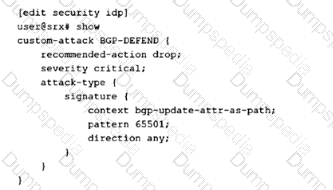
the action taken is defined in the IDP policy that includes this attack object.
the action taken is defined by the security policy.
The SRX Series device will reject the traffic.
The SRX series device will drop the traffic.
The correct answer is A. the action taken is defined in the IDP policy that includes this attack object. The exhibit defines a custom attack object named BGP-DEFEND under the security idp custom-attack hierarchy. The custom object includes metadata such as recommended-action drop, severity critical, and signature match conditions such as BGP update AS-path context and pattern 65501. However, an attack object by itself does not determine the final enforcement behavior. The attack object defines what to match; the IDP policy rule that references the object defines what action to take when that match occurs. Juniper describes attack objects as objects used inside IDP rules to identify malicious activity, while IDP rules include rule actions such as drop-packet, drop-connection, close-client, close-server, recommended, and others.
Option B is wrong because the firewall security policy enables IDP inspection by applying an IDP policy, but the IDP action is not selected directly by the normal security policy. Options C and D are too absolute. Even though the custom object shows recommended-action drop, that is only used if the IDP rule action invokes recommended behavior. Without seeing the IDP policy rule action, you cannot conclude reject or drop. Reference topics: IDP custom attack objects, IDP policy rule actions, recommended action, signature-based attack matching.
Using Junos Space Security Director, you want to configure a unique firewall policy for a specific SRX Series device.
Which firewall policy rules would satisfy the requirement?
all devices policy prerules
group policy prerules
device policy rules
all devices policy postrules
The correct answer is C. device policy rules. In Junos Space Security Director, policy scope matters. A rule intended for one specific SRX Series device must be placed in a device policy, because Juniper defines a device policy as a firewall policy created per device and used when you want to push a unique firewall policy configuration per device. Security Director also distinguishes this from group policies, which are shared with multiple devices, and from all-devices policy rules, which are global in scope rather than device-specific.
Option A is wrong because all-devices prerules are global rules evaluated before device-specific rules; they are not intended for a unique single-device exception. Option B is wrong because group policy prerules apply to devices within a group, not to one individually targeted SRX firewall. Option D is wrong because all-devices postrules are still globally scoped, even though they occur later in policy order. The clean Security Director design is to use device policy rules when the policy must apply only to one SRX device. Reference topics: Security Director, firewall policy hierarchy, device policy, group policy, all-devices prerules/postrules.
Which three algorithms are used to encrypt IP packets? (Choose three.)
Data Encryption Standard (DES)
Secure Hash Algorithm (SHA) - 1
Message Digest 5 (MD5)
Triple Data Encryption Standard (3DES)
Advanced Encryption Standard (AES)
The correct answers are A, D, and E. In IPsec VPN terminology, DES, 3DES, and AES are encryption algorithms used to provide confidentiality for protected IP traffic. Juniper’s IPsec material identifies AES, DES, and Triple DES/3DES as IPsec encryption standards, while separating them from authentication hash algorithms such as MD5, SHA-1, and SHA-2. This distinction matters heavily in JNCIS-SEC because IPsec proposals contain different cryptographic functions: encryption protects packet confidentiality, while authentication/hash algorithms validate integrity and origin.
Option B, SHA-1, is incorrect because SHA-1 is a hashing/authentication algorithm, not an encryption algorithm. It produces a message digest used for integrity checking and authentication, commonly as an HMAC variant. Option C, MD5, is also incorrect for the same reason: MD5 is a message-digest algorithm used for authentication/integrity, not for encrypting payload data. AES is the modern preferred encryption family because it is cryptographically stronger than DES and 3DES at comparable key strengths, while DES and 3DES remain historically recognized IPsec encryption algorithms. Reference topics: IPsec VPN, IPsec proposals, encryption algorithms, authentication algorithms, DES, 3DES, AES, SHA, and MD5.
What is a function of the Juniper Identity Management Service?
encrypting user e-mail
logging malicious code sent through ingress and egress ports
encrypting network data traffic
maintaining a centralized authentication table
The correct answer is D. maintaining a centralized authentication table. Juniper Identity Management Service, or JIMS, is used with SRX Series Firewalls to collect user-identity information from identity sources such as Microsoft Active Directory, domain controllers, and Exchange servers, then provide that identity data to SRX enforcement points. Juniper describes JIMS as storing IP address, username, and group-relationship information in its cache and generating authentication entries used for user-based or group-based access control on SRX firewalls. Juniper’s Identity-Aware Firewall documentation also states that the authentication table contains the IP address, username, and group mapping information used as the authentication source.
Option A is wrong because JIMS is not an email-encryption service. Option B is wrong because malicious-code logging belongs to security inspection features such as antivirus, IDP, or ATP workflows, not JIMS. Option C is wrong because network data encryption is handled by technologies such as IPsec VPN or SSL/TLS, not identity management. JIMS exists to centralize identity-to-IP mapping so identity-aware security policies can match users and groups instead of relying only on source IP addresses. Reference topics: Identity-Aware Security Policies, JIMS, authentication table, user-to-IP mapping, group-based policy enforcement.


TESTED 15 Oct 2026