dumpspedia logo

Which of the following services can QEMU provide in a user network? (Choose three.)
DHCP
BGP
CIFS
AppleTalk
TFTP
QEMU can provide some network services in a user network, which is a mode of networking that does not require any administrator privilege to run. The user network uses the SLIRP TCP/IP emulator to create a virtual NAT’ted subnet, with a DHCP server started by QEMU that gives out IP addresses to the guest machines and puts the host on 10.0.2.21. QEMU can also provide a TFTP server in the user network, which can be used to boot the guest machines from a network image. The TFTP server can be configured with the -tftp option2. QEMU does not provide BGP, CIFS, or AppleTalk services in the user network. BGP is a routing protocol that is used to exchange routing information between autonomous systems on the Internet3. CIFS is a file-sharing protocol that is used to access files and printers on a network4. AppleTalk is a deprecated network protocol suite that was used by Apple devices5. These services require more advanced networking features than the user network can offer, such as bridging, routing, or tunneling.
References:
Documentation/Networking - QEMU
QEMU/Networking - Wikibooks, open books for an open world
Border Gateway Protocol - Wikipedia
Common Internet File System - Wikipedia
AppleTalk - Wikipedia
Which of the following resources can be limited by libvirt for a KVM domain? (Choose two.)
Amount of CPU lime
Size of available memory
File systems allowed in the domain
Number of running processes
Number of available files
Libvirt is a toolkit that provides a common API for managing different virtualization technologies, such as KVM, Xen, LXC, and others. Libvirt allows users to configure and control various aspects of a virtual machine (also called a domain), such as its CPU, memory, disk, network, and other resources. Among the resources that can be limited by libvirt for a KVM domain are:
Amount of CPU time: Libvirt allows users to specify the number of virtual CPUs (vCPUs) that a domain can use, as well as the CPU mode, model, topology, and tuning parameters. Users can also set the CPU shares, quota, and period to control the relative or absolute amount of CPU time that a domain can consume. Additionally, users can pin vCPUs to physical CPUs or NUMA nodes to improve performance and isolation. These settings can be configured in the domain XML file under the
Size of available memory: Libvirt allows users to specify the amount of memory that a domain can use, as well as the memory backing, tuning, and NUMA node parameters. Users can also set the memory hard and soft limits, swap hard limit, and minimum guarantee to control the memory allocation and reclaim policies for a domain. These settings can be configured in the domain XML file under the
The other resources listed in the question are not directly limited by libvirt for a KVM domain. File systems allowed in the domain are determined by the disk and filesystem devices that are attached to the domain, which can be configured in the domain XML file under the
References:
libvirt: Domain XML format
CPU Allocation
Memory Allocation
Hard drives, floppy disks, CDROMs
Which of the following statements is true regarding the following output ofxl list:
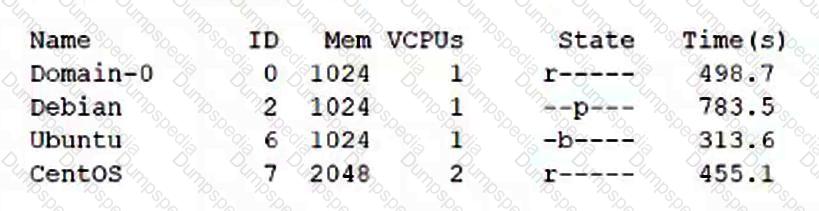
Both Debian and Ubuntu require xl commands to start running.
The domain with ID 2 uses Para virtualization.
CentOS is the domain which has consumed the most CPU time.
Ubuntu is idle or waiting for I/O.
It is necessary to use the xl command to change Ubuntu’s state to running.
The output of xl list shows the state of the domains. The domain with ID 6, Ubuntu, has a state of “b—”. This means that the domain is blocked, which means it is idle or waiting for I/O.
https://xenbits.xen.org/docs/unstable/man/xl.1.html
Which of the following commands boots a QEMU virtual machine using hardware virtualization extensions?
qvirt -create -drive file=debian.img -cdrom debian.iso -m 1024 -boot d -driver hvm
vm -kvm -drive file=debian.img -cdrom debian.iso -m 1024 -boot d
qemu-hw -create -drive file=debian.img -cdrom debian.iso -m 1024 -boot d
qemu -accel kvm -drive file-debian.img -cdrom debian.iso -m 1024 -boot d
qvm start -vmx -drive file=debian.img -cdrom debian.iso -m 1024 -boot d
The correct command to boot a QEMU virtual machine using hardware virtualization extensions is qemu -accel kvm -drive file-debian.img -cdrom debian.iso -m 1024 -boot d. This command uses the -accel option to specify the hardware accelerator to use, which in this case is kvm. KVM is a full virtualization solution for Linux on x86 hardware containing virtualization extensions (Intel VT or AMD-V)1. The -drive option specifies the disk image file to use, which in this case is debian.img. The -cdrom option specifies the ISO image file to use as a CD-ROM, which in this case is debian.iso. The -m option specifies the amount of memory to allocate to the virtualmachine, which in this case is 1024 MB. The -boot option specifies the boot order, which in this case is d, meaning to boot from the CD-ROM first. References:
https://access.redhat.com/documentation/en-us/red_hat_enterprise_linux/7/html/virtualization_deployment_and_administration_guide/sect-troubleshooting-enabling_intel_vt_x_and_amd_v_virtualization_hardware_extensions_in_bios
https://fedoraproject.org/wiki/Virtualization
What is the purpose of a .dockerignore file?
It lists files existing in a Docker image which should be excluded when building a derivative image.
It specifies files that Docker does not submit to the Docker daemon when building a Docker image
It exists in the root file system of containers that should ignore volumes and ports provided by Docker.
It must be placed in the top level directory of volumes that Docker should never attach automatically to a container
It specifies which parts of a Dockerfile should be ignored when building a Docker image.
The purpose of a .dockerignore file is to specify files that Docker does not submit to the Docker daemon when building a Docker image. A .dockerignore file is a text file that contains a list of files or directories that should be excluded from the build context, which is the set of files and folders that are available for use in a Dockerfile. By using a .dockerignore file, you can avoid sending files or directories that are large, contain sensitive information, or are irrelevant to the Docker image to the daemon, which can improve the efficiency and security of the build process. The other options are incorrect because they do not describe the function of a .dockerignore file. Option A is wrong because a .dockerignore file does not affect the files existing in a Docker image, but only the files sent to the daemon during the build. Option C is wrong because a .dockerignore file does not exist in the root file system of containers, but in the same directory as the Dockerfile. Option D is wrong because a .dockerignore file does not affect the volumes that Docker attaches to a container, but only the files included in the build context. Option E is wrong because a .dockerignore file does not affect the parts of a Dockerfile that are executed, but only the files available for use in a Dockerfile. References:
What are .dockerignore files, and why you should use them?
Dockerfile reference | Docker Docs
How to use .dockerignore and its importance - Shisho Cloud
Which directory is used bycloud-initto store status information and configuration information retrieved from external sources?
/var/lib/cloud/
/etc/cloud-init/cache/
/proc/sys/cloud/
/tmp/.cloud/
/opt/cloud/var/
cloud-init uses the /var/lib/cloud/ directory to store status information and configuration information retrieved from external sources, such as the cloud platform’smetadata service or user data files. The directory contains subdirectories for different types of data, such as instance, data, handlers, scripts, and sem. The instance subdirectory contains information specific to the current instance, such as the instance ID, the user data, and the cloud-init configuration. The data subdirectory contains information about the data sources that cloud-init detected and used. The handlers subdirectory contains information about the handlers that cloud-init executed. The scripts subdirectory contains scripts that cloud-init runs at different stages of the boot process, such as per-instance, per-boot, per-once, and vendor. The sem subdirectory contains semaphore files that cloud-init uses to track the execution status of different modules and stages. References:
Configuring and managing cloud-init for RHEL 8 - Red Hat Customer Portal
vsphere - what is the linux file location where the cloud-init user …
Which of the following kinds of data cancloud-initprocess directly from user-data? (Choose three.)
Shell scripts to execute
Lists of URLs to import
ISO images to boot from
cloud-config declarations in YAML
Base64-encoded binary files to execute
Cloud-init is a tool that allows users to customize the configuration and behavior of cloud instances during the boot process. Cloud-init can process different kinds of data that are passed to the instance via user-data, which is a mechanism provided by various cloud providers to inject data into the instance. Among the kinds of data that cloud-init can process directly from user-data are:
Shell scripts to execute: Cloud-init can execute user-data that is formatted as a shell script, starting with the #!/bin/sh or #!/bin/bash shebang. The script can contain any commands that are valid in the shell environment of the instance. The script is executed as the root user during the boot process12.
Lists of URLs to import: Cloud-init can import user-data that is formatted as a list of URLs, separated by newlines. The URLs can point to any valid data source that cloud-init supports, such as shell scripts, cloud-config files, or include files. The URLs are fetched and processed by cloud-init in the order they appear in the list13.
cloud-config declarations in YAML: Cloud-init can process user-data that is formatted as a cloud-config file, which is a YAML document that contains declarations for various cloud-init modules. The cloud-config file can specify various aspects of the instance configuration, such as hostname, users, packages, commands, services, and more. The cloud-config file must start with the #cloud-config header14.
The other kinds of data listed in the question are not directly processed by cloud-init from user-data. They are either not supported, not recommended, or require additional steps to be processed. These kinds of data are:
ISO images to boot from: Cloud-init does not support booting from ISO images that are passed as user-data. ISO images are typically used to install an operating system on a physical or virtual machine, not to customize an existing cloud instance. To boot from an ISO image, the user would need to attach it as a secondary disk to the instance and configure the boot order accordingly5.
Base64-encoded binary files to execute: Cloud-init does not recommend passing binary files as user-data, as they may not be compatible with the instance’s architecture or operating system. Base64-encoding does not change this fact, as it only converts the binary data into ASCII characters. To execute a binary file, the user would need to decode it and make it executable on the instance6.
References:
User-Data Formats — cloud-init 22.1 documentation
User-Data Scripts
Include File
Cloud Config
How to Boot From ISO Image File Directly in Windows
How to run a binary file as a command in the terminal?.
After setting up a data container using the following command:
docker create -v /data --name datastore debian /bin/true
how is an additional new container started which shares the/datavolume with the datastore container?
docker run --share-with datastore --name service debian bash
docker run -v datastore:/data --name service debian bash
docker run --volumes-from datastore --name service debian bash
docker run -v /data --name service debian bash
docker run --volume-backend datastore -v /data --name service debian bash
The correct way to start a new container that shares the /data volume with the datastore container is to use the --volumes-from flag. This flag mounts all the defined volumes from the referenced containers. In this case, the datastore container has a volume named /data, which is mounted in the service container at the same path. The other options are incorrect because they either use invalid flags, such as --share-with or --volume-backend, or they create new volumes instead of sharing the existing one, such as -v datastore:/data or -v /data. References:
Docker Docs - Volumes
Stack Overflow - How to map volume paths using Docker’s --volumes-from?
Docker Docs - docker run
Which of the following commands deletes all volumes which are not associated with a container?
docker volume cleanup
docker volume orphan -d
docker volume prune
docker volume vacuum
docker volume garbage-collect
The command that deletes all volumes which are not associated with a container is docker volume prune. This command removes all unused local volumes, which are those that are not referenced by any containers. By default, it only removes anonymous volumes, which are those that are not given a specific name when they are created. To remove both unused anonymous and named volumes, the --all or -a flag can be added to the command. The command will prompt for confirmation before deleting the volumes, unless the --force or -f flag is used to bypass the prompt. The command will also show the total reclaimed space after deleting the volumes12.
The other commands listed in the question are not valid or do not have the same functionality as docker volume prune. They are either made up, misspelled, or have a different purpose. These commands are:
docker volume cleanup: This command does not exist in Docker. There is no cleanup subcommand for docker volume.
docker volume orphan -d: This command does not exist in Docker. There is no orphan subcommand for docker volume, and the -d flag is not a valid option for any docker volume command.
docker volume vacuum: This command does not exist in Docker. There is no vacuum subcommand for docker volume.
docker volume garbage-collect: This command does not exist in Docker. There is no garbage-collect subcommand for docker volume.
References:
docker volume prune | Docker Docs
How to Remove all Docker Volumes - YallaLabs.
Which of the following commands moves the libvirt domainweb1from the current host system to the host systemhost2?
virsh node-update host1=-dom:web1 host2=+dom:web1
virsh pool-add host2 web1
virsh migrate web1 qemu+ssh://host2/system
virsh patch web1 .Domain.Node=host2
virsh cp .:web1 host2:web1
The correct command to move the libvirt domain web1 from the current host system to the host system host2 is virsh migrate web1 qemu+ssh://host2/system. This command uses the virsh migrate command, which initiates the live migration of a domain to another host1. The first argument is the name of the domain to migrate, which in this case is web1. The second argument is the destination URI, which specifies the connection to the remote host and the hypervisor to use2. In this case, the destination URI is qemu+ssh://host2/system, which means to use the QEMU driver and connect to host2 via SSH, and use the system instance of libvirtd3. The other options are incorrect because they either use invalid commands or arguments, such as node-update, pool-add, patch, or cp, or they do not specify the destination URI correctly. References:
https://balamuruhans.github.io/2019/01/09/kvm-migration-with-libvirt.html
http://libvirt.org/migration.html
Which of the following types of guest systems does Xen support? (Choose two.)
Foreign architecture guests (FA)
Paravirtualized quests (PVI
Emulated guests
Container virtualized guests
Fully virtualized guests
Xen supports two types of guest systems: paravirtualized guests (PV) and fully virtualized guests (HVM).
Paravirtualized guests (PV) are guests that have been modified to run on the Xen hypervisor. They use a special kernel that communicates with the hypervisor through hypercalls, and use paravirtualized drivers for I/O devices. PV guests can run faster and more efficiently than HVM guests, but they require the guest operating system to be ported to Xen and to support the Xen ABI12.
Fully virtualized guests (HVM) are guests that run unmodified operating systems on the Xen hypervisor. They use hardware virtualization extensions, such as Intel VT-x or AMD-V, to create a virtual platform for the guest. HVM guests can run any operating system that supports the hardware architecture, but they incur more overhead and performance penalties than PV guests. HVM guests can also use paravirtualized drivers for I/O devices to improve their performance12.
The other options are not correct. Xen does not support foreign architecture guests (FA), emulated guests, or container virtualized guests.
Foreign architecture guests (FA) are guests that run on a different hardware architecture than the host. For example, running an ARM guest on an x86 host. Xen does not support this type of virtualization, as it would require emulation or binary translation, which are very complex and slow techniques3.
Emulated guests are guests that run on a software emulator that mimics the hardware of the host or another platform. For example, running a Windows guest on a QEMU emulator. Xen does not support this type of virtualization, as it relies on the emulator to provide the virtual platform, not the hypervisor. Xen can use QEMU to emulate some devices for HVM guests, but not the entire platform14.
Container virtualized guests are guests that run on a shared kernel with the host and other guests, using namespaces and cgroups to isolate them. For example, running a Linux guest on a Docker container. Xen does not support this type of virtualization, as it requires the guest operating system to be compatible with the host kernel, and does not provide the same level of isolation and security as hypervisor-based virtualization56.
References:
Xen Project Software Overview - Xen
Xen ARM with Virtualization Extensions - Xen
Xen Project Beginners Guide - Xen
QEMU - Xen
Docker overview | Docker Documentation
What is a Container? | App Containerization | VMware
Which of the following statements about the commandlxc-checkpointis correct?
It creates a clone of a container.
It doubles the memory consumption of the container.
It only works on stopped containers.
It writes the status of the container to a file.
It creates a container image based on an existing container.
The command lxc-checkpoint is used to checkpoint and restore containers. Checkpointing a container means saving the state of the container, including its memory, processes, file descriptors, and network connections, to a file or a directory. Restoring a container means resuming the container from the saved state, as if it was never stopped. Checkpointing and restoring containers can be useful for various purposes, such as live migration, backup, debugging, or snapshotting. The command lxc-checkpoint has the following syntax:
lxc-checkpoint {-n name} {-D path} [-r] [-s] [-v] [-d] [-F]
The options are:
-n name: Specify the name of the container to checkpoint or restore.
-D path: Specify the path to the file or directory where the checkpoint data is dumped or restored.
-r, --restore: Restore the checkpoint for the container, instead of dumping it. This option is incompatible with -s.
-s, --stop: Optionally stop the container after dumping. This option is incompatible with -r.
-v, --verbose: Enable verbose criu logging. Only available when providing -r.
-d, --daemon: Restore the container in the background (this is the default). Only available when providing -r.
-F, --foreground: Restore the container in the foreground. Only available when providing -r.
The command lxc-checkpoint uses the CRIU (Checkpoint/Restore In Userspace) tool to perform the checkpoint and restore operations. CRIU is a software that can freeze a running application (or part of it) and checkpoint it to a hard drive as a collection of files. It can then use the files to restore and run the application from the point it was frozen at1.
The other statements about the command lxc-checkpoint are not correct. It does not create a clone or an image of a container, nor does it double the memory consumptionof the container. It can work on both running and stopped containers, depending on the options provided. References:
Linux Containers - LXC - Manpages - lxc-checkpoint.12
lxc-checkpoint(1) - Linux manual page - man7.org3
CRIU4
What is the default provider of Vagrant?
lxc
hyperv
virtualbox
vmware_workstation
docker
Vagrant is a tool that allows users to create and configure lightweight, reproducible, and portable development environments. Vagrant supports multiple providers, which are the backends that Vagrant uses to create and manage the virtual machines. By default, VirtualBox is the default provider for Vagrant. VirtualBox is still the most accessible platform to use Vagrant: it is free, cross-platform, and has been supported by Vagrant for years. With VirtualBox as the default provider, it provides the lowest friction for new users to get started with Vagrant. However, users can also use other providers, such as VMware, Hyper-V, Docker, or LXC, depending on their preferences and needs. To use another provider, users must install it as a Vagrant plugin and specify it when running Vagrant commands. Users can also change the default provider by setting the VAGRANT_DEFAULT_PROVIDER environmental variable. References:
Default Provider - Providers | Vagrant | HashiCorp Developer1
Providers | Vagrant | HashiCorp Developer2
How To Set Default Vagrant Provider to Virtualbox3
What is the purpose of the commandvagrant init?
It executes a provisioning tool in a running box.
It starts a Vagrant box.
It creates a Vagrant configuration file.
It installs Vagrant on a Linux host.
It downloads a Vagrant box.
The command vagrant init is used to initialize the current directory to be a Vagrant environment by creating an initial Vagrantfile if one does not already exist1. The Vagrantfile contains the configuration settings for the Vagrant box, such as the box name, box URL, network settings, synced folders, provisioners, etc. The command vagrant init does not execute any provisioning tool, start any box, install Vagrant on a Linux host, or download any box. Those actions are performed by other Vagrant commands, such as vagrant provision, vagrant up, vagrant install, and vagrant box add, respectively. References:
1: vagrant init - Command-Line Interface | Vagrant | HashiCorp Developer
A clone of a previously used virtual machine should be created. All VM specific information, such as user accounts, shell histories and SSH host keys should be removed from the cloned disk image. Which of the following tools can perform these tasks?
virc-reset
virt-sparsi
virt-rescue
virt-svspre
sysprep
vire-wipe
Sysprep is a tool that removes all your personal account and security information, and then prepares the machine to be used as an image. It is supported by Windows and some Linux distributions. It can also remove drivers and other machine-specific settings. Sysprep is required when creating a managed image outside of a gallery in Azure
https://learn.microsoft.com/en-us/azure/virtual-machines/generalize


TESTED 14 Oct 2026