dumpspedia logo

You have a Microsoft 365 E5 subscription.
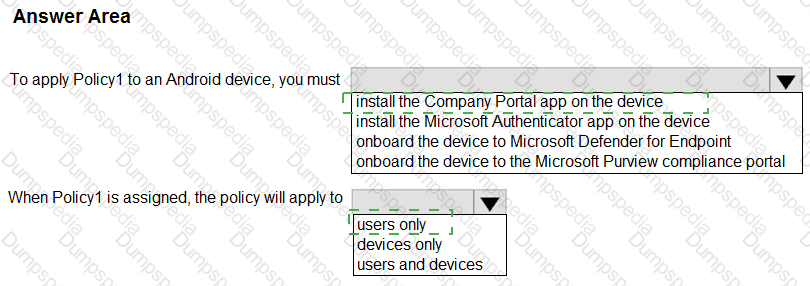
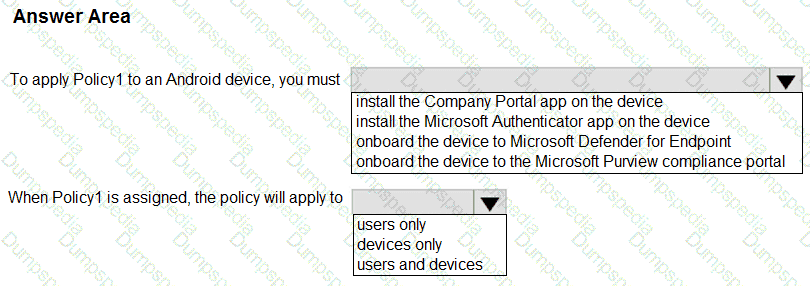
You create an app protection policy for Android device named Policy1 as shown in the following exhibit.
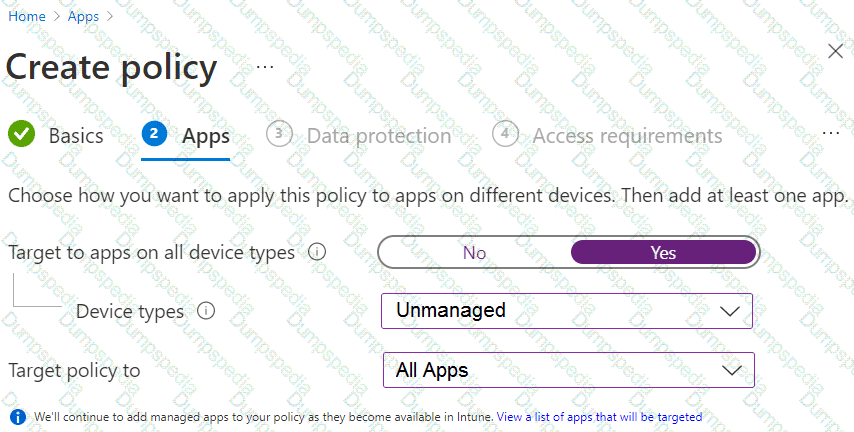
Use the drop-down menus to select the answer choice that completes each statement based on the information presented in the graphic.
NOTE: Each correct selection is worth one point.
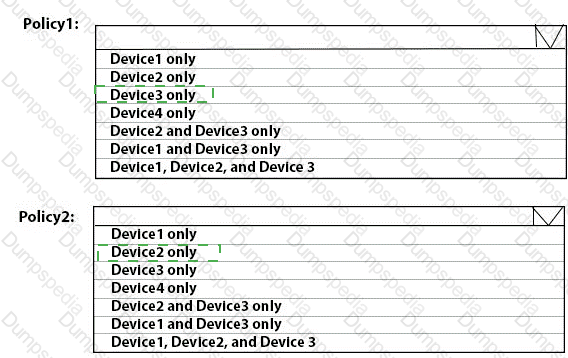
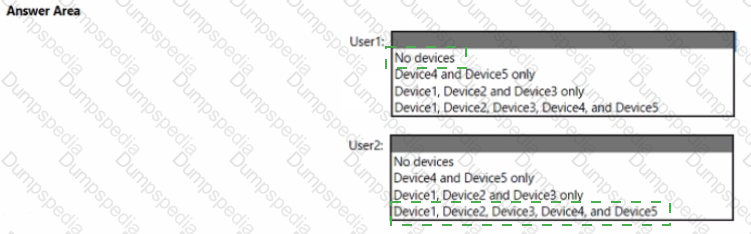
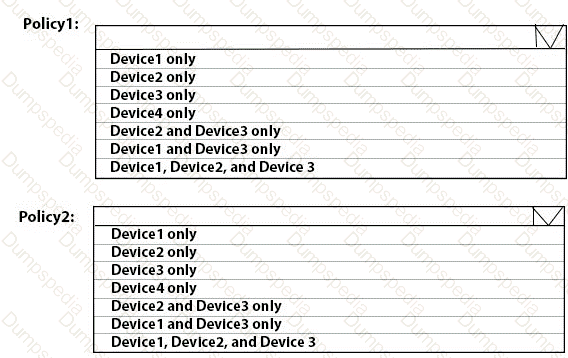
To which devices do Policy1 and Policy2 apply? To answer, select the appropriate options in the answer area.
NOTE: Each correct selection is worth one point.
You implement the planned changes for Connection1 and Connection2
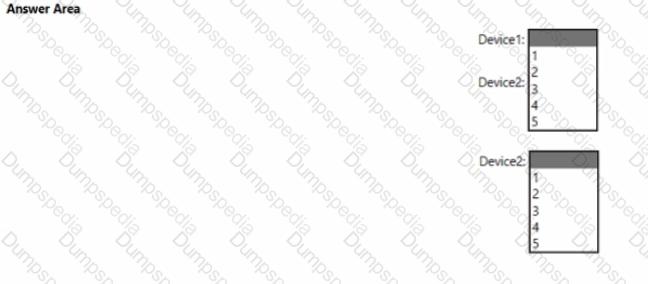
How many VPN connections will there be for User1 when the user signs in to Device 1 and Devke2? To answer select the appropriate options in the answer area.
NOTE; Each correct selection is worth one point.
You have a Microsoft 365 subscription that uses Microsoft Intune.
You plan to manage Windows updates by using Intune.
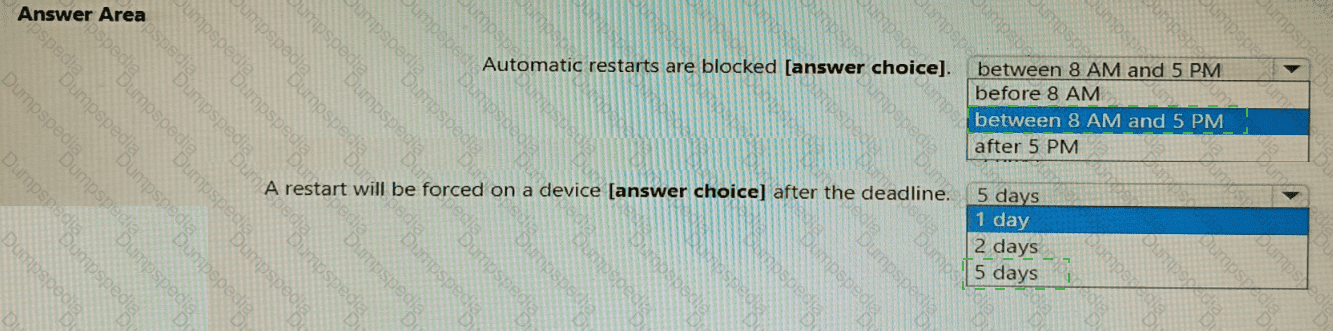
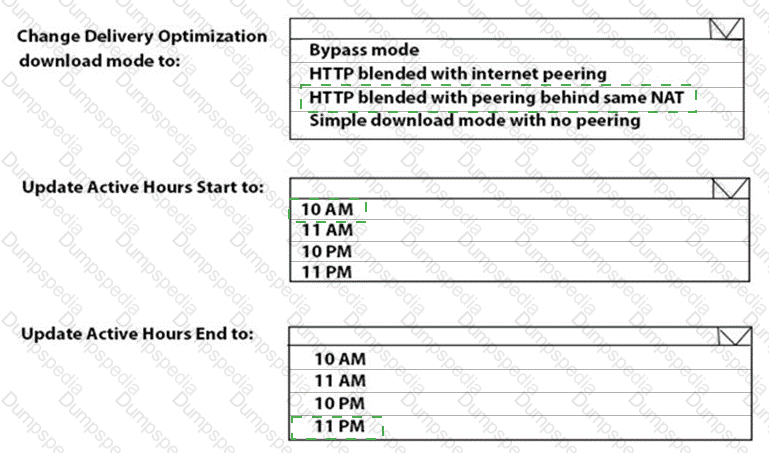
You create an update ring for Windows 10 and later and configure the User experience settings for the ring as shown in the following exhibit.
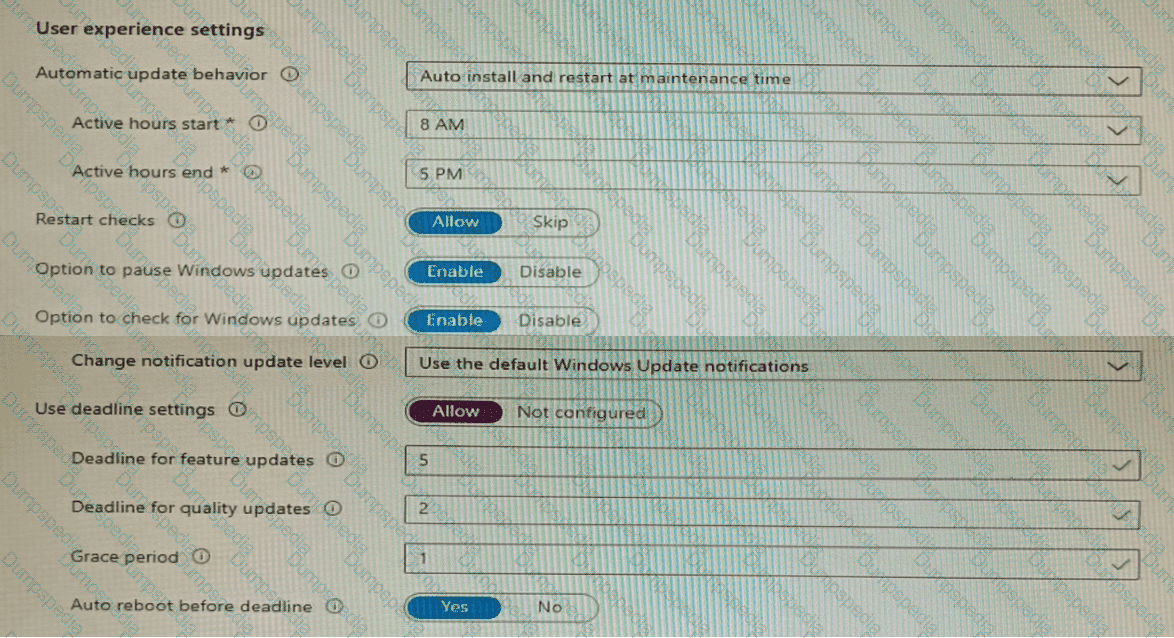
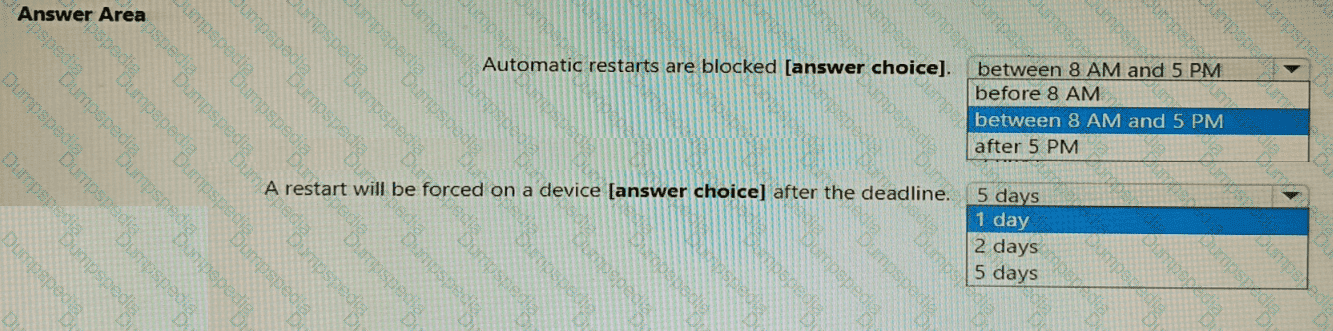
Use the drop-down menus to select the answer choice that completes each statement based on the information presented in the graphic.
NOTE: Each correct selection is worth one point.
You have a Microsoft 365 subscription.
All users have Microsoft 365 apps deployed.
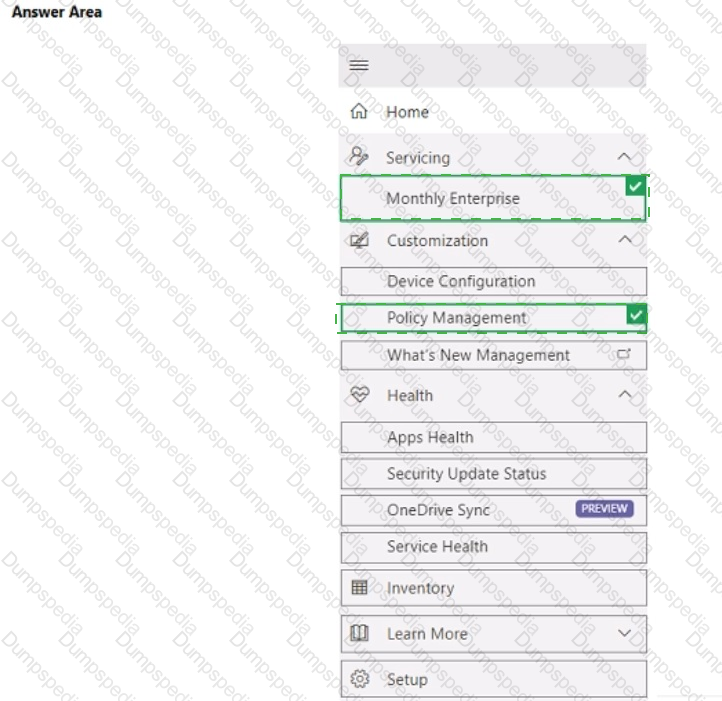
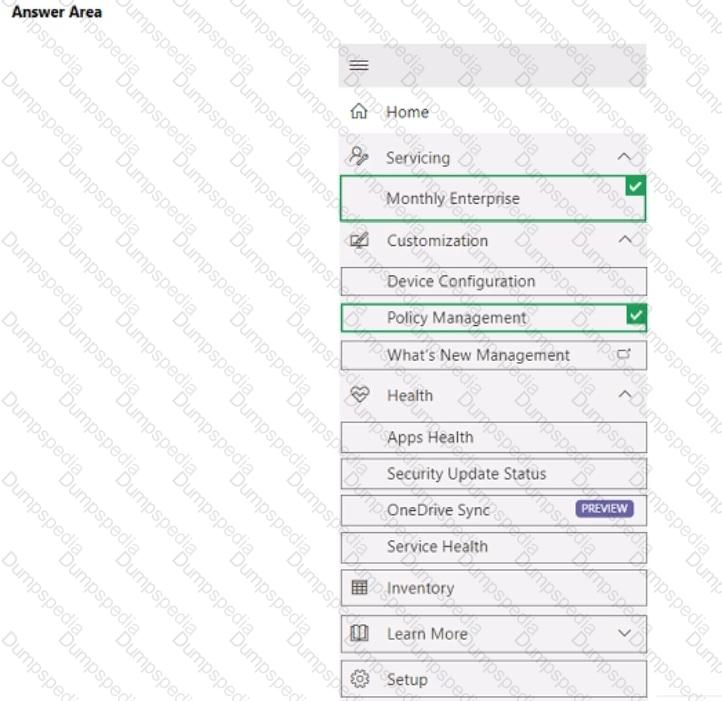
You need to configure Microsoft 365 apps to meet the following requirements:
• Enable the automatic installation of WebView2 Runtime.
• Prevent users from submitting feedback.
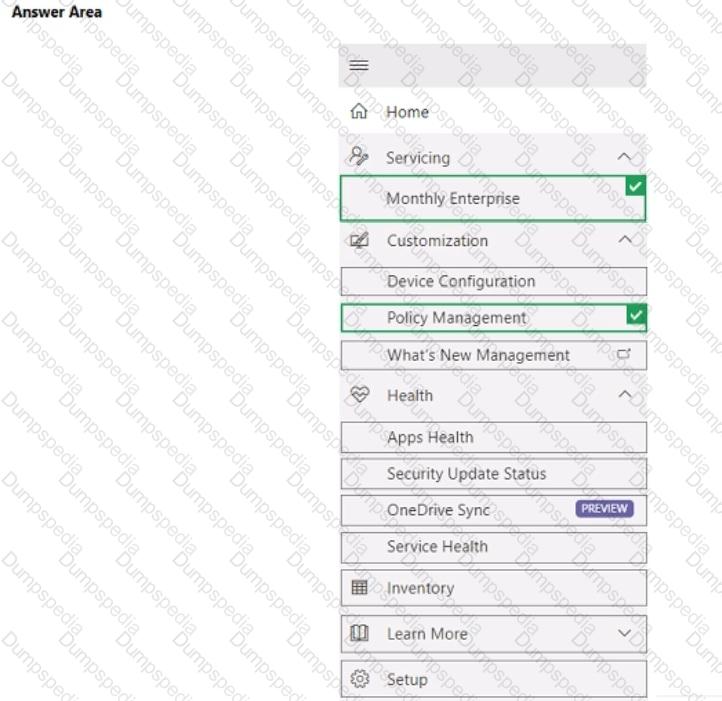
Which two settings should you configure in the Microsoft 365 Apps admin center? To answer, select the appropriate settings in the answer area.
NOTE: Each correct selection is worth one point.
You have a Microsoft 365 E5 subscription that uses Microsoft Intune Suite and contains 500 devices that are either hybrid joined or Microsoft Entra joined.
You plan to deploy Endpoint Privilege Management (EPM).
You need to ensure that users can only run apps as an administrator when they meet the following requirements:
• The users are approved by a member of your company ' s IT department.
• The users are signed in to a device that is only Microsoft Entra joined.
The solution must minimize administrative effort.
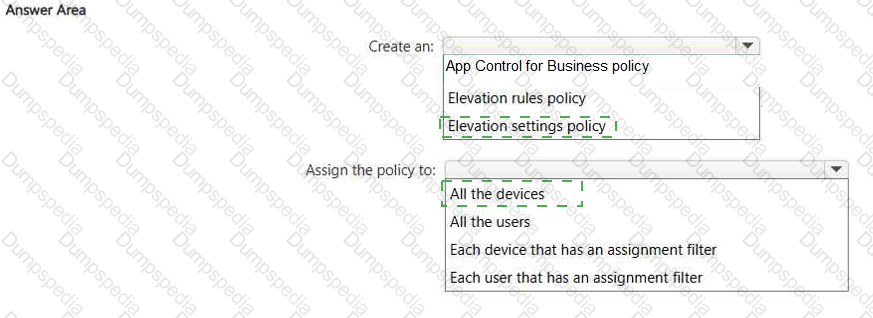
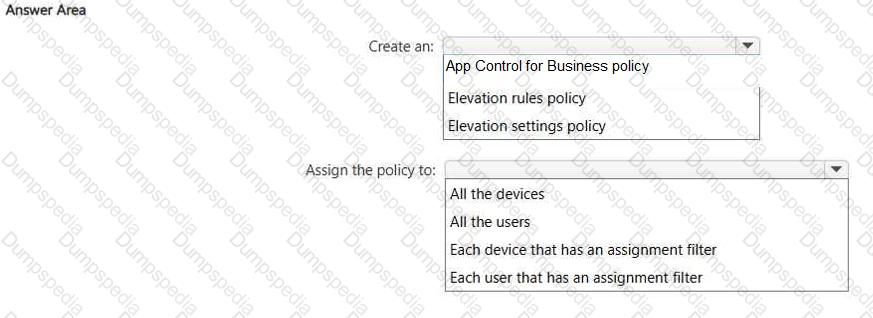
Which policy should you create, and to what should you assign the policy? To answer, select the appropriate options in the answer
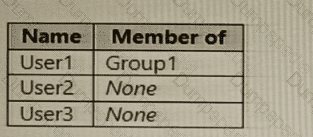
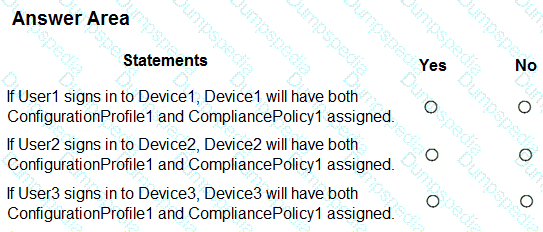
You have a Microsoft 365 subscription that uses Microsoft Intune and contains the users shown in the following table.
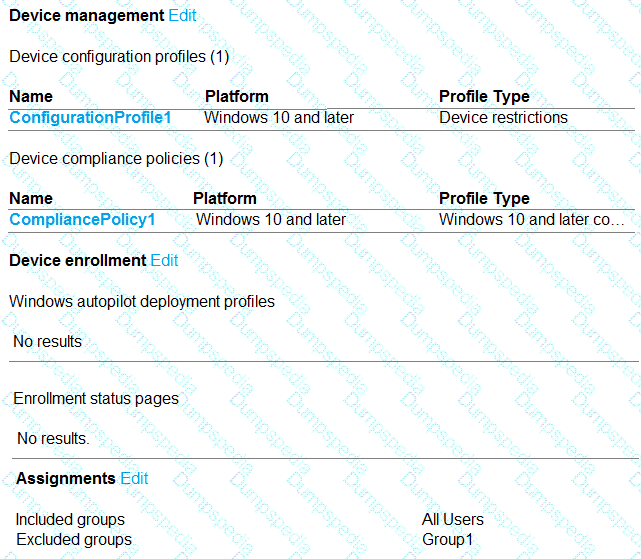
You create a policy set named Set1 as shown in the exhibit. (Click the Exhibit tab.)
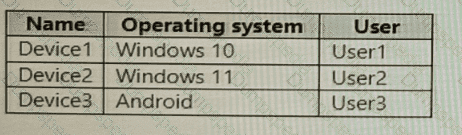
You enroll devices in Intune as shown in the following table.
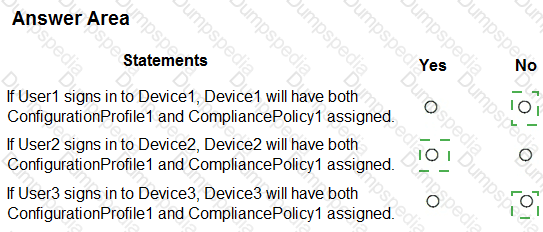
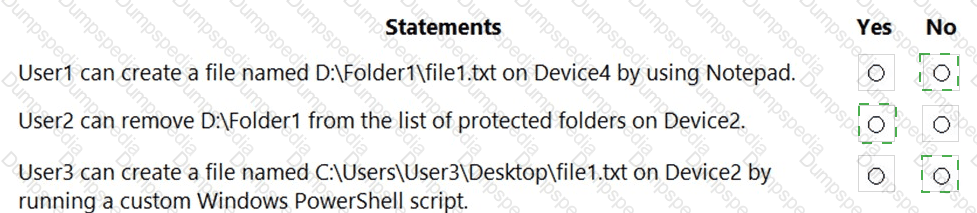
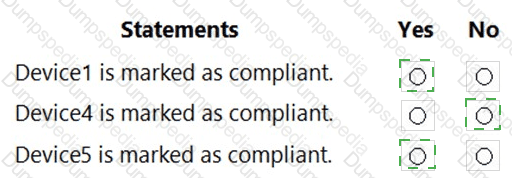
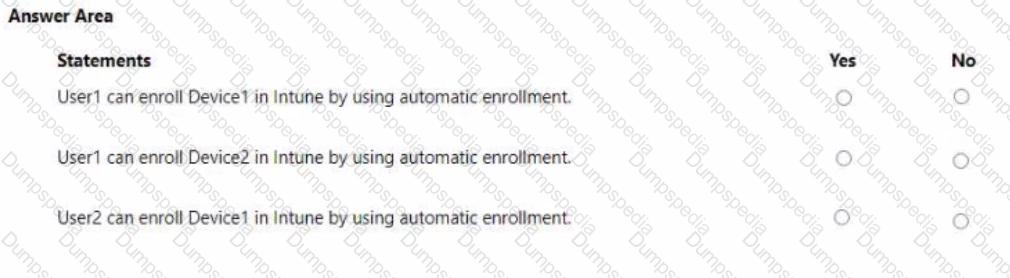
For each of the following statements, select Yes if the statement is true. Otherwise, select No.
NOTE: Each correct selection is worth one point.
You have a Microsoft 365 subscription that contains 1,000 iOS devices and includes Microsoft Intune. You need to prevent the printing of corporate data from managed apps on the devices, should you configure?
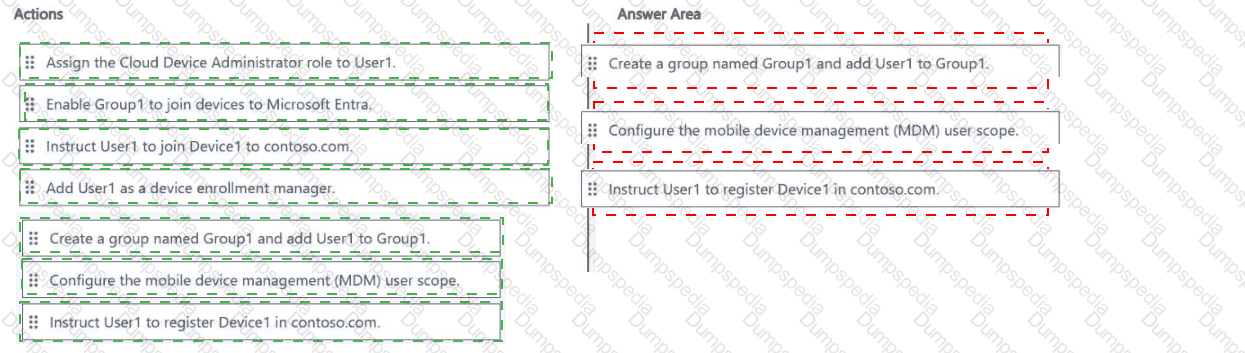
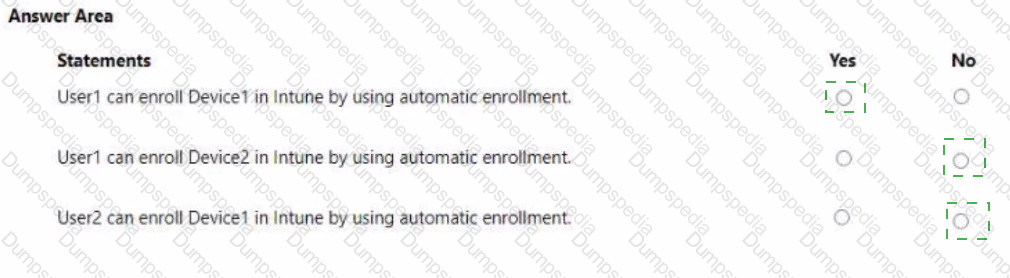
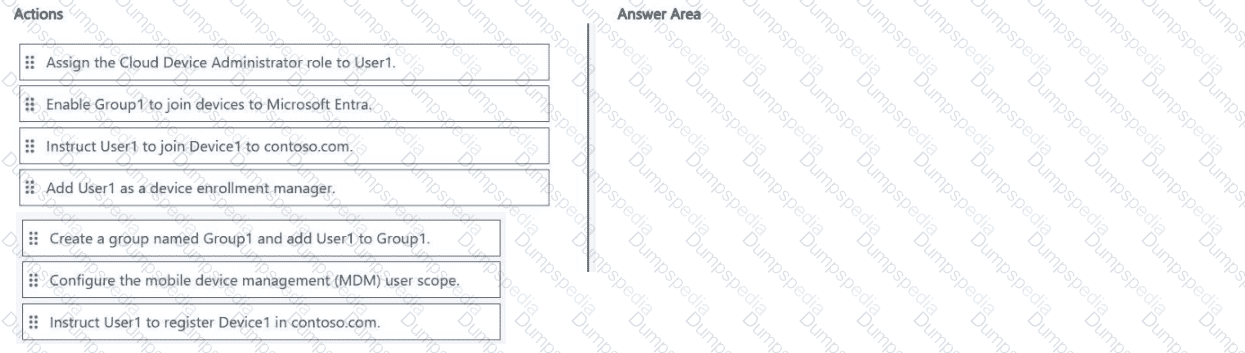
You have a Microsoft 365 E5 subscription that is linked to a Microsoft Entra tenant named contoso.com. The subscription contains a user named User1 and a new Windows 11 device named Device1.
User1 must enroll Device1 in Microsoft Intune automatically.
You need to ensure that all other users cannot use automatic enrollment.
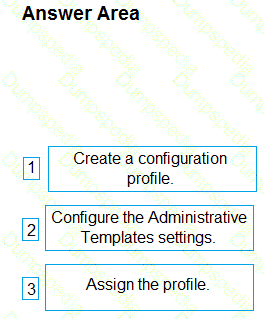
Which three actions should you perform in sequence? To answer, move the appropriate actions from the list of actions to the answer area and arrange them in the correct order.
You have a Microsoft 365 subscription that includes Microsoft Intune.
You plan to use Windows Autopilot to deploy Windows 11 devices.
You need to meet the following requirements during Autopilot provisioning:
• Display the app and profile configuration progress.
• Block users from using the devices until all apps and profiles are installed
What should you configure?
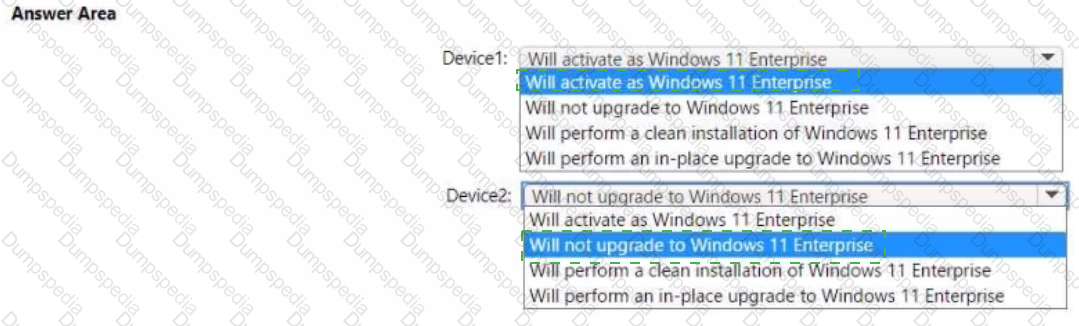
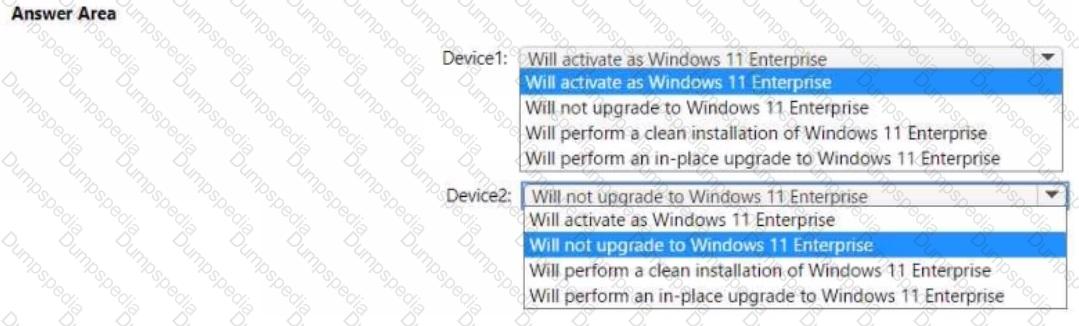
Your network contains an on-premises Active Directory domain named contoso.com that syncs to Azure AD. A user named User! uses the domain-joined devices shown in the following table.
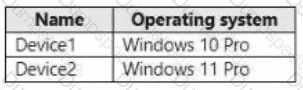
In the Microsoft Entra admin center, you assign a Windows 11 Enterprise E5 license to User1.
You need to identify what will occur when User1 next signs in to the devices.
What should you identify for each device? To answer, select the appropriate options in the answer area.
NOTE: Each correct selection is worth one point.
You have a Microsoft 365 subscription that contains Windows 11 Enterprise devices enrolled in Microsoft Intune. You have a custom compliance policy that uses the following discovery script

A device compliance report indicates that the discovered settings are not evaluated and returns error code 65009. You need to ensure that Intune can evaluate the settings returned by the discovery script. What should you do?
You have computer that run Windows 10 and connect to an Azure Log Analytics workspace. The workspace is configured to collect all available events from Windows event logs.
The computers have the logged events shown in the following table.
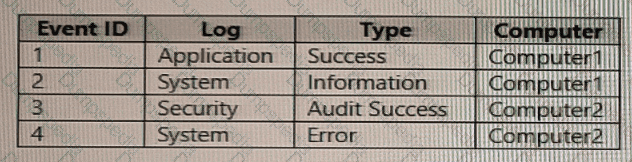
Which events are collected in the Log Analytics workspace?
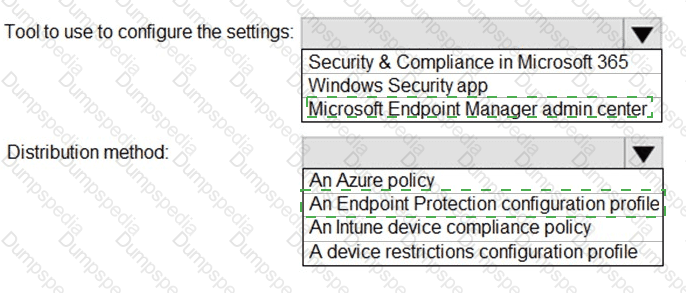
Your network contains an Active Directory domain. Active Directory is synced with Microsoft Azure Active Directory (Azure AD).
There are 500 Active Directory domain-joined computers that run Windows 10 and are enrolled in Microsoft Intune.
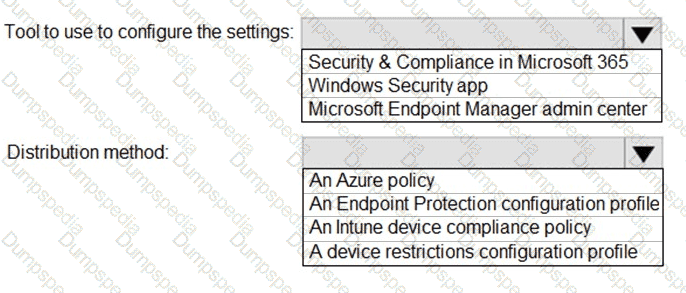
You plan to implement Microsoft Defender Exploit Guard.
You need to create a custom Microsoft Defender Exploit Guard policy, and then distribute the policy to all the computers.
What should you do? To answer, select the appropriate options in the answer area.
NOTE: Each correct selection is worth one point.
You have a Microsoft 365 subscription that uses Microsoft Intune Suite.
You use Microsoft Intune to manage devices.
Auto-enrollment in Intune is configured.
You have 100 Windows 11 devices in a workgroup.
You need to connect the devices to the corporate wireless network and enroll 100 new Windows devices in Intune.
What should you use?
Which devices are registered by using the Windows Autopilot deployment service?
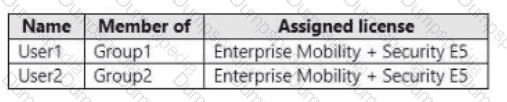
You have an Azure Active Directory Premium Plan 2 subscription that contains the users shown in the following table.
You purchase the devices shown in the following table.
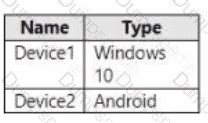
You configure automatic mobile device management (MDM) and mobile application management (MAM) enrollment by using the following settings:
• MDM user scope: Group1
• MAM user scope: Group2
For each of the following statements, select Yes if the statement is true. Otherwise, select No. NOTE: Each correct selection is worth one point.
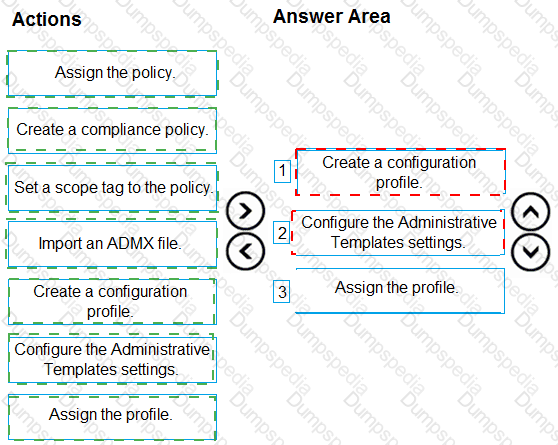
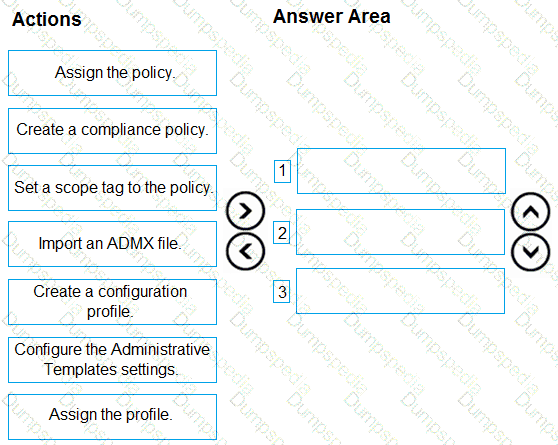
You have an on-premises Active Directory domain that syncs to Azure AD tenant.
The tenant contains computers that run Windows 10. The computers are hybrid Azure AD joined and enrolled in Microsoft Intune.
The Microsoft Office settings on the computers are configured by using a Group Policy Object (GPO).
You need to migrate the GPO to Intune.
Which three actions should you perform in sequence? To answer, move the appropriate actions from the list of actions to the answer area and arrange them in the correct order.
You have a Microsoft Entra tenant.
You are creating a dynamic device group named Group1.
Group1 will include only Windows devices that are Microsoft Entra registered.
How should you configure the dynamic membership rule for Group1? To answer, select the appropriate options in the answer area.
NOTE: Each correct selection is worth one point.

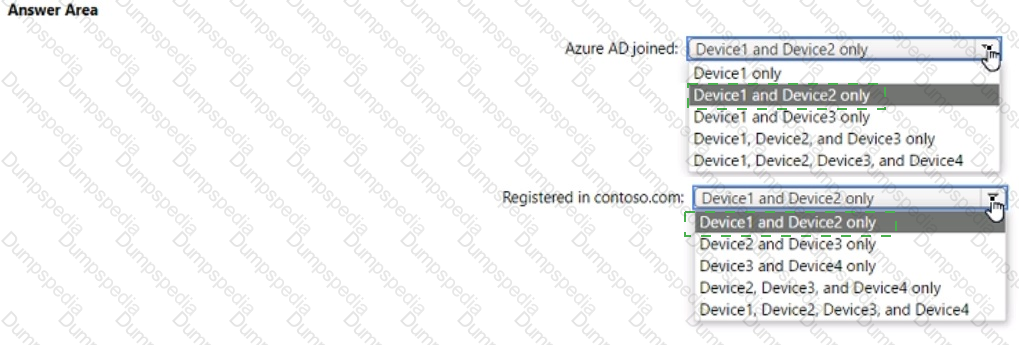
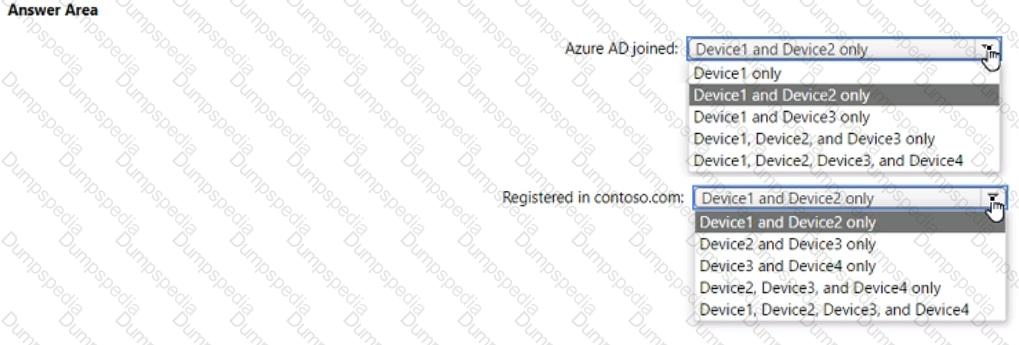
You have an Azure AD tenant named contoso.com. You have the devices shown in the following table.
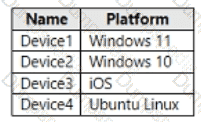
Which devices can be Azure AD joined, and which devices can be registered in contoso.com? To answer, select the appropriate options in the answer area. NOTE: Each correct selection is worth one point.
You have a Microsoft 365 E5 subscription that contains 500 macOS devices enrolled in Microsoft Intune.
You need to ensure that you can apply Microsoft Defender for Endpoint antivirus policies to the macOS devices. The solution must minimize administrative effort.
What should you do?
Note: This question is part of a series of questions that present the same scenario. Each question in the series contains a unique solution that might meet the stated goals. Some question sets might have more than one correct solution, while others might not have a correct solution.
After you answer a question in this section, you will NOT be able to return to it. As a result, these questions will not appear in the review screen.
Your company has an Azure AD tenant named contoso.com that contains several Windows 10 devices.
When you join new Windows 10 devices to contoso.com, users are prompted to set up a four-digit pin.
You need to ensure that the users are prompted to set up a six-digit pin when they join the Windows 10 devices to contoso.com.
Solution: From the Microsoft Entra admin center, you configure the Authentication methods.
Does this meet the goal?
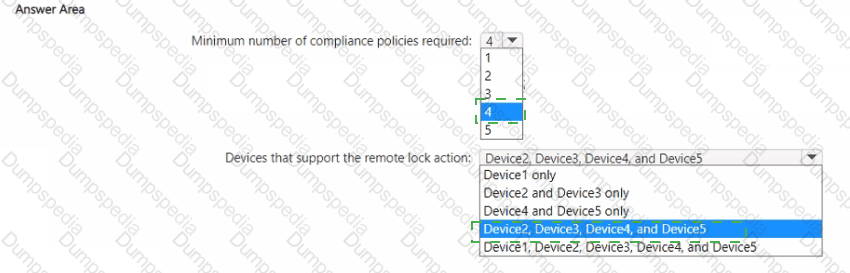
You have a Microsoft 365 tenant that uses Microsoft Intune to manage the devices shown in the following table.
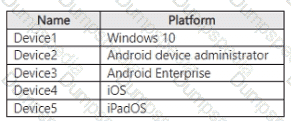
You need to deploy a compliance solution that meets the following requirements:
• Marks the devices as Not Compliant if they do not meet compliance policies
• Remotely locks noncompliant devices
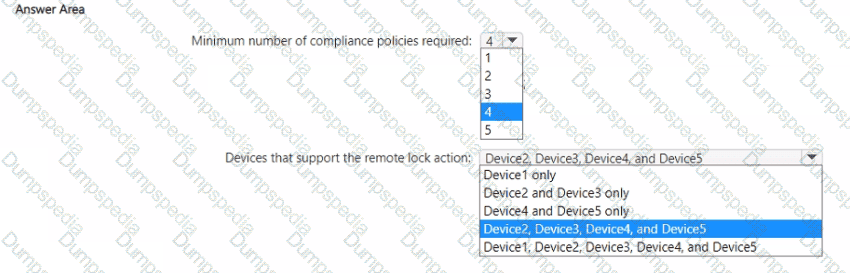
What is the minimum number of compliance policies required, and which devices support the remote lock action? To answer, select the appropriate options in the answer area.
NOTE: Each correct selection is worth one point.
Your network contains an on-premises Active Directory Domain Services (AD DS) domain that syncs with an Azure AD tenant.
You have a Microsoft 365 subscription
You plan to use Windows Autopilot to deploy new Windows devices.
You plan to create a deployment profile.
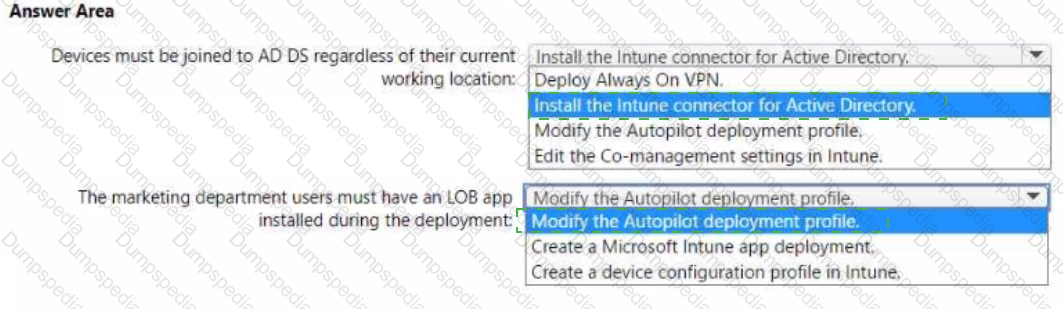
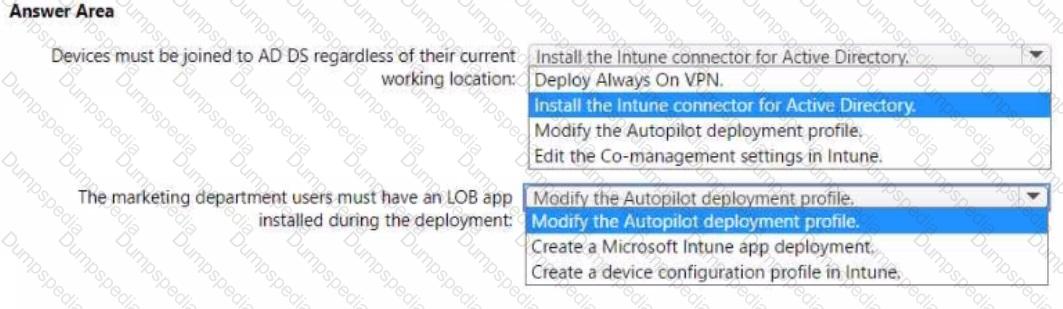
You need to ensure that The deployment meets the following requirements:
• Devices must be joined to AD DS regardless of their current working location.
• Users in the marketing department must have a Iine-of-business (LOB) app installed during the deployment.
The solution must minimize administrative effort.
What should you do for each requirement? To answer, select the appropriate options in the answer area.
NOTE: Each correct selection is worth one point.
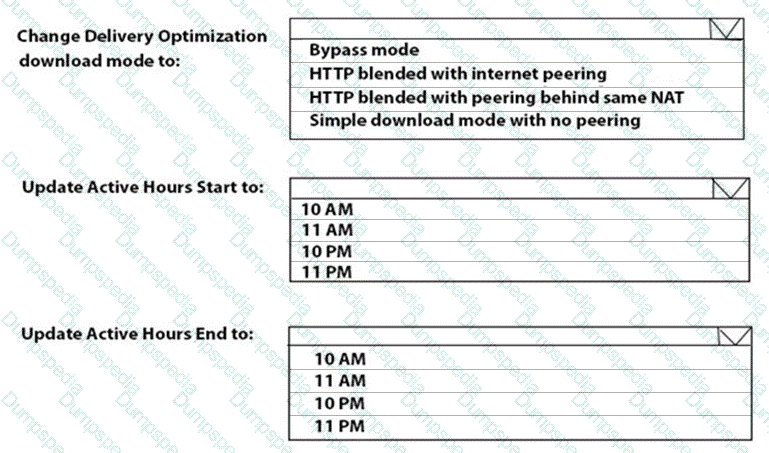
You need to resolve the performance issues in the Los Angeles office.
How should you configure the update settings? To answer, select the appropriate options in the answer area.
NOTE: Each correct selection is worth one point.
You have a Microsoft 365 subscription.
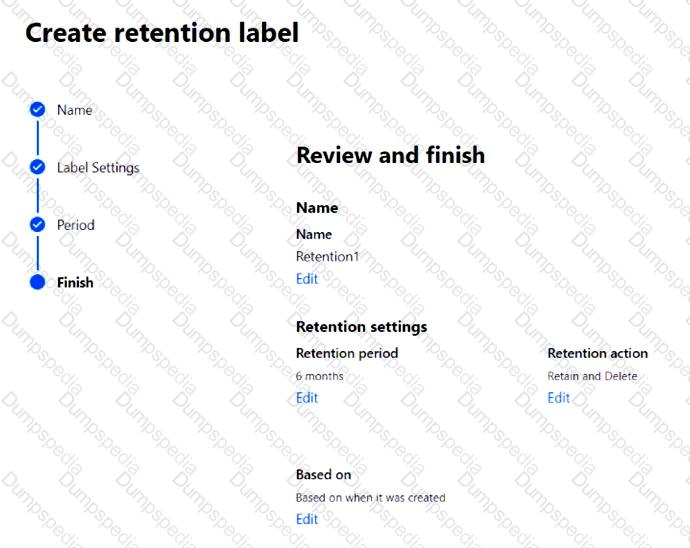
You create a retention label named Retention1 as shown in the following exhibit.
You apply Retention1 to all the Microsoft OneDrive content.
On January 1, 2020, a user stores a file named File1 in OneDrive.
On January 10, 2020, the user modifies File1.
On February 1, 2020, the user deletes File1.
When will File1 be removed permanently and unrecoverable from OneDrive?
You implement Boundary1 based on the planned changes.
Which devices have a network boundary of 192.168.1.0/24 applied?
You need to capture the required information for the sales department computers to meet the technical
requirements.
Which Windows PowerShell command should you run first?
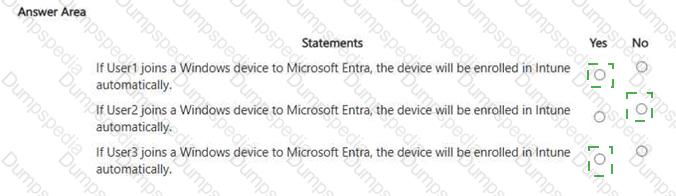
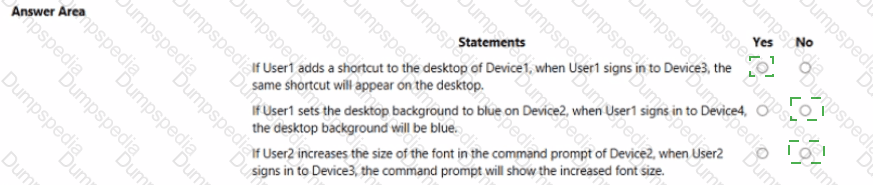
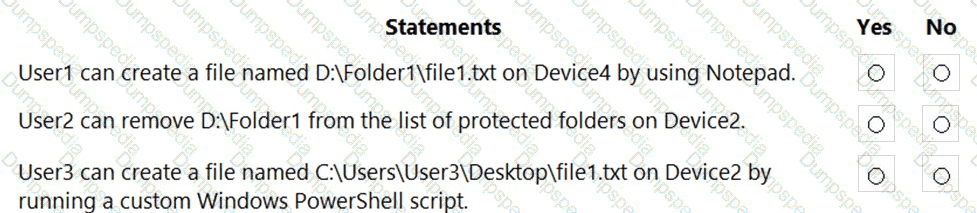
For each of the following statements, select Yes if the statement is true. Otherwise, select No.
NOTE: Each correct selection is worth one point.
You need to ensure that computer objects can be created as part of the Windows Autopilot deployment. The solution must meet the technical requirements.
To what should you grant the right to create the computer objects?
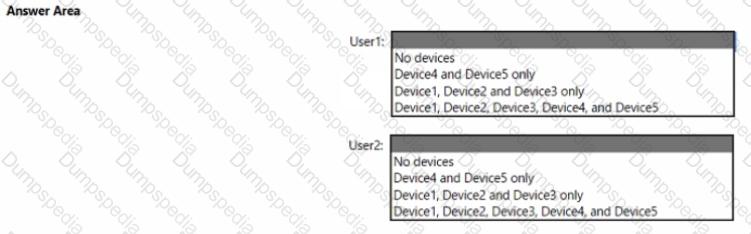
User1 and User2 plan to use Sync your settings.
On which devices can the users use Sync your settings? To answer, select the appropriate options in the answer area.
NOTE: Each correct selection is worth one point.
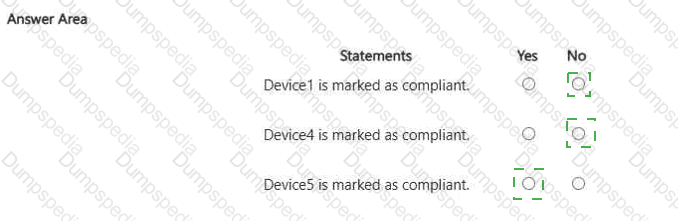
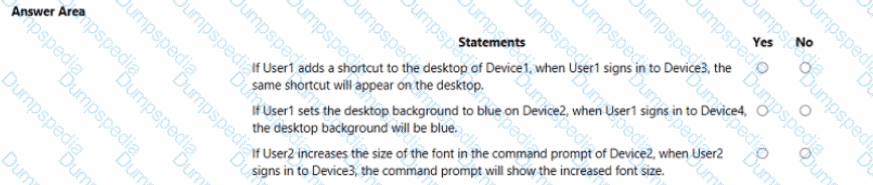
For each of the following statements, select Yes if the statement is true. Otherwise, select No. NOTE: Each correct selection is worth one point
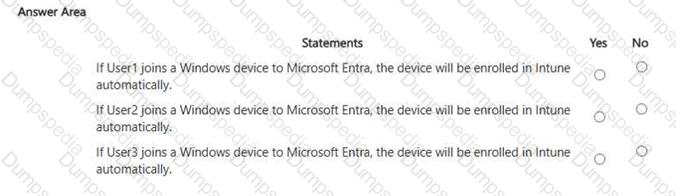
For each of the following statements, select Yes if the statement is true. Otherwise, select No. NOTE: Each correct selection is worth one point.
You have a Microsoft 365 subscription.
You discover that device enrollment to Microsoft Intune fails on multiple platforms.
You need to identify which incidents are affecting the availability of the Intune tenant.
What should you do in the Microsoft Intune admin center?
You have a Microsoft 365 ES subscription.
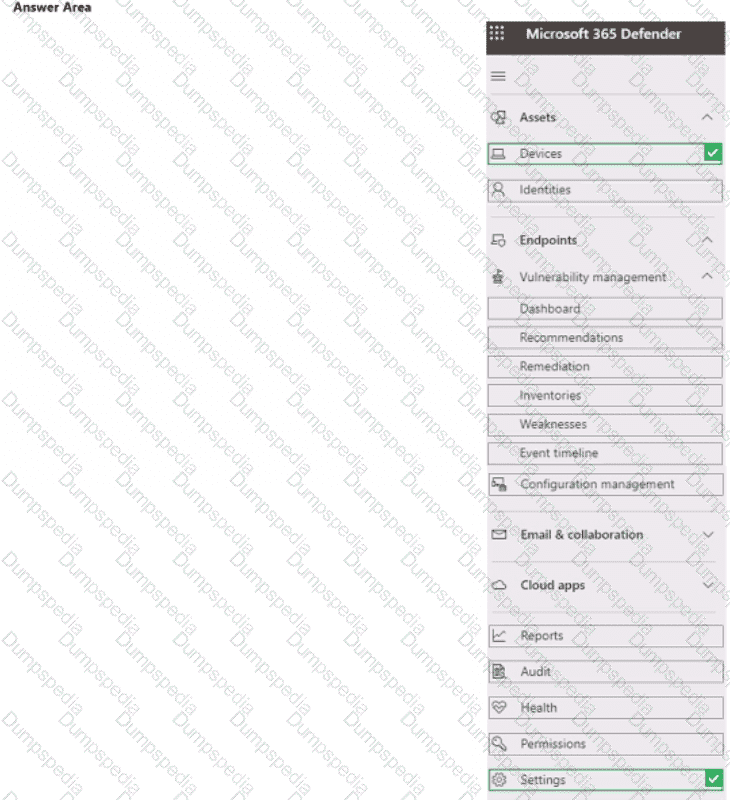
You need to review and implement Microsoft 365 Defender device onboarding. The solution must meet the following requirements:
• View onboarded devices that have the Chromium-based version of Microsoft Edge installed,
• Download an onboarding package for a Windows 11 device.
• Minimize administrative effort.
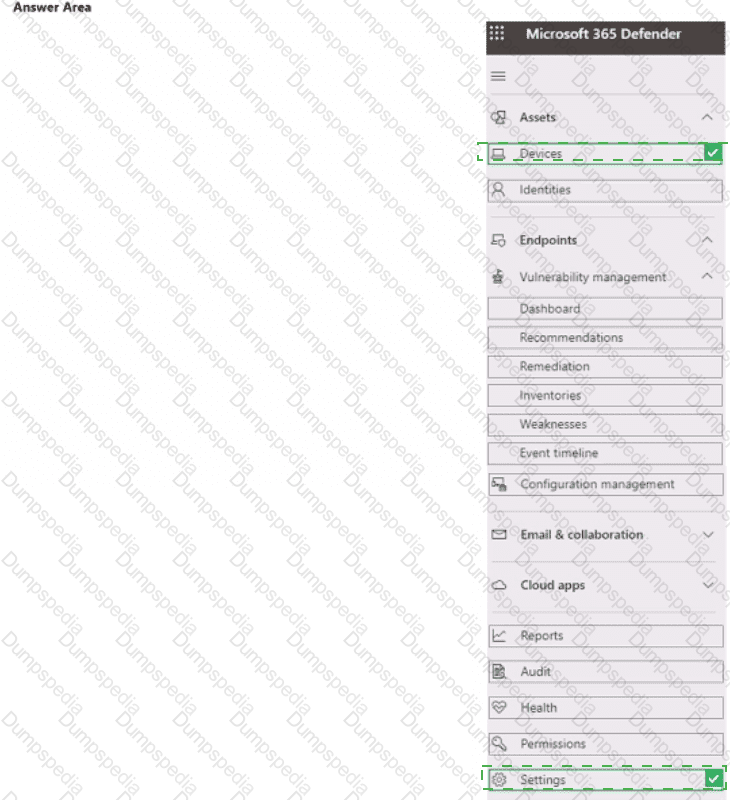
Which two settings should you use in the Microsoft 365 Defender portal? To answer, select the appropriate settings in the answer area.
NOTE: Each correct selection is worth one point.
You need to meet the technical requirements for the IT department.
What should you do first?
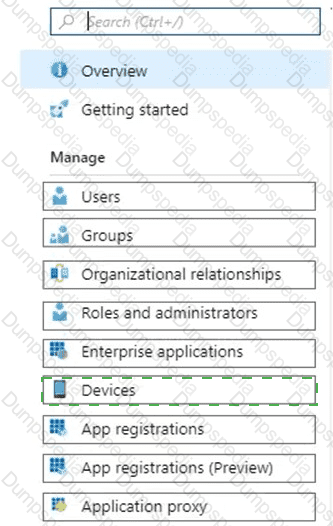
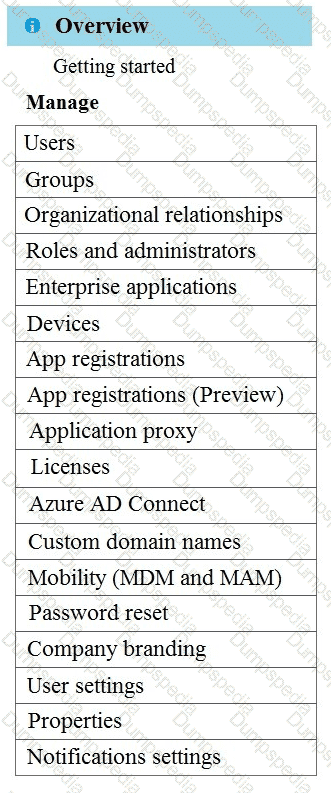
You need to meet the OOBE requirements for Windows AutoPilot.
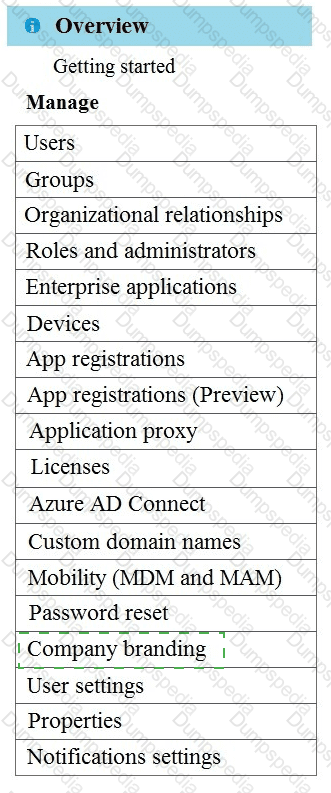
Which two settings should you configure from the Azure Active Directory blade? To answer, select the appropriate settings in the answer area.
NOTE: Each correct selection is worth one point.
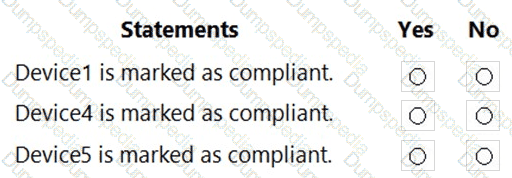
For each of the following statements, select Yes if the statement is true. Otherwise, select No.
NOTE: Each correct selection is worth one point.
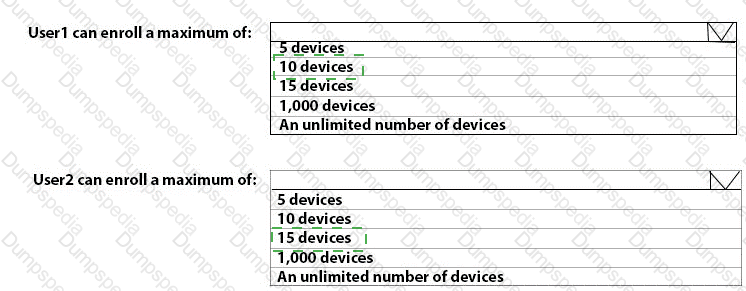
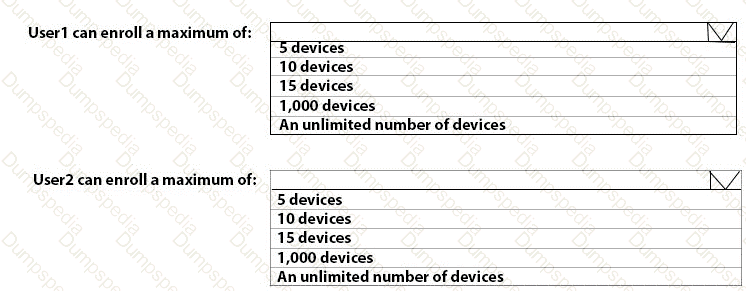
What is the maximum number of devices that User1 and User2 can enroll in Intune? To answer, select the appropriate options in the answer area.
NOTE: Each correct selection is worth one point.
You need to prepare for the deployment of the Phoenix office computers.
What should you do first?
You need to assign the same deployment profile to all the computers that are configured by using Windows Autopilot.
Which two actions should you perform? Each correct answer presents part of the solution.
NOTE: Each correct selection is worth one point.
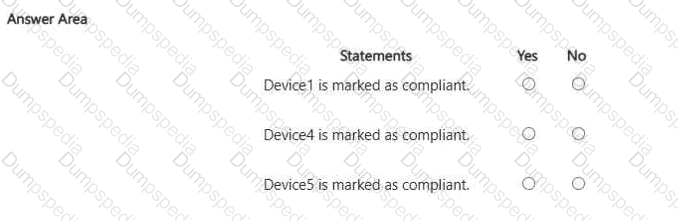
For each of the following statements, select Yes if the statement is true. Otherwise, select No. NOTE: Each correct selection is worth one point.
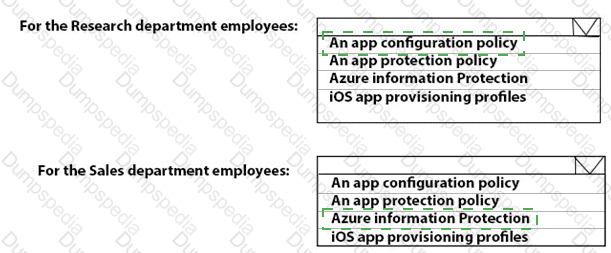
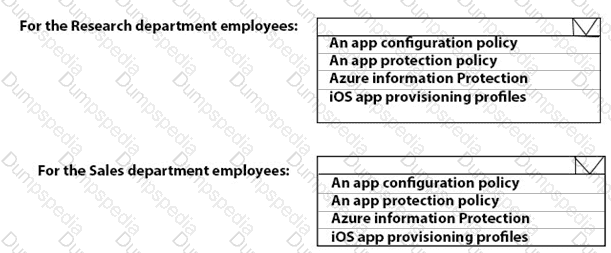
You need to meet the technical requirements for the iOS devices.
Which object should you create in Intune?
What should you upgrade before you can configure the environment to support co-management?
What should you configure to meet the technical requirements for the Azure AD-joined computers?
You need to meet the device management requirements for the developers.
What should you implement?
You need to recommend a solution to meet the device management requirements.
What should you include in the recommendation? To answer, select the appropriate options in the answer area.
NOTE: Each correct selection is worth one point.
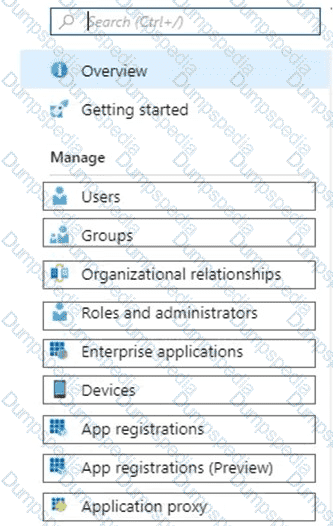
You need to meet the technical requirements for Windows AutoPilot.
Which two settings should you configure from the Azure Active Directory blade? To answer, select the appropriate settings in the answer area.
NOTE: Each correct selection is worth one point.

TESTED 20 Sep 2026