dumpspedia logo

What is the primary benefit of using switch configuration templates?
They improve the performance of switches.
They reduce Junos OS upgrade times.
They make it easier to make switch-specific configuration changes.
They provide a consistent configuration for all switches in an organization.
InJuniper Mist AI for Wired, configuration templates are a foundational part ofswitch onboarding and management. The primary purpose of these templates is to ensure configuration consistency across all switches that belong to a specific site or organization.
“Switch configuration templates allow administrators to define a standard configuration that is automatically applied to all switches within a site or organization, ensuring consistency and reducing configuration errors.”
Templates can contain base configuration parameters such as NTP, syslog, VLANs, port profiles, and authentication settings. When new switches are onboarded to the Mist Cloud, they automatically inherit the template’s configuration, ensuring uniform behavior across the network fabric.
Option Ais incorrect — templates do not directly impact hardware performance.
Option Bis incorrect — templates are not related to upgrade times.
Option Cis incorrect — templates are used for uniformity, not for switch-specific changes.
Option Dcorrectly describes their main benefit —ensuring consistent configuration across all switches.
Which two steps must be performed when configuringDynamic Port Configuration (DPC)in theJuniper Mist dashboard?(Choose two.)
Select the Configuration Profile that client devices will be assigned to when matching the DPC.
Define the polling frequency for DPC.
Assign the ports on which you would like to enable Dynamic Configuration.
Define the minimum Junos version.
Dynamic Port Configuration (DPC)in Juniper Mist enablesautomatic switch port configurationbased on connected device type (e.g., phones, access points, printers). When setting up DPC, administrators define thematching criteria(such as MAC OUI or LLDP system name) and associate aConfiguration Profilethat determines which settings are applied.
“To configure Dynamic Port Configuration, you must assign the ports where DPC will run and select the configuration profile that defines how the port will be automatically configured when a matching device is detected.”
Option A:Correct— you must select the configuration profile to apply once the device type matches.
Option B:Incorrect — DPC does not use polling; it reacts to real-time LLDP/device discovery.
Option C:Correct— you must assign the ports on which DPC operates.
Option D:Incorrect — DPC is supported across EX models running compatible firmware but does not require manually setting a Junos version in configuration.
Which campus fabric architecture extends from the core tier to the access tier?
campus fabric core-distribution - edge-routed bridging (ERB)
EVPN multihoming
campus fabric IP Clos
campus fabric core-distribution - centrally-routed bridging (CRB)
According to Juniper Mist documentation regarding campus fabric design, the campus fabric IP Clos (also known as a 5-stage Clos) is the architecture that extends the EVPN-VXLAN protocol stack from the core tier down through the distribution tier and finally to the access tier. In this model, every switch in the hierarchy—from the high-capacity core switches to the wiring closet access switches—participates in the EVPN control plane and VXLAN data plane.
By extending EVPN-VXLAN to the access tier, the IP Clos architecture provides a standards-based, scalable framework that allows for seamless Layer 2 connectivity over a Layer 3 underlay across the entire campus333333333. This enables advanced features like Microsegmentation using Group-Based Policies (GBP) and Macrosegmentation via Virtual Routing and Forwarding (VRF) instances directly at the edge of the network.
In contrast, other architectures like "core-distribution" (either CRB or ERB) typically limit the EVPN-VXLAN fabric to the core and distribution layers, leaving the access tier to connect via traditional methods like LAG, Virtual Chassis, or standard Layer 2 trunks5555. The IP Clos architecture is specifically designed for large-scale deployments where high density, vendor interoperability, and end-to-end policy enforcement are critical6. By utilizing a 5-stage IP Clos, organizations can eliminate the complexities of Spanning Tree Protocol (STP) while maintaining a flexible, "any-to-any" communication path throughout the physical infrastructure.
Which two statements are correct about switch adoption?(Choose two.)
Greenfield switch adoption requires cloud-enabled switches with a claim or activation code.
Switch adoption uses SSH over TCP port 443.
Switch adoption requires Mist AP.
Brownfield switch adoption requires manual adoption and is used for switches that do not have a claim or activation code.
In Juniper Mist,Greenfield adoptionapplies to new, cloud-ready switches (such as EX4100, EX4400, and QFX series) using aclaim or activation codeto securely connect to the Mist cloud.
Brownfield adoption, however, supports switches already deployed or not factory-fresh. These are manually onboarded by configuring outbound management connectivity and adopting them through the Mist portal.
This distinction enables both new and legacy EX/QFX environments to be cloud-managed under Wired Assurance.
Which statement is correct regarding the Mist UI?
The Mist UI is used to manage network devices.
The Mist UI is used to distribute routes between your wireless and physical networks.
The Mist UI is used by clients to connect to wireless networks.
The Mist UI is used by cloud providers to provision VMs.
TheMist UI(User Interface) is Juniper’s cloud-based management platform used tomanage both wired and wireless devices, including EX, QFX, and SRX platforms.
It provides centralized visibility, configuration, analytics, and AI-driven insights for the entire enterprise network infrastructure.
WithinWired Assurance, the Mist UI enables device claiming, switch templates, configuration management, and SLE monitoring.
You are planning to deploy a new campus fabric. This campus will have a significant amount of east-west traffic. All access switches will only be operating at Layer 2. In this scenario, which architecture should you deploy?
campus EVPN multihoming
campus fabric core-distribution with centrally-routed bridging (CRB)
campus fabric core-distribution with edge-routed bridging (ERB)
campus fabric IP Clos
According to Juniper Networks' validated designs for campus fabrics, the campus fabric core-distribution with edge-routed bridging (ERB) is the optimal architecture when high volumes of east-west traffic are present and access switches are restricted to Layer 2 operations. In an ERB design, the EVPN-VXLAN fabric extends from the core switches to the distribution switches.1 The critical differentiator is the placement of the default gateways (Integrated Routing and Bridging or IRB interfaces). In the ERB model, these gateways are moved from the core to the distribution layer, which effectively acts as the "edge" of the EVPN fabric.
By placing the Layer 3 gateways at the distribution layer, inter-VLAN (east-west) traffic is routed closer to the endpoints.2 This prevents the "hairpinning" effect found in Centrally-Routed Bridging (CRB) architectures, where traffic must travel all the way to the core layer to be routed between subnets before returning down to the distribution and access layers. This reduction in latency and core-link utilization is essential for modern campus environments with high server-to-server or client-to-client traffic patterns.
Furthermore, this architecture specifically accommodates Layer 2 access switches. In the ERB core-distribution model, the access switches are not part of the EVPN-VXLAN overlay; instead, they connect to the distribution tier using standard Link Aggregation Control Protocol (LACP) or ESI-LAG. This allows organizations to leverage existing legacy or lower-tier access switches that do not support advanced VXLAN capabilities while still benefiting from a robust, scalable EVPN-VXLAN fabric at the distribution and core layers.5 In contrast, while the campus fabric IP Clos also excels at handling east-west traffic, it requires the access switches themselves to perform VXLAN encapsulation/decapsulation (acting as VTEPs), which contradicts the requirement for access switches to operate only at Layer 2.
You are asked to configure switch ports to VLANs depending on which type of device is connected to it. Which Mist feature will accomplish this task?
bulk upload of switch configuration
dynamic port configuration
select switch configuration
site variables
According to Juniper Mist documentation, Dynamic Port Configuration (DPC)—also referred to as Dynamic Port Profiles—is the feature specifically designed to automate the assignment of VLANs and port settings based on the type of device connected to a switch. This technology enables the concept of "colorless ports," where any device (such as a Juniper Mist Access Point, an IP camera, or a VoIP phone) can be plugged into any available switch port without prior manual configuration.
The system functions by using "port assignment rules" that leverage various device properties to identify the connected hardware. These properties include LLDP attributes (System Name, Chassis ID, or Description), MAC addresses (including specific OUI ranges), and RADIUS attributes. For example, a rule can be configured to detect an LLDP System Description starting with "Mist Systems" and automatically apply a "Wireless AP" port profile. This profile typically includes the management VLAN, PoE settings, and Spanning Tree Protocol (STP) parameters required for an access point to function.
The primary benefit of DPC is the reduction of manual labor and the elimination of configuration errors in large-scale deployments. In traditional environments, an administrator would have to manually assign a VLAN to a specific physical port; with DPC, the Juniper Mist cloud detects the device and pushes the relevant configuration to the switch in real-time. If the device is disconnected, the port can be configured to revert to a "restricted" or "guest" VLAN, ensuring that the network remains secure against unauthorized access. This AI-driven approach drives consistency across multiple sites while significantly streamlining the onboarding of new hardware.
In a Juniper Mistcampus fabric deploymentusingEVPN-VXLAN, which component performs the VXLAN encapsulation and de-encapsulation functions?
VLAN
VTEP
EVPN route reflector
GBP tag
Comprehensive and Detailed Explanation From Exact Extract:
InEVPN-VXLANarchitectures, theVXLAN Tunnel Endpoint (VTEP)is the logical interface responsible for encapsulating and de-encapsulating Layer 2 Ethernet frames into VXLAN packets.
Each participating switch — typically the access or distribution node — hosts aVTEPthat maps local VLANs to VXLAN Network Identifiers (VNIs).
When a packet leaves a local VLAN, the VTEP encapsulates it in a VXLAN header and routes it through the underlay IP fabric.
When received at the destination VTEP, the frame is de-encapsulated and delivered to the appropriate local VLAN.
“VTEPs in an EVPN-VXLAN campus fabric perform MAC-to-VNI mapping and encapsulate/decapsulate traffic between virtualized network segments, allowing seamless Layer 2 and Layer 3 connectivity across an IP underlay.”
You are asked to apply the samesystem-level configurationacross all the devices in multiple sites usingMist AI.
According to Juniper Networks, which solution should you use in this scenario?
Use the CLI on each device.
Use the site-level switch configuration option in Mist AI.
Use an organization-level template in Mist AI.
Use the individual switch configuration option in Mist AI.
Juniper Mist supports ahierarchical configuration model:
Organization level:global configuration templates applied across sites.
Site level:shared configuration for all devices in a site.
Individual device level:unique overrides.
To applycommon system-level settings(e.g., NTP, SNMP, DNS, syslog) across multiple sites, the correct method is to use anorganization-level template.
“Organization-level templates provide a consistent configuration framework that can be applied across multiple sites, ensuring uniform system settings for all switches.”
Option A:Incorrect — manual CLI configuration defeats automation.
Option B:Incorrect — applies only to one site, not multiple.
Option C:Correct— organization-level templates provide centralized configuration for all sites.
Option D:Incorrect — individual configuration is for unique settings only.
Click the Exhibit button.
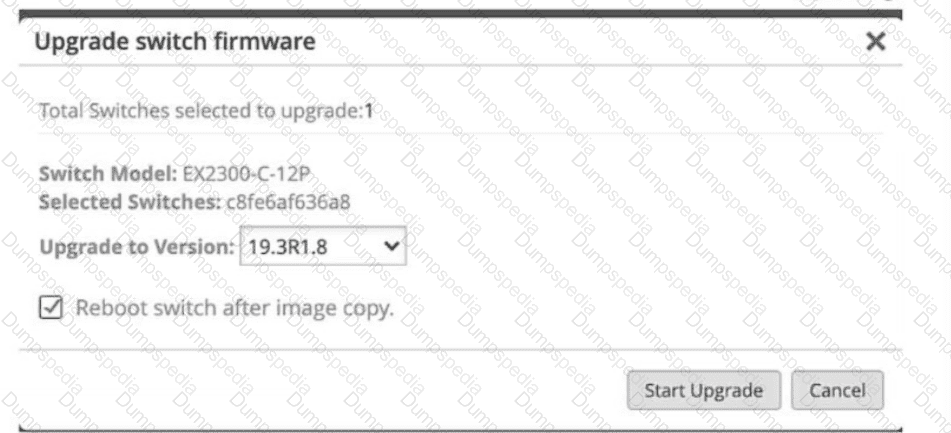
What does the exhibit show as part of the switching upgrade process?
The switch model is a EX2300-C-12T.
The switch will reboot after the upgrade.
Multiple switches will be upgraded.
The previous software version was 18.3R1.8.
According to the Juniper Mist dashboard's firmware management interface shown in the exhibit, several key details of the switch upgrade process are visible. The "Upgrade switch firmware" dialog box is a standard component of Juniper Mist Wired Assurance used to manage Junos OS updates across the fabric.
The correct statement is that the switch will reboot after the upgrade. This is explicitly confirmed by the checkbox labeled "Reboot switch after image copy," which is currently selected in the exhibit. In Juniper's cloud-managed workflow, once the new software image is successfully transferred from the Mist cloud to the switch's local storage, the system requires a reboot to initialize the new Junos OS kernel and complete the installation process5. While some platforms support non-disruptive upgrades, the standard procedure for EX-series switches in a standalone or Virtual Chassis configuration typically involves a scheduled reboot to ensure the new version is correctly applied.
The other options are incorrect based on the visual evidence provided in the exhibit.
Option A: The exhibit clearly identifies the "Switch Model" as an EX2300-C-12P (the 'P' designating PoE support), not an EX2300-C-12T88.
Option C: The dialog box explicitly states "Total Switches selected to upgrade: 1," confirming this is a single-device operation rather than a bulk upgrade.
Option D: The "Upgrade to Version" field is set to 19.3R1.8, which indicates the target version, not the previous version10101010.
By providing these granular controls, Juniper Mist allows administrators to maintain strict version compliance across the site while choosing whether to immediately reboot or stage the image for a later maintenance window.
Which configuration step is required to create a network in Juniper Mist Wired Assurance?
Enable traffic steering.
Name the VLAN and corresponding VLAN ID.
Create a unique port profile.
Create a unique access policy.
According to the Juniper Mist Wired Assurance Configuration Guide, the foundational step for implementing Layer 2 segmentation within the Mist UI is the creation of a "Network". In the context of Mist Wired Assurance, a Network is logically synonymous with a Virtual Local Area Network (VLAN). To define a network, a user must navigate to the Networks section—located within an organization-level template, a site-level configuration, or an individual switch configuration—and click to add a new entry.
The two mandatory parameters for this step are naming the VLAN and providing the corresponding VLAN ID. The name serves as a human-readable alias (such as "Corporate_Data" or "IoT_Devices") that allows administrators to easily reference the segment across different parts of the configuration without constantly tracking numeric IDs. The VLAN ID is the specific numeric value (ranging from 1 to 4094) that will be used by the switch for 802.1Q tagging on the physical wire.
This step is a prerequisite for more advanced configurations. Once a network is created with its name and ID, it can then be selected within a Port Profile. While creating a port profile (Option C) or an access policy (Option D) are common tasks in the deployment workflow, they are dependent on the prior existence of a defined Network. For instance, a Port Profile defines how a port behaves (e.g., access vs. trunk), but it must point to a specific Network name to know which VLAN to assign to that interface. Similarly, site variables can be used to override these VLAN IDs at specific locations, but the base definition requires the initial pairing of a name and a default ID in the portal.
When do you need to "adopt a switch"?
in a brownfield environment
immediately upon arrival after it ships from the factory
in a greenfield environment
immediately upon arrival after it ships from distribution
According to Juniper Mist documentation, the term "Adopting a Switch" specifically refers to the process of bringing an existing, already-configured switch—often termed a brownfield device—under the management of the Juniper Mist cloud. This is distinct from the "claiming" process, which is reserved for greenfield environments where new, factory-default switches are added using a QR code or activation code.
In a brownfield scenario, the switch is typically already in production or has a pre-existing local configuration that must be preserved or integrated into the Mist AI-driven dashboard. To adopt such a switch, the administrator must manually interact with the switch's Command Line Interface (CLI). The Mist portal provides a unique adoption command—a string of Junos OS configuration—that includes the specific URL for the Mist cloud and the organization’s unique registration token. Once this command is pasted into the switch's CLI and committed, the switch initiates an outbound connection to the Mist cloud via TCP port 2200 or 443.
Upon successful connection, the switch's status changes from "Unassigned" to "Connected" in the Mist dashboard. This transition allows the Mist AI engine to begin collecting telemetry, monitoring Service Level Expectations (SLEs), and performing automated troubleshooting. While the adoption process allows for "monitoring only" mode to avoid disrupting existing services, it is the fundamental first step for transitioning legacy Juniper infrastructure into a modern, cloud-managed Wired Assurance environment. This workflow is essential for organizations looking to leverage Marvis AI and automated operations without having to factory-reset their entire existing network.
You have deployed your switches and need to provide a unique hostname on each switch.
Which Mist dashboard option allows you to accomplish this task?
Organization switch template
Site switch configuration
Individual switch configuration
Device profiles
In Juniper Mist Cloud, there are multiple configuration scopes:
Organization-level templatesapply globally.
Site-level configurationapplies across all devices in a site.
Individual switch configurationis used to define unique, device-specific attributes such ashostname, management IP, or local overrides.
“Templates and site-level configuration ensure consistency across devices, whileindividual switch configuration is used to assign unique values such as hostnames.”
Option A:Incorrect — org templates define common config, not hostnames.
Option B:Incorrect — site configs are shared across all switches in the site.
Option D:Incorrect — device profiles apply settings like port policies or authentication, not hostnames.
Option C:Correct —individual switch configurationis the correct place to assign hostnames uniquely per device.
You are experiencing issues with your video streams. In this scenario, which SLE and classifier should you inspect to see if BUM traffic is a problem?
Throughput Congestion
Successful Connect --> Authentication
Throughput Storm Control
Throughput —> Interface Anomalies
According to Juniper Mist documentation, the Throughput Service Level Expectation (SLE) is the primary metric used to measure the ability of wired clients to pass traffic across the physical network without impedance. This SLE is critical for diagnosing issues with real-time, high-bandwidth applications such as video streams, which are highly sensitive to packet loss and latency. Within the Throughput SLE, the Storm Control classifier is specifically designed to identify "bad user minutes" caused by the suppression of Broadcast, Unknown Unicast, and Multicast (BUM) traffic.
Storm control is a mechanism that enables the switch to monitor traffic levels and drop BUM packets when a specified traffic level—known as the storm control level—is exceeded. This prevents a "traffic storm" from proliferating and degrading the overall performance of the LAN. While this is a vital security feature to prevent network meltdowns, it can inadvertently impact legitimate traffic. For instance, if multicast-based video streams or other heavy BUM traffic exceed the configured bandwidth percentage on a port, the switch will drop those packets to protect the rest of the network.
When troubleshooting video stream issues, network administrators should inspect the Storm Control classifier to see if it is triggering "bad user minutes". If the Mist dashboard indicates failures under this classifier, it signifies that the switch hardware is actively dropping packets because the BUM traffic limit has been reached. This provides immediate root-cause evidence, allowing the administrator to determine if they need to adjust the storm control thresholds within the Port Profile or investigate the source of the excessive broadcast traffic. By correlating these hardware-level events with the end-user experience, Mist AI simplifies the resolution of complex performance problems that traditional "up/down" monitoring would miss.
Which two statements are correct about theEVPN-VXLAN control plane?(Choose two.)
The control plane encapsulates the traffic.
The control plane learns the MAC addresses of end-user devices.
The control plane learns the IP addresses of end-user devices.
The control plane rewrites the destination MAC address of the packet.
In anEVPN-VXLAN fabric, thecontrol planeoperates overBGP EVPNand is responsible for distributing endpoint reachability information (MAC and IP) among VTEPs. Thedata plane, by contrast, performs encapsulation and forwarding.
“The EVPN control plane uses BGP to exchange MAC and IP address reachability information between VTEPs, enabling efficient forwarding and loop prevention without relying on flood-and-learn behavior.”
Option A:Incorrect — encapsulation occurs in thedata plane, not the control plane.
Option B:Correct — the control plane distributesMAC-to-VTEP mappings.
Option C:Correct — the control plane also distributesIP-to-MAC associations(Type 2 and Type 5 EVPN routes).
Option D:Incorrect — the control plane does not alter packet headers.
You are asked to forward event messages from Mist to an external log collector.
In this scenario, which feature would enable this capability?
syslog
webhooks
NETCONF
SNMP traps
In Juniper Mist, thesyslogfeature allows administrators to forward event messages and alerts from the Mist cloud to an external syslog server.
This is often used for centralized event monitoring, compliance, and correlation with tools like Splunk or SIEM systems.
Syslog operates over UDP or TCP and can capture switch events, system logs, and Marvis actions for both Wired and Wireless networks.
What are the two ways to forward BUM traffic when using EVPN?(Choose two.)
Use static routes.
Use BGP neighborship.
Use ingress replication.
Use underlay replication.
InEVPN-VXLAN,BUM (Broadcast, Unknown unicast, and Multicast)traffic is handled differently than unicast traffic. EVPN provides two main forwarding mechanisms to distribute BUM traffic betweenVTEPs(VXLAN Tunnel Endpoints):
“BUM traffic in EVPN-VXLAN fabrics is replicated using eitheringress replicationorunderlay multicast(PIM-based). Both methods ensure that broadcast and unknown unicast frames reach all remote VTEPs within the same VXLAN segment.”
Option A:Incorrect — static routes are unrelated to BUM forwarding.
Option B:Incorrect — BGP is thecontrol plane, not a data-plane forwarding method.
Option C:Correct—Ingress replicationreplicates BUM packets to all remote VTEPs in the same VNI using unicast tunnels.
Option D:Correct—Underlay replication (multicast)uses multicast groups in the IP underlay to distribute BUM frames efficiently.
Which API is used within the Juniper Mist solution?
REST
SOAP
JSON
RPC
Juniper Mist Cloud uses anopen RESTful API frameworkfor integration, automation, and programmability across all Mist services, includingWired Assurance,Marvis, andAI-driven automation.
“All Mist Cloud services are built on a 100% open REST API framework, allowing customers to automate configuration, monitoring, and troubleshooting through standard REST calls.”
The REST API exchanges data inJSONformat, but the API type itself isREST, not JSON.
Option A (REST):Correct— Mist services expose 100% REST-based APIs.
Option B (SOAP):Incorrect — SOAP is an older XML-based protocol not used in Mist.
Option C (JSON):Incorrect — JSON is thedata format, not the API type.
Option D (RPC):Incorrect — not used in the Mist Cloud architecture.
Which hthree administrator roles allow you to claim switches?(Choose three.)
Network Admin
Installer
Super User
Observer
Helpdesk
In Juniper Mist Cloud, administrative roles define what actions a user can perform within an organization. The ability to claim and onboard switches is granted to roles that have configuration or deployment privileges.
“Only users with Super User, Network Admin, or Installer roles can claim, onboard, or delete devices such as access points, switches, or gateways within a Mist organization.”
Option A (Network Admin):Correct— can claim and manage network devices.
Option B (Installer):Correct— role specifically intended for device onboarding and site setup.
Option C (Super User):Correct— full administrative privileges including device claiming.
Option D (Observer):Incorrect — view-only access.
Option E (Helpdesk):Incorrect — limited to troubleshooting functions, not device management.
What is meant when aMarvis Actionis shown as “AI Validated”?
The issue which triggered an alert has been set to Resolved status.
Marvis has observed a new issue.
Marvis has observed a recurring issue.
Marvis has observed an issue that is no longer present.
WhenMarvis Actionsdisplay “AI Validated,” it indicates the issue was detected earlier but is nowresolved.
Marvis automatically validates remediation and marks the action closed once the anomaly clears.
When adopting your switches into theJuniper Mist Cloud, you notice that the status of the switches is“Unassigned.”
In this scenario, which additional step is required for the switches to show as“Connected”in the Juniper Mist dashboard?
Use the Mist AI mobile application and rescan the QR code for adoption to your Mist site.
You must restart each switch before Mist recognizes it on your dashboard.
Troubleshoot the system configuration with the [show system connections | grep 2200] and [show configuration system services outbound-ssh] commands.
Select each switch and assign them to your selected site.
When a switch is successfully onboarded into Mist Cloud but shows“Unassigned,”it means the device has been claimed into the organization but hasnot yet been assigned to a specific site.
“After claiming switches into an organization, you must assign each switch to a site for it to transition from Unassigned to Connected state and begin receiving configuration and telemetry updates.”
Option A:Incorrect — rescanning is not needed once the device is claimed.
Option B:Incorrect — reboots are unnecessary for assignment recognition.
Option C:Incorrect — these commands are for connectivity troubleshooting, not site assignment.
Option D:Correct— assigning each switch to itsintended siteenables full Mist management and connectivity state.
Which statement is correct about a 3-stage campus fabric IP Clos?
The distribution layer is connected to the access layer.
The distribution layer is connected to the core layer.
The core layer is connected to the access layer.
The core layer devices are connected to each other.
Juniper’s official Campus Fabric IP Clos designfor Mist Wired Assurance defines that the3-stage IP Clostopology eliminates the traditionaldistribution layerentirely. This architecture is intended for smaller campus environments that do not need an intermediate distribution layer between the access and core.
“Juniper’s Wired Assurance supports 3-Stage and 5-Stage IP Clos deployments. The 3-Stage IP Clos is targeted towards deployments that do not require a Distribution Layer and have smaller scale requirements.”
Because the distribution layer is not present, the only hierarchical connection in a 3-stage campus fabric is between thecore and access layers. Traffic is routed directly at the access layer, and each access switch acts as a Layer-3 gateway (IRB) for its VLANs.
“In a campus fabric IP Clos architecture, Mist provisions Layer-3 (L3) integrated routing and bridging (IRB) interfaces on the access layer. All the access switches are configured with the same IP address for each L3 subnet.”
Additionally, the Juniper documentation explains that point-to-point links are configuredbetween layers, and in the case of the 3-stage design (with no distribution), this means between thecore and accessdevices:
“The point-to-point links between each layer utilize /31 addressing to conserve addresses.”
Therefore, the correct statement isC: The core layer is connected to the access layer.
OptionsAandBincorrectly mention a distribution layer that does not exist in this topology.
OptionDis incorrect because core (spine) devices in a Clos fabric are not interconnected with each other.


TESTED 07 Nov 2026