Refer to the exhibits.

The exhibits show the system performance output and default configuration of high memory usage thresholds on a FortiGate device.
Based on the system performance output, what are the two possible outcomes? (Choose two.)
FortiGate drops new sessions.
Administrators can access FortiGate only through the console port.
Administrators can change the configuration.
FortiGate has entered conserve mode.
“Three different configurable thresholds define when FortiGate enters and exits conserve mode. If memory usage goes above the percentage of total RAM defined as the red threshold , FortiGate enters conserve mode.”
“If memory usage keeps increasing, it might exceed the extreme threshold . While memory usage is above this highest threshold, all new sessions are dropped. ”
“What actions does FortiGate take to preserve memory while in conserve mode?
• FortiGate does not accept configuration changes , because they might increase memory usage.”
“However, if the memory usage exceeds the extreme threshold, new sessions are always dropped , regardless of the FortiGate configuration.”
Technical Deep Dive:
The system performance output shows Memory: 2042076k total, 1837868k used (90%) . The configured thresholds shown are:
green = 82
red = 88
extreme = 89
Because memory usage is 90% , it is:
Above the red threshold (88%) → so FortiGate has entered conserve mode
Above the extreme threshold (89%) → so all new sessions are dropped
That makes A and D correct.
Why the others are wrong:
B is not stated anywhere in the study guide as an automatic outcome of conserve mode.
C is the opposite of what the guide says. In conserve mode, FortiGate does not accept configuration changes .
A useful verification command is:
diagnose hardware sysinfo conserve
Operationally, once a FortiGate crosses the red threshold , it starts protecting itself by limiting behavior that could increase memory usage. Once it crosses the extreme threshold , it becomes more severe and drops new sessions to keep the system from becoming unstable.
Refer to the exhibit.
A RADIUS server configuration is shown.

An administrator added a configuration for a new RADIUS server While configuring, the administrator enabled Include in every user group What is the impact of enabling Include in every user group in a RADIUS configuration?
This option places the RADIUS server, and all users who can authenticate against that server, into every FortiGate user group.
This option places all FortiGate users and groups required to authenticate into the RADIUS server, which, in this case, is FortiAuthenticator.
This option places the RADIUS server, and all users who can authenticate against that server, into every RADIUS group.
This option places all users into every RADIUS user group, including groups that are used for the LDAP server on FortiGate.
Based on the FortiOS 7.6 Authentication and User Group documentation, the correct answer is A.
Meaning of “Include in every user group” (FortiOS 7.6)
When configuring a RADIUS server on FortiGate, enabling Include in every user group has a very specific and documented effect:
The configured RADIUS server object is automatically added to all FortiGate user groups.
As a result, any user who successfully authenticates against that RADIUS server becomes a valid member of every FortiGate user group, unless additional group filtering (such as RADIUS attributes) is applied.
This simplifies configuration when the same external authentication source must be accepted across multiple firewall policies that reference different user groups.
This behavior is explicitly described in the FortiOS 7.6 Administrator Guide under RADIUS authentication servers and user groups.
Why Option A is Correct
FortiGate user groups can include:
Local users
LDAP servers
RADIUS servers
Enabling Include in every user group causes FortiGate to:
Insert the RADIUS server into all existing and future FortiGate user groups
Therefore, all users authenticating via this RADIUS server are implicitly allowed in every FortiGate user group.
This is exactly what option A describes.
Why the Other Options Are Incorrect
B: FortiGate does not push users or groups into the RADIUS server. Authentication is always initiated by FortiGate toward RADIUS.
C: FortiGate does not manage or modify RADIUS-side group definitions.
D: LDAP and RADIUS user groups are separate authentication mechanisms; this setting does not merge or affect LDAP groups.
A new administrator is configuring FSSO authentication on FortiGate using DC Agent Mode. Which step is not part of the expected process?
The DC agent sends login event data directly to FortiGate.
FortiGate determines user identity based on the IP address in the FSSO list.
The collector agent forwards login event data to FortiGate.
The user logs into the windows domain.
Which three strategies are valid SD-WAN rule strategies for member selection? (Choose three answers)
Lowest Cost (SLA) without load balancing
Manual with load balancing
Lowest Quality (SLA) with load balancing
Lowest Cost (SLA) with load balancing
Best Quality with load balancing
According to the FortiOS 7.6 Administrator Study Guide and official documentation, SD-WAN rules (services) determine the path selection for traffic matching specific criteria. Version 7.6 provides specific flexibility regarding how these strategies handle multiple member interfaces.
First, Manual with load balancing (Statement B) is a valid configuration. In the Manual strategy, the administrator orders interfaces by preference, but by enabling the Load balancing toggle, the FortiGate can distribute traffic across all members that are up.
Second, the Lowest Cost (SLA) strategy has been enhanced to support two modes. When the load balancing option is disabled, it acts as Lowest Cost (SLA) without load balancing (Statement A), selecting the single lowest-cost link that meets the SLA. Alternatively, by enabling the toggle, it functions as Lowest Cost (SLA) with load balancing (Statement D), where the FortiGate distributes traffic across all interfaces that satisfy the SLA target, regardless of their individual costs.
Statements C and E are incorrect because " Lowest Quality " is not a recognized SD-WAN strategy, and the Best Quality strategy is specifically a priority-based selection for a single " best " link, meaning the load balancing toggle is not available in the GUI when this mode is selected.
When configuring a FortiGate in a multi-WAN setup, why would an administrator enable session preservation on an interface? (Choose one answer)
To allow the FortiGate to dynamically change interfaces for all active sessions when a WAN link fails
To make sure all sessions without source NAT enabled always use the primary WAN link
To improve security by forcing users to authenticate again when the WAN link changes
To ensure that existing SSL VPN connections remain on the same interface even if route changes occur
A closely related routing principle from the guide is:
“For each session, FortiGate performs two route lookups... After completing these two lookups, FortiGate writes the routing information to its session table. Subsequent packets are routed according to the session table, not the routing table.”
Also, the guide notes an HA limitation that helps explain the same design principle for FortiGate-terminated sessions:
“Enabling session pickup allows active sessions to be seamlessly handed picked up by the new primary in the event of an HA failover... Note that there are some limitations to this – for example, any sessions that terminate at the FortiGate itself ( e.g. SSL VPN, proxy sessions ) cannot be handed off to another FortiGate and must be restarted on the new primary.”
Technical Deep Dive:
The correct answer is D .
In multi-WAN environments, session preservation is used so that traffic for sessions that are tightly bound to the FortiGate interface they terminate on—most notably SSL VPN and other FortiGate-terminated flows—does not suddenly switch to another egress interface just because the routing table changes. Those sessions are sensitive to interface consistency. If replies start leaving through a different WAN after a route recalculation, the remote peer may see an address/interface mismatch and the session can break.
That means:
A is the opposite of session preservation. Preservation is meant to avoid moving active sessions around.
B is not the purpose of the feature.
C is unrelated.
D correctly describes why an administrator would enable it.
Operationally, this matters most for SSL VPN , management-plane flows, and other sessions that terminate on the FortiGate itself , not just ordinary transit traffic. Transit sessions are generally tracked in the session table and can often survive normal routing behavior more gracefully, but FortiGate-terminated sessions are much more sensitive to WAN/interface changes.
Refer to the exhibit.

An SD-WAN zone configuration on the FortiGate GUI is shown. Based on the exhibit, which statement is true?
The Underlay zone contains no member.
The virtual-wan-link and overlay zones can be deleted
The Underlay zone is the zone by default.
port2 and port3 are not assigned to a zone.
According to the FortiOS 7.6 Administrator Guide and the specific behavior of the SD-WAN GUI, here is the technical breakdown:
SD-WAN Zone Hierarchy and UI Elements: In the FortiGate GUI, SD-WAN zones that contain member interfaces are displayed with a plus (+) icon next to the checkbox. This icon allows administrators to expand the zone and view the specific physical or logical interfaces assigned to it.
Analysis of the " Underlay " Zone: In the provided exhibit, the virtual-wan-link and overlay zones both feature the plus (+) expansion icon, indicating they have active members. The Underlay zone, however, lacks this icon and displays a red status icon. This is the visual indicator in FortiOS that the zone is currently empty and contains no member interfaces.
Mandatory Zone Membership: In FortiOS 7.x, every SD-WAN member interface must be assigned to a zone. It is not possible for an interface to be an " SD-WAN member " (as shown in the legend with port2 and port3) without being assigned to a zone. Since port2 and port3 are listed in the legend, they are indeed assigned to one of the other expanded zones (likely virtual-wan-link or overlay), making Option D incorrect.
Default Zone Behavior: While FortiOS 7.6 often creates default zones like virtual-wan-link, underlay, and overlay during certain configuration wizards or by default in newer versions, they are distinct entities. There is no single " default " zone that acts as a global catch-all in the way Option C suggests.
Immutability of System Zones: While certain system-defined zones have restrictions, the primary focus of this specific exhibit is the current membership state, which clearly shows the Underlay zone is empty.
You have created a web filter profile named restrictmedia-profile with a daily category usage quota.
When you are adding the profile to the firewall policy, the restrict_media-profile is not listed in the available web profile drop down.
What could be the reason?
The web filter profile is already referenced in another firewall policy.
The firewall policy is in no-inspection mode instead of deep-inspection.
The naming convention used in the web filter profile is restricting it in the firewall policy.
The inspection mode in the firewall policy is not matching with web filter profile feature set.
In FortiOS 7.6, web filter profiles are inspection-mode dependent. Certain advanced web filtering features—such as daily category usage quota—are only supported when the firewall policy is operating in proxy-based inspection mode.
Why the profile is not visible
The profile restrictmedia-profile includes a daily category usage quota.
Daily quotas are a proxy-based web filtering feature.
If the firewall policy is configured with:
Inspection mode: Flow-based
Then FortiGate will not display proxy-only web filter profiles in the Web Filter drop-down list.
FortiGate automatically filters the available profiles based on feature compatibility with the policy’s inspection mode.
This behavior is explicitly documented in the FortiOS 7.6 Web Filtering and Inspection Mode Compatibility sections.
Why the other options are incorrect
A. Already referenced in another firewall policyWeb filter profiles can be reused across multiple policies. This does not hide them.
B. Firewall policy is in no-inspection mode instead of deep-inspectionSSL inspection depth affects HTTPS visibility, not whether a web filter profile appears in the drop-down list.
C. Naming convention restrictionFortiOS does not restrict profile selection based on naming conventions.
Refer to the exhibits.


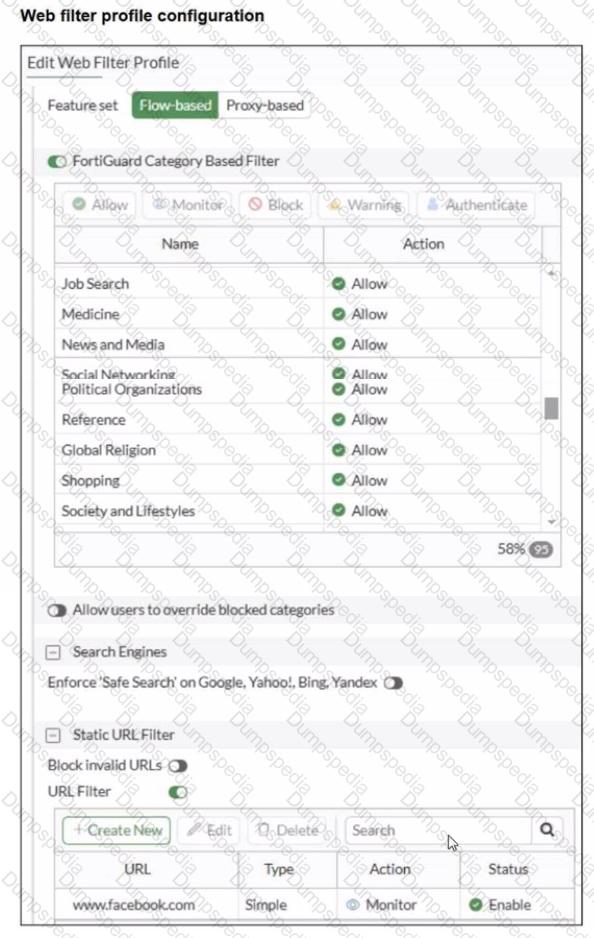
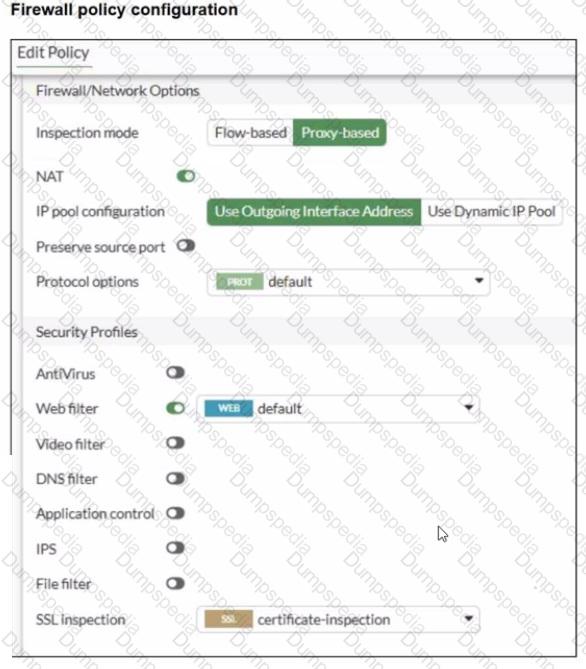
A web filter profile configuration and firewall policy configuration are shown.
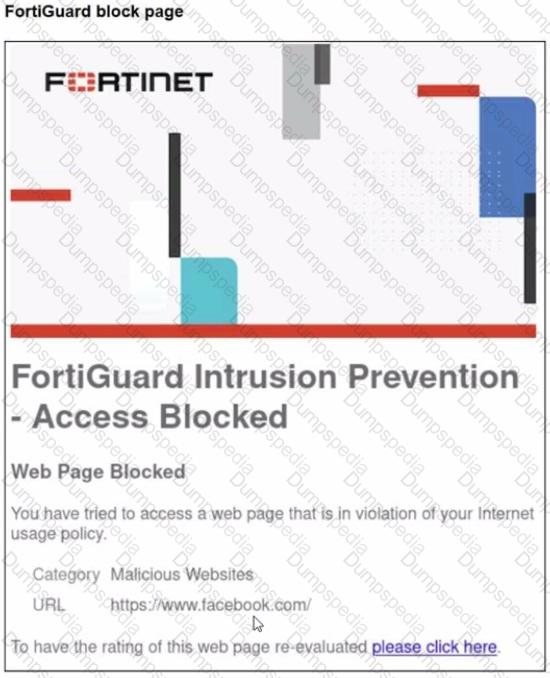
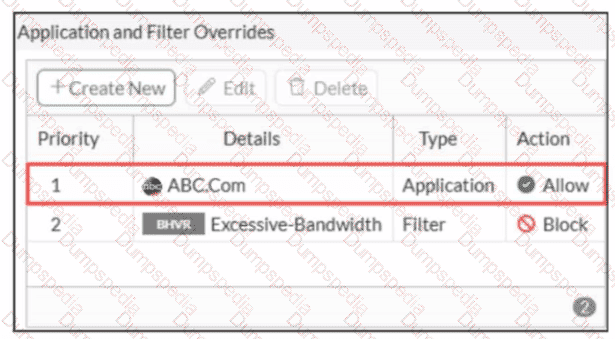
You are trying to access www. facebook.com, but you are redirected to a FortiGuard web filtering block page.
Based on the exhibits, what is the possible cause of the issue?
The web rating override configuration is incorrect.
The web filter profile feature set is configured incorrectly.
The firewall policy inspection mode is incorrect.
For www. facebook. com. the URL filter action is incorrect.
From the exhibits:
The Web Filter profile is configured with Feature set = Flow-based.
The Firewall policy is configured with Inspection mode = Proxy-based and has Web Filter enabled.
In FortiOS 7.6, security profiles that have a feature set selection (Flow-based vs Proxy-based) must match the inspection mode used by the firewall policy. If the profile’s feature set does not match the policy’s inspection mode, the profile behavior will not align with what the administrator expects (and in many cases FortiOS will prevent correct use/selection, or the feature behavior will not apply as intended).
That mismatch explains why the configured URL filter entry for www.facebook.com (set to Monitor) is not producing the expected result, and instead the session is being evaluated by category rating and blocked (shown as Malicious Websites on the FortiGuard block page).
Why the other options are not the best fit:
A: A web rating override is not shown in the exhibits, and nothing indicates an override misconfiguration.
C: While the policy inspection mode could be changed, the root cause shown is the profile feature set mismatch (profile is Flow-based).
D: The URL filter action shown is Monitor, which would not produce a block page by itself.
What are two features of FortiGate FSSO agentless polling mode? (Choose two.)
FortiGate uses the AD server as the collector agent.
FortiGate uses the SMB protocol to read the event viewer logs from the DCs.
FortiGate does not support workstation check.
FortiGate directs the collector agent to use a remote LDAP server.
Based on the FortiOS 7.6 Administrator Guide regarding Fortinet Single Sign-On (FSSO) polling modes, the agentless polling mode has specific technical characteristics:
SMB Protocol Usage (Statement B is True):
In agentless polling mode, the FortiGate unit itself acts as the collector.
It establishes direct connections to the Windows Domain Controllers (DCs) using the SMB (Server Message Block) protocol, typically over TCP port 445, to read the Windows Security Event logs.
This allows FortiGate to parse login event IDs (such as 4768 and 4769) to identify users and their corresponding IP addresses without needing an external collector agent installed on a server.
Workstation Check Support (Statement C is True):
One of the primary limitations of the agentless polling mode compared to the agent-based mode is the lack of workstation verification.
In agentless mode, FortiGate does not perform " workstation checks " or " dead entry checks " . This means it cannot proactively verify if a user is still logged into a specific workstation after the initial logon event is recorded, which can lead to stale entries if a user logs off without a corresponding event being captured.
Why other options are incorrect:
Option A: In agentless mode, FortiGate (the FSSO daemon) performs the collection itself; it does not use the AD server as a " collector agent " in the functional sense of FSSO architecture.
Option D: While FortiGate uses LDAP to retrieve group membership information once a user is identified, it does not " direct " a collector agent to a remote LDAP server, as there is no external collector agent involved in this specific mode.
What are three key routing principles in SD-WAN? (Choose three answers)
By default, SD-WAN rules are skipped if the included SD-WAN members do not have a valid route to the destination.
SD-WAN rules have precedence over any other type of routes.
Regular policy routes have precedence over SD-WAN rules.
By default, SD-WAN rules are skipped if only one route to the destination is available.
By default, SD-WAN rules are skipped if the best route to the destination is not an SD-WAN member.
“This slide shows the SD-WAN rule lookup process. SD-WAN rules are essentially policy routes.”
“FortiGate performs a forwarding information base (FIB) lookup for the packet destination IP (dstip). If the resolved interface for the fib-best-match isn’t an SD-WAN member, then FortiGate moves on to the next rule. This behavior follows the key routing principle: SD-WAN rules are skipped if the best route to the destination isn’t an SD-WAN member .”
“If the resolved interface is an SD-WAN member, then FortiGate looks for one or more acceptable members in the oif list... An acceptable member is an alive member that has a route to the destination. This behavior follows the key routing principle: SD-WAN rules are skipped if none of the configured members in the rule have a valid route to the destination .”
“Because regular policy routes have precedence over any other routes...”
“Also note that policy routes have precedence over SD-WAN rules, and over any routes in the FIB.”
Technical Deep Dive:
The correct answers are A, C, and E .
A is correct because an SD-WAN rule is not enough by itself. A selected member must also be alive and have a valid route to the destination. If none of the members referenced by the rule can actually reach the destination, the rule is skipped.
C is correct because a regular policy route is evaluated before SD-WAN rules. This is a classic exam trap. FortiGate treats SD-WAN steering like policy-route logic, but standard policy routes still win if they match and are valid.
E is correct because FortiGate first checks the FIB best match . If that best route resolves to an interface that is not an SD-WAN member, FortiGate skips the SD-WAN rule and continues.
Why the others are wrong:
B is false because SD-WAN rules do not have precedence over everything; regular policy routes do.
D is false because the number of available routes is not the deciding rule. Even with only one route, SD-WAN can still steer traffic if the routing and member conditions are met.
Operationally, think of SD-WAN routing in this order: policy route check → SD-WAN rule lookup → standard FIB fallback . On FortiGate, the practical validation commands are:
get router info routing-table all
diagnose sys sdwan service
diagnose firewall proute list
That combination lets you confirm whether a packet is being captured by a policy route, whether an SD-WAN rule has acceptable members, and what the FIB currently resolves for the destination.
Refer to the exhibits.


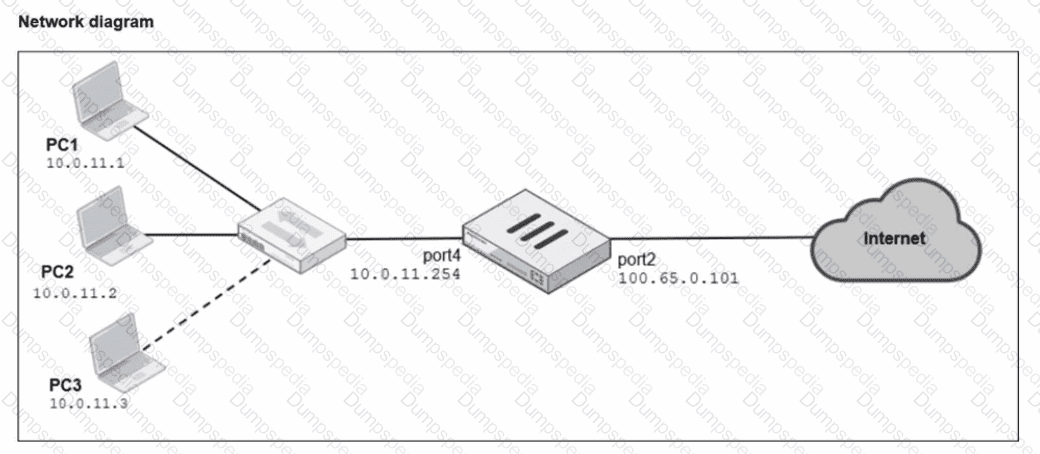
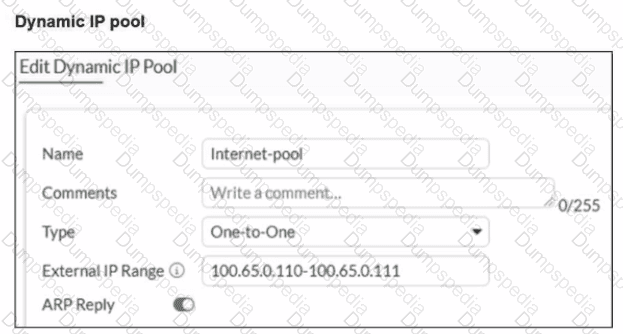
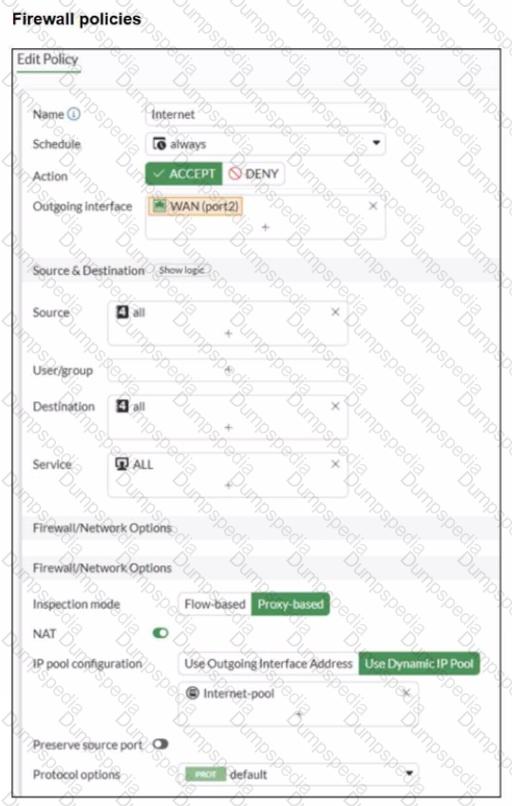
A diagram of a FortiGate device connected to the network, as well as the firewall policy and IP pool configuration on the FortiGate device are shown.
Two PCs. PC1 and PC2, are connected behind FortiGate and can access the internet successfully. However, when the administrator adds a third PC to the network (PC3), the PC cannot connect to the internet.
Based on the information shown in the exhibit, which two configuration options can the administrator use to fix the connectivity issue for PC3? (Choose two.)

In the system settings, set Multiple Interface Policies to enable.
in the IP pool configuration, set end ipto 100.65.0.112.
In the firewall policy, set match-vip to enable using CLI.
In the IP pool configuration, set type to overload.
From the exhibits:
The firewall policy has NAT enabled and is configured to Use Dynamic IP Pool.
The selected IP pool (Internet-pool) is configured as:
Type: One-to-One
External IP Range: 100.65.0.110–100.65.0.111 (only two public IPs)
PC1 and PC2 can access the internet because each one-to-one NAT mapping consumes one public IP from the pool. When PC3 is added, there is no third public IP available in the pool, so FortiGate cannot allocate a one-to-one mapping for PC3 and the session fails.
FortiOS behavior here is standard: with one-to-one IP pools, the available pool size limits how many distinct internal sources can be translated concurrently (depending on allocation and sessions), and a pool with only two IPs will not reliably support three separate hosts needing translations.
Therefore, the administrator can fix this in two valid ways:
B. In the IP pool configuration, set end ip to 100.65.0.112.
This expands the pool by adding an additional public IP address, making three public IPs available (.110, .111, .112), so PC3 can be assigned an address for one-to-one NAT.
D. In the IP pool configuration, set type to overload.
Changing the pool type to overload enables PAT (many-to-one), allowing multiple internal hosts (PC1, PC2, PC3) to share the pool address(es) using different source ports. This removes the “one public IP per internal host” limitation inherent to one-to-one pools.
Why the other options are not correct:
A. Multiple Interface Policies is unrelated to IP pool exhaustion and does not solve NAT allocation limits.
C. match-vip affects VIP matching behavior for destination NAT/virtual IP usage and does not address the source NAT pool shortage causing PC3 to fail.
Refer to the exhibits.

An administrator wants to add HQ-ISFW-2 in the Security Fabric. HQ-ISFW-2 is in the same subnet as HQ-ISFW. After configuring the Security Fabric settings on HQ-ISFW-2, the status stays Pending. What can be the two possible reasons? (Choose two answers)
Upstream FortiGate IP must be set to 10.0.11.254.
SAML Single Sign-On must be set to Manual.
HQ-ISFW-2 must be authorized on HQ-ISFW.
Management IP must be set to 10.0.13.254.
According to the FortiOS 7.6 Security Fabric documentation and Study Guide, several conditions must be met for a downstream FortiGate to successfully join a Security Fabric.
First, the Upstream FortiGate IP/FQDN configured on the downstream device must point to the IP address of the interface on the upstream device that is listening for fabric connections. In the provided logical topology, the Fabric Root (HQ-NGFW-1) uses port4 with the IP 10.0.11.254 to connect to the internal segmentation firewalls (ISFWs). Since HQ-ISFW-2 is in the same subnet as HQ-ISFW, it is physically and logically connected to the network segment serviced by port4. Therefore, the current configuration of 10.0.13.254 (which is port6, likely the WAN side) is incorrect, and it must be set to 10.0.11.254 (Statement A).
Second, once the downstream device successfully reaches the upstream device, it enters a Pending state. For security purposes, FortiOS does not allow devices to join the fabric automatically; the administrator of the upstream device (in this case, HQ-ISFW or the root) must manually authorize the new device (Statement C) in the Fabric Management console. Until this authorization is granted, the status will remain " Pending " and no fabric data will be synchronized. Statements B and D are incorrect as SAML settings do not block the initial fabric join, and the management IP should be the local device ' s IP, not the upstream ' s IP.
Which two statements are correct when the FortiGate device enters conserve mode? (Choose two.)
FortiGate refuses to accept configuration changes.
FortiGate halts complete system operation and requires a reboot to regain available resources.
FortiGate continues to transmit packets without IPS inspection when the fail-open global setting in IPS is enabled.
FortiGate continues to run critical security actions, such as quarantine.
Which two statements about the Security Fabric rating are true? (Choose two answers)
A license is required to obtain an executive summary in the Security Rating section.
The root FortiGate provides executive summaries of all the FortiGate devices in the Security Fabric.
The Security Posture category provides PCI compliance results.
Security Rating Insights are available only in the Security Rating page.
“The Security Rating page is separated into three major scorecards: Security Posture, Fabric Coverage, and Optimization, which provide an executive summary of the three largest areas of security focus in the Security Fabric .” ( Fortinet Document Library )
“On the root FortiGate , go to Security Fabric > Security Rating.” ( Fortinet Document Library )
“The Info and Compliance tab includes the security controls used for the test and links to specific FSBP, PCI, or CIS compliance policies .” ( Fortinet Document Library )
“A new Security Rating Insights feature provides immediate access to crucial security information. Hover over any tested object to reveal a tooltip...” and “Objects, such as firewall policies, with security rating recommendations are highlighted... click Security Rating Insights to display relevant issues.” ( Fortinet Document Library )
Technical Deep Dive:
The correct answers are B and C .
B is correct because Security Rating is viewed from the root FortiGate and its scorecards provide an executive summary for the Security Fabric, not just an isolated downstream unit. The root device is the point from which the Security Fabric summary is presented. ( Fortinet Document Library )
C is correct because the Security Rating results include an Info and Compliance view with references to PCI compliance policies. That means PCI-related compliance results are part of the Security Rating reporting associated with the security categories, including Security Posture. ( Fortinet Document Library )
Why the others are incorrect:
A is incorrect because Fortinet documents state there is a base set of free checks and a separate licensed set of checks. A license is not required just to obtain the executive summary view itself. ( Fortinet Document Library )
D is incorrect because Security Rating Insights are not limited to the Security Rating page. Fortinet documents show they also appear as tooltips and buttons on other GUI objects and pages . ( Fortinet Document Library )
Which three methods are used by the collector agent for AD polling? (Choose three answers)
NetAPI
WMI
WinSecLog
DNS reverse lookup
FSSO REST API
“As previously stated, collector agent-based polling mode has three methods (or options) for collecting login information. The order on the slide from left to right shows most recommend to least recommended:
• WMI ...
• WinSecLog ...
• NetAPI ...”
Technical Deep Dive:
The correct three AD polling methods are WMI, WinSecLog, and NetAPI . These are the collector-agent polling options FortiGate FSSO uses against Windows domain controllers. WMI is generally the most efficient because the DC returns requested login events directly. WinSecLog polls Windows Security Event Logs and is typically more reliable than NetAPI for not missing recorded logons. NetAPI can be faster, but it is more prone to missing events under load because it depends on temporary session information rather than persistent security logs.
Why the other options are wrong:
DNS reverse lookup is not one of the three AD polling methods. DNS is used by FSSO to resolve workstation names to IP addresses and to track IP changes, but it is not itself a polling method for collecting AD logon events. FSSO REST API is also not one of the documented collector-agent AD polling methods in the study guide.
From an operational standpoint, FSSO login collection and workstation verification are separate functions. The collector agent may still rely on DNS and workstation checks after a login is learned, but the actual AD polling methods remain only WMI, WinSecLog, and NetAPI . On a FortiGate, when troubleshooting FSSO behavior, you would typically validate the collector feed and user cache with commands such as:
diagnose debug authd fsso list
diagnose debug authd fsso server-status
Those commands help confirm whether the users gathered by the collector through one of those three polling methods are reaching FortiGate correctly.
Refer to the exhibit.

Based on the routing table shown in the exhibit, which two statements are true? (Choose two.)
A packet with the source IP address 10.0.13.10 arriving on port2 is allowed if strict RPF is disabled.
A packet with the source IP address 10.100.110.10 arriving on port2 is allowed if strict RPF is enabled.
A packet with the source IP address 10.100.110.10 arriving on port3 is allowed if strict RPF is disabled.
A packet with the source IP address 10.10.10.10 arriving on port2 is allowed if strict RPF is enabled.
Refer to the exhibit.

The predefined deep-inspection and custom-deep-inspection profiles exclude some web categories from SSL inspection, as shown in the exhibit For which two reasons are these web categories exempted? (Choose two.)
The resources utilization is optimized because these websites are in the trusted domain list on FortiGate.
The legal regulation aims to prioritize user privacy and protect sensitive information for these websites.
These websites are in an allowlist of reputable domain names maintained by FortiGuard.
The FortiGate temporary certificate denies the browser ' s access to websites that use HTTP Strict Transport Security.
“You may need to exempt traffic from SSL inspection if it is causing problems with traffic, or for legal reasons.”
“Performing SSL inspection on a site that is enabled with HTTP Strict Transport Security (HSTS), for example, can cause problems with traffic. Remember, the only way for FortiGate to inspect encrypted traffic is to intercept the certificate coming from the server and generate a temporary one. After FortiGate presents the temporary SSL certificate, browsers that use HSTS refuse to proceed.”
“Laws protecting privacy might be another reason to bypass SSL inspection. For example, in some countries, it is illegal to inspect SSL bank-related traffic. Configuring an exemption for sites is simpler than setting up firewall policies for each individual bank. You can exempt sites based on their web category, such as Finance and Banking...”
“The predefined deep-inspection and custom-deep-inspection profiles exclude some web categories—Finance and Banking, and Health and Wellness—and some FQDN addresses...”
Technical Deep Dive:
The correct answers are B and D .
B is correct because the study guide explicitly says SSL inspection may be bypassed for legal reasons , especially where privacy laws restrict inspection of sensitive categories such as Finance and Banking . The same privacy rationale also explains why Health and Wellness is commonly exempted.
D is correct because some sites break under deep inspection due to HSTS . FortiGate must generate and present a temporary certificate during full SSL inspection, and browsers enforcing HSTS can reject that interception flow. That is why some sites are exempted from deep inspection.
Why the others are wrong:
A is not stated in the guide.
C refers to the separate Reputable websites option, which is a FortiGuard-maintained allowlist feature, not the reason the predefined categories shown in the exhibit are excluded.
From an operational standpoint, this is a classic balance between security visibility and application/legal compatibility . Deep inspection gives FortiGate payload visibility, but it can interfere with pinned-certificate/HSTS behavior and can violate privacy policy for regulated content.
Refer to the exhibit.

FortiGate has two separate firewall policies for Sales and Engineering to access the same web server with the same security profiles.
Which action must the administrator perform to consolidate the two policies into one?
Select port1 and port2 subnets in a single firewall policy.
Create an Aggregate interface that includes port1 and port2 to create a single firewall policy.
Replace port1 and port2 with the any interface in a single firewall policy.
Enable Multiple Interface Policies to select port1 and port2 in the same firewall policy.
“By default, you can select only a single interface as the incoming interface and a single interface as the outgoing interface. This is because the option to select multiple interfaces, or any interface in a firewall policy, is disabled on the GUI. However, you can enable the Multiple Interface Policies option on the Feature Visibility page to disable the single interface restriction.”
“You can also specify multiple interfaces, or use the any option, if you configure a firewall policy on the CLI, regardless of the default GUI setting.”
Technical Deep Dive:
The correct answer is D .
The policies are identical except for the incoming interface : one is for Sales and one is for Engineering . FortiGate GUI policy creation normally restricts you to one incoming interface per policy. To consolidate both into a single GUI policy, the administrator must enable Multiple Interface Policies so both port1 and port2 can be selected in the same rule.
Why the others are wrong:
A is not enough, because policy matching also includes the incoming interface , not just the source subnets.
B changes the network design and is unnecessary.
C would work too broadly by matching traffic from any interface, which is not the intended controlled consolidation.
A matching CLI-style concept would be:
config firewall policy
edit < id >
set srcintf " port1 " " port2 "
set dstintf " < server-interface > "
set srcaddr " Sales_Subnet " " Engineering_Subnet "
set dstaddr " < web-server > "
set service " HTTP " " HTTPS "
set action accept
next
end
That preserves a single policy while still being specific about which interfaces are allowed.
Refer to the exhibit.

Which two ways can you view the log messages shown in the exhibit? (Choose two.)
By right clicking the implicit deny policy
Using the FortiGate CLI command diagnose log test
By filtering by policy universally unique identifier (UUID) and application name in the log entry
In the Forward Traffic section
The exhibit shows a FortiGate UTM application control log with fields such as:
type= " utm "
subtype= " app-ctrl "
action= " block "
policyid=1
appid=30220
appcat= " Video/Audio "
service= " HTTP "
apprisk= " elevated "
This is a forward traffic security log, generated by Application Control applied to a firewall policy.
Why the correct answers are C and D
C. By filtering by policy universally unique identifier (UUID) and application name in the log entry
Correct.
FortiOS logs can be viewed and filtered in:
Log & Report → Forward Traffic
Administrators can filter logs using fields such as:
Policy ID / Policy UUID
Application name (app)
Application ID (appid)
The log entry clearly includes application-related fields, making filtering by policy and application a valid and documented way to view these logs.
D. In the Forward Traffic section
Correct.
The log is a UTM Application Control log for traffic passing through a firewall policy.
Such logs are displayed under:
Log & Report → Forward Traffic
This is the standard and correct location to view application control, web filter, IPS, and other security profile logs related to user traffic.
Why the other options are incorrect
A. By right clicking the implicit deny policy
Incorrect.
Implicit deny policies do not generate UTM forward traffic logs like the one shown.
Application control logs are generated only by explicit firewall policies with security profiles enabled.
B. Using the FortiGate CLI command diagnose log test
Incorrect.
diagnose log test is used to test log connectivity and log settings, not to view historical log entries.
It does not display traffic or UTM logs.
Which two features of IPsec IKEv1 authentication are supported by FortiGate? (Choose two.)
No certificate is required on the remote peer when you set the certificate signature as the authentication method
Extended authentication (XAuth) for faster authentication because fewer packets are exchanged
Extended authentication (XAuth) to request the remote peer to provide a username and password
Pre-shared key and certificate signature as authentication methods
“Authentication-wise, both versions support PSK and certificate signature . Although only IKEv1 supports XAuth ...”
“Now, you will learn about the Authentication section in phase 1 configuration:
• Method: FortiGate supports two authentication methods: Pre-shared Key and Signature. When you select Pre-shared Key, you must configure both peers with the same pre-shared key. When you select Signature, phase 1 authentication is based on digital certificate signatures.”
“The purpose of phase 1 is to authenticate peers and set up a secure channel... To authenticate each other, the peers use two methods: pre-shared key or digital signature . You can also enable an additional authentication method, XAuth, to enhance authentication. ”
“A common use of the IPsec wizard is for configuring a remote access VPN for FortiClient users. The wizard enables IKE mode config, XAuth , and other appropriate settings for FortiClient users.”
Technical Deep Dive:
The correct answers are C and D .
D is correct because FortiGate supports the two primary IKEv1 authentication methods: pre-shared key and certificate signature . That is explicitly stated in the study guide.
C is also correct because FortiGate supports XAuth with IKEv1 as an additional authentication mechanism. In practice, XAuth is used to request extra user credentials such as a username and password , especially in remote-access VPN deployments such as FortiClient.
Why the other options are incorrect:
A is incorrect because when using Signature , certificate-based authentication is in use. The study guide states that digital signature validation depends on the relevant certificates and CA trust chain being present. It is not a certificate-free method.
B is incorrect because “fewer packets are exchanged” is a characteristic of aggressive mode , not XAuth. XAuth enhances authentication; it is not the feature that makes IKE negotiation faster.
So the two supported IKEv1 authentication features are:
Extended authentication (XAuth) to request the remote peer to provide a username and password
Pre-shared key and certificate signature as authentication methods
FortiGate is integrated with FortiAnalyzer and FortiManager.
When creating a firewall policy, which attribute must an administrator include to enhance functionality and enable log recording on FortiAnalyzer and FortiManager?
Universally Unique Identifier
Policy ID
Sequence ID
Log ID
In FortiOS 7.6, when FortiGate is integrated with FortiAnalyzer and FortiManager, firewall policies rely on a Universally Unique Identifier (UUID) to ensure proper policy tracking, synchronization, and log correlation across devices.
Why the UUID is required
Every firewall policy in FortiOS has a UUID.
FortiManager uses the UUID to:
Track policies across managed FortiGate devices
Maintain policy consistency during installs and revisions
FortiAnalyzer uses the UUID to:
Correlate logs accurately to the correct firewall policy
Preserve log association even if policy order or policy ID changes
Without a UUID:
Policy-to-log mapping can break
FortiManager cannot reliably manage or synchronize policies
FortiAnalyzer log analysis becomes inconsistent
This is explicitly documented in Fortinet administration and logging architecture references.
Why the other options are incorrect
B. Policy IDPolicy ID can change when policies are moved and is not reliable for long-term correlation across FortiManager and FortiAnalyzer.
C. Sequence IDSequence ID reflects GUI ordering only and has no role in log correlation.
D. Log IDLog ID is generated per log event, not per firewall policy.
Which three statements explain a flow-based antivirus profile? (Choose three answers)
FortiGate buffers the whole file but transmits to the client at the same time.
Flow-based inspection uses a hybrid of the scanning modes available in proxy-based inspection.
If a virus is detected, the last packet is delivered to the client.
Flow-based inspection optimizes performance compared to proxy-based inspection.
The IPS engine handles the process as a standalone.
According to the FortiOS 7.6 Study Guide and Parallel Path Processing documentation, flow-based antivirus inspection is designed to provide security with minimal impact on performance.
First, a defining characteristic of modern flow-based AV (specifically in its " hybrid " mode) is that FortiGate buffers the whole file but transmits to the client at the same time (Statement A). This behavior allows the client to start receiving data immediately to prevent session timeouts, while the FortiGate reassembles the file in memory to perform a signature check before the final packet is released.
Second, starting with recent FortiOS versions including 7.6, flow-based inspection uses a hybrid of the scanning modes (Statement B). Previously, flow mode offered " Quick " or " Full " scans; now, it combines these techniques to offer a balance between the speed of stream-based scanning and the thoroughness of archive inspection.
Third, the primary motivation for selecting this mode is that flow-based inspection optimizes performance compared to proxy-based inspection (Statement D). It processes traffic in a single pass using the IPS engine, avoiding the overhead associated with the WAD (proxy) process. Statement C is incorrect because if a virus is detected, the last packet is withheld and the connection is reset to prevent the file from being completed. Statement E is less accurate as the IPS engine loads the AV engine to perform the task rather than acting as a " standalone " entity in the context of file scanning.
Which two statements are correct when FortiGate enters conserve mode? (Choose two answers)
FortiGate continues to run critical security actions, such as quarantine.
FortiGate refuses to accept configuration changes.
FortiGate halts complete system operation and requires a reboot to regain available resources.
FortiGate continues to transmit packets without IPS inspection when the fail-open global setting in IPS is enabled.
According to the FortiOS 7.6 Study Guide and technical documentation, conserve mode is a protective state triggered when memory utilization reaches the Extreme Threshold (typically 95% by default). When this occurs, the FortiGate implements several measures to prioritize system stability over new functionality. One of the primary restrictions is that the FortiGate refuses to accept configuration changes (Statement B). This prevents the system from initiating new processes or allocating additional memory that could lead to a total system crash.
Regarding traffic handling, the behavior is determined by specific " fail-open " settings. For the IPS engine, if the fail-open global setting is enabled, the FortiGate continues to transmit packets without IPS inspection (Statement D). This ensures that network connectivity is maintained even when the system lacks the memory resources to perform deep packet inspection. In contrast, Statement A is incorrect because the system may skip non-essential actions to save memory. Statement C is incorrect because conserve mode is designed to avoid a system halt; the device remains operational and will automatically exit conserve mode once memory usage drops below the Release Threshold (typically 82%).
Which two statements are true about an HA cluster? (Choose two answers)
An HA cluster cannot have both in-band and out-of-band management interfaces at the same time.
Link failover triggers a failover if the administrator sets the interface down on the primary device.
When sniffing the heartbeat interface, the administrator must see the IP address 169.254.0.2.
HA incremental synchronization includes FIB entries and IPsec SAs.
According to FortiOS 7.6 High Availability documentation, the FortiGate Cluster Protocol (FGCP) provides robust mechanisms for both link monitoring and stateful data synchronization. Link failover is a primary trigger for cluster renegotiation; if a monitored interface goes down—including when an administrator manually sets the interface to administratively down —the primary unit ' s priority is effectively reduced, triggering a failover to a secondary unit to ensure path continuity. 5 This is a standard method for testing HA failover behavior.
Furthermore, to achieve a seamless stateful failover where active sessions are not dropped, the FortiGate performs incremental synchronization of critical runtime data. 6 This specifically includes Forwarding Information Base (FIB) entries, which represent the compiled routing table, and IPsec Security Associations (SAs) . 7 By synchronizing IPsec SAs, the secondary unit 8 can resume encrypted tunnels immediately after a failover without requiring a f 9 ull IKE re-negotiation. 10 Statement A is incorrect because in-band and out-of-band management can coexist using reserved management interfaces and management-ip settings. 11 Statement C is incorrect because while heartbeat interfaces use link-local IPs in the 169.254.0.x range, the specific IP .2 is not universally required for all heartbeats and depends on the number of cluster members and serial numbers.
TESTED 29 Jun 2026