dumpspedia logo

During the testing of a newly modeled infrastructure switch, the administrator is not seeing hosts as they connect or move from one port to another. What would cause this issue?
MAC notification traps are misconfigured.
Layer 3 polling is failing.
The default scheduled polling is disabled.
Contact polling is not configured.
The correct answer is A . When FortiNAC-F needs near real-time Layer 2 visibility, it relies on link traps, MAC notification traps, RADIUS, or scheduled/manual Layer 2 polling. The study guide explains that MAC notification traps contain the MAC address learned or removed from the switch MAC address table and the associated port, allowing FortiNAC-F to update its database when hosts connect, disconnect, or move. It also states that MAC notification traps are the preferred method for learning and updating Layer 2 information.
If a newly modeled switch does not show hosts as they connect or move between ports, the likely problem is that MAC notification traps are not correctly configured or not reaching FortiNAC-F . Layer 3 polling failure would affect IP-to-MAC correlation, not the ability to learn which switch port a MAC address is connected to. Disabled scheduled polling could delay updates, but it would not be the best explanation when the expected behavior is immediate host detection during connection or movement testing. Contact polling only checks whether the device is reachable; it does not collect host MAC-to-port visibility.
An administrator wants to control user access to corporate resources by integrating FortiNAC-F with FortiGate using firewall tags defined on FortiNAC-F.
Where would the administrator assign the firewall tag value that will be sent to FortiGate?
RADIUS group attribute
Logical network
Device profiling rule
Security rule
Questions no:9
Verified Answer: B
Comprehensive and Detailed 250 to 300 words each Explanation with Exact Matched Extract from FortiNAC-F Administrator library and documentation for current versions (including F 7.2, 7.4, and 7.6) documents:
In FortiNAC-F, the integration with FortiGate for Security Fabric and Single Sign-On (FSSO) allows the system to communicate the access level of an endpoint directly to the firewall usingfirewall tags. This eliminates the need for complex VLAN steering in some environments by allowing the FortiGate to apply policies based on these dynamic tags instead of just a physical or virtual network segment.
The actual assignment of the firewall tag value occurs within aLogical Network. In the FortiNAC-F architectural model, a Logical Network acts as a container for " Access Values " . When an administrator configures a Logical Network (located underNetwork > Logical Networks), they define what that network represents—such as " Corporate Access " or " Contractor Limited " . Within that definition, they assign the specificFirewall Tagthat matches the tag created on the FortiGate. Once a user or host matches aNetwork Access Policy, FortiNAC-F identifies the associated Logical Network and pushes the defined tag to the FortiGate via the FSSO connector.
It is important to note that whileNetwork Access Policies(and by extensionSecurity Rules) are the logic engines thattriggerthe assignment, they do not hold the tag value itself. They simply point to a Logical Network, which serves as the central repository for that specific access configuration.
" To assign firewall tags, navigate toNetwork > Logical Networks. Select the desired logical network and clickEdit. Under theAccess Valuesection, selectFirewall Tagas the type and enter the tag name exactly as it appears on the FortiGate. When a Network Access Policy matches a host, FortiNAC sends this tag to the FortiGate as an FSSO message. " —FortiNAC-F Administration Guide: Logical Networks and Security Fabric Integration.
Refer to the exhibit.
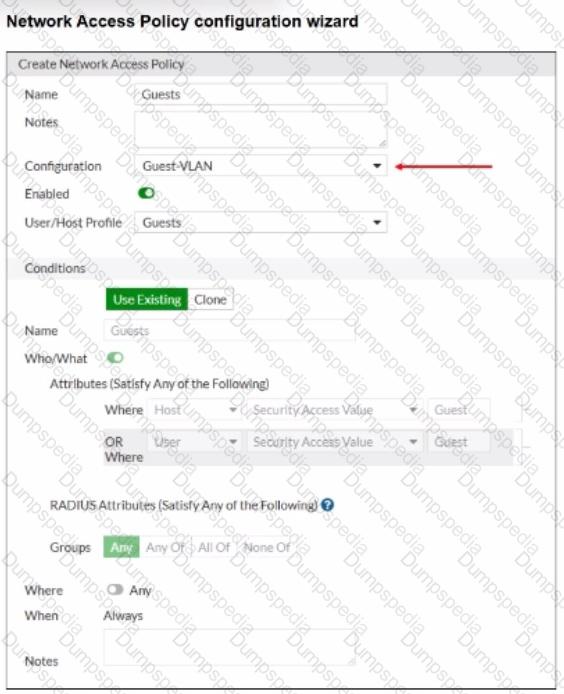
When configuring guest access using a network access policy, where would an administrator configure the Guest-VLAN value?
In the Model configuration
In the Guest template
In the User/Host profile
in the Guest portal configuration
The correct answer is A . In the exhibit, Guest-VLAN is selected as the network access policy Configuration . That policy configuration points to a logical network, but the actual access value for that logical network is not defined inside the guest template, user/host profile, or guest portal. The FortiNAC-F study guide explains that logical networks translate policy-level names into device-specific access values, and those values are configured in the Model Configuration of the infrastructure device. It specifically states that device-specific configurations for infrastructure devices associate the configuration values with the devices, and that after a logical network is created, it appears within the model configuration of each modeled infrastructure device.
So, Guest-VLAN is the logical network selected by the network access policy, while the actual VLAN ID, VLAN name, SSID role, controller group, or vendor-specific access value is configured under the relevant switch, AP, controller, or firewall Model Configuration . Option B is wrong because the guest template defines guest account properties such as role, security/access value, password settings, account duration, and login availability. Option C is wrong because the user/host profile defines the matching condition for guests. Option D is wrong because the guest portal controls onboarding or login behavior, not the infrastructure access value used to provision the endpoint.
An administrator wants to create a conference manager administrator account but would like to limit the number of conference accounts that can be generated to 30.
Which statement about conference accounts is true?
In FortiNAC-F, conference accounts can be limited by multiples of 25, so the conference administrator could create 50 accounts.
The administrator can set a maximum of 30 conference accounts in the administrative profile for the conference manager.
The conference account limit is defined in the onboarding conference portal.
Conference account limits are defined in the conference guest and contractor template.
In FortiNAC-F, theConference Manageris a specialized administrative role designed for delegated administration, often used by receptionists or event organizers to create temporary guest accounts. To maintain security and prevent the over-provisioning of credentials, FortiNAC-F allows for granular restrictions on these accounts.
According to theFortiNAC-F Administration GuideregardingAdministrative Profiles, when an administrator creates a profile for a Conference Manager, they can define specific " Account Limits. " Under the profile settings (located inSystem > Settings > Admin Profiles), there is a field specifically for " Max Accounts. " By entering " 30 " into this field, the administrator ensures that any user assigned to this profile cannot exceed 30 active conference accounts at any given time.
This setting is distinct from the Portal configuration or the Guest templates. While templates define thetypeof account (e.g., duration and access level), theAdministrative Profiledefines thecapabilities and limitationsof the person creating those accounts. This ensures that even if a guest template allows for unlimited registrations, the specific administrator is physically restricted by the system from generating more than the allotted 30.
" Administrative Profiles define what an administrator can see and do within the system. For delegated administration roles like the Conference Manager, the ' Max Accounts ' field in the Administrative Profile is used to specify the maximum number of accounts the user is permitted to create. Once this limit is reached, the user will be unable to generate additional accounts until existing ones expire or are deleted. " —FortiNAC-F Administration Guide: Administrative Profiles and Delegated Administration.
As part of a company policy, all end stations must be scanned for compliance each day. The security administrators want to satisfy this requirement without any necessary interaction from the end user. Which two agents can provide that functionality? (Choose two.)
Dissolvable
Persistent
Passive
Mobile
The correct answers are B and C . The persistent agent is the strongest fit because it is installed and stays resident on the endpoint. The study guide states that after deployment, the persistent agent communicates back to FortiNAC-F every 15 minutes and performs scheduled scans in the background, transparent to the end user. That directly satisfies the requirement for recurring compliance scans without user involvement.
The passive agent can also scan Windows domain end stations without end-user interaction. The guide states that the passive agent is deployed through login/logoff scripts and administrative templates, and that passive agent registration can register and scan hosts associated with LDAP or Active Directory users. If enabled, the passive agent scans the host to verify compliance with the appropriate endpoint policy.
Option A is wrong because the dissolvable agent is a run-once agent that requires manual end-user interaction in the captive portal, then removes itself after reporting results. Option D is not the best answer for this requirement because the mobile agent is specifically for Android onboarding and is manually installed; it is not the general solution for daily compliance scanning of all end stations.
Which two actions must the administrator perform to allow FortiNAC-F to process incoming syslog messages from an unknown vendor? (Choose two.)
The device must have an event parser created for it.
The device sending the messages must be modeled in the Network Inventory view.
The device must be added as a server in the Host view.
The device must be added as a log receiver in FortiNAC-F.
The correct answers are A and B . For FortiNAC-F to process syslog messages from a vendor that is not already known, it needs a parser so it can understand the message structure. The study guide describes this under syslog integration: syslog files must be created, and FortiNAC-F parses CSV, CEF, or tag/value messages by using column mapping or tag-to-value mapping. That parser is what allows FortiNAC-F to extract the correct event information from the incoming message.
The sending device must also be modeled in the Inventory view, normally as a pingable device, and its Incoming Events setting must be set to Syslog with the appropriate parser selected. The guide is blunt on this point: FortiNAC-F does not process syslog or trap messages unless the source address belongs to a modeled device.
Option C is wrong because adding the device as a server in the Host view does not prepare FortiNAC-F to parse syslog input. Option D is also wrong because log receivers are for sending FortiNAC-F event or alarm information out to external systems such as FortiAnalyzer, SIEM, or a syslog server, not for receiving and parsing unknown-vendor syslog messages.
What must an administrator configure to allow FortiNAC-F to process incoming syslog messages that are not supported by default?
A Syslog Service Connector
A Security Action
A Security Event Parser
A Log Receiver
FortiNAC-F provides a robust engine for processing security notifications from third-party devices. For standard integrations, such as FortiGate or Check Point, the system comes pre-loaded with templates to interpret incoming data. However, when an administrator needs FortiNAC-F to process syslog messages from a vendor or device that is not supported by default, they must configure aSecurity Event Parser.
TheSecurity Event Parseracts as the translation layer. It uses regular expressions (Regex) or specific field mappings to identify key data points within a raw syslog string, such as the source IP address, the threat type, and the severity. Without a parser, FortiNAC-F may receive the syslog message but will be unable to " understand " its contents, meaning it cannot generate the necessarySecurity Eventrequired to trigger automated responses. Once a parser is created, the system can extract the host ' s IP address from the message, resolve it to a MAC address via L3 polling, and then apply the appropriate security rules. This allows for the integration of any security appliance capable of sending RFC-compliant syslog messages.
" FortiNAC parses the information based onpre-defined security event parsersstored in FortiNAC ' s database... If the incoming message format is not recognized, a newSecurity Event Parsermust be created to define how the system should extract data fields from the raw syslog message. This enables FortiNAC to generate a security event and take action based on the alarm configuration. " —FortiNAC-F Administration Guide: Security Event Parsers.
Refer to the exhibit.
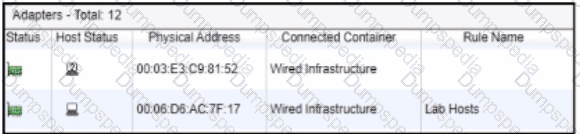
After a successful layer 2 poll, two hosts were learned on the same port The port is a member of the Role-Based Access and Forced Registration groups. The switch has been configured to leverage a single isolation VLAN.
How will FortiNAC-F manage this port?
The port will be provisioned to the isolation network
The port will be provisioned for the normal state host, but the second host will have access to only the isolation portal page.
The port will be provisioned as an uplink to a hub or unmanaged switch.
The port will be added to the Access Point Management group
The correct answer is A . The exhibit shows two adapters learned on the same wired port: one appears as a rogue/unknown host, and the other is associated with the Lab Hosts rule. The port is in both Role-Based Access and Forced Registration . FortiNAC-F state-based control takes precedence over policy-based provisioning, and the study guide states that when a rogue host connects to a port in the Forced Registration group, FortiNAC-F isolates that host by moving it into the registration captive network. The guide also explains that the Isolation network can be used as a single network for abnormal host states while still presenting state-specific portal pages.
Because this is a wired switch port using VLAN-based control, FortiNAC-F cannot put one host on the production VLAN and the other host on the isolation portal VLAN at the same time on the same access port. The VLAN change applies to the port, not independently to each MAC address behind that port. Therefore, the presence of the rogue host on a Forced Registration port causes the port to be provisioned to the isolation network. Option B is technically unrealistic for this access-port scenario. Option C is wrong because two MAC addresses alone do not make the port an uplink; FortiNAC-F uses uplink logic for infrastructure-device MACs, manually marked uplinks, or a threshold such as more than 20 MAC addresses. Option D is unrelated because Access Point Management is not triggered by learning two wired hosts on a port.
When configuring FortiNAC-F to manage FortiGate VPN users, an endpoint compliance policy must be created for the integration.
Why is the endpoint compliance policy necessary for this type of integration?
To designate the required agent type
To validate the VPN user credentials
To confirm the installed endpoint certificate
To validate the VPN client being used
The integration of FortiNAC-F withFortiGate VPNrequires a specific policy workflow to bridge the gap between initial user authentication and full network access. When a user connects to the VPN, the FortiGate typically provides the User ID and IP address, but FortiNAC-F requires aMAC addressto uniquely identify and manage the endpoint ' s record.
According to theFortiGate VPN Integration Guide, theEndpoint Compliance Policyis a mandatory component of this setup because it is used todesignate the required agent type. Because a VPN connection is Layer 3, FortiNAC cannot " see " the MAC address through traditional SNMP or L2 polling. The compliance policy instructs the system to present aCaptive Portalto the remote user, requiring them to download and run either thePersistentorDissolvable Agent. The agent then reports the device ' s MAC address back to FortiNAC, allowing the system to correlate the VPN session with a host record.
Once the agent is running and the MAC is known, FortiNAC-F can evaluate the device ' s security posture (if scanning is configured) and send the necessaryFSSO tagsback to the FortiGate to lift the initial network restrictions. Without the compliance policy to enforce the agent requirement, the connection would remain in an isolated " IP-only " state with no unique hardware identity.
" TheEndpoint Compliance Policyis necessary to control the agent requirement for VPN users. Create a default VPN Endpoint Compliance Policy todistribute an agentvia captive portal for isolated machines. This policy allows the administrator todesignate the required agent type(Persistent or Dissolvable) that will be used to collect the hardware (MAC) address and perform health scans on the remote endpoint. " —FortiNAC FortiGate VPN Integration Guide: Default Endpoint Compliance Policy (Optional) Section.
Refer to the exhibit.
A FortiNAC-F N+1 HA configuration is shown.
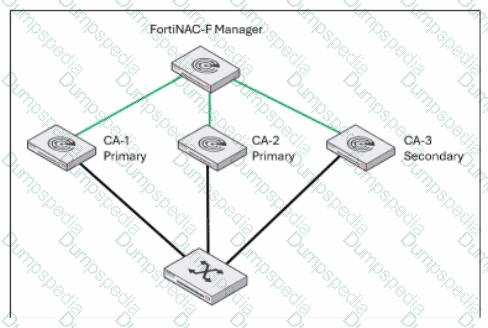
What will occur if CA-2 fails?
CA-1 and CA-3 will operate as a 1+1 HA cluster with CA-3 acting as a hot standby.
CA-3 will continue to operate as a secondary in an N+1 HA configuration.
CA-3 will be promoted to a primary and share management responsibilities with CA-1.
CA-3 will be promoted to a primary and FortiNAC-F manager will load balance between CA-1 and CA-3.
In anN+1 High Availability (HA)configuration, a single secondary Control and Application (CA) server provides backup for multiple primary CA servers. The FortiNAC-F Manager (FortiNAC-M) acts as the centralized orchestrator for this cluster, monitoring the health of all participating nodes.
According to theFortiNAC-F 7.6.0 N+1 Failover Reference Manual, when a primary CA (such asCA-2in the exhibit) fails, the secondary CA (CA-3) is automatically promoted by the Manager to take over the specific workload and database functions of that failed primary. Crucially, the documentation specifies that even after this promotion, the system architecture maintains its N+1 logic. The secondary CA effectively " assumes the identity " of the failed primary while continuing to operate within the N+1 framework established by the Manager.
It doesnotmerge with CA-1 to form a traditional 1+1 active/passive cluster (A), nor does it engage in load balancing (D), as FortiNAC-F HA is designed for redundancy and failover rather than active traffic distribution. Furthermore, CA-3 does not " share " management with CA-1 (C); it independently handles the tasks originally assigned to CA-2. Throughout this failover state, the Manager continues to oversee the group, and CA-3 remains the designated secondary unit currently acting in a primary capacity for the downed node until CA-2 is restored.
" In an N+1 Failover Group, theSecondary CAis designed to take over the functionality ofany single failed primary componentwithin the group. The FortiNAC Manager monitors the primaries and initiates the failover to the secondary... Once failover occurs, the secondary continues to operate as the backup unit for the failed primary while remaining part of the managed N+1 HA configuration. " —FortiNAC-F 7.6.0 N+1 Failover Reference Manual: Failover Behavior Section.
When configuring isolation networks in the configuration wizard, why does a layer 3 network typo allow for mora than ono DHCP scope for each isolation network typo?
The layer 3 network type allows for one scope for each possible host status.
Configuring more than one DHCP scope allows for DHCP server redundancy
There can be more than one isolation network of each type
Any scopes beyond the first scope are used if the initial scope runs out of IP addresses.
In FortiNAC-F, theLayer 3 Network typeis specifically designed for deployments where the isolation networks—such as Registration, Remediation, and Dead End—are separated from the FortiNAC appliance ' s service interface (port2) by one or more routers. This architecture is common in large, distributed enterprise environments where endpoints in different physical locations or branches must be isolated into subnets that are local to their respective network equipment.
The reason the Configuration Wizard allows for more than one DHCP scope for a single isolation network type (state) is thatthere can be more than one isolation network of each typeacross the infrastructure. For instance, if an organization has three different sites, each site might require its own unique Layer 3 registration subnet to ensure efficient routing and to accommodate local IP address management. By allowing multiple scopes for the " Registration " state, FortiNAC can provide the appropriate IP address, gateway, and DNS settings to a rogue host regardless of which site ' s registration VLAN it is placed into.
When an endpoint is isolated, the network infrastructure (via DHCP Relay/IP Helper) directs the DHCP request to the FortiNAC service interface. FortiNAC then identifies which scope to use based on the incoming request ' s gateway information. This flexibility ensures that the system is not limited to a single flat subnet for each isolation state, supporting a scalable, multi-routed network topology.
" Multiple scopes are allowed for each isolation state (Registration, Remediation, Dead End, VPN, Authentication, Isolation, and Access Point Management). Within these scopes, multiple ranges in the lease pool are also permitted... This configWizard option is used when Isolation Networks are separated from the FortiNAC Appliance ' s port2 interface by a router. " —FortiNAC-F Configuration Wizard Reference Manual: Layer 3 Network Section.
An administrator wants each department to create and manage its own contractor accounts but not be able to manage contractor accounts for other departments. What must the administrator configure to limit the sponsor ' s capabilities?
The contractor ' s template
The portal settings on the kiosk portal page
The user/host profile applied to the contractor
The sponsor ' s administrative profile
The correct answer is D . FortiNAC-F limits what a sponsor can create and manage through the administrator profile assigned to that sponsor. The study guide explains that sponsors can be restricted to specific guest or contractor templates and that the Manage Guests settings in the admin profile define whether the sponsor can manage all accounts, no accounts, or only accounts they created. It also states that allowed templates are defined in the admin profile, meaning each department can be given access only to its own contractor template.
The contractor template defines account fields, role values, authentication method, account duration, and related account properties, but it does not by itself restrict what a sponsor can manage. Portal settings control how users interact with the captive portal or kiosk page, not sponsor administrative scope. A user/host profile is used for matching users or hosts in policy decisions; it does not delegate sponsor permissions. For departmental separation, the administrator must create sponsor-specific administrative profiles that allow only the appropriate templates and account-management scope.
Refer to the exhibit.
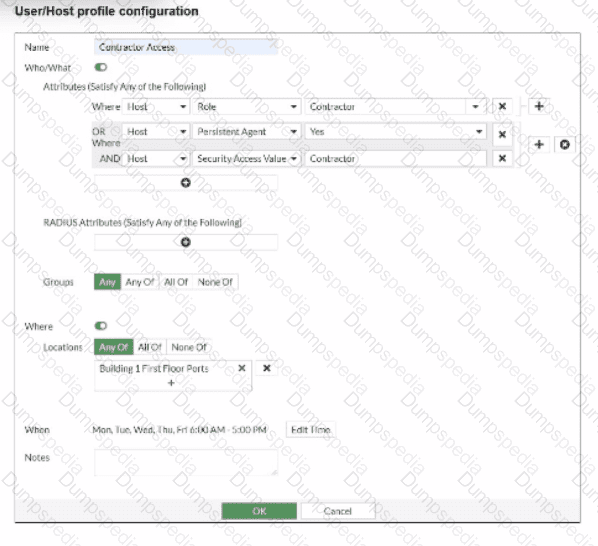
If a host is connected to a port in the Building 1 First Floor Ports group, what must also be true to match this user/host profile?
The host must have a role value of contractor, an installed persistent agent or a security access value of contractor, and be connected between 6 AM and 5 PM.
The host must have a role value of contractor or an installed persistent agent, a security access value of contractor, and be connected between 9 AM and 5 PM.
The host must have a role value of contractor or an installed persistent agent or a security access value of contractor, and be connected between 6 AM and 5 PM.
The host must have a role value of contractor or an installed persistent agent and a security access value of contractor, and be connected between 6 AM and 5 PM.
TheUser/Host Profilein FortiNAC-F is the fundamental logic engine used to categorize endpoints for policy assignment. As seen in the exhibit, the configuration uses a combination of Boolean logic operators (ORandAND) to define the " Who/What " attributes.
According to theFortiNAC-F Administrator Guide, attributes grouped together within the same bracket or connected by anORoperator require only one of those conditions to be met. In the exhibit, the first two attributes are " Host Role = Contractor " OR " Host Persistent Agent = Yes " . This forms a single logical block. This block is then joined to the third attribute ( " Host Security Access Value = Contractor " ) by anANDoperator. Consequently, a host must satisfyat least oneof the first two conditionsANDsatisfy the third condition to match the " Who/What " section.
Furthermore, the profile includesLocationandWhen(time) constraints. The exhibit shows the location is restricted to the " Building 1 First Floor Ports " group. The " When " schedule is explicitly set toMon-Fri 6:00 AM - 5:00 PM. For a profile to match,allenabled sections (Who/What, Locations, and When) must be satisfied simultaneously. Therefore, the host must meet the conditional contractor/agent criteria, possess the specific security access value, and connect during the defined 6 AM to 5 PM window.
" User/Host Profiles use a combination of attributes to identify a match. Attributes joined byORrequire any one to be true, while attributes joined byANDmust all be true. If aSchedule(When) is applied, the host must also connect within the specified timeframe for the profile to be considered a match. All criteria in the Who/What, Where, and When sections are cumulative. " —FortiNAC-F Administration Guide: User/Host Profile Configuration.
Which two requirements must be met to set up an N+1 HA cluster? (Choose two.)
A FortiNAC-F manager
A FortiNAC-F device designated as a secondary
A dedicated VLAN for primary and secondary synchronization
At least two FortiNAC-F devices designated as primary
TheN+1 High Availability (HA)architecture was introduced in FortiNAC-F version 7.6 to provide a more scalable and flexible redundancy model compared to the traditional 1+1 active/passive setup. In an N+1 configuration, a single secondary (standby) appliance can provide coverage for multiple primary (active) Control and Application (CA) appliances.
To set up an N+1 HA cluster, there are two fundamental structural requirements:
A FortiNAC-F Manager (FortiNAC-M):Unlike standard 1+1 HA, which can be configured directly between two CAs, N+1 management is centralized. The FortiNAC-M acts as the orchestrator that manages the failover groups, monitors the health of the primaries, and coordinates the promotion of the secondary server if a primary fails.
A FortiNAC-F device designated as a Secondary:The cluster must have one appliance explicitly configured with theSecondary failover role. This device remains in a standby state, receiving database replications from all N primaries in its group until it is called upon to take over the functions of a failed unit.
While a cluster can support multiple primaries (D), it does not strictly require " at least two " to function as an N+1 group; it simply requires N primaries (where N ≥ 1). Additionally, N+1 is typically a Layer 3 managed solution via the Manager, meaning it does not mandate a " dedicated VLAN " for synchronization like some Layer 2 HA deployments.
" In FortiNAC-F 7.6,FortiNAC-Mfunctions as a manager to manage the N+1 Failover Groups... enabling N+M high availability for CAs. To create an N+1 Failover group, you should add thesecondary CAto the FortiNAC-M first, then add the primary CAs. The secondary CA is designed to take over the functionality of any single failed primary component. " —FortiNAC-F 7.6.0 N+1 Failover Reference Manual.


TESTED 28 Sep 2026