dumpspedia logo

You want FortiGate to use SD-WAN rules to steer ping local-out traffic. Which two constraints should you consider? (Choose two.)
You must configure each local-out feature individually to use SD-WAN.
By default, FortiGate uses SD-WAN rules only for local-out traffic that corresponds to ping and traceroute.
You can steer local-out traffic only with SD-WAN rules that use the manual strategy.
By default, FortiGate uses SD-WAN rules only for local-out traffic that corresponds to ping and traceroute.
In theSD-WAN 7.6 Core Administratorcurriculum, steering "local-out" traffic (traffic generated by the FortiGate itself, such as DNS queries, FortiGuard updates, or diagnostic pings) requires specific configuration because this traffic follows a different path than "forward" traffic.
Individual Configuration (Option A): By default, local-out traffic bypasses the SD-WAN engine and uses the standard system routing table (RIB/FIB). To use SD-WAN rules for specific features like DNS or RADIUS, you must individually enable the sdwan interface-select-method within that feature's configuration (e.g., config system dns or config user radius).
Default Steerable Traffic (Option B): In FortiOS 7.6, while most local-out traffic is excluded from SD-WAN by default, the system is designed so that when SD-WAN is active, it primarily considers SD-WAN rules for specific diagnostic local-out traffic—specificallypingandtraceroute—to allow administrators to verify path quality using the same logic as user traffic.
Why other options are incorrect:
Option C: Local-out traffic can be steered using any SD-WAN strategy (Manual, Best Quality, etc.), provided the interface-selection-method is set to sdwan.
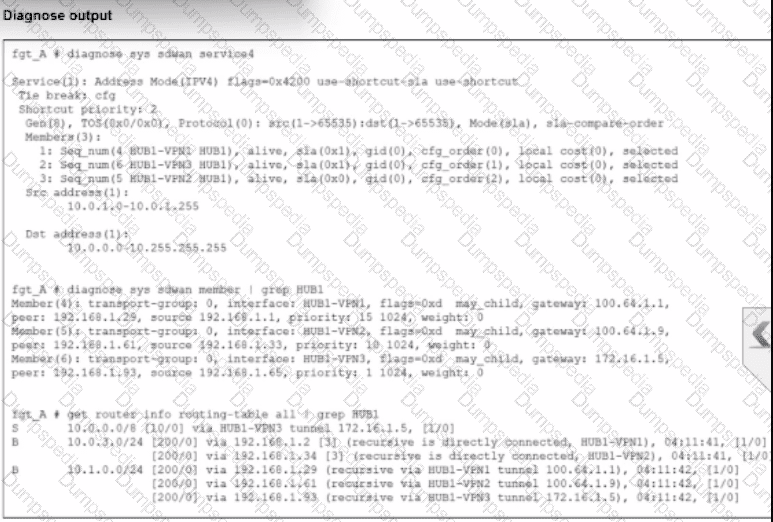
An administrator is troubleshooting SD-WAN on FortiGate. A device behind branch1_fgt generates traffic to the 10.0.0.0/8 network. The administrator expects the traffic to match SD-WAN rule ID 1 and be routed over HUB1-VPN1. However, the traffic is routed over HUB1-VPN3.
Based on the output shown in the exhibit, which two reasons, individually or together, could explain the observed behavior? (Choose two.)
HUB1-VPN1 does not have a valid route to the destination.
HUB1-VPN3 has a higher member configuration priority than HUB1-VPN1.
HUB1-VPN3 has a lower route priority value (higher priority) than HUB1-VPN1.
The traffic matches a regular policy route configured with HUB1-VPN3 as the outgoing device.
According to theSD-WAN 7.6 Core Administratorcurriculum and the diagnostic outputs shown in the exhibit, the reason traffic is steered toHUB1-VPN3instead of the expectedHUB1-VPN1(defined in SD-WAN rule ID 1) can be explained by two core routing principles in FortiOS:
Valid Route Requirement (Option A): In thediagnose sys sdwan service 4output (which corresponds to Rule ID 1), it shows the rule has membersHUB1-VPN1,HUB1-VPN2, andHUB1-VPN3. A key principle of SD-WAN steering is that for a member to be "selectable" by a rule, itmust have a valid route to the destinationin the routing table (RIB/FIB). If the routing table output (the third section of the exhibit) shows a route to 10.0.0.0/8 viaHUB1-VPN3butnotthroughHUB1-VPN1, the SD-WAN engine will skip HUB1-VPN1 entirely because it is considered a "non-reachable" path for that specific destination.
Policy Route Precedence (Option D): In the FortiOS route lookup hierarchy,Regular Policy Routes (PBR)are evaluatedbeforeSD-WAN rules. If an administrator has configured a traditional Policy Route (found underNetwork > Policy Routes) that matches traffic destined for 10.0.0.0/8 and specifiesHUB1-VPN3as the outgoing interface, the FortiGate will forward the packet based on that policy route and willnever evaluate the SD-WAN rulesfor that session. This "bypass" occurs regardless of whether the SD-WAN rule would have chosen a "better" link.
Why other options are incorrect:
Option B: While member configuration priority (cfg_order) is a tie-breaker in some strategies, the SD-WAN rule logic is only applied if the routing table allows it or if a higher-priority policy route doesn't intercept the traffic first.
Option C: Lower route priority (which means higher preference in the RIB) affects theImplicit Rule(standard routing). However, SD-WAN rules are designed tooverrideRIB priority for matching traffic. If HUB1-VPN1 was a valid candidate and no Policy Route existed, the SD-WAN rule would typically ignore RIB priority to enforce its own steering strategy.
How is the Geofencing feature used in FortiSASE? (Choose one answer)
To allow or block remote user connections to FortiSASE POPs from specific countries.
To restrict access to applications based on the time of day in specific countries.
To encrypt data at rest on mobile devices in specific countries.
To monitor user behavior on websites and block non-work-related content from specific countries
According to theFortiSASE 7.6 Administration Guideand theFCP - FortiSASE 24/25 Administratorstudy materials, theGeofencingfeature is a security measure implemented at the edge of the FortiSASE cloud to control ingress connectivity based on the physical location of the user.
Access Control by Location (Option A): Geofencing allows administrators toallow or block remote user connectionsto the FortiSASE Points of Presence (PoPs) based on the source country, region, or specific network infrastructure (e.g., AWS, Azure, GCP).
Scope of Application: This feature is universal across all SASE connectivity methods. It applies toAgent-based users(FortiClient),Agentless users(SWG/PAC file), andEdge devices(FortiExtender/FortiAP). If a user attempts to connect from a blacklisted country, the connection is dropped at the PoP level before the user can even attempt to authenticate.
Use Case Example: An organization operating exclusively in North America might configure geofencing toblock all connections originating from outside the US and Canada. This significantly reduces the attack surface by preventing brute-force or unauthorized access attempts from high-risk regions or countries where the organization has no legitimate employees.
Configuration Path: In the FortiSASE portal, this is managed underConfiguration > Geofencing. From there, administrators can create an "Allow" or "Deny" list and select the relevant countries from a standardized global database.
Why other options are incorrect:
Option B: While FortiSASE supportsTime-based schedulesfor firewall policies, geofencing is specifically an IP-to-Geography mapping tool for connection admission, not a time-of-day restriction tool.
Option C: Encryption of data at rest on mobile devices is a function of anMDM (Mobile Device Management)solution or local OS features (like FileVault or BitLocker), not a SASE network geofencing feature.
Option D: Monitoring web behavior and blocking non-work content is the role of theWeb FilterandApplication Controlprofiles, which operate on the trafficafterthe connection is allowed by geofencing.
Refer to the exhibit, which shows the SD-WAN rule status and configuration.
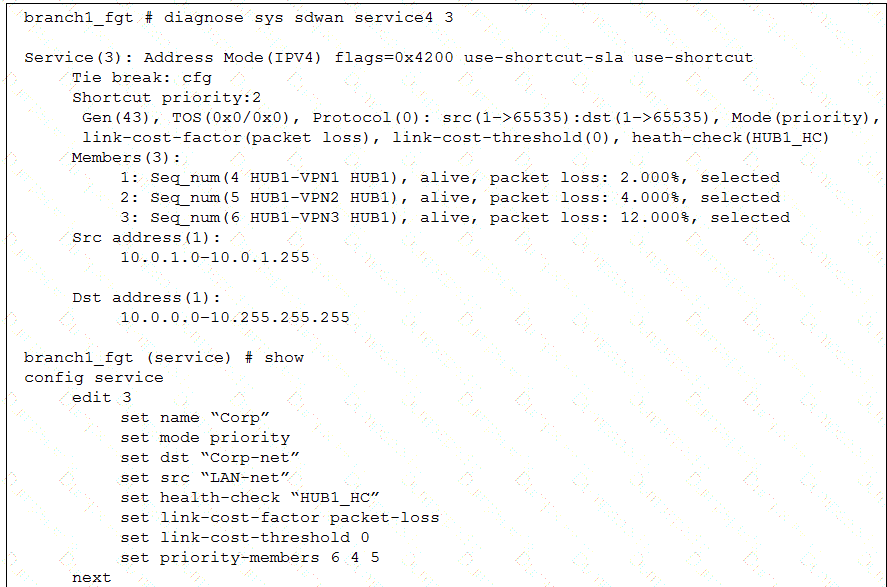
Based on the exhibit, which change in the measured packet loss will make HUB1-VPN3 the new preferred member? (Choose one answer)
When all three members have the same packet loss
When HUB1-VPN1 has 4% packet loss
When HUB1-VPN1 has 12% packet loss
When HUB1-VPN3 has 4% packet loss
According to theSD-WAN 7.6 Core Administratorstudy guide and theFortiOS 7.6 Administration Guide, the selection process for theBest Quality (priority)strategy depends on two primary factors: the measured link quality metric and the configured member priority order.
Based on the provided exhibit (image_b40dfc.png), we can determine the following:
Strategy and Metric: The rule is in Mode(priority) (Best Quality) using link-cost-factor(packet loss).
Strict Comparison: The link-cost-threshold is set to0. This means there is no "advantage" given to the current preferred link; the FortiGate performs a strict comparison where the link with the objectively best metric is chosen.
Tie-Breaker Logic: When multiple links have thesamepacket loss, the FortiGate uses theMember Priority Orderdefined in the rule (set priority-members 6 4 5) as the tie-breaker.
Member 6 (HUB1-VPN3)is the highest priority.
Member 4 (HUB1-VPN1)is the second priority.
Member 5 (HUB1-VPN2)is the lowest priority.
Current State: HUB1-VPN1 is currently selected because its packet loss (2.000%) is lower than HUB1-VPN2 (4.000%) and HUB1-VPN3 (12.000%). Even though HUB1-VPN3 has a higher configuration priority, its significantly higher packet loss prevents it from being chosen.
Evaluation of Options:
Option A (Verified): If all three members have thesame packet loss(e.g., they all show 2%), the quality metrics are equal. The SD-WAN engine then refers to the priority-members list. Since HUB1-VPN3 (Seq 6) is the first member in that list, it will immediately become the new preferred member.
Option B: If HUB1-VPN1 reaches 4%, it matches HUB1-VPN2 (4%). HUB1-VPN3 remains at 12%. The system will choose between VPN1 and VPN2. Since VPN1 (Seq 4) is higher in the priority list than VPN2 (Seq 5), HUB1-VPN1 stays preferred.
Option C: If HUB1-VPN1 reaches 12%, it matches HUB1-VPN3. However, HUB1-VPN2 is still better at4.000%. Therefore, HUB1-VPN2 would become the new preferred member, not HUB1-VPN3.
Option D: If HUB1-VPN3 drops to 4%, it matches HUB1-VPN2. However, HUB1-VPN1 is still the best link at2.000%, so it remains selected.
What is a key use case for FortiSASE Secure Internet Access (SIA) in an agentless deployment? (Choose one answer)
It provides secure web browsing by isolating browser sessions and enforcing data loss prevention for temporary employees.
It acts as a secure web gateway (SWG) distributing a PAC file for explicit web proxy use, securing HTTP and HTTPS traffic with a full security stack, and is ideal for unmanaged endpoints like contractors.
It distributes a PAC file to secure non-web traffic protocols and applies antivirus protection only for managed endpoints.
It requires FortiClient endpoints and supports ZTNA tags to secure all network traffic for unmanaged endpoints.
According to theFortiSASE 7.6 Administration Guideand theFCP - FortiSASE 24/25 Administratorcurriculum, the Agentless deployment mode—commonly referred to asSecure Web Gateway (SWG)mode—is a vital component of the Secure Internet Access (SIA) framework.
Deployment Mechanism: In an agentless deployment, FortiSASE functions as an explicit web proxy. This is achieved by distributing aPAC (Proxy Auto-Configuration) fileto the user's browser, which instructs the device to send its web traffic to the nearest FortiSASE Point of Presence (PoP).
Target Use Case: This mode is specifically designed forunmanaged endpoints, such as those used bycontractors, partners, or temporary workers, where the organization does not have the authority or capability to install the FortiClient agent.
Security Capabilities: Even without an agent, FortiSASE applies afull security stackto the redirected traffic. This includesWeb Filtering,Anti-Malware,SSL Inspection, andInline-CASBto secure HTTP and HTTPS sessions.
Protocol Limitations: Because it relies on proxy settings, this mode is limited to web protocols (HTTP/HTTPS) and does not inherently secure non-web traffic like ICMP, DNS, or custom TCP/UDP applications unless they are specifically proxied.
Why other options are incorrect:
Option A: While it provides secure browsing, session isolation (RBI) is a specific feature that can be used in either mode; the defining characteristic of the agentless use case is the proxy-based redirection for unmanaged devices.
Option C: A PAC file can only secure web traffic (protocols that support proxying), not non-web traffic protocols.
Option D: Agentless mode is the opposite of requiring FortiClient; ZTNA tags generally require the FortiClient agent to provide the necessary telemetry for tag evaluation.
Which three factors about SLA targets and SD-WAN rules should you consider when configuring SD-WAN rules? (Choose three answers)
When configuring an SD-WAN rule, you can select multiple SLA targets from different performance SLAs.
SLA targets are used only by SD-WAN rules that are configured with a Lowest Cost (SLA) strategy.
Member metrics are measured only if a rule uses the SLA target.
SD-WAN rules can use SLA targets to check whether the preferred members meet the SLA requirements.
When configuring an SD-WAN rule, you can select multiple SLA targets if they are from the same performance SLA.
According to theSD-WAN 7.6 Core Administratorstudy guide and theFortinet Document Library, the interaction between SD-WAN rules and SLA targets is governed by specific selection and measurement logic:
Usage by Strategy (Option B): SLA targets are fundamentally used by theLowest Cost (SLA)strategy to determine which links are currently healthy enough to be considered for traffic steering. While other strategies likeBest Qualityuse a "Measured SLA" to monitor metrics, they do not typically use the "Required SLA Target" to disqualify links unless specifically configured in a hybrid mode. In most curriculum contexts, the "Required SLA Target" field is specifically associated with the Lowest Cost and Maximize Bandwidth strategies.
SLA Compliance Checking (Option D): SD-WAN rules utilize SLA targets as a "pass/fail" gatekeeper. The engine checks if thepreferred membersmeet the defined SLA requirements (latency, jitter, or packet loss thresholds). If a preferred member fails the SLA, the rule will move to the next member in the priority list that does meet the SLA.
Single SLA Binding (Option E): When configuring an SD-WAN rule, the GUI and CLI allow you to selectmultiple SLA targets, but they must all belong to thesame Performance SLAprofile. You cannot mix and match targets from different health checks (e.g., Target 1 from "Google_HC" and Target 2 from "Amazon_HC") within a single SD-WAN rule.
Why other options are incorrect:
Option A: This is incorrect because a single SD-WAN rule can only be associated with one specific Performance SLA profile at a time; therefore, you cannot select targets fromdifferentSLAs.
Option C: This is incorrect because member metrics (latency, jitter, packet loss) are measured by thePerformance SLAprobes regardless of whether an SD-WAN rule is currently using that SLA target for steering decisions. Measurement is a function of the health-check, not the rule matching process.
Refer to the exhibit.
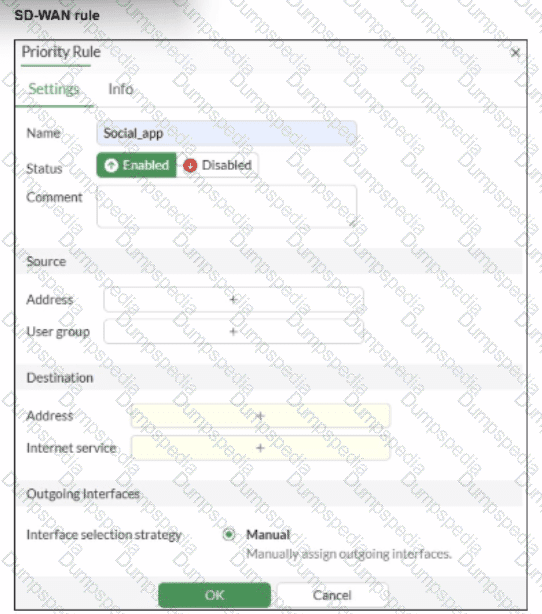
You configure SD-WAN on a standalone FortiGate device. You want to create an SD-WAN rule that steers traffic related to Facebook and LinkedIn through the less costly internet link. What must you do to set Facebook and LinkedIn applications as destinations from the GUI?
Install a license to allow applications as destinations of SD-WAN rules.
In the Internet service field, select Facebook and LinkedIn.
You cannot configure applications as destinations of an SD-WAN rule on a standalone FortiGate device.
Enable the visibility of the applications field as destinations of the SD-WAN rule.
According to theSD-WAN 7.6 Core Administratorcurriculum and theFortiOS 7.6 Administration Guide, setting common web-based services like Facebook and LinkedIn as destinations in an SD-WAN rule is primarily accomplished through theInternet Service Database (ISDB).
Internet Service vs. Application Control: In FortiOS, there is a distinction betweenInternet Services(which use a database of known IP addresses and ports to identify traffic at the first packet) andApplications(which require the IPS engine to inspect deeper into the packet flow to identify Layer 7 signatures).
SD-WAN Efficiency: Fortinet recommends using theInternet service fieldfor services like Facebook and LinkedIn in SD-WAN rules because it allows the FortiGate to steer the traffic immediately upon the first packet. If the "Application" signatures were used instead, the first session might be misrouted because the application is not identified until after the initial handshake.
GUI Configuration: As shown in the exhibit (image_b3a4c2.png), the "Destination" section of an SD-WAN rule includes anInternet servicefield by default. To steer Facebook and LinkedIn traffic, the administrator simply clicks the "+" icon in that field and selects the entries for Facebook and LinkedIn from the database.
Feature Visibility (Alternative): While youcanenable a specific "Application" field inSystem > Feature Visibility(by enabling "Application Detection Based SD-WAN"), this is typically used for less common applications that do not have dedicated ISDB entries. For the specific "applications" mentioned (Facebook and LinkedIn), they are natively available in theInternet servicefield, making Option B the most direct and common implementation.
Why other options are incorrect:
Option A: Licensing for application signatures is part of the standard FortiGuard services and is not a prerequisite specific only to "applications as destinations" in SD-WAN rules.
Option C: Standalone FortiGate devices fully support application-based and ISDB-based steering in SD-WAN rules.
Option D: While enabling feature visibility would add anadditionalfield for L7 applications, it is not a "must" for Facebook and LinkedIn, which are already accessible via the Internet Service field provided in the default GUI layout.


TESTED 28 Sep 2026