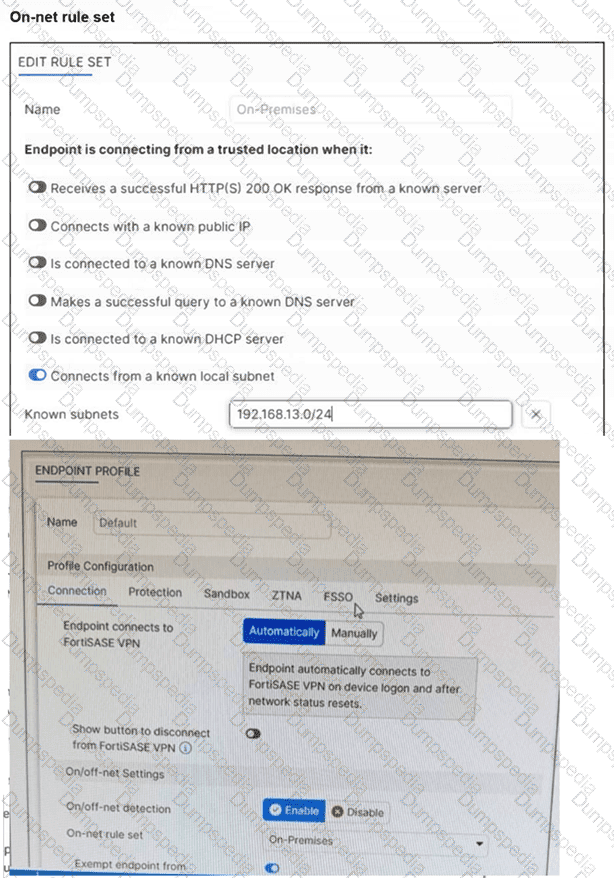
One user has reported connectivity issues; no other users have reported problems. Which tool can the administrator use to identify the problem? (Choose one answer)
Mobile device management (MDM) service to troubleshoot the connectivity issue.
Digital experience monitoring (DEM) to evaluate the performance metrics of the remote computer.
Forensics service to obtain detailed information about the user's remote computer performance.
SOC-as-a-Service (SOCaaS) to get information about the user's remote computer.
In a FortiSASE deployment, Digital Experience Monitoring (DEM) is the primary diagnostic tool used to troubleshoot connectivity and performance issues specifically for a single user or endpoint.
End-to-End Visibility: DEM provides real-time, end-to-end visibility into the network path between the end-user's device and the application they are trying to reach. This is critical when only one user reports an issue, as it allows administrators to pinpoint whether the problem resides on the local device, the local ISP, the SASE backbone, or the destination application.
Performance Metrics: The DEM agent (often integrated with the FortiMonitor agent on the endpoint) collects granular performance metrics such as latency, jitter, packet loss, and RTT (Round Trip Time). It also provides device-specific health data, including CPU and memory usage, to determine if the connectivity issue is actually caused by the remote computer's performance.
Hop-by-Hop Analysis: Unlike standard monitoring, DEM offers End-to-End Continuous Hop Analytics. This path monitoring visualizes every "hop" in the traffic route and highlights exactly where degraded service is occurring. For a single user experiencing issues while everyone else is fine, this tool immediately triangulates if a specific "problem hop" in their unique connection path is the cause.
Operational Comparison: * MDM (A) is used for managing device configurations and software distribution, not for real-time network performance troubleshooting.
Forensics (C) is a security-focused service used for investigating malware incidents or data breaches, not for measuring network latency.
SOCaaS (D) is a managed security service for threat monitoring and event triage; while it handles "security" connectivity issues (like a blocked IP), it is not a tool for performance metric evaluation.
What can be configured on FortiSASE as an additional layer of security for FortiClient registration? (Choose one answer)
Security posture tags
User verification
Device identification1
Application inventory
In a default FortiSASE deployment, endpoints are typically onboarded using a shared invitation code sent via email. While this code simplifies deployment, it can represent a security risk if the code is leaked or intercepted, as any device with the code could potentially register with the SASE management service.
User Verification (SAML SSO): To mitigate this risk, administrators can enable user verification as an additional layer of security.3 When this feature is enforced, entering the invitation code is no longer sufficient to complete registration.
Authentication Workflow: After the end user enters the invitation code in FortiClient, they are prompted to provide their corporate credentials via a SAML SSO login.5 FortiSASE acts as the Service Provider (SP), while an external identity provider (IdP) such as Microsoft Entra ID, Okta, or FortiAuthenticator verifies the user's identity.
Security Benefit: This ensures that only authenticated users—not just anyone with a valid code—can successfully register an endpoint and receive the organization's security and VPN profiles. It prevents unauthorized "shadow" endpoints from joining the managed environment.
Incorrect Options:
Option A: Security posture tags are used after registration to determine if an endpoint is compliant (e.g., checking if an antivirus is active); they do not secure the registration process itself.
Option C and D: Device identification and application inventory are monitoring and visibility features that occur once the endpoint is already managed.
Refer to the exhibit. Based on the configuration shown in image_595357.jpg, FortiSASE will process sessions requiring FortiSandbox inspection in the following two ways:
A. Only endpoints assigned a profile for sandbox detection will be processed by the sandbox feature.
C. All files executed on a USB drive will be sent to FortiSandbox for analysis.
Answer: A, C
The provided exhibit displays an Endpoint Profile configuration specifically for the Sandbox module. This profile controls how the FortiClient agent on remote endpoints interacts with the integrated FortiSASE cloud sandbox engine.
Profile Assignment (A): In the FortiSASE architecture, security and endpoint settings are organized into profiles that must be explicitly assigned to users or user groups via endpoint policies. Consequently, the sandbox detection and remediation features are active only on those endpoints that have been assigned this specific endpoint profile. If an endpoint is not assigned a profile with sandbox enabled, it will not submit files for analysis.
Removable Media Analysis (C): Under the File Submission Options, the toggle for All Files Executed from Removable Media is enabled (shown in blue). Since USB drives are the most common form of removable media, this configuration ensures that any file executed from a USB drive is intercepted by FortiClient and submitted to the FortiSASE sandbox for behavioral analysis before being allowed to run, protecting the endpoint from offline-delivered threats.
Understanding Verdict Levels (B): The exhibit shows the Action is set to Quarantine and the Sandbox Detection Verdict Level is set to Medium. This configuration functions as a threshold; FortiClient will quarantine any file that receives a verdict of Medium or higher (including High and Malicious). Option B is incorrect because it claims only medium-level files are quarantined, which ignores the high-risk and malicious files that would also be blocked.
Sandbox Mode (D): The Sandbox Mode is clearly set to FortiSASE, which utilizes the built-in cloud-native sandbox. This contradicts Option D, which suggests the use of an on-premises or standalone sandbox appliance.
Which secure internet access (SIA) use case minimizes individual workstation or device setup, because you do not need to install FortiClient on endpoints or configure explicit web proxy settings on web browser-based end points?
SIA for inline-CASB users
SIA for agentless remote users
SIA for SSLVPN remote users
SIA for site-based remote users
The Secure Internet Access (SIA) use case that minimizes individual workstation or device setup is SIA for agentless remote users. This use case does not require installing FortiClient on endpoints or configuring explicit web proxy settings on web browser-based endpoints, making it the simplest and most efficient deployment.
SIA for Agentless Remote Users:
Agentless deployment allows remote users to connect to the SIA service without needing to install any client software or configure browser settings.
This approach reduces the setup and maintenance overhead for both users and administrators.
Minimized Setup:
Without the need for FortiClient installation or explicit proxy configuration, the deployment is straightforward and quick.
Users can securely access the internet with minimal disruption and administrative effort.
Which three traffic flows are supported by FortiSASE Secure Private Access (SPA)? (Choose three answers)
From private resources to FortiSASE agent-based users.
From private resources to the internet.
From agent-based users to private resources behind the Fortinet SD-WAN.
From private resources to other private resources (SPA to SPA).
From thin branches/branch on-ramp to private resources behind the Fortinet SD-WAN.
FortiSASE Secure Private Access (SPA) provides flexible connectivity to internal corporate resources using a hub-and-spoke architecture where FortiSASE PoPs act as spokes to an organization's FortiGate hub.
Flow from Agent-based users to Private Resources (C): This is the core functionality of SPA. Remote users running FortiClient (agent-based) connect to the nearest FortiSASE PoP. The PoP, integrated into the corporate SD-WAN fabric, uses IPsec and BGP to route traffic to the private applications located behind the FortiGate hub or associated spokes.
Flow from Thin Branches/Branch On-ramp to Private Resources (E): FortiSASE extends its security and connectivity to physical locations through "Thin Edge" (e.g., FortiExtender, FortiAP) or "Branch On-ramp" (e.g., branch FortiGates). These sites form tunnels to the FortiSASE PoP, which then provides them with access to the same private resources in the SD-WAN network as the remote agent-based users.
Flow from Private Resources to Agent-based users (A): The SPA architecture is designed for bidirectional communication. Documentation confirms that traffic can be initiated from the FortiGate hub (or local networks behind it) to the remote VPN agents. This "Server-to-Client" flow is essential for administrative tasks, log forwarding, or real-time communication applications like VoIP.
Incorrect Options:
Option B: Traffic from private resources to the internet is handled via Secure Internet Access (SIA) or local gateway policies, not the SPA use case, which is dedicated to internal private application access.
Option D: While FortiSASE can facilitate branch-to-branch communication via ADVPN shortcuts, the term "SPA" specifically refers to the access layer for users and is not used to describe resource-to-resource or hub-to-hub traffic.
To complete their day-to-day operations, remote users require access to a TCP-based application that is hosted on a private web server. Which FortiSASE deployment use case provides the most efficient and secure method for meeting the remote users' requirements?
SD-WAN private access
inline-CASB
zero trust network access (ZTNA) private access
next generation firewall (NGFW)
Zero Trust Network Access (ZTNA) private access provides the most efficient and secure method for remote users to access a TCP-based application hosted on a private web server. ZTNA ensures that only authenticated and authorized users can access specific applications based on predefined policies, enhancing security and access control.
Zero Trust Network Access (ZTNA):
ZTNA operates on the principle of "never trust, always verify," continuously verifying user identity and device security posture before granting access.
It provides secure and granular access to specific applications, ensuring that remote users can securely access the TCP-based application hosted on the private web server.
Secure and Efficient Access:
ZTNA private access allows remote users to connect directly to the application without needing a full VPN tunnel, reducing latency and improving performance.
It ensures that only authorized users can access the application, providing robust security controls.
Which two components are part of onboarding a secure web gateway (SWG) endpoint? (Choose two)
FortiSASE CA certificate
proxy auto-configuration (PAC) file
FortiSASE invitation code
FortiClient installer
Onboarding a Secure Web Gateway (SWG) endpoint involves several components to ensure secure and effective integration with FortiSASE. Two key components are the FortiSASE CA certificate and the proxy auto-configuration (PAC) file.
FortiSASE CA Certificate:
The FortiSASE CA certificate is essential for establishing trust between the endpoint and the FortiSASE infrastructure.
It ensures that the endpoint can securely communicate with FortiSASE services and inspect SSL/TLS traffic.
Proxy Auto-Configuration (PAC) File:
The PAC file is used to configure the endpoint to direct web traffic through the FortiSASE proxy.
It provides instructions on how to route traffic, ensuring that all web requests are properly inspected and filtered by FortiSASE.
During FortiSASE provisioning, how many security points of presence (POPs) need to be configured by the FortiSASE administrator?
3
4
2
1
During FortiSASE provisioning, the FortiSASE administrator needs to configure at least one security point of presence (PoP). A single PoP is sufficient to get started with FortiSASE, providing the necessary security services and connectivity for users.
Security Point of Presence (PoP):
A PoP is a strategically located data center that provides security services such as secure web gateway, firewall, and VPN termination.
Configuring at least one PoP ensures that users can connect to FortiSASE and benefit from its security features.
Scalability:
While only one PoP is required to start, additional PoPs can be added as needed to enhance redundancy, load balancing, and performance.
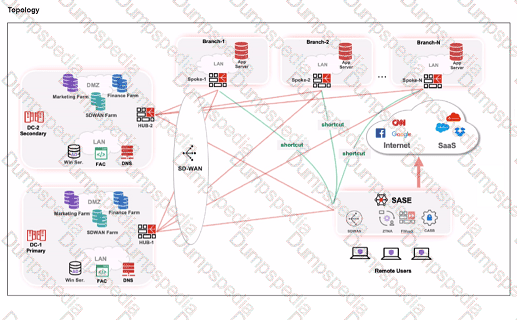
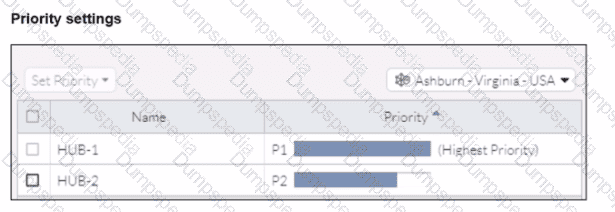
Refer to the exhibits.


When remote users connected to FortiSASE require access to internal resources on Branch-2. how will traffic be routed?
FortiSASE will use the SD-WAN capability and determine that traffic will be directed to HUB-2. which will then route traffic to Branch-2.
FortiSASE will use the AD VPN protocol and determine that traffic will be directed to Branch-2 directly, using a static route
FortiSASE will use the SD-WAN capability and determine that traffic will be directed to HUB-1, which will then route traffic to Branch-2.
FortiSASE will use the AD VPN protocol and determine that traffic will be directed to Branch-2 directly, using a dynamic route
When remote users connected to FortiSASE require access to internal resources on Branch-2, the following process occurs:
SD-WAN Capability:
FortiSASE leverages SD-WAN to optimize traffic routing based on performance metrics and priorities.
In the priority settings, HUB-1 is configured with the highest priority (P1), whereas HUB-2 has a lower priority (P2).
Traffic Routing Decision:
FortiSASE evaluates the available hubs (HUB-1 and HUB-2) and selects HUB-1 due to its highest priority setting.
Once the traffic reaches HUB-1, it is then routed to the appropriate branch based on internal routing policies.
Branch-2 Access:
Since HUB-1 has the highest priority, FortiSASE directs the traffic to HUB-1.
HUB-1 then routes the traffic to Branch-2, providing the remote users access to the internal resources.
When viewing the daily summary report generated by FortiSASE. the administrator notices that the report contains very little data. What is a possible explanation for this almost empty report?
Digital experience monitoring is not configured.
Log allowed traffic is set to Security Events for all policies.
The web filter security profile is not set to Monitor
There are no security profile group applied to all policies.
If the daily summary report generated by FortiSASE contains very little data, one possible explanation is that the "Log allowed traffic" setting is configured to log only "Security Events" for all policies. This configuration limits the amount of data logged, as it only includes security events and excludes normal allowed traffic.
Log Allowed Traffic Setting:
The "Log allowed traffic" setting determines which types of traffic are logged.
When set to "Security Events," only traffic that triggers a security event (such as a threat detection or policy violation) is logged.
Impact on Report Data:
If the log setting excludes regular allowed traffic, the amount of data captured and reported is significantly reduced.
This results in reports with minimal data, as only security-related events are included.
Refer to the exhibit.

Which type of information or actions are available to a FortiSASE administrator from the following output? (Choose one answer)
Administrators can view and configure endpoint profiles and ZTNA tags.
Administrators can view and configure automatic patching of endpoints, and first detected date for applications.
Administrators can view latest application version available and push updates to managed endpoints.
Administrators can view application details, such as vendor, version, and installation dates to identify unwanted or outdated software.
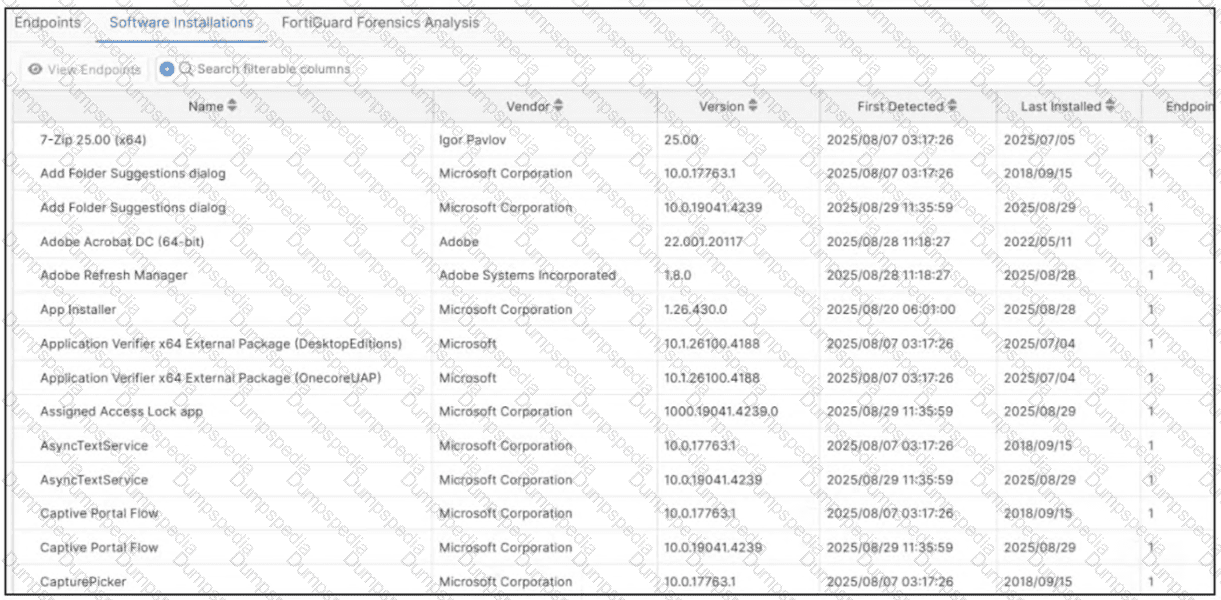
The provided exhibit (image_57e69d.jpg) displays the Software Installations dashboard within the FortiSASE portal. This dashboard is a key component of the endpoint visibility and management features provided by the integrated FortiClient EMS functionality.
Visible Metadata: The output provides a granular list of all software detected on managed endpoints, including the application Name, the Vendor (e.g., Igor Pavlov, Microsoft Corporation, Adobe), the specific Version currently installed, and critical timestamps such as First Detected and Last Installed.
Administrative Utility: This information allows an administrator to audit the software environment effectively. By reviewing these details, they can identify unwanted software (PUA), shadow IT, or outdated software versions that may possess known vulnerabilities.
Actions Available: While the primary view is informational, the presence of the View Endpoints button (visible in the top-left) allows administrators to pivot from a specific application to a list of all individual devices where that software is present, facilitating targeted remediation.
Analysis of Incorrect Options:
Option A: While FortiSASE manages profiles and tags, this specific "Software Installations" view is focused purely on software inventory.
Option B: Although the "First Detected" date is visible, FortiSASE does not support "automatic patching" of third-party software directly from this inventory screen.
Option C: The dashboard shows what is installed, not the "latest available" version in the market, nor does it provide a mechanism to "push updates" to these third-party applications.
A company must provide access to a web server through FortiSASE secure private access for contractors. What is the recommended method to provide access? (Choose one answer)
Configure a TCP access proxy forwarding rule and push it to the contractor FortiClient endpoint.
Publish the web server URL on a bookmark portal and share it with contractors.
Update the PAC file with the web server URL and share it with contractors.
Update the DNS records on the endpoint to access private applications.
When providing Secure Private Access (SPA) to external contractors who may not be using managed corporate devices, FortiSASE offers specific methods to ensure security while maintaining ease of use.
Bookmark Portal (Clientless Access): For web-based resources like a web server, the recommended and most efficient method for contractors is to use the ZTNA portal (bookmark portal). This allows for clientless access, meaning the contractor does not need to install the FortiClient agent or any specific software on their personal machine.
Workflow: The administrator publishes the web server URL as a bookmark within the FortiSASE portal. Contractors simply log into the secure SASE web portal via their browser, authenticate, and click the bookmark to access the internal server.
Security Benefits: This method leverages the FortiSASE ZTNA access proxy to mediate the connection. It ensures that the contractor is authenticated and that the traffic is inspected without exposing the internal network directly to the contractor's device.
Analysis of Incorrect Options:
Option A: TCP forwarding rules require the FortiClient agent to be installed and managed on the endpoint. Contractors often use unmanaged devices where installing agents is restricted or undesirable.
Option C: Updating a PAC (Proxy Auto-Configuration) file is part of a Secure Web Gateway (SWG) deployment for internet access, not for routing traffic to private internal web servers via an SPA hub.1
Option D: Manually updating DNS records on a contractor's endpoint is an unscalable, insecure, and administratively heavy task that does not provide the session-level security required by ZTNA.
An organization needs to resolve internal hostnames using its internal rather than public DNS servers for remotely connected endpoints. Which two components must be configured on FortiSASE to achieve this? (Choose two.)
SSL deep inspection
Split DNS rules
Split tunnelling destinations
DNS filter
To resolve internal hostnames using internal DNS servers for remotely connected endpoints, the following two components must be configured on FortiSASE:
Split DNS Rules:
Split DNS allows the configuration of specific DNS queries to be directed to internal DNS servers instead of public DNS servers.
This ensures that internal hostnames are resolved using the organization's internal DNS infrastructure, maintaining privacy and accuracy for internal network resources.
Split Tunneling Destinations:
Split tunneling allows specific traffic (such as DNS queries for internal domains) to be routed through the VPN tunnel while other traffic is sent directly to the internet.
By configuring split tunneling destinations, you can ensure that DNS queries for internal hostnames are directed through the VPN to the internal DNS servers.
A FortiSASE administrator is configuring a Secure Private Access (SPA) solution to share endpoint information with a corporate FortiGate.
Which three configuration actions will achieve this solution? (Choose three.)
Add the FortiGate IP address in the secure private access configuration on FortiSASE.
Use the FortiClient EMS cloud connector on the corporate FortiGate to connect to FortiSASE
Register FortiGate and FortiSASE under the same FortiCloud account.
Authorize the corporate FortiGate on FortiSASE as a ZTNA access proxy.
Apply the FortiSASE zero trust network access (ZTNA) license on the corporate FortiGate.
To configure a Secure Private Access (SPA) solution to share endpoint information between FortiSASE and a corporate FortiGate, you need to take the following steps:
Add the FortiGate IP address in the secure private access configuration on FortiSASE:
This step allows FortiSASE to recognize and establish a connection with the corporate FortiGate.
Use the FortiClient EMS cloud connector on the corporate FortiGate to connect to FortiSASE:
The EMS (Endpoint Management Server) cloud connector facilitates the integration between FortiClient endpoints and FortiSASE, enabling seamless sharing of endpoint information.
Register FortiGate and FortiSASE under the same FortiCloud account:
By registering both FortiGate and FortiSASE under the same FortiCloud account, you ensure centralized management and synchronization of configurations and policies.
When accessing the FortiSASE portal for the first time, an administrator must select data center locations for which three FortiSASE components? (Choose three.)
Endpoint management
Points of presence
SD-WAN hub
Logging
Authentication
When accessing the FortiSASE portal for the first time, an administrator must select data center locations for the following FortiSASE components:
Endpoint Management:
The data center location for endpoint management ensures that endpoint data and policies are managed and stored within the chosen geographical region.
Points of Presence (PoPs):
Points of Presence (PoPs) are the locations where FortiSASE services are delivered to users. Selecting PoP locations ensures optimal performance and connectivity for users based on their geographical distribution.
Logging:
The data center location for logging determines where log data is stored and managed. This is crucial for compliance and regulatory requirements, as well as for efficient log analysis and reporting.
Your organization is currently using FortiSASE for its cybersecurity. They have recently hired a contractor who will work from the HQ office and who needs temporary internet access in order to set up a web-based point of sale (POS) system. How can you provide secure internet access to the contractor using FortiSASE? (Choose one answer)
Use a proxy auto-configuration (PAC) file and provide secure web gateway (SWG) service as an explicit web proxy.
Use a tunnel policy with a contractors user group as the source on FortiSASE to provide internet access.
Use zero trust network access (ZTNA) and tag the client as an unmanaged endpoint.
Use the self-registration portal on FortiSASE to grant internet access.
In the FortiSASE architecture, there are two primary methods for delivering Secure Internet Access (SIA): Agent-based (using FortiClient) and Agentless (using Secure Web Gateway/SWG).
Use Case Analysis: The scenario describes a contractor—an unmanaged user—who requires temporary access for a web-based application (the POS system). For contractors or guests using personal/non-corporate devices where installing the FortiClient agent is either not feasible or not desired, FortiSASE provides the SIA Agentless deployment model.
Mechanism (SWG & PAC): In this mode, FortiSASE functions as an explicit web proxy. To steer the contractor's web traffic (HTTP/HTTPS) to the SASE cloud for inspection, the administrator provides the user with a proxy auto-configuration (PAC) file. The contractor simply configures their browser or operating system to point to the URL of this PAC file.
Security Enforcement: Once the PAC file is applied, all web traffic from the contractor's device is redirected to the FortiSASE SWG PoP. Here, the traffic is subject to the organization’s full security stack, including SSL deep inspection, Antivirus, Web Filtering, and Application Control, ensuring that even temporary contractor access is fully secured and logged.
Why other options are incorrect:
Option B (Tunnel Policy): This refers to agent-based access where a VPN tunnel is established. This requires FortiClient, which is generally not used for temporary contractors on unmanaged devices.
Option C (ZTNA Unmanaged): While ZTNA supports agentless access to private applications (SPA), providing internet access (SIA) to an unmanaged endpoint is specifically the role of the SWG/Proxy service.
Option D (Self-registration): While FortiSASE has a User Portal for onboarding, it is a method for user registration/credential management, not the technical traffic-steering mechanism used to provide internet connectivity.
According to the FortiSASE 25 Secure Internet Access Architecture Guide, the SWG (Agentless) approach is the recommended best practice for securing web-only traffic from unmanaged endpoints and third-party contractors.
Refer to the exhibit.

The daily report for application usage shows an unusually high number of unknown applications by category.
What are two possible explanations for this? (Choose two.)
Certificate inspection is not being used to scan application traffic.
The inline-CASB application control profile does not have application categories set to Monitor
Zero trust network access (ZTNA) tags are not being used to tag the correct users.
Deep inspection is not being used to scan traffic.
In FortiSASE, the accuracy of application usage reports depends on two primary factors: the ability to identify the application (visibility) and the configuration to log that data (reporting).
Deep Inspection Requirement (D): Modern applications frequently use encryption (SSL/TLS) and dynamic ports. Without Deep Inspection (SSL decryption), the FortiSASE security engine cannot see the application payload and is limited to inspecting headers or SNI. This results in many applications being identified only by their generic protocol (e.g., "SSL" or "HTTPS") and subsequently appearing as Unknown in reports because the specific Layer 7 application signature cannot be matched.
Application Control Monitor Setting (B): Even when an application is correctly identified, it must be properly logged to appear accurately in the "Daily report for application usage". In the inline-CASB (Application Control) profile, categories are assigned actions such as "Allow", "Block", or "Monitor". If categories are set to "Allow" instead of Monitor, the traffic is permitted but granular session details—including the specific application category—may not be logged for reporting purposes, causing them to be grouped into an "Unknown" or "Uncategorized" bucket in high-level summaries.
Analysis of Incorrect Options:
Option A: While certificate inspection provides more visibility than no inspection, it is still insufficient for many applications that require deep packet inspection for identification. Therefore, the lack of Deep inspection (Option D) is the more accurate technical explanation for "Unknown" results.
Option C: ZTNA tags are used for access control and posture-based policy enforcement; they do not impact the application identification engine's ability to categorize traffic flows.
You have configured FortiSASE Secure Private Access (SPA) deployment. Which statement is true about traffic flows? (Choose two answers)
When using SD-WAN private access, traffic goes from an endpoint directly to an SPA hub.
When using zero trust network access, traffic goes from an endpoint to a FortiSASE POP, and then to a ZTNA access proxy.
When using zero trust network access (ZTNA) traffic goes from an endpoint directly to a ZTNA access proxy.
When using SD-WAN private access, traffic goes from an endpoint to a FortiSASE POP, and then to an SPA hub.
FortiSASE Secure Private Access (SPA) offers two distinct architectural methods for connecting remote users to private applications: SD-WAN-based SPA and ZTNA-based SPA. Each utilizes a different traffic flow to balance security and performance requirements.
SD-WAN Private Access (Hub-and-Spoke): In this model, the FortiSASE Security Points of Presence (PoPs) act as spokes in a traditional hub-and-spoke VPN topology. When a remote user attempts to access a private network, the traffic is first steered to the closest FortiSASE PoP. The PoP then routes that traffic over a persistent IPsec tunnel to the corporate FortiGate hub (or SPA hub). This ensures that all traffic, regardless of protocol (TCP/UDP), can be inspected by the SASE security stack before entering the private network.
Zero Trust Network Access (ZTNA): Unlike the SD-WAN approach, ZTNA is designed for a "shortest path" connection. While FortiSASE manages the endpoint's posture and issues certificates, the actual application traffic (the data plane) bypasses the FortiSASE PoP. Instead, the FortiClient agent on the endpoint establishes a direct HTTPS or TCP-forwarding connection to the ZTNA Access Proxy configured on the corporate FortiGate. This significantly reduces latency and is ideal for high-performance TCP-based applications.
According to the FortiSASE 25 Secure Internet Access Architecture Guide, "In FortiSASE, ZTNA refers to traffic that is destined directly to private resources using the FortiGate ZTNA access proxy traffic flow," whereas for SD-WAN SPA, the PoPs "rely on IPsec overlays... to secure and route traffic between PoPs and the networks behind an organization’s SD-WAN hubs."
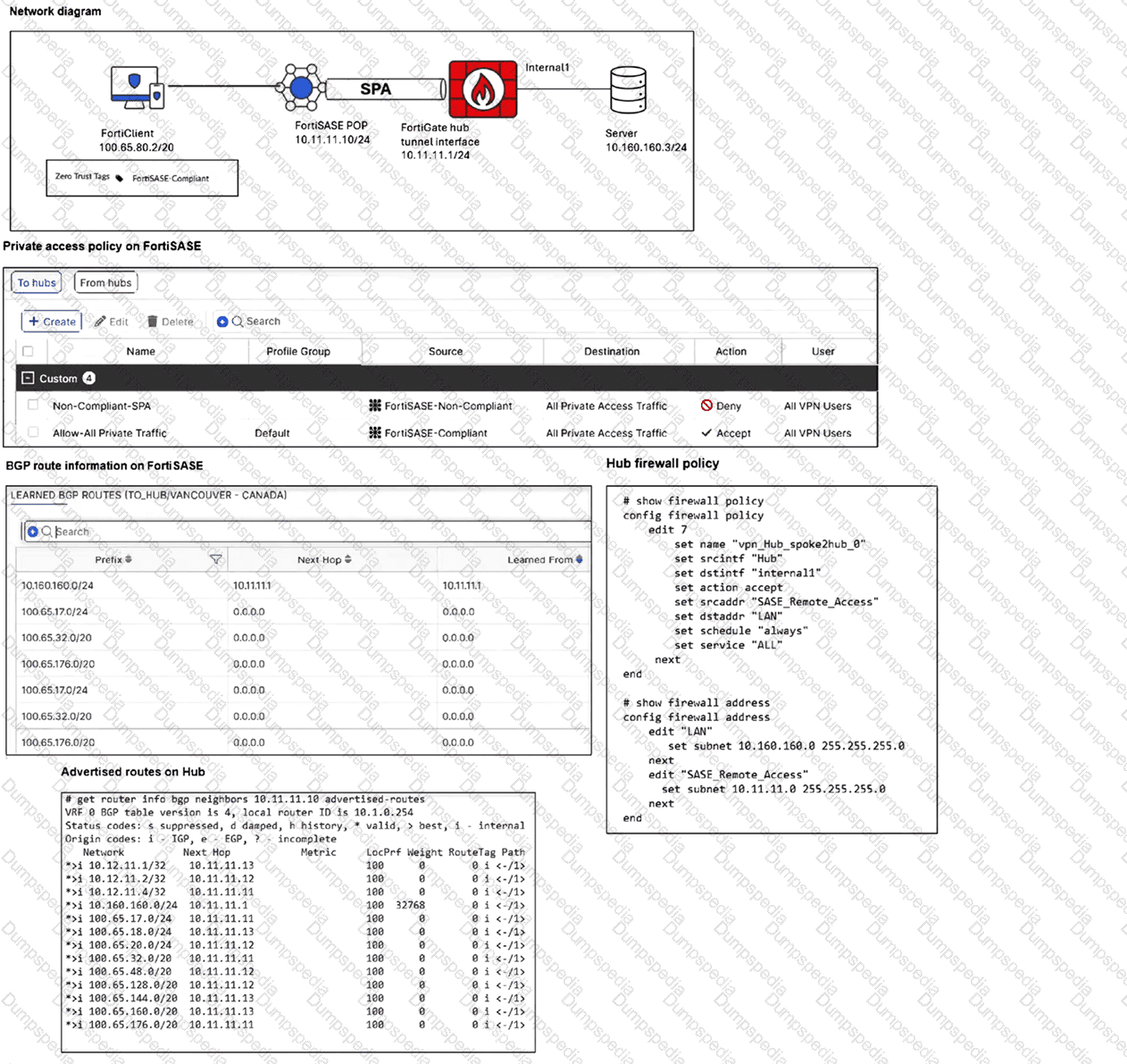
Refer to the exhibits.

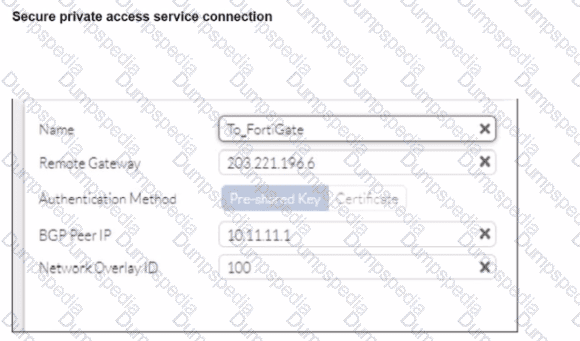
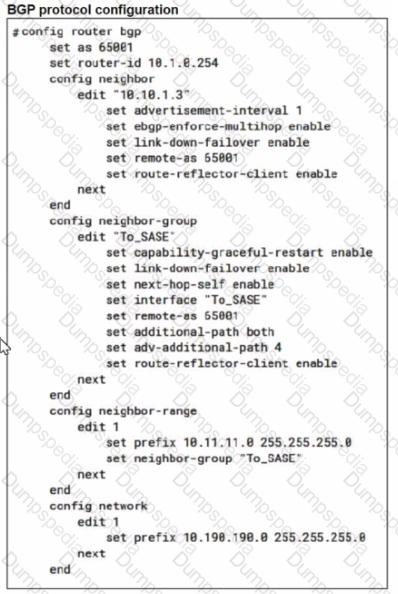
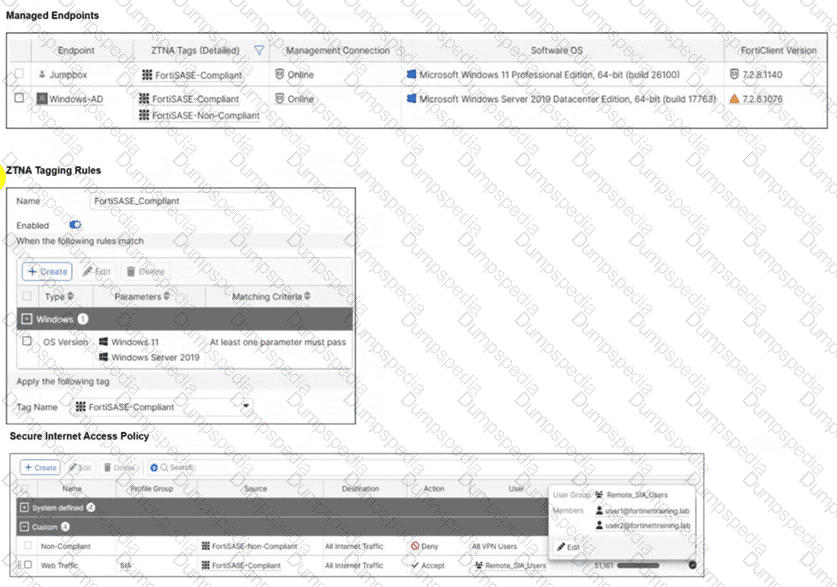
A FortiSASE administrator has configured FortiSASE as a spoke to a FortiGate hub. The tunnel is up to the FortiGate hub. However, the remote FortiClient is not able to access the web server hosted behind the FortiGate hub. What is the reason for the access failure? (Choose one answer)
The hub is not advertising the required routes.
A private access policy has denied the traffic because of failed compliance.
The hub firewall policy does not include the FortiClient address range.
The server subnet BGP route was not received on FortiSASE.
Based on the detailed analysis of the provided exhibits (image_65feb6.jpg), the connectivity failure is caused by a mismatch in the Hub firewall policy configuration.
Endpoint Analysis: The Network Diagram shows the FortiClient endpoint has an IP address of 100.65.80.2/20 and currently carries the FortiSASE-Compliant ZTNA tag.
FortiSASE Policy Validation: The Private access policy on FortiSASE shows an "Accept" rule for traffic originating from "FortiSASE-Compliant" sources destined for "All Private Access Traffic". This confirms the traffic is successfully leaving the FortiSASE PoP.
Routing Validation: The Learned BGP Routes on FortiSASE table shows the prefix 10.160.160.0/24 (the Server subnet) is correctly received via Next Hop 10.11.11.1. Routing is correctly established.
Hub Firewall Policy Error: Examining the Hub firewall policy (edit 7), the srcaddr is set to "SASE_Remote_Access". Looking at the address object definition for "SASE_Remote_Access," it is configured with the subnet 10.11.11.0 255.255.255.0.
The Conflict: The FortiClient's actual IP address (100.65.80.2) does not fall within the 10.11.11.0/24 range defined in the policy's source address. On a FortiGate hub, for traffic to be permitted through the tunnel to the internal server, the firewall policy must include the specific subnet assigned to the remote clients, not just the tunnel interface subnet. Because the FortiClient address range is missing from the hub's policy, the traffic is dropped at the hub.
When you configure FortiSASE Secure Private Access (SPA) with SD-WAN integration, you must establish a routing adjacency between FortiSASE and the FortiGate SD-WAN hub. Which routing protocol must you use?
BGP
IS-IS
OSPF
EIGRP
When configuring FortiSASE Secure Private Access (SPA) with SD-WAN integration, establishing a routing adjacency between FortiSASE and the FortiGate SD-WAN hub requires the use of the Border Gateway Protocol (BGP).
BGP (Border Gateway Protocol):
BGP is widely used for establishing routing adjacencies between different networks, particularly in SD-WAN environments.
It provides scalability and flexibility in managing dynamic routing between FortiSASE and the FortiGate SD-WAN hub.
Routing Adjacency:
BGP enables the exchange of routing information between FortiSASE and the FortiGate SD-WAN hub.
This ensures optimal routing paths and efficient traffic management across the hybrid network.
Refer to the exhibit.

A customer wants to fine-tune network assignments on FortiSASE, so they modified the IPAM configuration as shown in the exhibit. After this configuration, the customer started having connectivity problems and noticed that devices are using excluded ranges. What could be causing the unexpected behavior and connectivity problems? (Choose two answers)
The pool must include at least one /20 per security POP for the IPAM to work correctly.
The pool must include at least one /16 per Instance for the IPAM to work correctly.
The pool must include at least one /20 per Instance for the IPAM to work correctly.
The customer excluded too many networks from the pool.
IP Address Management (IPAM) in FortiSASE is responsible for automatically allocating subnets to various services, including VPN tunnels and Edge devices. When an administrator modifies the default IPAM configuration, they must adhere to specific architectural scaling requirements.
Subnet Requirements per PoP: FortiSASE architecture requires a minimum amount of address space to be available for each provisioned Security Point of Presence (PoP) to handle internal routing and endpoint assignments. For the IPAM engine to function correctly and distribute unique subnets across the global infrastructure, the pool must provide at least one /20 subnet per security PoP. If the available space is smaller than this per-PoP requirement, the allocation logic may fail or produce unpredictable routing behavior.
Impact of Excessive Exclusions: In the exhibit (image_578940.png), the customer has defined a large summary pool of 172.16.0.0/12. However, they have configured eight separate /15 excluded subnets: 172.16.0.0/15, 172.18.0.0/15, 172.20.0.0/15, 172.22.0.0/15, 172.24.0.0/15, 172.26.0.0/15, 172.28.0.0/15, and 172.30.0.0/15.
Calculating the Exhaustion: A /12 network contains exactly eight /15 blocks. By excluding all eight /15 ranges listed in the exhibit, the customer has effectively excluded 100% of the available addresses from the primary 172.16.0.0/12 pool.
Connectivity Problems: When the IPAM pool is exhausted or overly restricted, FortiSASE cannot assign valid, non-overlapping subnets to the PoPs. This leads to connectivity problems for remote users and can cause the system to "fall back" to ranges it believes are available, even if they were intended to be excluded, or simply fail to establish tunnels entirely.
To resolve this, the administrator must ensure that the excluded subnets do not consume the entire pool and that the remaining unexcluded space is large enough to provide a /20 block for every active PoP in their subscription.
Which information does FortiSASE use to bring network lockdown into effect on an endpoint? (Choose one answer)
Zero-day malware detection on endpoint
The number of critical vulnerabilities detected on the endpoint
The connection status of the tunnel to FortiSASE
The security posture of the endpoint based on ZTNA tags
The Network Lockdown feature in FortiSASE is a specialized security control designed to ensure that managed endpoints remain protected by the SASE security stack at all times.
Mechanism of Action: Network lockdown relies specifically on the connection status of the tunnel to FortiSASE. When this feature is enabled in the Endpoint Profile, the FortiClient agent monitors whether the secure VPN tunnel (SSL or IPsec) to a FortiSASE Point of Presence (PoP) is active.
Enforcement Logic: If the agent detects that the tunnel is disconnected, it immediately places the endpoint's network interface into a "locked" state. In this state, all inbound and outbound network traffic is blocked, with the exception of traffic required to re-establish the connection to the FortiSASE infrastructure.
Purpose: This prevents "leakage" where an endpoint might communicate directly with the internet without inspection if the VPN tunnel drops or is manually disabled by the user. It essentially mandates that the device is either connected to FortiSASE or has no network access at all.
Analysis of Incorrect Options:
Option A and B: While malware and vulnerabilities affect the security posture, they trigger different remediation actions (like quarantine or patching) rather than the "Network Lockdown" tunnel-state feature.
Option D: ZTNA tags identify the security posture to allow or deny access to specific applications, whereas Network Lockdown is a binary state (On/Off) affecting all network traffic based purely on tunnel connectivity.
TESTED 29 Jun 2026