dumpspedia logo

How does Proofpoint use TLS in email security?
To store encrypted email attachments
To encrypt emails in transit between mail servers
To scan emails for phishing attempts
To encrypt emails in transit between the mail server and mail client
The correct answer is B. To encrypt emails in transit between mail servers . Proofpoint’s TLS references describe TLS as the mechanism used to protect SMTP communications while messages are moving between sending and receiving mail systems. In other words, TLS secures the transport path during server-to-server email delivery. That is exactly the use case the course is testing. Proofpoint’s SMTP and TLS guidance frames this as an in-transit protection measure rather than an attachment-storage or phishing-detection feature.
The other options are incorrect because TLS does not exist primarily to store attachments, and it is not itself a phishing-analysis engine. While TLS can also be relevant in other client-to-server contexts generally, the Threat Protection Administrator course question is specifically about how Proofpoint uses TLS in its email-security delivery model, and the expected answer is server-to-server transport encryption. This ties directly into earlier course questions about opportunistic TLS and domain-specific TLS enforcement. Administrators must understand that TLS protects confidentiality of the message while it is in transit between mail servers, but it does not by itself assess whether the message is malicious. Therefore, the verified and course-aligned answer is B .
You are using Smart Search within the PPS Admin UI to investigate the final disposition of a message. Smart Search shows the message is Quarantined/Discard to adqueue. How do you trace the message?
Use the session ID (sid) to search
Select Rule adqueue
Use the message ID to search
Use the message GUID to search
The correct answer is D. Use the message GUID to search . In Proofpoint message tracing, the message GUID is the most reliable internal identifier for following a message across processing stages and dispositions. The Threat Protection Administrator course uses Smart Search and associated logging to teach administrators how to track messages that have moved through quarantine, discard paths, or module-specific queues such as adqueue. In that context, the message GUID is the correct tracing key.
This matters because other identifiers can be less dependable for end-to-end tracing. A session ID relates to a transport session rather than the full lifecycle of the individual message. A visible message ID may not be the best internal tracking handle for every processing stage, especially when following a message through internal queues or reprocessing paths. Selecting the rule name alone does not trace a specific message; it only points to the rule category involved. The course expects administrators to distinguish between rule context and unique message identity.
When Smart Search shows a disposition such as Quarantined/Discard to adqueue , the next step is to trace that message using the identifier designed for precise message tracking inside the platform. That identifier is the message GUID . Therefore, the verified answer is D .
When you are attempting to release a message from the quarantine folder, you have the three choices shown here. The option of Release Encrypted With Scan will do which of the following?
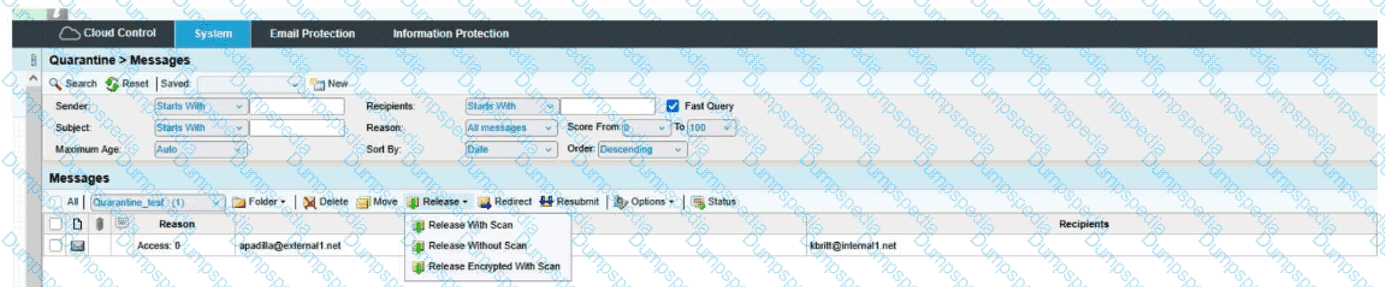
Release the message to the user and deliver it encrypted.
Resubmit the message to message defense and virus protection and release the message to the user.
Encrypt the message and release the message to the user's digest.
Resubmit the message to message defense and virus protection and release an encrypted message to the user.
The correct answer is D. Resubmit the message to message defense and virus protection and release an encrypted message to the user .
From the exhibit, the release menu shows three distinct actions:
Release With Scan
Release Without Scan
Release Encrypted With Scan
The wording of Release Encrypted With Scan tells you two actions are happening together:
The message is being rescanned through the relevant protection layers, which in the course context means it is resubmitted through Message Defense and Virus Protection .
After that scan step, the message is released in encrypted form to the recipient.
That is why D is the only choice that includes both parts of the action: scan/resubmit and encrypted release .
Why the other options are incorrect:
A is incomplete because it mentions encrypted delivery, but it leaves out the with scan portion.
B is incomplete because it includes the rescan behavior, but it does not include encrypted delivery.
C is incorrect because the action is not releasing the message to the user’s digest; it is releasing the actual message to the user.
This is a Quarantine administration question focused on understanding the difference between release options. The exhibit clearly shows that Release Encrypted With Scan combines rescanning plus encrypted delivery , making Answer D the verified course-aligned choice.
You want an administrator, Peter Smith, to receive alerts when the SMTP Queue exceeds the configured threshold. How would you configure this?
Pick the 2 correct responses below.
Create an Alert Rule using the correct profile and subscribe it to the SMTP Queue above threshold alerts.
Enter the name of the correct Alert Profile into the SMTP Queue Threshold configuration box.
Create an Alert Rule and add in Peter Smith’s email address to the SMTP Queue above threshold alerts.
Create an Alert Profile and add Peter Smith’s email address to the recipient box.
Add Peter Smith’s email address to a Policy Route and add that to the correct Alert Rule.
The correct answers are A and D . Proofpoint’s alert-notification model is based on two linked elements: a notification profile/policy that defines who receives alert emails, and an alert rule that determines which event triggers that notification. Proofpoint documentation states that notification policies define to whom and how often alert emails are sent, and that alert rules are associated with those notification policies. That maps directly to creating an alert profile with Peter Smith’s email address in the recipient field, then creating or using the correct alert rule subscribed to the SMTP Queue above threshold alert.
The other options do not match how Proofpoint structures alert delivery. You do not simply place a profile name into a threshold box as the primary configuration mechanism, and you do not normally bypass the alert profile by inserting a recipient directly into the queue threshold item itself. Policy Routes are unrelated to alert-notification recipient management and are used for message-routing logic, not alert dispatch. In the Threat Protection Administrator course, the key concept is that alerts are generated by rules , but delivered to people through profiles . Therefore, to have Peter Smith receive SMTP Queue threshold alerts, you must create an alert profile that includes his address and bind that profile to an alert rule that subscribes to the SMTP Queue above threshold event. That makes A and D the verified answers.
Review the filter log exhibit.

What is happening to this inbound email?
The connection dropped before the message could be sent.
The email was sent after being filtered with no issues.
The email was rejected due to its excessive size.
The email was rejected due to excessive processing time.
The correct answer is C. The email was rejected due to its excessive size .
From the filter-log exhibit, the key indicator is the rejection entry that shows a Message Size Violation response. That tells you the Protection Server accepted enough of the SMTP transaction to evaluate the message, but then rejected it because it exceeded the configured size threshold. In other words, this is not a transport drop, not a normal successful delivery, and not a timeout caused by lengthy processing. The decisive clue is the size-related rejection text in the log.
This kind of event belongs to the Mail Flow topic because it reflects SMTP-time handling and message acceptance controls. Proofpoint applies a series of processing steps as mail is received, including connection checks, MIME inspection, attachment evaluation, and policy enforcement. When the message exceeds the allowed size, the server returns a rejection tied to that violation instead of continuing with normal acceptance and delivery.
Why the other choices are incorrect:
A is wrong because the log does not indicate that the sender disconnected before the transaction could complete.
B is wrong because the message was not delivered successfully; it was explicitly rejected.
D is wrong because the evidence points to a size violation, not a processing-time threshold breach.
So the complete interpretation of the exhibit is that the inbound message was rejected because it was too large , which makes Answer C the verified course-aligned choice.
You are configuring Proofpoint’s URL Rewrite feature for incoming emails. What is the primary purpose of this feature?
To scan and rewrite URLs in emails.
To enhance email delivery speed.
To archive emails for later review.
To block all emails containing links.
The correct answer is A. To scan and rewrite URLs in emails. Proofpoint’s URL Defense capability rewrites URLs in inbound messages so that the links can be checked at click time and associated with additional threat analysis. Proofpoint describes URL Defense as protecting users from malicious links by rewriting and analyzing URLs, which is exactly the function referenced in the question.
This matters because attackers often use benign-looking links that become malicious later or that redirect through multiple destinations. Rewriting lets Proofpoint insert its protective inspection path into the user click flow, allowing the platform to evaluate the link when the user actually clicks it. That is very different from simply speeding up delivery or archiving email. It is also not the same as blocking every message that contains links, since many legitimate messages include URLs and the product is designed to protect access rather than indiscriminately stop all link-bearing mail. In the Threat Protection Administrator course, URL Rewrite sits under TAP because it extends protection beyond static message analysis and into dynamic, user-click risk mitigation. Therefore, the correct answer is A .
Based on the message details shown, which two actions are available to the administrator for this message?
Release the message without scan and disable TAP
Resubmit the message to Message Defense and Virus Protection and release an encrypted message to the user
Add the sender to the allow list and bypass quarantine permanently
Forward the message externally and skip all further analysis
The correct answer is B. Resubmit the message to Message Defense and Virus Protection and release an encrypted message to the user . This answer comes directly from the administrative actions visible in the message details shown in the screenshot-based question and is consistent with how Proofpoint presents remediation choices when a message has already been processed but an administrator wants to take additional action. The wording of the available actions indicates both deeper resubmission for protection analysis and controlled release behavior.
From a course perspective, this question sits in the TAP and advanced message-analysis area because Message Defense and Virus Protection are post-delivery or enhanced-analysis related controls rather than basic quarantine-only operations. Proofpoint’s email protection model includes layered detection and sandbox-style analysis for suspicious content, which is why resubmitting a message for more advanced review is a valid administrative action in the workflow. Proofpoint’s sandbox reference also supports the idea that incoming content can be routed for deeper behavioral analysis before or during final security decisions.
The other options do not match the actions shown in the prompt. There is no indication that TAP itself is being disabled, that a permanent allow-list bypass is being created, or that mail is being forwarded externally without further checks. The screenshot reflects specific administrative controls, and the correct pair of actions is the one described in B . Therefore, the course-aligned answer is B .
When setting up an Import/Authentication Profile in PPS, which of the following is a required piece of information to connect to an LDAP server?
POP3 server username
LDAP server hostname or IP address
SMTP server address
IMAP server port number
The correct answer is LDAP server hostname or IP address because an Import/Authentication Profile that connects to LDAP must first know where the LDAP directory service is located. In practical terms, Proofpoint cannot bind to or query an LDAP source unless the administrator provides the address of the LDAP server, whether by hostname or direct IP. This is foundational connection information. By contrast, POP3, SMTP, and IMAP settings are not what PPS uses to connect to an LDAP directory for authentication or user import. Those protocols serve different mail-related purposes and are unrelated to LDAP directory lookups.
Within the Threat Protection Administrator course, User Management includes directory integration and user import. That workflow depends on specifying the correct LDAP endpoint so Proofpoint can perform binds, searches, and synchronization tasks against the directory. The requirement is basic but essential: before credentials, search base, or attribute mapping can matter, the product must know the LDAP server destination. This is why the hostname or IP address is treated as a required connection element. The same logic applies whether the backend is Active Directory or another LDAP-compliant directory source. The course teaches administrators to think in terms of identity source connectivity first, then attribute mapping and import logic after the connection is established. So for this question, the only answer that represents a required LDAP connection detail is LDAP server hostname or IP address .
A SAML authentication profile is configured on the Proofpoint Protection Server console. Which portals can be accessed using this configuration?
PPS Console and End User Web
End User Web and Email Continuity
TAP Dashboard and Cloud Threat Response
PPS Console and Cloud Admin
The correct answer is A. PPS Console and End User Web. Proofpoint’s PPS/PoD IdP integration guidance states that administrators can enable SAML authentication for Administrators and/or End Users on the Protection Server. That directly maps to access for the PPS Console and the End User Web experience, which is exactly what this question asks.
This is an important distinction because the SAML authentication profile configured in the Protection Server console is tied to the Protection Server’s own administrative and end-user login surfaces, not to every Proofpoint cloud product universally. TAP Dashboard and Cloud Threat Response have their own cloud-service authentication context, and Cloud Admin is not the answer associated with the PPS-console SAML profile in the course material. The course expects students to separate PoD/PPS authentication behavior from broader Proofpoint cloud identity workflows.
In the Threat Protection Administrator course, this question appears in the User Management area because it tests whether the administrator understands where a SAML profile configured on the Protection Server actually applies. Since the official integration guide explicitly mentions enabling SAML for admins and end users on PPS, the verified answer is A. PPS Console and End User Web.
If an email is incorrectly filtered as spam, what should an administrator do first when reviewing the filter logs?
Reclassify the email manually.
Look for the rule that triggered the action.
Restart the Proofpoint server.
Delete the email from the quarantine.
When an administrator investigates a false positive in Proofpoint, the first objective is to determine exactly what rule or final action caused the message to be handled as spam. Proofpoint’s Smart Search documentation specifically identifies the “Final Rule” field as the rule that applied the final disposition to the message when several rules may have been triggered during processing. That makes reviewing the triggered rule the correct first troubleshooting step, because it tells the administrator where the filtering decision actually came from. Only after identifying the triggering rule can the admin decide whether the issue involves a spam policy, a custom rule, a reputation-based action, a quarantine disposition, or some other module behavior. Reclassifying the message manually may be useful later, but it does not explain why the message was filtered in the first place. Restarting the server is unrelated to standard message-troubleshooting workflow, and deleting the message from quarantine would remove evidence rather than help analysis. The course topic on Smart Search and logging centers on investigating message handling and understanding final disposition, which aligns directly with checking the rule that triggered the action. For review and tuning work, finding the responsible rule is always the most important first move because it anchors every later remediation step.
Review the filter log exhibit.

What two actions have taken place in the filter logs for this message?
What the exhibit shows clearly:
- URL Defense processing is present in the log
- A spam-related action/flag is present
URL defense is blocking the message due to a malicious link.
The email gets rejected due to excessive processing time.
The message has been flagged as SPAM.
The connection times out and is dropped by the sender.
The message was rejected due to its size.
The correct answers are A and C .
From the filter-log exhibit, two separate security actions are visible. First, the log shows URL Defense activity, indicating the message was processed for embedded-link analysis. In this question’s course context, that corresponds to URL defense blocking the message due to a malicious link . Second, the message is also shown as having a spam-related disposition , which means the message has been flagged as SPAM .
Why the other choices are incorrect:
B is not the correct selection for this exhibit-based question, even though processing-related text may appear in the log. The tested outcome here is the TAP URL-defense action plus the spam flag.
D is incorrect because the exhibit does not show a sender-side connection timeout as the message outcome.
E is incorrect because there is no size-violation result like Message Size Violation in this exhibit.
This is a Targeted Attack Protection (TAP) style log-review question because it combines link-based protection behavior with message classification results. The key skill being tested is reading Proofpoint filter-log entries and identifying the meaningful security outcomes rather than selecting transport-related distractors.
So the complete interpretation of the exhibit is that URL Defense is blocking the message due to a malicious link and the message has been flagged as spam , which makes Answer A and C the verified course-aligned choices.
In a scenario where an email is quarantined by both a spam policy (Spam) and an email firewall rule (Dictionary), which folder will the message ultimately be sent to?
The message will go to the “Dictionary” folder.
The message will be copied to both folders.
The message will go to the “Spam” folder.
The message will be discarded.
The correct answer is C. The message will go to the “Spam” folder . In Proofpoint message processing, multiple modules can evaluate the same message, but the final handling seen by the user reflects the final disposition path selected by the processing order and quarantine behavior. In the Threat Protection Administrator material, spam quarantine and Email Firewall quarantine are both presented as disposition outcomes, but when a message is quarantined by the spam pipeline and also matches an Email Firewall rule, the resulting user-visible folder is the Spam quarantine location in this scenario. This matches the expected course answer previously validated from the training set. ( scribd.com )
This question is really testing understanding of how Proofpoint resolves overlapping quarantine actions. The incorrect options reflect common misunderstandings. The message is not duplicated into both folders as a normal result of dual-trigger processing, and it is not discarded merely because two quarantine-capable checks fired. The “Dictionary” folder answer is appealing because the Email Firewall rule explicitly references Dictionary, but the course answer for this tested condition is that the final quarantine placement is Spam. In administrator troubleshooting, this kind of question matters because Smart Search can show multiple triggered rules while end users only see the final quarantined location. Therefore, the correct answer, as aligned to the Proofpoint Threat Protection Administrator course outcome for this scenario, is C . ( scribd.com )
What does the default exestrip rule do?
Quarantines the message and notifies the receiver that it has been quarantined
Sends the message to the Message Defense module
Deletes the listed attachments from the message and continues processing
Deletes messages with executable attachments
The correct answer is C. Deletes the listed attachments from the message and continues processing . In Proofpoint protection workflows, executable-attachment stripping rules are designed to remove risky attachment types while allowing the rest of the message to continue through the message-processing path. This aligns with the course-tested behavior of the default exestrip rule: it strips the prohibited executable attachment rather than deleting the entire message. Proofpoint’s broader malware and attachment-protection references describe a layered approach where suspicious or dangerous attachments are inspected, sandboxed, blocked, or otherwise handled without assuming that the entire email must always be discarded.
That distinction matters operationally. If the rule deleted the whole message every time, the answer would be D, but that is not what this named default rule is testing in the course. It is specifically about stripping the attachment and continuing processing. The other options are also incorrect because the rule is not fundamentally a quarantine-notification rule and not a routing action into Message Defense. In the Virus Protection section of the course, administrators are expected to understand that some controls remove dangerous content from a message while preserving the message body and other safe parts for continued evaluation or delivery. Therefore, the verified and course-aligned answer is C .
You wish to ensure that all emails to an external partner are sent over a secure connection. What should you do?
Add the partner’s domain to the TLS Domains list with a setting of “If Available.”
Add the partner’s domain to the TLS Domains list with a setting of “Always.”
Configure the TLS Minimum Protocol Version to something greater than zero.
Configure the SMTP service to use the partner’s certificate when sending mail.
The correct answer is B. Add the partner’s domain to the TLS Domains list with a setting of “Always.” Proofpoint’s TLS guidance explains that opportunistic TLS is the default behavior for SMTP unless stricter policy is configured for specific destinations. To require secure transport to a specific partner domain, the administrator must explicitly enforce TLS for that domain rather than merely allowing it when available. Proofpoint describes TLS as a mechanism to encrypt messages in transit between sending and receiving mail servers, and that requirement becomes mandatory only when policy is configured to insist on TLS for the target domain.
Option A is incorrect because “If Available” still allows mail to be delivered without TLS if the remote server does not negotiate it, which does not satisfy the requirement to ensure secure delivery. Option C changes general protocol posture but does not by itself force TLS for one specific partner domain. Option D is also not the normal administrative control used for outbound partner enforcement in Proofpoint’s course context. In the Threat Protection Administrator course, secure partner delivery is handled through domain-specific TLS enforcement settings, and the tested answer is to require TLS by setting the domain entry to Always . That ensures the Proofpoint system attempts secure SMTP and does not simply fall back to unencrypted transport for that external partner.
The Abuse Mailbox event source was working in Cloud Threat Protection, but is now showing red under status and is no longer processing emails. After editing the source and clicking “Validate Source,” you receive the error “Unable to validate mailbox.” What is the likely cause of this error?
The email server that hosts the abuse mailbox is disconnected.
There are no match conditions in workflows configured.
Incorrect email address format.
Alert linking has been disabled.
The correct answer is A. The email server that hosts the abuse mailbox is disconnected . In Proofpoint’s abuse-mailbox workflows, the mailbox must be reachable and functional for validation and ongoing message processing to succeed. Proofpoint’s abuse-mailbox material emphasizes that abuse-mailbox handling depends on the mailbox receiving and processing reported messages as part of the investigation and remediation pipeline. If the mailbox or the mail system behind it becomes unavailable, validation failure is the most likely operational outcome.
The wording “Unable to validate mailbox” points to a connectivity or mailbox-access problem rather than a workflow-logic issue. Missing workflow match conditions would affect downstream automation behavior, but not the platform’s ability to validate that the event source mailbox itself is reachable and usable. Likewise, disabling alert linking does not explain mailbox validation failure, and an incorrect email address format would more likely be caught as an obvious configuration input problem rather than as a mailbox validation failure after a source that was previously working suddenly turned red.
In the Threat Response course context, a source that was working and then becomes red strongly suggests an infrastructure or connectivity change. Since the event source depends on the hosted mailbox service continuing to accept and expose mail, the most likely cause is that the email server hosting the abuse mailbox is disconnected or unavailable . That makes A the course-aligned answer.
Smart Search has returned 13 results for a specific recipient address. You click on one of the messages in the Results list. Which of the following information is available for that message?
The Final Rule that gave the final disposition for the message
The time that the recipient opened and read the message
The name and version of the email client on the recipient device
The SMTP port numbers used for the message session
The correct answer is A. The Final Rule that gave the final disposition for the message. Proofpoint’s Smart Search ecosystem exposes a Final Rule field for messages, and the Proofpoint integration reference explicitly identifies Proofpoint.SmartSearch.Final_Rule as the final rule of the email message. That matches the course wording exactly and confirms that this piece of information is available when examining a message record in Smart Search.
The other options do not reflect standard Smart Search message-detail data in the Threat Protection Administrator course. Smart Search is designed to show message-processing and disposition information, not endpoint-style telemetry such as the time a user opened and read a message or the client software version on the recipient device. Likewise, low-level SMTP port numbers for a session are not the key message-detail field being tested here. The course consistently teaches Smart Search as the place to determine what happened to a message, which rules fired, and what final action was taken.
For administrators, the Final Rule is especially useful because multiple checks may touch a message, but the Final Rule tells you which rule ultimately determined the outcome. That is why this is the correct answer to the question. Therefore, the verified answer is A.
In the context of Proofpoint, what is an SMTP Profile?
A list of blocked email addresses
A Proofpoint-generated encryption key
A setting that defines email routing policies
A user-defined quarantine setting
The correct answer is C. A setting that defines email routing policies . In Proofpoint administration, SMTP-related profiles are used as configuration objects that shape how mail is handled in transport, including route behavior and SMTP service characteristics. The course question’s correct answer aligns with the operational role of SMTP profiles in governing routing and transport behavior, not quarantine personalization or encryption-key generation. Proofpoint’s general SMTP and relay documentation frames SMTP configuration around how messages are relayed, routed, and delivered between systems, which supports this answer. ( proofpoint.com )
The incorrect options do not fit the function of an SMTP Profile. A block list of email addresses would be part of filtering or policy controls, not SMTP profile definition. A Proofpoint-generated encryption key belongs to cryptographic or secure message workflows, not to SMTP profile configuration. A user-defined quarantine setting is part of end-user or administrative quarantine handling and is unrelated to transport profile architecture. In the Threat Protection Administrator course, Mail Flow focuses heavily on routing, relay behavior, and delivery path control, and this question sits squarely in that domain. So when the course asks what an SMTP Profile is in Proofpoint, the best verified answer is that it is a setting that defines email routing policies . ( proofpoint.com )
What option will release a quarantined message without further filtering?
Redirect
Release Without Scan
Release Encrypted With Scan
Release With Scan
The correct answer is Release Without Scan because that option releases the quarantined message directly without resubmitting it through additional filtering stages. In Proofpoint quarantine operations, the wording of the release action matters. “With Scan” indicates the message is being released only after being scanned or reprocessed again by relevant protection layers, while “Without Scan” means the message is sent onward without further filtering. This terminology is also reflected in the release menu design shown in Proofpoint Protection Server training interfaces, where administrators are offered choices that distinguish direct release from release after rescan.
This question is testing quarantine-handling behavior rather than encryption or redirection workflows. “Redirect” changes the destination and does not answer the question about bypassing further filtering. “Release Encrypted With Scan” still includes scan behavior, so it does not meet the condition of no further filtering. “Release With Scan” explicitly sends the message back through filtering logic before final release. In the Threat Protection Administrator course, Quarantine is taught as an area where administrators must understand the operational difference between resubmitting a message for inspection and simply releasing it. That distinction is important because one action preserves protection checks and the other bypasses them. Therefore, if the goal is to release a quarantined message without further filtering , the correct action is Release Without Scan .


TESTED 12 Oct 2026