dumpspedia logo

Move the MFA factors from the list on the left to their correct examples on the right. You may use each factor once, more than once, or not at all.
Note: You will receive partial credit for each correct selection.
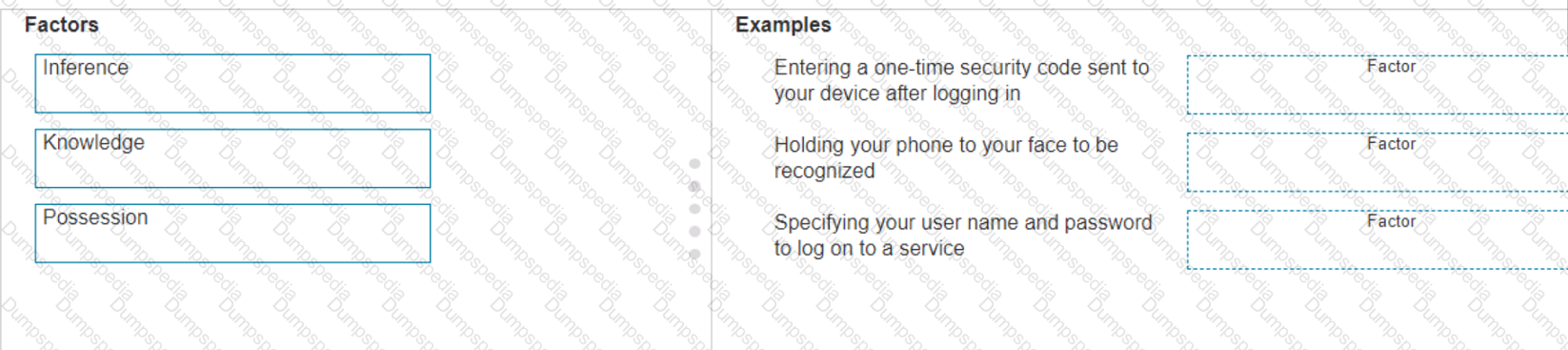
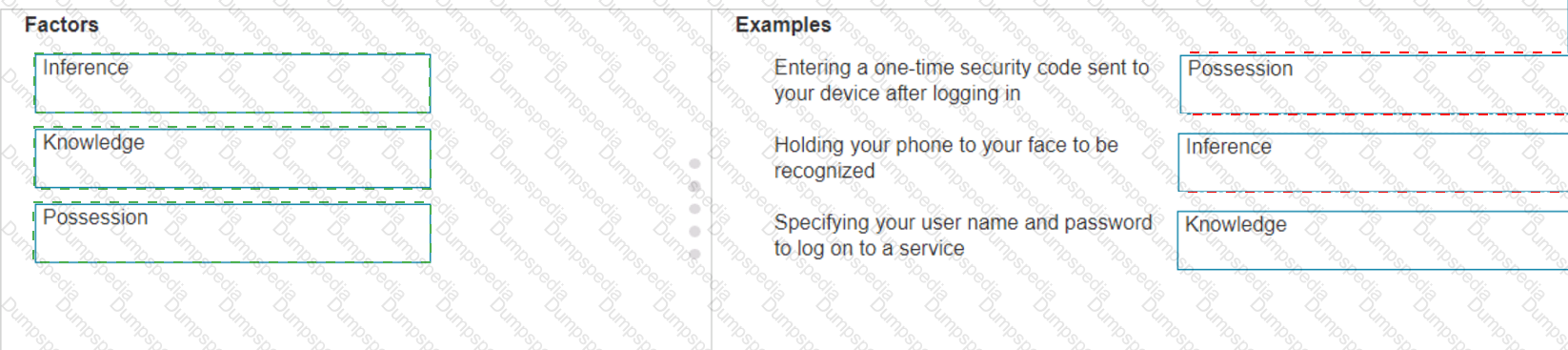
The correct matching of the MFA factors to their examples is as follows:
Entering a one-time security code sent to your device after logging in: Possession
Holding your phone to your face to be recognized: Inherence
Specifying your user name and password to log on to a service: Knowledge
Here’s why each factor matches the example:
Possession: This factor is something the user has, like a mobile device. A one-time security code sent to this device falls under this category.
Inherence: This factor is something the user is, such as a biometric characteristic. Facial recognition using a phone is an example of this factor.
Knowledge: This factor is something the user knows, like a password or PIN.
Multi-Factor Authentication (MFA) enhances security by requiring two or more of these factors to verify a user’s identity before granting access.
Entering a one-time security code sent to your device after logging in.
Factor: Possession
Explanation: This factor relates to something you have, such as a device that receives a security code.
Holding your phone to your face to be recognized.
Factor: Inference (typically referred to as Inherence or Biometric)
Explanation: This factor relates to something you are, such as biometric authentication like facial recognition.
Specifying your username and password to log on to a service.
Factor: Knowledge
Explanation: This factor relates to something you know, such as a username and password.
Possession Factor: This involves something the user has in their possession. Receiving a one-time security code on a device (e.g., phone) is an example of this.
Inference Factor (Inherence/Biometric): This involves something inherent to the user, such as biometric verification (e.g., facial recognition or fingerprint scanning).
Knowledge Factor: This involves something the user knows, such as login credentials (username and password).
References:
Multi-Factor Authentication (MFA) Explained: MFA Guide
Understanding Authentication Factors: Authentication Factors
In the network shown in the following graphic, Switch1 is a Layer 2 switch.
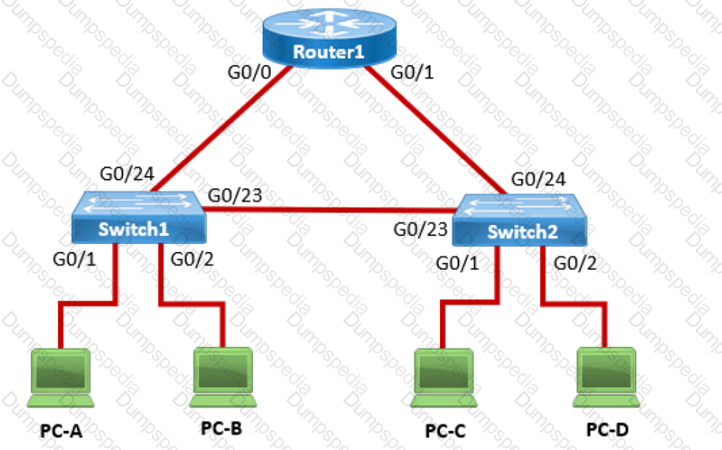
PC-A sends a frame to PC-C. Switch1 does not have a mapping entry for the MAC address of PC-C. Which action does Switch1 take?
Switch1 queries Switch2 for the MAC address of PC-C.
Switch1 drops the frame and sends an error message back to PC-A.
Switch1 floods the frame out all active ports except port G0/1.
Switch1 sends an ARP request to obtain the MAC address of PC-C.
Understanding How Layer 2 Switches Handle Unknown MAC Addresses
Switches operate atLayer 2 (Data Link Layer)of the OSI model and maintain aMAC address table (CAM table)to forward frames efficiently.
When a switch receives a frame, itchecks its MAC address tableto see if it knows the destination MAC address.
If the destinationMAC address is not in the table(meaning the switch does not know which port leads to PC-C), the switch follows theflooding behavior.
What Happens When Switch1 Receives a Frame from PC-A to PC-C?
Switch1 checks its MAC table:
The source MAC (PC-A) is recorded in the table on portG0/1.
The destination MAC (PC-C)is not in the table.
Switch1 does not know where PC-C is:
Itfloodsthe frame out of allactive ports except the port it was received on (G0/1).
This means the frame is sent to:
Switch2 (via G0/23)
PC-B (via G0/2)
Switch2 receives the frame and follows the same process:
If Switch2 has PC-C's MAC in its table, it forwards the frame appropriately.
If not,it floodsthe frame again until PC-C replies.
Once PC-C responds, Switch1 and Switch2 learn its MAC address and update their tables.
Why Other Options Are Incorrect:
❌A. Switch1 queries Switch2 for the MAC address of PC-C.
Incorrect:Switches do not query other switches directly for MAC addresses. Instead, they rely on learning MAC addresses dynamically through frame forwarding.
❌B. Switch1 drops the frame and sends an error message back to PC-A.
Incorrect:Switchesdo not drop frames for unknown MAC addresses. Instead, theyfloodthe frames out all ports except the incoming port.
❌D. Switch1 sends an ARP request to obtain the MAC address of PC-C.
Incorrect:
ARP (Address Resolution Protocol)is only used to resolve IP addresses to MAC addresses.
Since PC-A issending a frame (Layer 2), not an IP packet (Layer 3), ARP isnot involvedhere.
Conclusion
Since Switch1does not know the destination MAC address, itfloods the frame out all active ports except the port it was received on. This is the default behavior of Layer 2 switches when they encounter anunknown MAC address.
Thus, thecorrect answer is:✔C. Switch1 floods the frame out all active ports except port G0/1.
References
Cisco CCNA 200-301 Official Guide – MAC Address Table & Frame Forwarding
RFC 894 – Standard for Ethernet Frame Forwarding
Cisco Networking Essentials – Switch Flooding Behavior
Move each cloud computing service model from the list on the left to the correct example on the right
Note: You will receive partial credit for each correct answer.
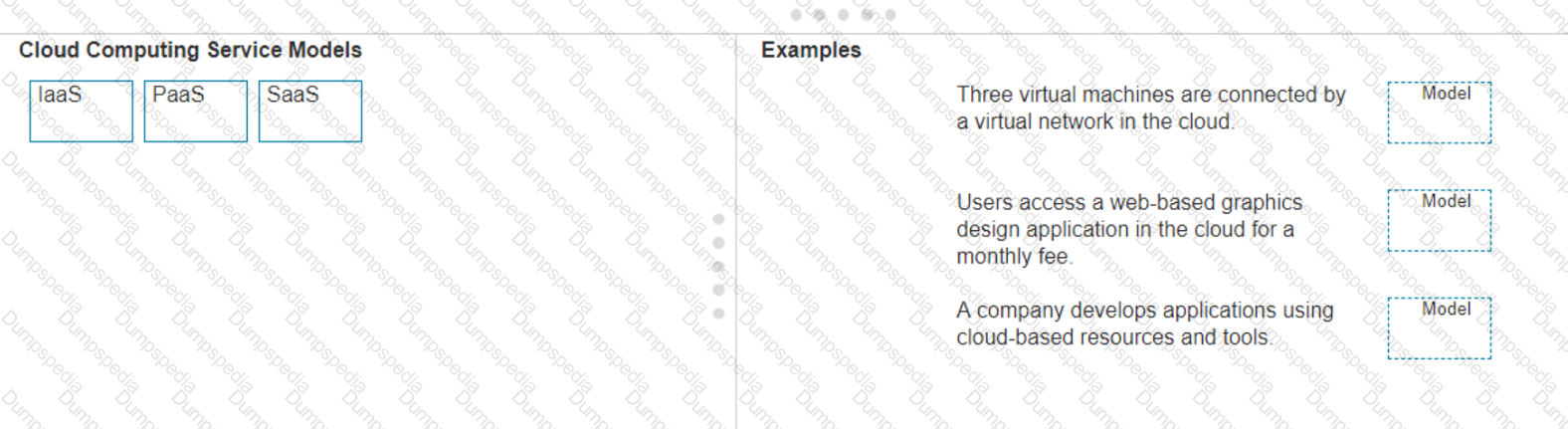
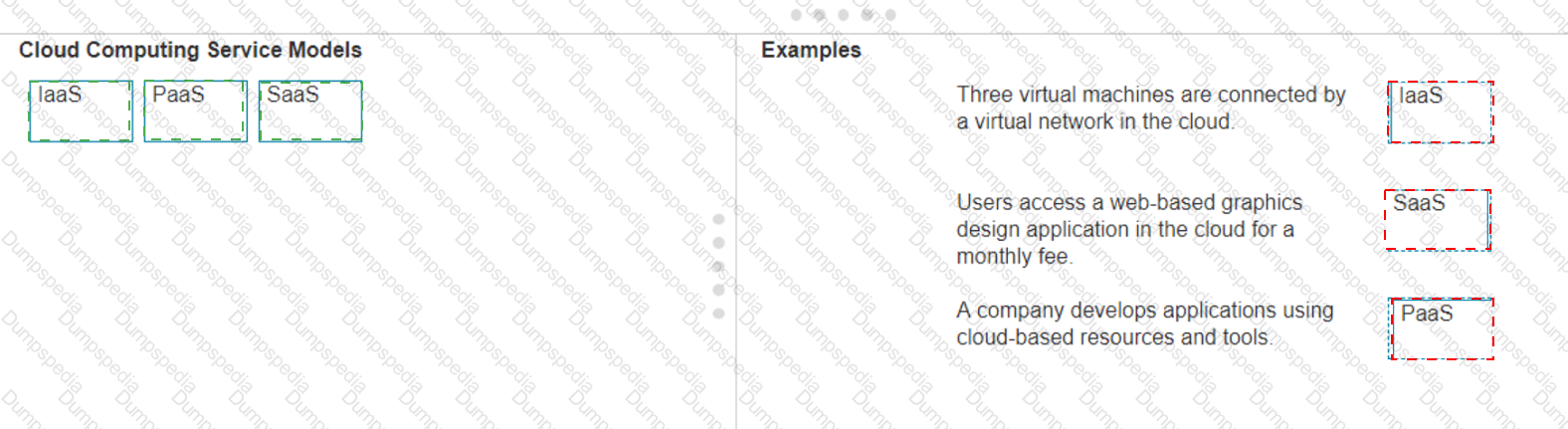
Three virtual machines are connected by a virtual network in the cloud.
Model: IaaS (Infrastructure as a Service)
Explanation: IaaS provides virtualized computing resources over the internet, including virtual machines, storage, and networks.
Users access a web-based graphics design application in the cloud for a monthly fee.
Model: SaaS (Software as a Service)
Explanation: SaaS delivers software applications over the internet, typically on a subscription basis, accessible via a web browser.
A company develops applications using cloud-based resources and tools.
Model: PaaS (Platform as a Service)
Explanation: PaaS provides a platform allowing customers to develop, run, and manage applications without dealing with the infrastructure.
IaaS (Infrastructure as a Service): Provides virtualized hardware resources that customers can use to build their own computing environments.
PaaS (Platform as a Service): Offers a platform with tools and services to develop, test, and deploy applications.
SaaS (Software as a Service): Delivers fully functional applications over the internet that users can access and use without managing the underlying infrastructure.
References:
Cloud Service Models: Understanding IaaS, PaaS, SaaS
NIST Definition of Cloud Computing:NIST Cloud Computing
Move each network type from the list on the left to the correct example on the right.

Two home office computers are connected to a switch by Ethernet cables.
Network Type: LAN (Local Area Network)
Explanation: A LAN connects devices within a limited area such as a home, office, or building, using Ethernet cables or Wi-Fi.
Three government buildings in the same city connect to a cable company over coaxial cables.
Network Type: MAN (Metropolitan Area Network)
Explanation: A MAN connects networks across a city or campus, often using fiber optic or coaxial cables.
A cell phone connects to a Bluetooth headset.
Network Type: PAN (Personal Area Network)
Explanation: A PAN connects devices within a personal workspace, typically using wireless technologies like Bluetooth.
A financial institution connects its branches through a telecommunications service provider.
Network Type: WAN (Wide Area Network)
Explanation: A WAN connects multiple LANs over long distances, often using leased lines or satellite links provided by telecommunications companies.
LAN (Local Area Network): Used for connecting devices within a small geographical area such as a single building or home.
MAN (Metropolitan Area Network): Covers a larger geographical area than a LAN, typically a city or campus.
PAN (Personal Area Network): Connects devices within the range of an individual person, such as connecting a phone to a Bluetooth headset.
WAN (Wide Area Network): Spans large geographical areas, connecting multiple LANs across cities, countries, or continents.
References:
Network Types Overview: Cisco Networking Basics
Understanding Different Network Types: Network Types Guide
Which two pieces of information should you include when you initially create a support ticket? (Choose 2.)
A detailed description of the fault
Details about the computers connected to the network
A description of the conditions when the fault occurs
The actions taken to resolve the fault
The description of the top-down fault-finding procedure
Statement A: "A detailed description of the fault." This is essential for support staff to understand the nature of the problem and begin troubleshooting effectively.
Statement C: "A description of the conditions when the fault occurs." This helps in reproducing the issue and identifying patterns that might indicate the cause of the fault.
Statement B: "Details about the computers connected to the network." While useful, this is not as immediately critical as understanding the fault itself and the conditions under which it occurs.
Statement D: "The actions taken to resolve the fault." This is important but typically follows the initial report.
Statement E: "The description of the top-down fault-finding procedure." This is more of a troubleshooting methodology than information typically included in an initial support ticket.
References:
Best Practices for Submitting Support Tickets: Support Ticket Guidelines
Move each protocol from the list on the left to the correct TCP/IP model layer on the right.
Note: You will receive partial credit for each correct match.


Here’s how each protocol aligns with the correct TCP/IP model layer:
TCP (Transmission Control Protocol): This protocol belongs to theTransportlayer, which is responsible for providing communication between applications on different hosts1.
IP (Internet Protocol): IP is part of theInternetworklayer, which is tasked with routing packets across network boundaries to their destination1.
FTP (File Transfer Protocol): FTP operates at theApplicationlayer, which supports application and end-user processes.It is used for transferring files over the network1.
Ethernet: While not a protocol within the TCP/IP stack, Ethernet is associated with theNetwork Interfacelayer, which corresponds to the link layer of the TCP/IP model and is responsible for the physical transmission of data1.
The TCP/IP model layers are designed to work collaboratively to transmit data from one layer to another, with each layer having specific protocols that perform functions necessary for the data transmission process1.
TCP:
TCP Model Layer: Transport
Explanation: The Transport layer is responsible for end-to-end communication and error handling. TCP (Transmission Control Protocol) operates at this layer to provide reliable, ordered, and error-checked delivery of data.
IP:
TCP Model Layer: Internetwork
Explanation: The Internetwork layer, also known as the Internet layer, is responsible for logical addressing and routing. IP (Internet Protocol) operates at this layer to route packets across networks.
FTP:
TCP Model Layer: Application
Explanation: The Application layer provides network services to applications. FTP (File Transfer Protocol) operates at this layer to transfer files between computers over a network.
Ethernet:
TCP Model Layer: Network
Explanation: The Network layer, also known as the Link layer in the TCP/IP model, is responsible for physical addressing and access to thephysical medium. Ethernet operates at this layer to provide the physical and data link functions.
Transport Layer: This layer is responsible for providing communication services directly to the application processes running on different hosts. TCP is a core protocol in this layer.
Internetwork Layer: This layer is responsible for logical addressing, routing, and packet forwarding. IP is the primary protocol for this layer.
Application Layer: This layer interfaces directly with application processes and provides common network services. FTP is an example of a protocol operating in this layer.
Network Layer: In the TCP/IP model, this layer includes both the data link and physical layers of the OSI model. Ethernet is a protocol used in this layer to define network standards and communication protocols at the data link and physical levels.
References:
TCP/IP Model Overview: Cisco TCP/IP Model
Understanding the TCP/IP Model: TCP/IP Layers
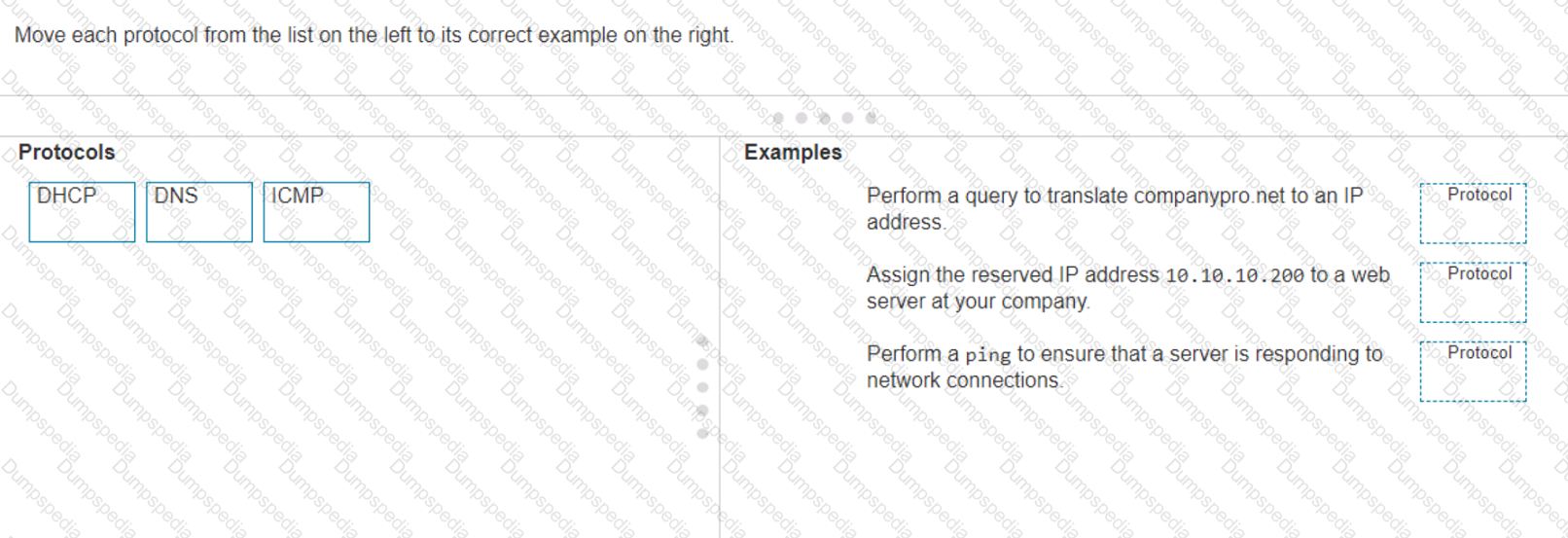
Move each protocol from the list on the left to its correct example on the right.
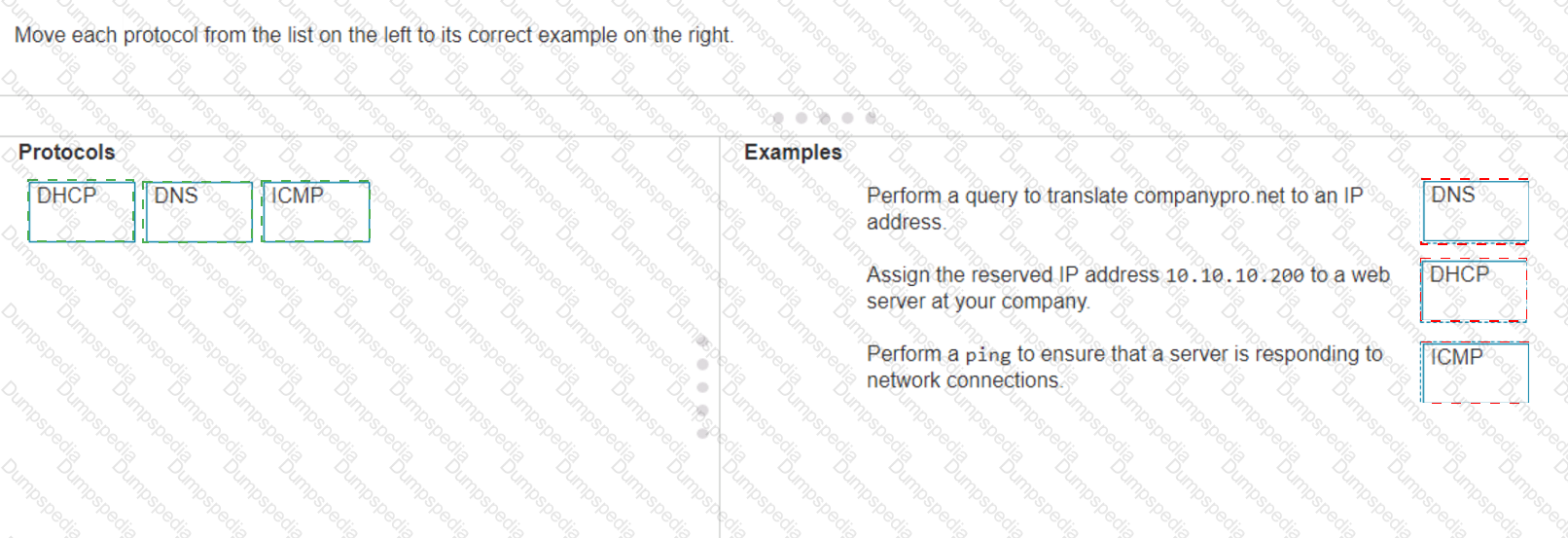
The correct matching of the protocols to their examples is as follows:
DHCP: Assign the reserved IP address 10.10.10.200 to a web server at your company.
DNS: Perform a query to translate companypro.net to an IP address.
ICMP: Perform a ping to ensure that a server is responding to network connections.
Here’s how each protocol corresponds to its example:
DHCP (Dynamic Host Configuration Protocol)is used to assign IP addresses to devices on a network. In this case, DHCP would be used to assign the reserved IP address 10.10.10.200 to a web server.
DNS (Domain Name System)is used to translate domain names into IP addresses. Therefore, to translate companypro.net to an IP address, DNS would be utilized.
ICMP (Internet Control Message Protocol)is used for sending error messages and operational information indicating success or failure when communicating with another IP address. An example of this is using the ping command to check if a server is responding to network connections.
These protocols are essential for the smooth operation of networks and the internet.
Perform a query to translate companypro.net to an IP address.
DNS (Domain Name System): DNS is used to resolve domain names to IP addresses.
Assign the reserved IP address 10.10.10.200 to a web server at your company.
DHCP (Dynamic Host Configuration Protocol): DHCP is used to assign IP addresses to devices on a network.
Perform a ping to ensure that a server is responding to network connections.
ICMP (Internet Control Message Protocol): ICMP is used by network devices to send error messages and operational information, and it is the protocol used by the ping command.
DNS (Domain Name System): DNS translates human-friendly domain names like "companypro.net" into IP addresses that computers use to identify each other on the network.
DHCP (Dynamic Host Configuration Protocol): DHCP automatically assigns IP addresses to devices on a network, ensuring that no two devices have the same IP address.
ICMP (Internet Control Message Protocol): ICMP is used for diagnostic or control purposes, and the ping command uses ICMP to test the reachability of a host on an IP network.
References:
DNS Basics: What is DNS?
DHCP Overview: What is DHCP?
ICMP and Ping: Understanding ICMP
Which protocol allows you to securely upload files to another computer on the internet?
SFTP
ICMP
NTP
HTTP
SFTP, or Secure File Transfer Protocol, is a protocol that allows for secure file transfer capabilities between networked hosts. It is a secure extension of the File Transfer Protocol (FTP). SFTP encrypts both commands and data, preventing passwords and sensitive information from being transmitted openly over the network. It is typically used for secure file transfers over the internet and is built on the Secure Shell (SSH) protocol1.
References :=
•What Is SFTP? (Secure File Transfer Protocol)
•How to Use SFTP to Safely Transfer Files: A Step-by-Step Guide
•Secure File Transfers: Best Practices, Protocols And Tools
The Secure File Transfer Protocol (SFTP) is a secure version of the File Transfer Protocol (FTP) that uses SSH (Secure Shell) to encrypt all commands and data. This ensures that sensitive information, such as usernames, passwords, and files being transferred, are securely transmitted over the network.
•ICMP (Internet Control Message Protocol) is used for network diagnostics and is not designed for file transfer.
•NTP (Network Time Protocol) is used to synchronize clocks between computer systems and is not related to file transfer.
•HTTP (HyperText Transfer Protocol) is used for transmitting web pages over the internet and does not inherently provide secure file transfer capabilities.
Thus, the correct protocol that allows secure uploading of files to another computer on the internet is SFTP.
References :=
•Cisco Learning Network
•SFTP Overview (Cisco)
An engineer configured a new VLAN named VLAN2 for the Data Center team. When the team tries to ping addresses outside VLAN2 from a computer in
VLAN2, they are unable to reach them.
What should the engineer configure?
Additional VLAN
Default route
Default gateway
Static route
When devices within a VLAN are unable to reach addresses outside their VLAN, it typically indicates that they do not have a configured path to external networks. The engineer should configure a default gateway for VLAN2. The default gateway is the IP address of the router’s interface that is connected to the VLAN, which will route traffic from the VLAN to other networks12.
References :=
•Understanding and Configuring VLAN Routing and Bridging on a Router Using the IRB Feature
•VLAN 2 not able to ping gateway - Cisco Community
=========================
•VLANs: Virtual Local Area Networks (VLANs) logically segment network traffic to improve security and performance. Devices within the same VLAN can communicate directly.
•Default Gateway: For devices in VLAN2 to communicate with devices outside their VLAN, they need a default gateway configured. The default gateway is typically a router or Layer 3 switch that routes traffic between different VLANs and subnets.
•Additional VLAN: Not needed in this scenario as the issue is related to routing traffic outside VLAN2, not creating another VLAN.
•Default Route: While a default route on the router may be necessary, the primary issue for devices within VLAN2 is to have a configured default gateway.
•Static Route: This is used on routers to manually specify routes to specific networks but does not address the need for a default gateway on the client devices.
References:
•Cisco VLAN Configuration Guide: Cisco VLAN Configuration
•Understanding and Configuring VLANs: VLANs Guide


TESTED 20 Sep 2026