dumpspedia logo

Which option listed below is an advanced Master Policy rule?
Allow users to select a reason for access.
Allow Manual Change.
Allow Users to View Passwords.
Only Administrators can approve password access.
CyberArk Master Policy provides centralized governance over privileged account access, session management, and password security workflows. Individual rules may include advanced settings that offer more granular control over how privileged credentials are accessed and exposed.
The Allow EPV transparent connections rule enables users to connect to privileged systems without manually obtaining or entering account passwords. Within its advanced configuration, administrators can control whether users are permitted to view password values.
This distinction is important because permission to initiate a privileged session does not necessarily imply permission to retrieve the underlying credential.
When password viewing is restricted, authorized users can establish sessions through CyberArk Privileged Session Manager without exposing the account password to their workstation. This reduces the risk of credential disclosure, unauthorized sharing, and subsequent misuse.
Option A concerns the requirement to provide a reason for accessing privileged accounts, which is managed through a separate privileged-access workflow. Option B is a platform-level password management setting rather than the advanced Master Policy control requested. Option D does not accurately describe the available dual-control approval configuration.
Therefore, option C represents the advanced setting associated with password visibility and transparent privileged connections.
When Dual Control is enabled for a platform in the Master Policy, exceptions may be configured in the following two locations.
Choose two
Exceptions can be configured in the safe permissions for specific users or groups.
Exceptions can be configured in the object level of individual vaulted accounts associated with that platform.
Exceptions can be configured for PSM connectivity at the platform level.
Exceptions can be configured for specific users or groups at the master policy level.
Exceptions can be configured in vault level permissions for specific users and groups.
CyberArk Dual Control establishes an approval-based security mechanism for accessing privileged credentials. When the Master Policy rule requiring dual-control password access approval is enabled, users must obtain authorization from an appropriate Safe member before accessing protected credentials.
Exceptions to this approval requirement can be implemented through the underlying authorization model.
At the Safe level, the Access Safe without Confirmation permission allows designated users or groups to access protected accounts without obtaining the normal dual-control approval. This capability should be restricted to explicitly authorized identities, such as designated emergency-access administrators.
Where Object Level Access Control (OLAC) is enabled, permissions can be managed more granularly for individual objects. This permits account-specific authorization arrangements rather than applying identical permissions throughout the Safe.
Option D is incorrect because Master Policy exceptions primarily control policy applicability for platforms; they are not the same mechanism as granting individual users or groups approval-bypass permissions.
Option C concerns PSM connectivity, which is separate from the Safe authorization mechanism. Vault-level permissions do not provide the specific per-account Dual Control exception described.
You want to be notified when a password is used. You configured NFNotifyOnPasswordUsed in the platform's Notification parameters.
Which two use cases result in the notification being sent?
Choose two
When a user copies the password from the PVWA Ul.
When the credential is first onboarded and assigned to the platform.
When a user clicks 'Verify' to verify the password via the PVWA Ul.
When user connects using PSM for SSH.
When user logs on and clicks connect from the PVWA Ul.
The NFNotifyOnPasswordUsed platform parameter controls notifications associated with privileged password usage. It enables administrators to monitor credential-access activity and support security oversight.
When an authorized user copies a password through the Password Vault Web Access (PVWA) interface, the operation constitutes an explicit credential retrieval. Consequently, option A represents a direct password-use event.
The uploaded question's explanation also identifies launching a connection through PVWA as a qualifying event. In the traditional privileged-access workflow, the Connect action initiates access to a managed target using the associated account credentials, potentially without displaying their values to the user.
Account onboarding, described in option B, is an account-management activity rather than password usage. Similarly, a CPM verification operation confirms credential validity and should not automatically be equated with an end-user password retrieval event.
However, PSM for SSH can also use vaulted credentials when establishing managed sessions. Whether such activity triggers this particular notification requires examination of the supported notification event behavior for the deployed product version.
Which components are required to configure external recording storage for PSM?
SMB 3.0 supported storage, A Windows Privileged Account, Storage-level Tampering Protection.
SMB 3.1 supported storage, A Domain Administrator Account, Storage-level Tampering Protection.
NAS Storage, a private SSH Key, Azure Key Vault.
SAN Storage, AWS Access Key, AWS KMS.
CyberArk Privileged Session Manager supports storing privileged-session recordings on external storage infrastructure instead of retaining every recording directly within the Digital Vault.
This capability is particularly relevant to environments generating substantial recording volumes or requiring dedicated archival storage.
The configuration described in the question requires storage supporting SMB 3.0, an appropriately privileged Windows account for accessing the storage location, and protection against unauthorized modification or deletion of recording files.
SMB provides the network file-sharing mechanism through which the recording infrastructure accesses the designated storage resource.
The Windows account must have the necessary permissions to perform the recording operations. These permissions should be scoped to the required storage functionality rather than granting unrestricted administrative access.
Storage-level tampering protection is essential because privileged-session recordings are security audit evidence. Unauthorized alteration, replacement, or deletion could undermine their integrity and evidentiary value.
A Domain Administrator account is not required merely to access external storage. Granting such excessive privileges would violate least-privilege principles.
Likewise, neither Azure Key Vault nor AWS KMS is an inherent prerequisite for the Windows SMB-based storage arrangement described.
Technical warning / qualification: Option A matches the uploaded Guardian material. The exact SMB and storage-security prerequisites must be validated against the deployed PSM release. External recording storage also requires independent consideration of encryption, backup, and retention controls.
What level of support is a customer entitled to with 24x7 support?
Enables customers to call the after hours Support hotline for all issues.
Enables customers to call the after hours Support hotline for all Critical issues where no work can be completed in a Production environment.
Enables customers to call the after hours Support hotline for all Critical or Serious issues where no work can be completed in a Production environment.
Enables customers to call the after hours Support hotline for all Critical or Serious issues where no work can be completed in any environment.
CyberArk technical support classifies incidents according to their severity and impact on business operations.
A Critical incident, commonly designated Priority 1 or P1, describes a situation where essential production operations cannot continue and no acceptable workaround is available.
Examples include a complete production service outage, a major failure that prevents access to business-critical applications, or an unavailable core function that stops normal business operations.
Twenty-four-hour emergency support is intended to provide continuous response and remediation for qualifying critical incidents.
CyberArk's support terms distinguish these incidents from Serious or Priority 2 problems, where a major function may be unavailable but the customer can continue some production work.
Serious incidents are generally handled through the applicable business-hours support process rather than receiving the same continuous emergency treatment as Critical incidents.
Moderate and Minor incidents receive different response priorities.
Therefore, having 24x7 support does not mean every issue qualifies for immediate after-hours telephone escalation.
The applicable service agreement determines precise response times and support entitlements.
Which Secrets Manager component is recommended to be placed behind a load balancer for availability and redundancy?
Application Server Credential Provider
Credential Provider
Central Credential Provider
Conjur Synchronizer
CyberArk Central Credential Provider (CCP) provides centralized, agentless credential retrieval through an HTTPS-based web service. Applications authenticate to CCP and retrieve authorized secrets without embedding permanent credentials in application code or configuration files.
Because CCP serves requests from potentially numerous applications, its availability is important to dependent services. A recommended resilient architecture uses multiple CCP instances behind a load balancer.
The load balancer distributes application requests among available CCP servers and directs traffic away from unhealthy instances. This improves service continuity, request distribution, and horizontal scalability.
CyberArk documents additional security considerations for load-balanced CCP environments. When application authentication relies on originating IP addresses, the load-balancing architecture must preserve the client's actual source address or correctly transmit it using a trusted X-Forwarded-For configuration.
Otherwise, application authentication can fail or identify the load balancer rather than the originating workload.
The standard Credential Provider is generally deployed close to applications requiring local credential retrieval. The Application Server Credential Provider targets supported application-server environments. Conjur Synchronizer performs secrets synchronization rather than functioning as the appropriate load-balanced credential retrieval service in this scenario.
Select the two controls that can be configured at the Master Policy level.
Choose two
Require dual control password access approval.
Enforce one-time password access.
Automatically reconcile password when changing.
PSM recording retention period.
Set number of password versions to be retained.
CyberArk Master Policy provides centralized control over key privileged-access and password-management requirements across managed platforms.
The Require dual control password access approval setting establishes an approval workflow for privileged credential retrieval.
When this rule is enabled, users must obtain authorization from designated approvers before accessing protected account credentials, unless a supported exception applies.
This is particularly useful for sensitive administrative accounts requiring separation of duties and additional access oversight.
The Enforce one-time password access rule controls the reuse of privileged credentials. When enabled, the password-management process changes the managed password after account usage, subject to the configured validity and workflow requirements.
This reduces the period during which a retrieved credential remains usable.
Automatic reconciliation is implemented through password-management platform settings and reconciliation-account configuration. It is not the specific Master Policy rule represented by option C.
PSM recording retention is configured through the relevant recording-retention and Safe-management mechanisms rather than being one of the two controls requested.
Similarly, password-version retention is governed by applicable Vault or Safe configuration rather than the Master Policy rules listed.
Options A and B therefore correctly identify the two Master Policy controls.
Which risk should be considered before enabling OLAC (Object Level Access Control)?
OLAC can significantly impact Vault performance.
OLAC can increase in complexity for user access workflows.
OLAC prevents the use of PSM session isolation and recording.
OLAC automatically grants 'Use' and 'Retrieve" authorizations to any new safe owner.
CyberArk Object Level Access Control (OLAC) enables administrators to assign permissions to individual objects stored within a Safe rather than relying exclusively on Safe-level authorizations.
This capability is useful when different privileged accounts within the same Safe require distinct access restrictions.
However, enabling OLAC introduces additional authorization-processing requirements.
Without OLAC, the Vault can determine access primarily through Safe-level membership and authorization settings.
When OLAC is enabled, the Vault must also evaluate object-specific permissions for relevant access operations.
As the number of objects, users, groups, and authorization relationships grows, this additional processing can increase administrative overhead and negatively affect Vault performance.
The performance implications are particularly important in large enterprise deployments containing substantial numbers of privileged accounts and frequent credential-access requests.
CyberArk therefore recommends using granular object-level authorization selectively, according to documented business requirements.
An additional limitation is that enabling OLAC for a Safe is not a temporary configuration decision; it cannot subsequently be disabled through the supported configuration mechanism.
Option B identifies a possible operational consequence, but option A represents the specific performance risk emphasized by the source.
Options C and D incorrectly describe PSM functionality and permission inheritance.
Alice is granted ownership of a Safe both through group membership and through her user ID.
With the default configuration, how does the Vault apply her Safe authorizations?
The Vault applies the combination of Alice's userID-defined and group-defined authorizations.
The Vault applies Alice's group-defined authorizations.
The Vault applies Alice's userID-defined authorizations.
The Vault denies access to Alice.
CyberArk Digital Vault implements a granular authorization model that controls access to Safes and their stored privileged credentials. Permissions may be assigned directly to individual Vault users or indirectly through their membership in authorized groups.
Under the default authorization model, Safe permissions are cumulative. When a user receives access through multiple applicable authorization assignments, the Vault evaluates the effective combination of those permissions.
In this scenario, Alice is assigned Safe ownership directly through her user ID while also receiving permissions through group membership. Her effective authorizations therefore include the applicable permissions granted through both assignments.
For example, if Alice receives the ability to list accounts through a group and receives permission to manage Safe members directly, her effective access can include both capabilities.
This behavior simplifies role-based access administration but requires careful permission reviews because indirect group membership can provide privileges beyond those explicitly assigned to an individual account.
Administrators should regularly inspect Safe memberships, nested group relationships where applicable, and effective permissions to identify excessive access.
Options B and C incorrectly treat one authorization source as automatically overriding the other. Option D incorrectly assumes that multiple authorization assignments create an access conflict.
How can a Secondary PTA server be promoted to a Primary PTA Server?
A manual procedure.
Automatically using the PTA Network Sensors.
This is not possible.
Automatically using a BASH script.
CyberArk Privileged Threat Analytics (PTA) provides security analytics for privileged account activity, identifying suspicious behavior, anomalous access patterns, and potential credential misuse.
In the traditional PTA disaster recovery architecture, the Primary PTA server processes incoming security events and performs the active analytics functions. A Secondary PTA server maintains replicated information and provides a recovery capability if the Primary PTA becomes unavailable.
Promoting the Secondary server requires an administrator-controlled failover procedure. The administrator must confirm the failure, assess replication consistency, activate the secondary environment according to the supported recovery procedure, and ensure that relevant integrations direct their traffic to the newly active server.
PTA Network Sensors collect network authentication information for analytics. They do not independently manage PTA server promotion or provide automatic high-availability orchestration.
Although Linux shell scripts may be involved in PTA disaster recovery configuration and recovery operations, the presence of such scripts does not mean that unattended automatic promotion is supported.
Manual promotion provides operational control over recovery and helps prevent inconsistent analytics environments or an unintended simultaneous-primary condition.
In which circumstances is it permissible to install third-party clients on a Vault server?
It is never acceptable to install 3rd-party clients on a Vault.
Device drivers whenever a Vault requires integration with SAN, HSM, or NIC.
Whenever regulations require anti-virus on all Windows systems.
When conforming to organizational policies.
The CyberArk Digital Vault Security Standard establishes strict controls over the operating system and software installed on Vault servers.
The Vault is intended to operate as a dedicated, hardened security appliance with a minimized attack surface.
Installing unnecessary third-party applications introduces additional services, executables, network dependencies, and potential vulnerabilities that can undermine the Vault's security isolation.
However, certain infrastructure integrations require supported device drivers or vendor-specific cryptographic libraries.
Examples include Hardware Security Module drivers, storage-controller drivers, and supported network-interface components required for the Vault to communicate with essential hardware.
Such components may be installed when they are necessary for the supported architecture and comply with CyberArk's installation and security requirements.
The presence of an organizational policy requiring antivirus software does not automatically establish that installing an arbitrary antivirus agent on the Vault is supported.
Likewise, compliance with a general organizational software standard does not override the Vault Security Standard.
Option A is too absolute because some infrastructure integrations require approved third-party components.
Technical warning / qualification: Option B is the intended answer, but it should not be interpreted as unrestricted permission to install any SAN, HSM, or NIC driver. Supported versions and approved installation procedures must be confirmed.
Place the steps for creating a new Alero tenant in the correct sequence.
Drag & Drop
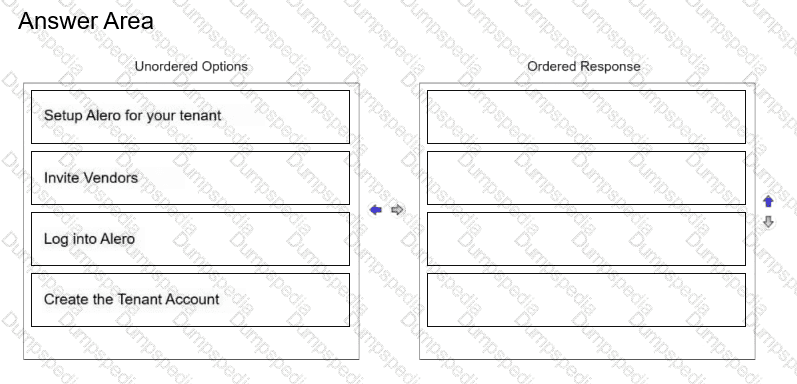
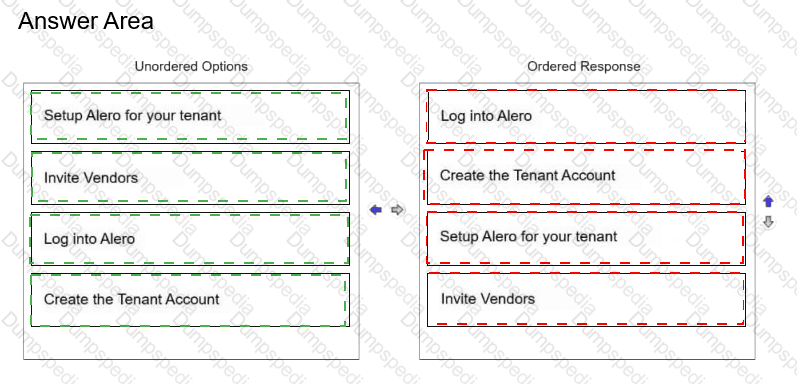
See correct matching / sequence below.
Original description / order
Correct match
1
Log into Alero
2
Create the Tenant Account
3
Setup Alero for your tenant
4
Invite Vendors
CyberArk Alero, the former product name associated with CyberArk Remote Access, provides secure remote access for external vendors and privileged employees without relying on traditional VPN-based access.
The tenant creation workflow establishes the administrative and security foundation required before external users can access managed enterprise resources.
The process begins by logging in to the Alero administration environment using an appropriately authorized account.
Next, the administrator creates the tenant account. The tenant represents the organization's logical Remote Access environment and provides the administrative scope for configuring users, applications, and access policies.
After tenant creation, the administrator configures the tenant environment. This includes the applicable authentication settings, Remote Access configuration, privileged-access integration, and permissions required for the intended deployment.
Once these foundational settings are established, external vendors can be invited into the environment.
Vendor invitations should be issued only after the required access configuration has been completed. This reduces the risk of users entering an incompletely configured environment or receiving unintended permissions.
The sequence therefore follows the dependency chain of authentication, tenant creation, tenant configuration, and vendor onboarding.
Technical warning / qualification: Alero is legacy product terminology. The process should be interpreted in the context of the product generation represented by the question.
The customer currently has a Primary and DR vault. They have heard that another DR vault can be deployed for additional redundancy, so they order a physical server and rack and stack it in a Co-Iocation.
However, when installing the DR module on the new vault, the installation fails. What is the most likely cause?
None of the PVWAs can communicate with the new vault.
The customer does not have enough DR licenses.
The vault has not been hardened correctly.
Unless the configuration is using the Distributed Vault architecture, you can only have 2 total vault servers.
CyberArk distinguishes between traditional Digital Vault disaster recovery and the Distributed Vault architecture. These architectures provide different forms of availability, replication, and workload distribution.
In a conventional disaster recovery deployment, a standby Vault replicates information from the active Primary Vault through the CyberArk Disaster Recovery service. Additional disaster recovery servers can be supported subject to applicable licensing, compatibility, and deployment configuration.
Consequently, the assertion in option D that a non-distributed deployment is universally limited to two Vault servers is not a reliable architectural rule.
Each additional DR Vault requires appropriate licensing and configuration. If the organization has acquired only the entitlements needed for its original Primary and DR deployment, attempting to install another DR instance can encounter licensing restrictions. This makes option B the strongest available explanation.
PVWA connectivity is not a prerequisite that independently determines whether the DR module can be installed. Likewise, Vault hardening must be implemented correctly, but the scenario provides no evidence that hardening caused the failure.
The installation logs and license entitlements must ultimately establish the actual failure.
What are the three Guiding Principles of the CyberArk Blueprint?
Credential Theft, Lateral and Vertical Movement, Privilege Escalation and Abuse.
Identity Security, Credential Theft, Lateral and Vertical Movement.
Attack and Defend capability, Credential Theft, Least Privilege.
Quick return on investment, Password Management, Credential Theft.
The CyberArk Blueprint is based on three security principles designed to interrupt the identity attack chain used by malicious actors to compromise enterprise systems.
The first principle is preventing credential theft . Attackers frequently obtain passwords, authentication tokens, SSH keys, and other privileged credentials through phishing, malware, exposed configuration files, or credential repositories. CyberArk mitigates these risks through secure credential storage, controlled retrieval, password rotation, and session isolation.
The second principle is stopping lateral and vertical movement . After obtaining initial access, attackers attempt to move between systems or cross security boundaries to reach more valuable resources. Unique privileged credentials, segmentation, and controlled privileged sessions reduce opportunities for such movement.
The third principle is limiting privilege escalation and abuse . Attackers may attempt to elevate compromised identities into administrative roles or misuse existing privileges. Least-privilege controls, session monitoring, application control, and just-in-time access help restrict these activities.
Together, these principles support the Blueprint's phased implementation methodology. Organizations can prioritize security controls according to their ability to reduce identity-related attack risk.
Option A correctly identifies all three areas, although CyberArk commonly presents them as preventative actions rather than simply naming the attack techniques.
The ‘LogRetention’ parameter in the DBParm.ini file specifies how long log records are retained.
When are the expired logs cleared?
It needs to be cleared manually.
It will not be cleared automatically. It will show warning.
Whenever the Server is stopped.
Whenever the Server is started.
The CyberArk Digital Vault uses the DBParm.ini configuration file to define operational parameters affecting the Vault Server, including logging, communication, and service behavior.
The LogRetention parameter specifies how long relevant Vault log records are retained before they become eligible for removal.
According to the behavior described by this legacy parameter, expired log records are cleared during the Vault Server startup process. At startup, the server can evaluate retention settings and perform the corresponding cleanup operations.
This means the retention period defines the eligibility threshold for removing records, while the server lifecycle determines when the cleanup operation is performed.
Stopping the service does not independently execute the startup cleanup operation. Additionally, an administrator is not ordinarily required to perform individual manual deletions of expired records governed by this mechanism.
It is important to distinguish operational log retention from other CyberArk retention controls. Vault audit records, external SIEM archives, privileged session recordings, and disaster recovery replicas may have separate retention requirements.
Administrators should therefore validate the relevant logging configuration and applicable audit obligations before modifying retention settings.

TESTED 29 Nov 2026