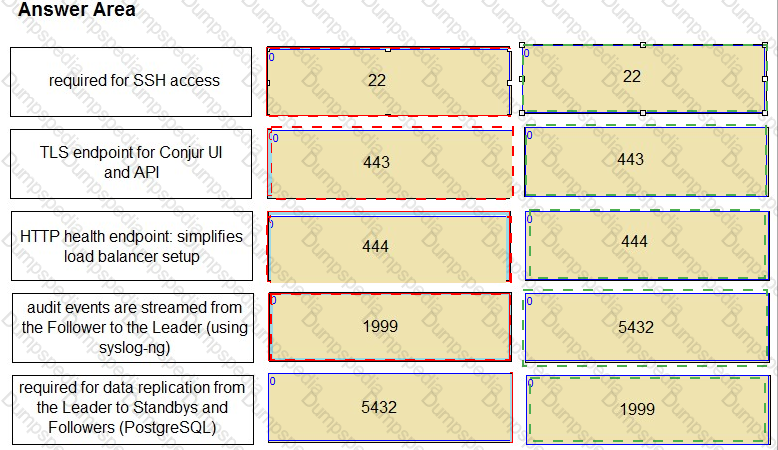
Match the correct network port to its function in Conjur.


Based on the image you sent, the correct network port to its function in Conjur are:
These are the standard ports and protocols used by the Conjur components to communicate with each other and with external clients. The ports can be customized according to the network and security requirements of the organization. These ports are documented in the CyberArk Secrets Manager documentation1 and the CyberArk Secrets Manager training course2.
During the configuration of Conjur, what is a possible deployment scenario?
The Leader and Followers are deployed outside of a Kubernetes environment; Slandbys can run inside a Kubernetes environment.
The Conjur Leader cluster is deployed outside of a Kubernetes environment; Followers can run inside or outside the environment.
The Leader cluster is deployed outside a Kubernetes environment; Followers and Standbys can run inside or outside the environment.
The Conjur Leader cluster and Followers are deployed inside a Kubernetes environment.
Conjur is a secrets management solution that securely stores and manages secrets and credentials used by applications, DevOps tools, and other systems. Conjur can be deployed in different scenarios, depending on the needs and preferences of the organization. One of the possible deployment scenarios is to deploy the Leader cluster outside a Kubernetes environment, and the Followers and Standbys inside or outside the environment.
The Leader cluster is the primary node that handles all write operations and coordinates the replication of data to the Follower and Standby nodes. The Leader cluster consists of one active Leader node and one or more Standby nodes that can be promoted to Leader in case of a failure. The Leader cluster can be deployed outside a Kubernetes environment, such as on a virtual machine or a physical server, using Docker or other installation methods. This can provide more control and flexibility over the configuration and management of the Leader cluster, as well as better performance and security.
The Follower and Standby nodes are read-only replicas of the Leader node that can serve requests from clients and applications that need to retrieve secrets or perform other read-only operations. The Follower and Standby nodes can be deployed inside or outside a Kubernetes environment, depending on the use case and the availability requirements. For example, if the clients and applications are running inside a Kubernetes cluster, it may be convenient and efficient to deploy the Follower and Standby nodes inside the same cluster, using Helm charts or other methods. This can reduce the network latency and complexity, and leverage the Kubernetes features such as service discovery, load balancing, and health checks. Alternatively, if the clients and applications are running outside a Kubernetes cluster, or if there is a need to distribute the Follower and Standby nodes across different regions or availability zones, it may be preferable to deploy the Follower and Standby nodes outside the Kubernetes cluster, using Docker or other methods. This can provide more scalability and resiliency, and avoid the dependency on the Kubernetes cluster.
References = Conjur Deployment Scenarios; Conjur Cluster Installation; Conjur Kubernetes Integration
An application owner reports that their application is suddenly receiving an incorrect password. CPM logs show the password was recently changed, but the value currently being retrieved by the application is a different value. The Vault Conjur Synchronizer service is running.
What is the most likely cause of this issue?
The Vault Conjur Synchronizer is not configured with the DR Vault IP address and there has been a failover event.
Dual Accounts are in use, but after the CPM changed the password for the Inactive account, it accidentally updated the password for the Active account instead.
The CPM is writing password changes to the Primary Vault while the Vault Conjur Synchronizer is configured to replicate from the DR Vault.
The application has been configured to retrieve the wrong password.
This is the most likely cause of this issue because it creates a discrepancy between the passwords stored in the Primary Vault and the DR Vault, which affects the Vault Conjur Synchronizer service (Synchronizer) and the application. The Synchronizer is a service that synchronizes secrets from the CyberArk Vault to the Conjur database. The application is a client that retrieves secrets from the Conjur database using the Conjur REST API. The CPM is a component that manages the lifecycle of the passwords stored in the CyberArk Vault, such as changing, verifying, and reconciling them. If the CPM is writing password changes to the Primary Vault while the Synchronizer is configured to replicate from the DR Vault, the following scenario may occur:
This answer is based on the CyberArk Secrets Manager documentation1 and the CyberArk Secrets Manager training course2.
If you rename an account or Safe, the Vault Conjur Synchronizer recreates these accounts and safes with their new name and deletes the old accounts or safes.
What does this mean?
Their permissions in Coniur must also be recreated to access them.
Their permissions in Coniur remain the same.
You can not rename an account or safe.
The Vault-Conjur Synchronizer will recreate these accounts and safes with their exact same names.
When an account or Safe is renamed in the Vault, the Vault Conjur Synchronizer will create new variables in Conjur with the new name and delete the old variables with the old name. This means that the permissions that were granted to the old variables in Conjur will not apply to the new variables, and they will need to be recreated using delegation policies. Otherwise, the users or hosts that had access to the old variables will not be able to access the new ones. References: Manage Accounts and Safes During Synchronization; Vault Synchronizer full policy guide
What does “Line of business (LOB)” represent?
a business group requiring access to secrets from the Vault/Privilege Claud to facilitate syncing accounts to Conjur
the services that Conjur offers and typically refers to a group of application identities in Conjur
a business group that meets a certain set of Conjur policies for entitlements and policy management
the services that Conjur offers and typically refers to the list of configured and enabled authenticators in Conjur
Line of business (LOB) is a term used by CyberArk Secrets Manager to describe the services that Conjur offers and typically refers to a group of application identities in Conjur. A LOB can be defined by a Conjur policy that grants permissions and access to secrets for a specific set of applications. For example, a LOB can represent a business unit, a project, a product, or a team within an organization. A LOB can also have sub-LOBs that inherit the permissions and secrets from the parent LOB, but can also have their own specific policies and secrets. A LOB can help organize and manage secrets for different applications in a hierarchical and scalable way. References: CyberArk Secrets Manager - Line of Business; CyberArk Secrets Manager - Policy Management; CyberArk Secrets Manager - Application Identity Management
You are setting up the Secrets Provider for Kubernetes to support rotation with Push-to-File mode.
Which deployment option should be used?
Init container
Application container
Sidecar
Service Broker
According to the CyberArk Sentry Secrets Manager documentation, the Secrets Provider for Kubernetes can be deployed as an init container or a sidecar in Push-to-File mode. In Push-to-File mode, the Secrets Provider pushes Conjur secrets to one or more secrets files in a shared volume in the same Pod as the application container. The application container can then consume the secrets files from the shared volume. The deployment option that should be used to support rotation with Push-to-File mode is the sidecar, because the sidecar can run continuously and check for updates to the secrets in Conjur. If changes are detected, the sidecar can update the secrets files in the shared volume. The init container, on the other hand, runs to completion and does not support rotation. The application container and the service broker are not valid deployment options for the Secrets Provider for Kubernetes in Push-to-File mode. References: 1: Secrets Provider - Init container/Sidecar - Push-to-File mode 2: Secrets Provider - init container/sidecar - Push-to-File mode
You have a request to protect all the properties around a credential object. When configuring the credential in the Vault, you specified the address, user and password for the credential.
How do you configure the Vault Conjur Synchronizer to properly sync all properties?
Modify VaultConjurSynchronizer.exe.config, uncomment SYNCALLPROPERTIES and update its value to true.
Modify SynchronizerReplication.config, uncomment SYNCALLPROPERTIES and update its value to true.
Modify Vault.ini, uncomment SYNCALLPROPERTIES and update its value to true.
In the Conjur UI under Cluster > Synchronizer > Config, change SYNCALLPROPERTIES and update its value to true.
This is the correct answer because the SynchronizerReplication.config file contains the configuration settings for the Vault Conjur Synchronizer service (Synchronizer) to sync secrets from the CyberArk Vault to the Conjur database. The SYNCALLPROPERTIES parameter specifies whether to sync all the properties of the accounts in the Vault or only the password property. By default, the SYNCALLPROPERTIES parameter is set to false, which means that only the password property is synced. To sync all the properties, such as the address and the user, the SYNCALLPROPERTIES parameter needs to be set to true. This answer is based on the CyberArk Secrets Manager documentation1 and the CyberArk Secrets Manager training course2.
The other options are not correct because they do not configure the Synchronizer to properly sync all properties. Modifying VaultConjurSynchronizer.exe.config, uncommenting SYNCALLPROPERTIES and updating its value to true is not a valid option, as this file does not contain the SYNCALLPROPERTIES parameter. The VaultConjurSynchronizer.exe.config file contains the configuration settings for the Synchronizer service, such as the log level, the log path, and the service name. The SYNCALLPROPERTIES parameter is only found in the SynchronizerReplication.config file.
Modifying Vault.ini, uncommenting SYNCALLPROPERTIES and updating its value to true is not a valid option, as this file does not contain the SYNCALLPROPERTIES parameter. The Vault.ini file contains the configuration settings for the CyberArk Central Credential Provider (CCP) to connect to the Vault server and provide credentials to the applications. The SYNCALLPROPERTIES parameter is not related to the CCP configuration or functionality.
In the Conjur UI under Cluster > Synchronizer > Config, changing SYNCALLPROPERTIES and updating its value to true is not a valid option, as this section does not exist in the Conjur UI. The Conjur UI does not have a Cluster, Synchronizer, or Config section. The Conjur UI has a Cluster Config section under Settings, but this section is used to configure the Conjur cluster settings, such as the master IP address, the follower IP address, and the seed fetcher IP address. The SYNCALLPROPERTIES parameter is not related to the Conjur cluster configuration or functionality.
You are upgrading an HA Conjur cluster consisting of 1x Leader, 2x Standbys & 1x Follower. You stopped replication on the Standbys and Followers and took a backup of the Leader.
Arrange the steps to accomplish this in the correct sequence.


To upgrade an HA Conjur cluster, you need to follow these steps:
References: You can find more information about the upgrade process in the following resources:
You are installing a Credential Provider on a Linux host. Arrange the installation steps in the correct sequence.


The correct sequence of installation steps for a Credential Provider on a Linux host is as follows:
References: 1: Download the Credential Provider 2: Install Credential Provider on Linux / AIX
You are diagnosing this log entry:
From Conjur logs:

Given these errors, which problem is causing the breakdown?
The Jenkins certificate chain is not trusted by Conjur.
The Conjur certificate chain is not trusted by Jenkins.
The JWT sent by Jenkins does not match the Conjur host annotations.
The Jenkins certificate is malformed and will not be trusted by Conjur.
The log entry shows a failed authentication attempt with Conjur using the authn-jwt method. This method allows applications to authenticate with Conjur using JSON Web Tokens (JWTs) that are signed by a trusted identity provider. In this case, the application is Jenkins, which is a CI/CD tool that can integrate with Conjur using the Conjur Jenkins plugin. The plugin allows Jenkins to securely retrieve secrets from Conjur and inject them as environment variables into Jenkins pipelines or projects.
The log entry indicates that the JWT sent by Jenkins was rejected by Conjur because of an SSL connection error. The error message says that the certificate chain of Jenkins could not be verified by Conjur, and that the certificate authority (CA) that signed the Jenkins certificate was unknown to Conjur. This means that the Jenkins certificate chain is not trusted by Conjur, and that Conjur does not have the CA certificate of Jenkins in its trust store. Therefore, Conjur cannot establish a secure and trusted connection with Jenkins, and cannot validate the JWT signature.
To fix this problem, the Jenkins certificate chain needs to be trusted by Conjur. This can be done by copying the CA certificate of Jenkins to the Conjur server, and adding it to the Conjur trust store. The Conjur trust store is a directory that contains the CA certificates of the trusted identity providers for the authn-jwt method. The Conjur server also needs to be restarted for the changes to take effect.
References = Conjur Jenkins Plugin; Conjur JWT Authentication; Conjur Trust Store
Refer to the exhibit.
In which example will auto-failover occur?

A)

B)

C)

D)

Option A
Option B
Option C
Option D
According to the CyberArk Sentry Secrets Manager documentation, auto-failover is a feature that enables the automatic promotion of a standby node to a leader node in case of a leader failure. Auto-failover requires a quorum, which is a majority of nodes in the cluster that are available and synchronized. A quorum ensures that only one node can be promoted to a leader at a time and prevents split-brain scenarios. In the exhibit, each option shows a network diagram of a load balancer and four nodes, one of which is crossed out with a red X, indicating a leader failure. The text below each diagram indicates whether there is a quorum or not. Option C is the only example where auto-failover will occur, because there is a quorum of three out of four nodes, and one of the standby nodes can be promoted to a leader. Option A will not have auto-failover, because there is no quorum, as only two out of four nodes are available. Option B will not have auto-failover, because there is no quorum, as only one out of four nodes is available. Option D will not have auto-failover, because there is no quorum, as none of the nodes are available. References: 1: Auto-failover 2: Configure auto-failover
Match each scenario to the appropriate Secrets Manager solution.


The appropriate Secrets Manager solution for each scenario is as follows:
These solutions are described in the Secrets Management Tools page of the CyberArk website
You have a PowerShell script that is being used on 1000 workstations. It requires a Windows Domain credential that is currently hard coded in the script.
What is the simplest solution to remove that credential from the Script?
Modify the script to use the CLI SDK to fetch the secret at runtime using Credential Providers installed on each workstation.
Modify the script to make a SOAP call to retrieve the secret from the Central Credential Provider.
Modify the script to run on WebSphere using the Application Server Credential Provider to retrieve the secret.
Use Conjur Summon to invoke the script and inject the secret at run time.
Conjur Summon is an open source utility that can fetch secrets from Conjur and export them as environment variables to a sub-process environment. This way, the secrets are not exposed or stored in the script, but are only available at run time. To use Conjur Summon, you need to install the summon-conjur provider on each workstation, define the secrets in a secrets.yml file, and wrap the PowerShell script in summon. For example, if the secret ID is win/domain/cred, the secrets.yml file would look like this:
DOMAIN_CRED: !var win/domain/cred
And the summon command would look like this:
summon --provider summon-conjur powershell script.ps1
This will inject the secret value of win/domain/cred as an environment variable named DOMAIN_CRED to the PowerShell script. The script can then access the secret using the $env:DOMAIN_CRED syntax.
References: Summon-inject secrets, cyberark/summon-conjur
What is a possible Conjur node role change?
A Standby may be promoted to a Leader.
A Follower may be promoted to a Leader.
A Standby may be promoted to a Follower.
A Leader may be demoted to a Standby in the event of a failover.
According to the CyberArk Sentry Secrets Manager documentation, Conjur is a secrets management solution that consists of a leader node and one or more follower nodes. The leader node is responsible for managing the secrets, policies, and audit records, while the follower nodes are read-only replicas that can serve secrets requests from applications. Additionally, Conjur supports a standby node, which is a special type of follower node that can be promoted to a leader node in case of a leader failure. A standby node is synchronized with the leader node and can take over its role in a disaster recovery scenario. A possible Conjur node role change is when a standby node is promoted to a leader node, either manually or automatically, using the auto-failover feature. A follower node cannot be promoted to a leader node, as it does not have the same data and functionality as the leader node. A standby node cannot be promoted to a follower node, as it already has the same capabilities as a follower node, plus the ability to become a leader node. A leader node cannot be demoted to a standby node in the event of a failover, as it would lose its data and functionality and would not be able to resume its role as a leader node. References: 1: Conjur Architecture 2: Deploying Conjur on AWS 3: Auto-failover
What is the most maintenance-free way to ensure a Conjur host’s access reflects any changes made to accounts in a safe in the CyberArk vault?

Write an automation script to update and load the host’s policy using PATCH/update.
Use yami anchor [&] and wildcard (*) syntax to maintain its list of permission grants.
Grant the consumers group/role created by the Synchronizer for the Safe to the host.
Use PVWA to add the Conjur host ID as a member of the Safe.
The most maintenance-free way to ensure a Conjur host’s access reflects any changes made to accounts in a safe in the CyberArk vault is to grant the consumers group/role created by the Synchronizer for the Safe to the host. This means that the host will inherit the read and execute permissions on all the secrets in the Safe from the consumers group/role, and will automatically get access to any new or updated secrets in the Safe without requiring any manual intervention or policy changes. The consumers group/role is created by the Vault Conjur Synchronizer, which is a service that synchronizes secrets between the CyberArk vault and Conjur. The Synchronizer creates a policy branch for each Safe in Conjur, and assigns the consumers group/role to have read and execute permissions on all the secrets in the Safe. The Synchronizer also creates a delegation policy for each Safe, which allows the Safe admins to grant permissions to other users, hosts, groups, or layers12.
The other options are not the most maintenance-free ways to ensure a Conjur host’s access reflects any changes made to accounts in a safe in the CyberArk vault. Writing an automation script to update and load the host’s policy using PATCH/update may work, but it requires additional effort and maintenance to ensure the script is always running and up to date with the changes in the Safe. Using yami anchor [&] and wildcard (*) syntax to maintain its list of permission grants may simplify the policy writing, but it still requires manual editing and loading of the policy whenever a new secret is added or removed from the Safe. Using PVWA to add the Conjur host ID as a member of the Safe may not be possible or advisable, as the PVWA is designed for managing human users and not Conjur hosts, and it may not have the necessary integration or authorization to do so3. References: =
TESTED 14 Jul 2026