Which two are true for a dbt retry command?
Choose 2 options.
It reruns all nodes in your previous invocation statement.
It retries the previous command if it is not a syntax error in a model.
It picks up from the error without running all of the upstream dependencies.
It reuses selectors from the previous command.
It reads a manifest.json file to identify the models and tests that failed in the last run.
The correct answers are B and E.
The dbt retry command was introduced to help developers quickly re-run only what failed in the prior dbt invocation. According to dbt documentation, dbt retry examines metadata from the previous execution, including the run results and the manifest.json, to determine which nodes failed. This aligns with Option E, as dbt uses the manifest to identify the models, tests, and other nodes that errored or were not executed successfully.
Option B is also correct because dbt retry works only when the previous run failed due to execution errors (e.g., a warehouse failure or a logic error in SQL). If the failure was due to a syntax error that prevented dbt from compiling, there will be no valid manifest produced, so retry cannot execute. Thus, dbt retry can only re-run models when the previous failure occurred after successful compilation.
Options A and C are incorrect because retry does not run all nodes nor does it automatically pick up exactly where an execution stopped — instead, it runs failed and downstream unbuilt nodes as determined by the manifest. Option D is also incorrect; retry uses the execution metadata, not selectors, to determine what should run.


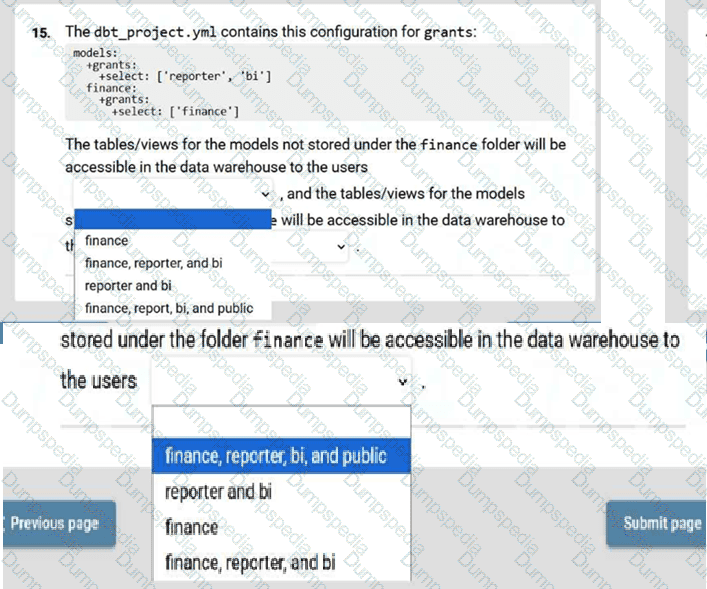
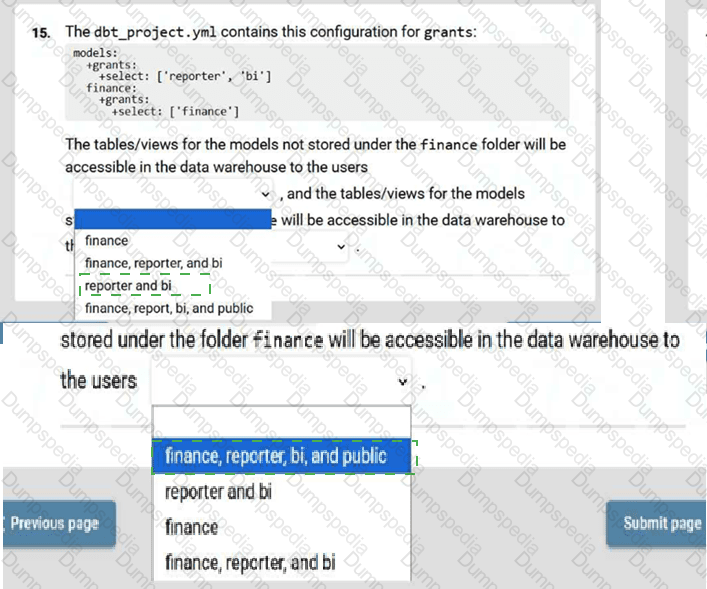
For models not stored under finance:
✔ reporter and bi
For models inside the finance folder:
✔ finance, reporter, bi, and public
In dbt, grants configured at the root level apply to all models unless overridden by a more specific folder- or model-level configuration.
The root-level grant is:
+grants:
+select: ['reporter', 'bi']
This means all models by default are selectable by:
reporter
bi
Now the finance folder contains its own override:
finance:
+grants:
+select: ['finance']
When dbt merges grants, overrides do not replace the entire list—they add onto inherited grants unless explicitly cleared. Therefore, models inside the finance folder inherit the parent grants and add the finance grant.
So models under finance are accessible to:
finance
reporter
bi
and public (implicit default in most warehouses unless denied)
Models not inside finance use only the root grants:
reporter
bi
Thus the correct dropdown answers are:
reporter and bi
finance, reporter, bi, and public
Which two are true about version controlling code with Git?
Choose 2 options.
Git automatically creates versions of files with suffixes.
All the code changes along the lifecycle of a project are tracked.
When bugs are raised, email notifications are automatically sent by Git to repository users.
Git prevents any sensitive fields from being saved in code.
Code can be reverted to a previous state.
The correct answers are B: All the code changes along the lifecycle of a project are tracked, and E: Code can be reverted to a previous state.
Git is a distributed version control system designed to maintain a complete, chronological history of all code changes. Every commit records who made the change, when it occurred, and what the modification included. This ensures transparency, reproducibility, and accountability across the development lifecycle, which makes B correct. Git also allows users to revert code to any previous commit, branch, or tag, making E correct as well. This capability is critical for recovering from mistakes, undoing faulty deployments, and ensuring stable releases.
Option A is incorrect because Git does not create file versions with suffixes; instead, it stores changes as snapshots within a repository. File suffixing is not part of Git’s functionality.
Option C is incorrect because Git does not automatically send email notifications. Notification mechanisms come from hosting platforms like GitHub, GitLab, or Bitbucket—not from Git itself.
Option D is incorrect because Git does not prevent committing sensitive information. Developers must manually ensure secrets are excluded via .gitignore, secret managers, or pre-commit hooks. Git will store whatever is committed unless prevented through tooling.
Thus, only B and E correctly describe how Git supports version control in analytics engineering and dbt workflows.


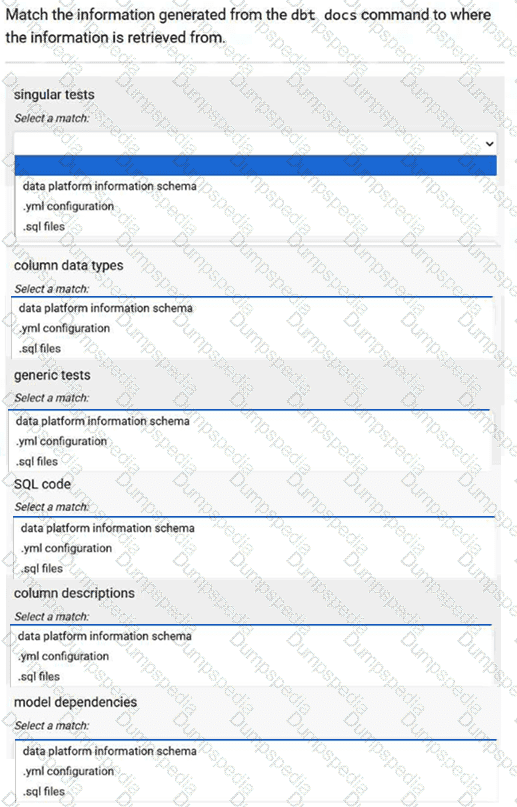
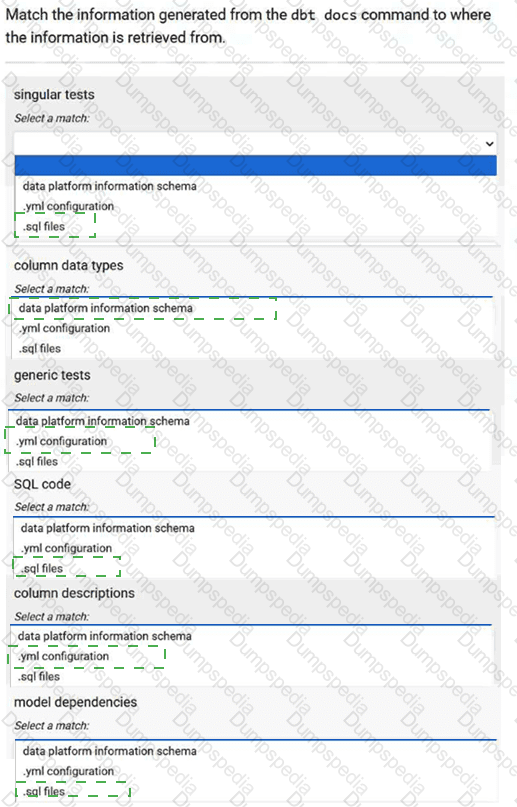
Information Type
Retrieved From
Singular tests
C. .sql files
Column data types
A. Data platform information schema
Generic tests
B. .yml configuration
SQL code
C. .sql files
Column descriptions
B. .yml configuration
Model dependencies
C. .sql files
The dbt docs command compiles metadata about your project by gathering information from three primary sources: your warehouse’s information schema, your YAML configuration files, and your SQL model files. Understanding which metadata comes from which source is essential for debugging and for effective documentation practices.
Singular tests live inside .sql files within the /tests directory. Since dbt renders these tests directly from SQL files, their definitions appear in documentation sourced from that location.
Column data types come from the warehouse itself. dbt introspects the data platform information schema to retrieve actual types because dbt does not infer or define column types—only the warehouse does.
Generic tests (e.g., unique, not_null, accepted_values) are declared in .yml files. These YAML definitions contain test configurations, descriptions, and parameters, which dbt uses to document and execute these tests.
SQL code for models is naturally sourced from .sql files where the models are defined. This includes logic such as SELECT statements, CTEs, and transformations.
Column descriptions are written exclusively in .yml files. dbt never extracts descriptions from SQL comments—only from YAML.
Model dependencies come from the ref() and source() calls inside .sql model files, which dbt parses to build the DAG.
You are working with git to version control the dbt logic.
Order these steps to add or modify transformations to your dbt project.
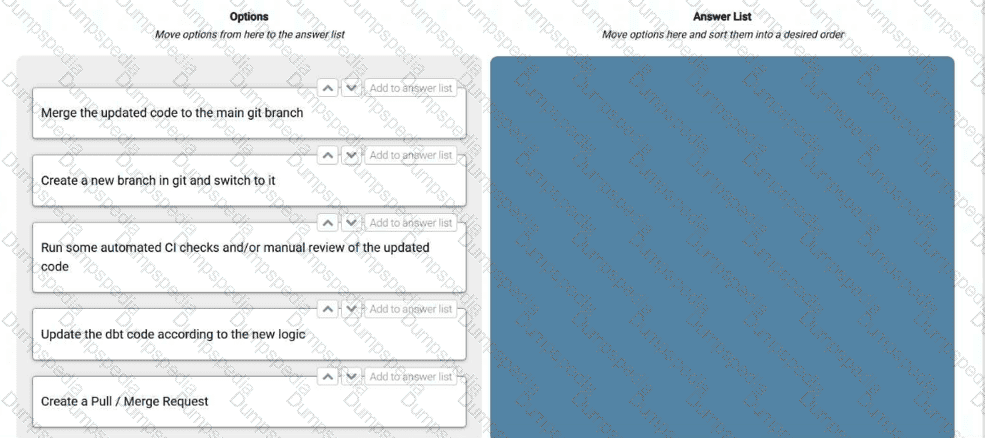

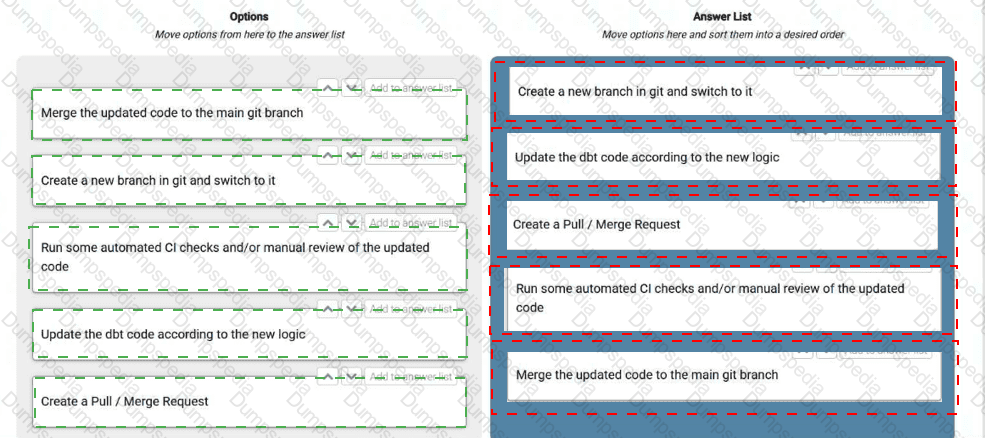
Create a new branch in git and switch to itB. Update the dbt code according to the new logicC. Create a Pull / Merge RequestD. Run some automated CI checks and/or manual review of the updated codeE. Merge the updated code to the main git branch
Version control best practices in dbt follow the same engineering workflow used in modern software development. The first step is always to create a new git branch and switch into it, ensuring all work is isolated from production-ready code and allowing your team to develop safely without affecting others. Once inside the feature branch, you update the dbt code according to the new logic, which may include modifying models, tests, macros, or documentation.
Next, you create a Pull Request (PR), also known as a Merge Request, to propose integrating your changes into the main branch. This is important because dbt projects are collaborative, and PRs facilitate peer review, enforce project standards, and prevent regressions. Once the PR is created, automated CI pipelines—such as running dbt build, schema tests, data quality checks, and code-style checks—are executed. Reviewers may also manually inspect code for logic correctness, naming conventions, and modeling consistency.
After all checks have passed and reviewers approve the PR, the final step is to merge the updated code into the main branch, making the new transformations part of the production dbt project. This workflow ensures governance, reliability, and auditable development practices, all of which are core principles in analytics engineering.
Which of the following is true about restricting the usage of models in dbt?
Choose 1 option.
Restrictions are set by defining the models and Git user groups approved for usage.
You must map your data platform roles to groups by specifying the role name in the configurations.
Model groups can limit references by other models which aren’t in the same group.
Data platform user emails can be used to determine who can reference a model.
The correct answer is C: Model groups can limit references by other models which aren’t in the same group.
According to the dbt documentation, dbt provides a formal access-control mechanism for models through model groups and the access property. Models can be assigned to groups, and each model can be marked as public, protected, or private. The purpose of this system is to create clear boundaries within a project, making it possible to control which models are allowed to reference others. Specifically, dbt enforces rules where models in a group can restrict references from models outside that group, which helps maintain modularity and prevents accidental coupling of unrelated data layers. This is extremely valuable in large analytics engineering projects where teams manage different domains or data products.
Option A is incorrect because dbt does not use Git user groups or any form of identity-based access control for model usage. Option B is incorrect because dbt does not integrate with warehouse roles for controlling model references—access is handled strictly within the dbt project’s metadata. Option D is incorrect because user emails or platform identities have no role in determining which models can reference others. dbt enforces usage rules only through its metadata-driven grouping and access configuration system.
32. You are creating a fct_tasks model with this CTE:
with tasks as (
select * from {{ ref('stg_tasks') }}
)
You receive this compilation error in dbt:
Compilation Error in model fct_tasks (models/marts/fct_tasks.sql)
Model 'model.dbt_project.fct_tasks' (models/marts/fct_tasks.sql) depends on a node named 'stg_tasks' which was not found
Which is correct? Choose 1 option.
Options:
stg_tasks is configured as ephemeral.
There is no dbt model called stg_tasks.
There is no stg_tasks in the data warehouse.
A stg_tasks has not been defined in schema.yml.
The dbt compilation error explicitly states that the model fct_tasks depends on a node named stg_tasks, but dbt cannot find any resource with that name in the project. dbt resolves ref('stg_tasks') at compile time by searching for a model, seed, or source named stg_tasks. When no such model exists, dbt raises the exact error shown: “depends on a node named 'stg_tasks' which was not found.”
This error occurs before execution and is unrelated to whether the table exists in the warehouse. For dbt, the existence of a warehouse table is irrelevant during compilation—only the presence of a declared dbt resource matters. Therefore, option C (no table in the warehouse) cannot cause this error.
Option A is incorrect because ephemeral models still count as dbt models, and dbt can resolve ref() to them without problem.
Option D is wrong because defining a model in schema.yml is optional and unrelated to dbt’s ability to find the model. Tests and documentation require YAML entries, but model definitions do not.
Thus, the only correct explanation is that no model file named stg_tasks.sql exists under /models, making Option B the correct choice.
Consider this DAG for a dbt project. You have configured your environment to use one thread.
When running dbt run, you determine that model_d fails to materialize.
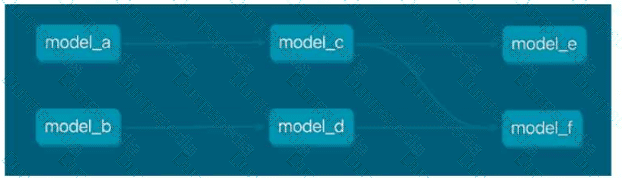
How will changing the command from dbt run to dbt run --fail-fast impact the execution of dbt run when model_d fails to materialize? Choose 1 option.
Options:
dbt will attempt to materialize the rest of the models.
dbt will drop the existing version of model_d in the data platform.
dbt will attempt to materialize everything else except for model_f.
dbt will stop building any additional nodes in the DAG.
The --fail-fast flag changes dbt’s execution behavior by immediately stopping the scheduling of any further models as soon as the first failure occurs. This is true regardless of the number of threads; in this case, the environment uses one thread, meaning models run strictly in sequence based on dependency order.
In the DAG provided, model_d is downstream of model_b, and model_f depends on model_d. The execution sequence when using a single thread would be something like:
model_a runs
model_c runs
model_e runs
model_b runs
model_d runs → fails
Once model_d fails:
With normal dbt run, dbt would attempt to continue running any unrelated models (though in this DAG, there are no more independent nodes left anyway).
With --fail-fast, dbt immediately stops scheduling any additional work, halting the run.
Therefore, no further models—including model_f or any other—will run. dbt does not drop models, retry them, or attempt related branches. It simply stops.
Which two statements about Exposures are true?
Choose 2 options.
Models, sources, and metrics are downstream from Exposures.
Exposures are materialized in the database.
Exposures describe a downstream use of your dbt project.
Exposures are defined in .sql files.
You can run, test, and list resources that feed into your Exposure.
The correct answers are C: Exposures describe a downstream use of your dbt project and E: You can run, test, and list resources that feed into your Exposure.
Exposures in dbt are documentation constructs that describe how the outputs of your dbt project are used downstream—such as dashboards, machine learning models, applications, reporting layers, or external tools. They exist to provide visibility into the final layer of the analytics workflow, making it easier to track lineage from raw data → models → downstream consumers.
Option C is correct because the official dbt documentation explicitly states that exposures define the downstream use cases of dbt models. They create transparency about dependencies outside the dbt DAG itself.
Option E is also correct. Using commands like dbt ls --select +exposure:
Option A is incorrect because exposures are downstream, not upstream—meaning models feed into exposures, not the other way around.
Option B is incorrect because exposures are not materialized in the warehouse; they are metadata stored in YAML.
Option D is incorrect because exposures are defined in YAML files, not SQL files.
Thus, C and E are the correct statements.
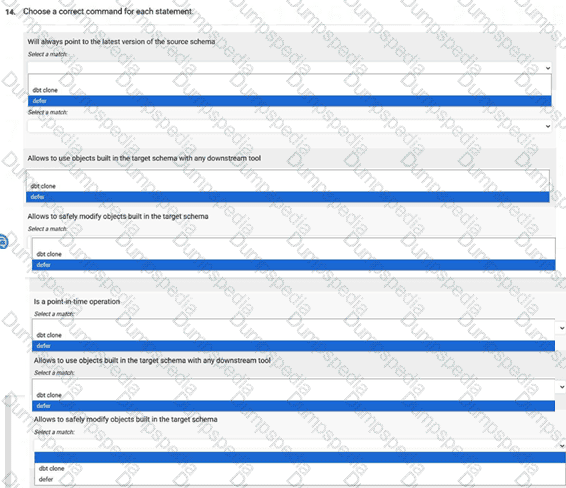
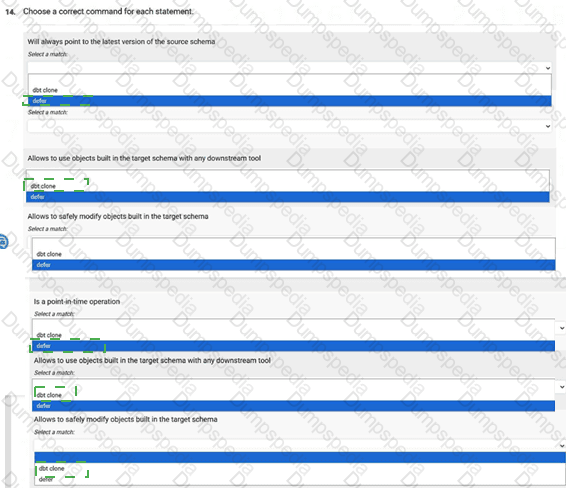
Choose a correct command for each statement.


Will always point to the latest version of the source schema
Correct Match: ✔ defer
Allows to use objects built in the target schema with any downstream tool
Correct Match: ✔ dbt clone
3️⃣ Allows to safely modify objects built in the target schema
Correct Match: ✔ defer
4️⃣ Is a point-in-time operation
Correct Match: ✔ dbt clone
defer and dbt clone serve very different purposes in dbt, and understanding their behavior is essential for choosing the right command.
The --defer flag tells dbt to use already-built objects from a previous environment (often production) instead of rebuilding them. Because it always references the existing target schema’s most recent objects, it “always points to the latest version of the source schema.” Since no objects are overwritten when using defer, it also “allows safely modifying objects built in the target schema”—your development environment uses production objects without altering them.
By contrast, dbt clone creates a point-in-time copy of existing relations. This cloned schema is static; it does not auto-update when source data changes. Therefore, clone is classified as a “point-in-time operation.” Since clone copies physical tables/views into a new schema, downstream tools (BI dashboards, ML pipelines) can safely query the cloned environment without affecting production, making “allows to use objects built in the target schema with any downstream tool” the correct match.
Thus, defer is used for logic substitution without copies, while clone is used for replicable, point-in-time snapshots.
You run the command:
dbt test --select 'test_type:singular'
What will the command run?
Options shown:
furniture_customers_test
macro_stg_tpch_orders_assert_pos_price
macro_stg_tpch_suppliers_assert_pos_acct_bal
stg_tpch_orders_assert_positive_price
macro_stg_tpch_orders_assert_pos_price
macro_stg_tpch_suppliers_assert_pos_acct_bal
stg_tpch_orders_assert_positive_price
furniture_customers_test
stg_tpch_orders_assert_positive_price
Choose 1 option.
In dbt, singular tests are custom SQL tests that live as standalone .sql files inside the root /tests directory, not inside /tests/generic. A singular test returns rows that indicate failure, and dbt runs the SQL directly as written. Generic tests, on the other hand, live inside the /tests/generic folder and are YAML-based macro-driven tests.
From your test folder structure (shown in the original screenshot), the following SQL files exist:
Inside /tests/generic/
furniture_customers_test.sqlThis file is a generic test, not singular.
Inside the root /tests directory:
macro_stg_tpch_orders_assert_pos_price.sql
macro_stg_tpch_suppliers_assert_pos_acct_bal.sql
stg_tpch_orders_assert_positive_price.sql
These are singular tests, because they are standalone SQL files in the tests root folder.
When you run:
dbt test --select 'test_type:singular'
dbt filters for only tests classified as singular. It ignores generic tests entirely.
Therefore, only the following 3 tests will run:
macro_stg_tpch_orders_assert_pos_price
macro_stg_tpch_suppliers_assert_pos_acct_bal
stg_tpch_orders_assert_positive_price
This matches Option C, making it the correct answer.
Your model has a contract on it.
When renaming a field, you get this error:
This model has an enforced contract that failed.
Please ensure the name, data_type, and number of columns in your contract match
the columns in your model's definition.
| column_name | definition_type | contract_type | mismatch_reason |
|-------------|------------------|----------------|-----------------------|
| ORDER_ID | TEXT | TEXT | missing in definition |
| ORDER_KEY | TEXT | | missing in contract |
Which two will fix the error? Choose 2 options.
Remove order_id from the contract.
Remove order_key from the contract.
Remove order_id from the model SQL.
Add order_key to the contract.
Add order_key to the model SQL.
dbt model contracts enforce that the column names, data types, and number of columns defined in the contract exactly match the columns produced by the compiled SQL. If any column appears in one location (the contract or the SQL) but not in the other, dbt raises an enforcement error.
In this scenario, the error message shows:
ORDER_ID is missing in the model definition, meaning the SQL no longer contains a column named order_id, but the contract still expects it.
ORDER_KEY is missing in the contract, meaning the model SQL now contains a new column, but this column has not been added to the contract.
To fix the mismatch, you must remove columns from the contract that no longer exist in the SQL and add to the contract any new columns that now appear in the SQL.
Therefore:
Option A — Remove order_id from the contract — is correct because the column no longer exists in the model SQL.
Option D — Add order_key to the contract — is correct because the SQL now produces this column.
Options B and C incorrectly alter the wrong side of the definition, and Option E would create a mismatch in the opposite direction.
Thus, the correct fixes are A and D.
Is this materialization supported by Python models in dbt?
Ephemeral
Yes
No
dbt Python models support a limited set of materializations because they rely on execution within the data platform’s Python compute engine (such as Snowpark for Snowflake, Dataproc for BigQuery, or Spark). These engines require models to materialize into actual relations—tables or views—in order to persist the results of Python-based transformations.
The ephemeral materialization, however, is fundamentally incompatible with this behavior. Ephemeral models do not create relations in the warehouse; instead, dbt inlines their SQL logic directly into downstream models. Since Python models cannot be inlined (they execute Python code, not SQL), dbt does not allow ephemeral Python models. dbt requires Python model outputs to be materialized as either:
table
view
incremental
Therefore, ephemeral is not supported for Python models, and attempting to configure a Python model as ephemeral will result in a compilation error.
The reason is straightforward: ephemeral logic depends on SQL compilation, while Python models depend on executing Python code in the data platform. Because these mechanisms are incompatible, dbt restricts Python models to relational materializations only.
Thus, the correct answer is No — ephemeral is not supported for Python models.
A developer imports a package from a private repository called timeformat for use within their project.
Which statement is correct? Choose 1 option.
Options:
“The package can be added with this configuration in the packages.yml file:”
packages:
- local: /opt/dbt/timeformat
“The package can be installed by running the command dbt build.”
“The package default schema can be overridden in the dbt_project.yml file as:”
models:
timeformat:
+schema: timeseries
“Including the package version/revision in the packages.yml file, for private git packages will result in an error.”
The only correct statement is Option C, because dbt allows you to override the schema for a package’s models directly within your project’s dbt_project.yml file. Packages behave just like subfolders within your own project, and therefore the standard configuration pattern applies:
models:
timeformat:
+schema: timeseries
This correctly overrides the package’s default schema, allowing all models within the timeformat package to be built into the timeseries schema.
Why the other options are incorrect
Option A
Local packages can be added using a path reference, but that is not what a private Git repository refers to. A private repo must be added using git: plus SSH/HTTPS URL, not local: unless the developer literally cloned the repo into a local directory. The question specifically describes a private repository, so this is not the correct statement.
Option B
Packages are installed using dbt deps, not dbt build.
dbt build only runs models, tests, and snapshots; it does not install dependencies.
Option D
Including a version or revision is allowed for private Git-based packages. You can specify branches, tags, or commit hashes safely in packages.yml.
You want to restrict which models can refer to a specific model.
How can this be done?
Choose 1 option.
Add model groups and set access to private.
Modify your data warehouse's permissions to restrict usage of the object.
Set access to protected for that specific model.
Create another version with a _v2 suffix and set the latest version to 2 in the model’s configuration.
The correct answer is A: Add model groups and set access to private.
dbt’s access control system is designed to restrict which models may reference others purely within the dbt project itself, independent of data warehouse permissions. This system uses model groups and an access property, which can be set to public, protected, or private. Setting a model to private means that only models within the same group are allowed to reference it. Any attempts to reference the model from outside the group will cause a compilation error, enforcing strong boundaries between domains or data products within a dbt project.
Option C (protected) is incorrect because protected allows references from other groups but requires explicit configuration—the intention is stewardship, not restriction. It does not fully restrict referencing.
Option B is incorrect because dbt model access control is not tied to warehouse permissions. Warehouse-level grants cannot control dependency references inside the dbt DAG.
Option D is irrelevant to access control. Versioning does not restrict references; it only manages updates to published models.
Therefore, the only correct way to restrict which models can reference another model is by placing it into a model group and marking it as private, which enforces strict internal usage boundaries.
The dbt_project.yml file contains this configuration:
models:
+grants:
select: ['reporter']
How can you grant access to the object in the data warehouse to both reporter and bi?

{{ config(grants = { '+select': ['bi'] }) }}
{{ config(grants = { 'select': ['+bi'] }) }}
{{ config(grants = { 'select': ['bi'], 'inherits': true }) }}
{{ config(grants = { 'select': ['bi'], 'include': ['dbt_project.yml'] }) }}
In dbt, grants can be configured globally, at the project level, or directly inside a model using the config() function. When a grant is set in dbt_project.yml, it becomes a base definition, and individual models may extend (append to) or override that configuration.
According to dbt documentation, prefixing a grant with a plus sign (+) means “extend the list defined in higher-level configurations.”
Thus, if the project-level config already sets:
select: ['reporter']
…and a model needs to add an additional role (here, bi) without removing the existing one, the correct syntax is:
{{ config(grants = { '+select': ['bi'] }) }}
This tells dbt: “Take the existing grant list (reporter) and append bi to it.”
Option B is incorrect because '+bi' is not a valid grants syntax.
Option C is invalid because grants do not use an inherits parameter.
Option D is invalid because include: is not a grants configuration key.
Therefore, Option A correctly applies dbt’s documented merging behavior for grants.
TESTED 16 Jul 2026